Taskbar skin is missing

Status
Not open for further replies.

neik123

New member
Hi,

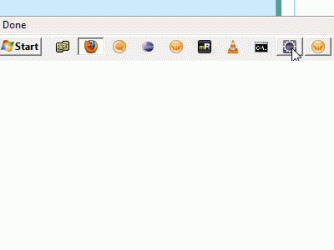
my brother has been playing with my computer with Win 7 Professional 64bit and he somehow manage to strip taskbar of its skin and even aero peek shows only a title of window, not its content.[Attachment1]

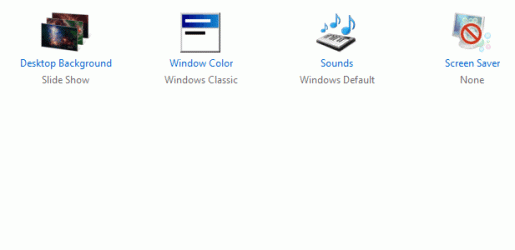
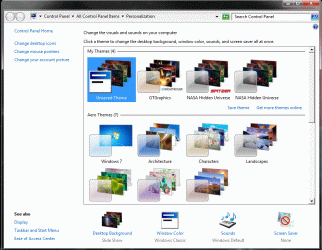
And when I go to Personalize there is no icon for Window Color.[Attachment2]

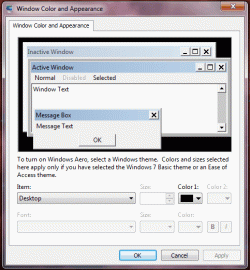
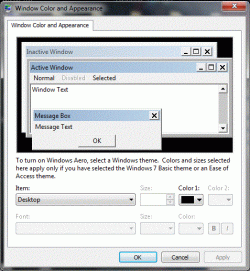
Second, when I go to "Window Color and Appereance" I see classic window from XP, not the one from Win 7 (choose color and transparency).[Attachment3]

Otherwise my PC is well configured and I dont want to reinstall because of this.
I tried sfc command....no help...

Thx a lot !
 

Attachments
  • Snap1.gif
    Snap1.gif
    5.3 KB · Views: 11
  • Snap2.gif
    Snap2.gif
    32.9 KB · Views: 8
  • Snap3.gif
    Snap3.gif
    9.5 KB · Views: 9

My Computer

Computer Manufacturer/Model Number
IBM ThinkPad T410
OS
Microsoft Windows 7 Professional 64-bit
CPU
Intel(R) Core(TM) i5 CPU M 520 @ 2.40GHz
Motherboard
LENOVO 2522AT6
Memory
4.00 GB SODIMM
Graphics Card(s)
Intel(R) HD Graphics (Core i5)
Sound Card
Conexant 20585 SmartAudio HD
Monitor(s) Displays
Build-in LCD + External
Screen Resolution
Build-in(1440x900) & External(1650x1280)
Hard Drives
250GB
PSU
Build-in
Case
Laptop
Hello neik123

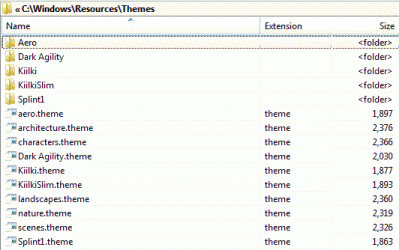
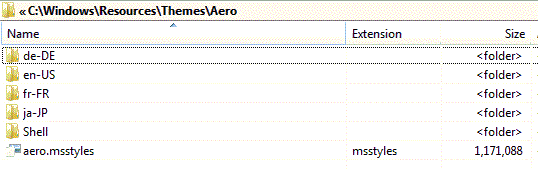
It looks like your aero msstyles is either missing or corrupt.Can you post a screenshot of your C:\Windows\Resources\Themes page and C:\Windows\Resources\Themes\Aero page.Lets see whats there.Also you mention you have run SFC /SCANNOW did it find any issues at all.

Danny
 

My Computer

Computer Manufacturer/Model Number
acer aspire 5935g
OS
Windows 7 Home Premium x64 SP1
CPU
intel(R)core(TM)2 duo CPU T6600 @ 2.20GHz
Motherboard
intel gm45/gm47 revision 07
Memory
3 gb ddr3
Graphics Card(s)
ati radeon hd4570/512mb
Monitor(s) Displays
lop156wh2-tle1 15.3 flat
Screen Resolution
1366x768
Hard Drives
OCZ-Agility3 60gig ssd
320gig external hdd
500gig external hdd
Mouse
Optical
Internet Speed
30Mbps Down/30Mbps Up
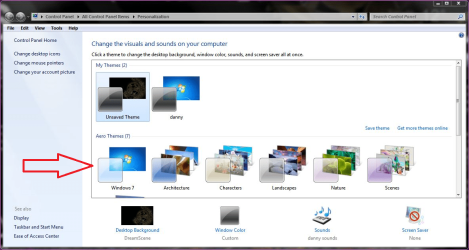
I may have jumped the gun a little here.It could be that he's just changed the theme to basic.Do you have any of these options on the line with the arrow.If so select one of those and see what happens.

Capture.png
 

My Computer

Computer Manufacturer/Model Number
acer aspire 5935g
OS
Windows 7 Home Premium x64 SP1
CPU
intel(R)core(TM)2 duo CPU T6600 @ 2.20GHz
Motherboard
intel gm45/gm47 revision 07
Memory
3 gb ddr3
Graphics Card(s)
ati radeon hd4570/512mb
Monitor(s) Displays
lop156wh2-tle1 15.3 flat
Screen Resolution
1366x768
Hard Drives
OCZ-Agility3 60gig ssd
320gig external hdd
500gig external hdd
Mouse
Optical
Internet Speed
30Mbps Down/30Mbps Up
Okey I have many options there and I used one of them.Now all that changed is that at "Window Color" there is right icon at [Attachment3 at previous post].
But taskbar stays at it was and when I use option "Window Color" I still see XP version of that[Attachment1], not Win7 - Google Images.
 

Attachments

  • Untitled.gif
    Untitled.gif
    64.4 KB · Views: 5

My Computer

Computer Manufacturer/Model Number
IBM ThinkPad T410
OS
Microsoft Windows 7 Professional 64-bit
CPU
Intel(R) Core(TM) i5 CPU M 520 @ 2.40GHz
Motherboard
LENOVO 2522AT6
Memory
4.00 GB SODIMM
Graphics Card(s)
Intel(R) HD Graphics (Core i5)
Sound Card
Conexant 20585 SmartAudio HD
Monitor(s) Displays
Build-in LCD + External
Screen Resolution
Build-in(1440x900) & External(1650x1280)
Hard Drives
250GB
PSU
Build-in
Case
Laptop

My Computer

Computer Manufacturer/Model Number
acer aspire 5935g
OS
Windows 7 Home Premium x64 SP1
CPU
intel(R)core(TM)2 duo CPU T6600 @ 2.20GHz
Motherboard
intel gm45/gm47 revision 07
Memory
3 gb ddr3
Graphics Card(s)
ati radeon hd4570/512mb
Monitor(s) Displays
lop156wh2-tle1 15.3 flat
Screen Resolution
1366x768
Hard Drives
OCZ-Agility3 60gig ssd
320gig external hdd
500gig external hdd
Mouse
Optical
Internet Speed
30Mbps Down/30Mbps Up
Welcome to the Seven Forums
1st
Click on the :orb: Start Button type in Services In the search box and then click on Services
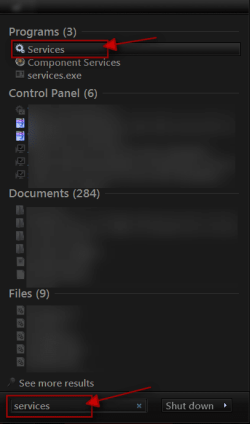
6 (1).png

Scroll down until you see Desktop Windows Manager Sessions Manager select it in click on the Stop text and let it stop after that click on Start text and see if that works. Your screen may blink when you do this.
6 (2).png6 (3).png


2nd
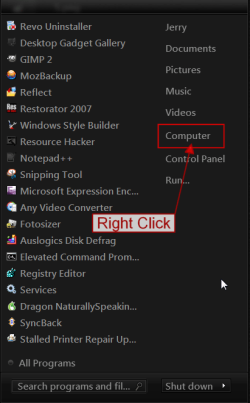
Click on the :orb: Start Button.
Right Click on Computer.
1.png

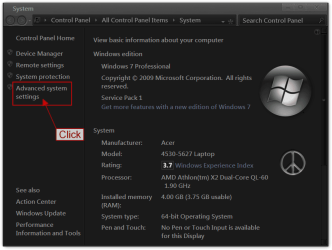
Click on Properties.
2.png

Click on Advanced system settings.
3.png

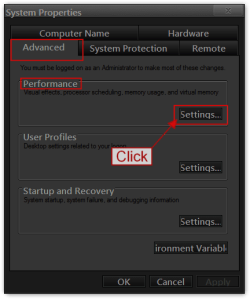
Under the Advanced tab in Performance
Click on Settings.
4.png

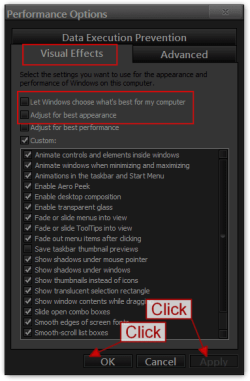
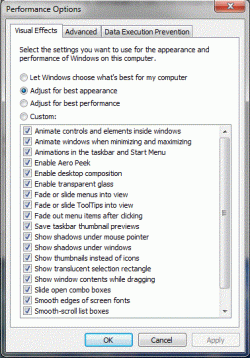
Under Visual Effects what is checked?
5.png

3rd
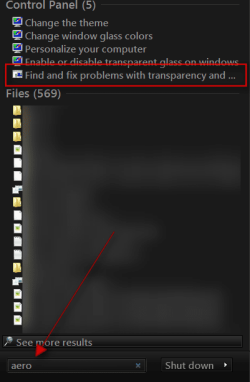
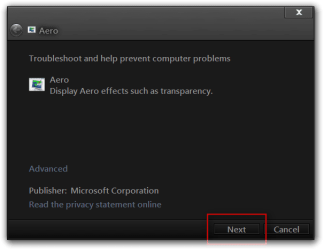
Click on :orb: Start button in the search box type Aero and look for Find and fix problems with transparency and check for problems
s.pngAero.png

Did you run SFC /scannow from Elevated Command Prompt? http://www.sevenforums.com/tutorials/1538-sfc-scannow-command-system-file-checker.html
Jerry
 

My Computer

Computer type
Laptop
Computer Manufacturer/Model Number
Sager NP9170
OS
Win 7 Pro x64 / Win 10 Pro
CPU
Intel(R) Core(TM) i7-3630QM CPU @ 2.40GHz
Motherboard
CLEVO P170EM
Memory
12 GB
Graphics Card(s)
(1) Intel(R) HD Graphics 4000 (2) NVIDIA GeForce GTX 675M
Sound Card
(1) Realtek High Definition Audio (2) Intel(R) Display Aud
Monitor(s) Displays
17.3
Screen Resolution
1920x1080
Hard Drives
(1) Samsung 860 EVO 500GB(OS) (1) Samsung 860 EVO 500GB(Data)
Keyboard
Backlite
Antivirus
MSE, Malwarebytes Pro
Browser
Firefox
Other Info
DESKTOP: Custom-built.
OS: Win 10 Pro x64.
CASE: Rosewill R5.
CPU: Intel I5 4670K CPU @ 3.40GHz.
CPU COOLER: Cool Master Hyper 212 EVO.
MOTHERBOARD: Asus Z87-A.
MEMORY: Kingston HyperX 2x4 GB.
GPU: Nvidia Geforce 650 TI.
PSU: Corsair TX750.
DRIVES: (1) Samsung 840 120 GB SSD (2) Western Digital blue 500 GB 7200 RPM.
Hi, first I have to thank you to take time to help me, appreciated.
My specs are filled.

1st
I stopped and start service, all that happened was my screen blinked.
Everything is same, taksbar has no skin, "Window Color" option still do the same :(

2nd
Untitled.gif
I have play with other options but no effect.

3rd
"Troubleshooting couldn't identify the problem"

And yes, I have run SFC /scannow from administrator powered command line, restarted, no effect.
 

My Computer

Computer Manufacturer/Model Number
IBM ThinkPad T410
OS
Microsoft Windows 7 Professional 64-bit
CPU
Intel(R) Core(TM) i5 CPU M 520 @ 2.40GHz
Motherboard
LENOVO 2522AT6
Memory
4.00 GB SODIMM
Graphics Card(s)
Intel(R) HD Graphics (Core i5)
Sound Card
Conexant 20585 SmartAudio HD
Monitor(s) Displays
Build-in LCD + External
Screen Resolution
Build-in(1440x900) & External(1650x1280)
Hard Drives
250GB
PSU
Build-in
Case
Laptop
Hello again neik123

Sorry to see your still having this issue. Can you post a screenshot of what themes you have available under aero like mine in post #3. Also please now post screenshots of C:\Windows\Resources\Themes page and C:\Windows\Resources\Themes\Aero page.

Regards Danny
 

My Computer

Computer Manufacturer/Model Number
acer aspire 5935g
OS
Windows 7 Home Premium x64 SP1
CPU
intel(R)core(TM)2 duo CPU T6600 @ 2.20GHz
Motherboard
intel gm45/gm47 revision 07
Memory
3 gb ddr3
Graphics Card(s)
ati radeon hd4570/512mb
Monitor(s) Displays
lop156wh2-tle1 15.3 flat
Screen Resolution
1366x768
Hard Drives
OCZ-Agility3 60gig ssd
320gig external hdd
500gig external hdd
Mouse
Optical
Internet Speed
30Mbps Down/30Mbps Up
OK here is what I have in Aero themes :
Untitled.gif

My C:\Windows\Resources\Themes look like this :
Untitled1.gif

And here is C:\Windows\Resources\Themes\Aero :
Untitled2.gif
 

My Computer

Computer Manufacturer/Model Number
IBM ThinkPad T410
OS
Microsoft Windows 7 Professional 64-bit
CPU
Intel(R) Core(TM) i5 CPU M 520 @ 2.40GHz
Motherboard
LENOVO 2522AT6
Memory
4.00 GB SODIMM
Graphics Card(s)
Intel(R) HD Graphics (Core i5)
Sound Card
Conexant 20585 SmartAudio HD
Monitor(s) Displays
Build-in LCD + External
Screen Resolution
Build-in(1440x900) & External(1650x1280)
Hard Drives
250GB
PSU
Build-in
Case
Laptop
They look ok to me, but I do have one question.You have some custom themes in there, how did you patch the files to enable custom themes.If you used a theme patcher are you aware that after running SFC /SCANNOW the patched files would be replaced with the originals therefore you will need to re patch the files to enable custom themes, are you trying to use a custom theme at present if so that's why it wont work until you patch the files again.Hope that makes sense to you.

Regards Danny
 

My Computer

Computer Manufacturer/Model Number
acer aspire 5935g
OS
Windows 7 Home Premium x64 SP1
CPU
intel(R)core(TM)2 duo CPU T6600 @ 2.20GHz
Motherboard
intel gm45/gm47 revision 07
Memory
3 gb ddr3
Graphics Card(s)
ati radeon hd4570/512mb
Monitor(s) Displays
lop156wh2-tle1 15.3 flat
Screen Resolution
1366x768
Hard Drives
OCZ-Agility3 60gig ssd
320gig external hdd
500gig external hdd
Mouse
Optical
Internet Speed
30Mbps Down/30Mbps Up

My Computer

Computer type
Laptop
Computer Manufacturer/Model Number
Sager NP9170
OS
Win 7 Pro x64 / Win 10 Pro
CPU
Intel(R) Core(TM) i7-3630QM CPU @ 2.40GHz
Motherboard
CLEVO P170EM
Memory
12 GB
Graphics Card(s)
(1) Intel(R) HD Graphics 4000 (2) NVIDIA GeForce GTX 675M
Sound Card
(1) Realtek High Definition Audio (2) Intel(R) Display Aud
Monitor(s) Displays
17.3
Screen Resolution
1920x1080
Hard Drives
(1) Samsung 860 EVO 500GB(OS) (1) Samsung 860 EVO 500GB(Data)
Keyboard
Backlite
Antivirus
MSE, Malwarebytes Pro
Browser
Firefox
Other Info
DESKTOP: Custom-built.
OS: Win 10 Pro x64.
CASE: Rosewill R5.
CPU: Intel I5 4670K CPU @ 3.40GHz.
CPU COOLER: Cool Master Hyper 212 EVO.
MOTHERBOARD: Asus Z87-A.
MEMORY: Kingston HyperX 2x4 GB.
GPU: Nvidia Geforce 650 TI.
PSU: Corsair TX750.
DRIVES: (1) Samsung 840 120 GB SSD (2) Western Digital blue 500 GB 7200 RPM.
U mean apply something like uxtheme patcher ?

But still, if you are right, wouldn't classic themes work just fine?
And why the only "broken" thing is task bar ?
 

My Computer

Computer Manufacturer/Model Number
IBM ThinkPad T410
OS
Microsoft Windows 7 Professional 64-bit
CPU
Intel(R) Core(TM) i5 CPU M 520 @ 2.40GHz
Motherboard
LENOVO 2522AT6
Memory
4.00 GB SODIMM
Graphics Card(s)
Intel(R) HD Graphics (Core i5)
Sound Card
Conexant 20585 SmartAudio HD
Monitor(s) Displays
Build-in LCD + External
Screen Resolution
Build-in(1440x900) & External(1650x1280)
Hard Drives
250GB
PSU
Build-in
Case
Laptop
Yes you are right I was just trying to give you some options. I use This to petch the files on my system.I see Bongo is back I will let him have a further look as he is brilliant when it comes to themes.All I can think of now is your msstyles folder is corrupt, but Jerry may be able to do something with that for you.

Danny
 

My Computer

Computer Manufacturer/Model Number
acer aspire 5935g
OS
Windows 7 Home Premium x64 SP1
CPU
intel(R)core(TM)2 duo CPU T6600 @ 2.20GHz
Motherboard
intel gm45/gm47 revision 07
Memory
3 gb ddr3
Graphics Card(s)
ati radeon hd4570/512mb
Monitor(s) Displays
lop156wh2-tle1 15.3 flat
Screen Resolution
1366x768
Hard Drives
OCZ-Agility3 60gig ssd
320gig external hdd
500gig external hdd
Mouse
Optical
Internet Speed
30Mbps Down/30Mbps Up
That's the thing, I cannot do system restore coz it is disabled, our company is using different way to handle this.
And frankly I dont know what would happen if I go there and say "hey I need a restore coz I dont like my taskbar", you know what I mean...
 

My Computer

Computer Manufacturer/Model Number
IBM ThinkPad T410
OS
Microsoft Windows 7 Professional 64-bit
CPU
Intel(R) Core(TM) i5 CPU M 520 @ 2.40GHz
Motherboard
LENOVO 2522AT6
Memory
4.00 GB SODIMM
Graphics Card(s)
Intel(R) HD Graphics (Core i5)
Sound Card
Conexant 20585 SmartAudio HD
Monitor(s) Displays
Build-in LCD + External
Screen Resolution
Build-in(1440x900) & External(1650x1280)
Hard Drives
250GB
PSU
Build-in
Case
Laptop
Are you saying you can use a aero theme and it's all OK but the taskbar?
Jerry
 

My Computer

Computer type
Laptop
Computer Manufacturer/Model Number
Sager NP9170
OS
Win 7 Pro x64 / Win 10 Pro
CPU
Intel(R) Core(TM) i7-3630QM CPU @ 2.40GHz
Motherboard
CLEVO P170EM
Memory
12 GB
Graphics Card(s)
(1) Intel(R) HD Graphics 4000 (2) NVIDIA GeForce GTX 675M
Sound Card
(1) Realtek High Definition Audio (2) Intel(R) Display Aud
Monitor(s) Displays
17.3
Screen Resolution
1920x1080
Hard Drives
(1) Samsung 860 EVO 500GB(OS) (1) Samsung 860 EVO 500GB(Data)
Keyboard
Backlite
Antivirus
MSE, Malwarebytes Pro
Browser
Firefox
Other Info
DESKTOP: Custom-built.
OS: Win 10 Pro x64.
CASE: Rosewill R5.
CPU: Intel I5 4670K CPU @ 3.40GHz.
CPU COOLER: Cool Master Hyper 212 EVO.
MOTHERBOARD: Asus Z87-A.
MEMORY: Kingston HyperX 2x4 GB.
GPU: Nvidia Geforce 650 TI.
PSU: Corsair TX750.
DRIVES: (1) Samsung 840 120 GB SSD (2) Western Digital blue 500 GB 7200 RPM.
No I think the point is the OP is trying to change a company computer without the administrators permission. That boat don't float. How ever the company, (IT Department has it set up) is what you live with.
--------------------------------------------------------------------
That's the thing, I cannot do system restore coz it is disabled, our company is using different way to handle this.
And frankly I dont know what would happen if I go there and say "hey I need a restore coz I dont like my taskbar", you know what I mean.
 

My Computer

Computer type
PC/Desktop
Computer Manufacturer/Model Number
Home made Desktop
OS
Windows 10 Pro. 64/ version 1709 Windows 7 Pro/64
CPU
Intel i7-6800K @ 4.3
Motherboard
ASUS X-99 Deluxe II
Memory
Corsair Platinum 16 gig @2400
Graphics Card(s)
EVGA GTX 1070 OC
Monitor(s) Displays
Asus 27" LED LCD/VE278Q
Screen Resolution
1920-1080 or 1280-720 HDMI
Hard Drives
INTEL SSD 730-240 Gb Sata 3.0/
PSU
EVGA Platium 1200W
Case
Phanteks Luxe Tempered Glass 8 fans/ one radiator
Cooling
XSPC/ Water Cooled CPU
Keyboard
Das 4 Professional
Mouse
Logitech M705/MX Anywhere 2-S
Internet Speed
100 mbits
Antivirus
Microsoft Security Essentials/ Malwarebytes Premium 3.0/ SAS
Browser
I.E. 11 default/Firefox/ ISP Time Warner Cable/Spectrum
Other Info
LG BluRay Burner/
Sound system-KLipsch-THX/
Icy Dock ssd Hot Swap bays.
Sevenforums cannot help users to circumvent security or settings put in place by the legitimate Licence holder of the Windows 7 Software.

Please consult with your appointed system administrator for any changes you may need to use the Operating System

Thread Closed
 

My Computers

System One System Two

  • Computer type
    PC/Desktop
    Computer Manufacturer/Model Number
    ChillBlast - Custom to my design
    OS
    Windows 11 Pro x64 [Latest Release and Release Preview]
    CPU
    Ryzen 9 5950X, 3.8 - 5.2 MHz
    Motherboard
    Asus Prime X570-Pro
    Memory
    64GB [2 x 32GB] DDR4 3200MHz
    Graphics Card(s)
    4GB NVIDIA GEFORCE GTX 1650 Ti
    Sound Card
    On-board SPDIF to 5.1 System + HDMI [5.1 system]
    Monitor(s) Displays
    32" UHD 32 Bit HDR Monitor + 43" UHD 4K 32Bit HDR TV
    Screen Resolution
    2 x 3840 x 2160 @60Hz
    Hard Drives
    1TB M2 SSD OS, 500GB Fast Access SSD, 2 x 8TB Data + Various Externals from 1TB to 4TB, 10TB NAS
    PSU
    NZXT C750 80 PLUS Gold 750W Modular PSU
    Case
    Workstation Case [Matt Black]
    Cooling
    NZXT Kraken X63 280mm CPU Cooler +2x Quiet Case fans
    Keyboard
    Logitech Wireless MX Keys & K400 + others
    Mouse
    Logitech Wireless MX Master 3S
    Internet Speed
    920 MB Down 50 MB Up
    Antivirus
    BitDefender Total Security Pro
    Browser
    Chrome (always run latest Non-Beta)
    Other Info
    Also run ...
    Laptop - Quad 8GB - Windows 10 Pro x64
    Nexus 7 Android tablet x2
    Samsung 10.2" tablet
    Blackview TAB 8 4G Android Tablet c/w Keyboard
    Wacom Intuos Pro Medium Pen Pad
    Wacom Intuos Pro Small Pen Pad
    Wacom Expresskeys Remote
    Loopdeck+ Graphics Controller
    Shuttle Pro v2 Control
  • Computer type
    Laptop
    System Manufacturer/Model Number
    Dell XPS 17 10750H
    OS
    Windows 11 Pro x64 Latest RP
    CPU
    Intel I7 10750H 5.0GHz
    Motherboard
    Dell XPS
    Memory
    32GB [2x16GB] DDR4 2933 MHz
    Graphics Card(s)
    nVidia GTX1650Ti 4 GB GDDR6
    Sound Card
    Stock [Realtek] 4 Speaker
    Monitor(s) Displays
    17" IPS UHD+ Infinity Edge Touchscreen
    Screen Resolution
    3840 x 2400
    Hard Drives
    2TB M2 NVMe, 4TB External + various 500GB & 1TB External NVMe (also have access to spinner HDD from
    PSU
    Stock
    Case
    Stock XPS Aluminium & Carbon Fibre
    Cooling
    Stock - Active Fan Control
    Keyboard
    Backlit + Various Logitech
    Mouse
    Stock Track Pad + Logitech MX Trackball
    Internet Speed
    72 MB Down 18MB Up
    Browser
    Chrome
    Other Info
    Also run ...
    Laptop - Quad 8GB - Windows 10 Pro x64
    Nexus 7 Android tablet x2
    10.2" tablet
    Sony Z3 Android Smartphone
    Wacom Intuos Pro Medium Pen Pad
    Wacom Intuos Pro Small Pen Pad
    Wacom Expresskeys Remote
    Loopdeck+ Graphics Controller
    Shuttle Pro v2 Control Pad
    10TB NAS
Status
Not open for further replies.
Back
Top