TextHider: Make text invisible + hidden

Tookeri

Security enthusiast
Guru
VIP
Local time
6:37 AM
Messages
1,049
   Information
A standalone program(EXE) is available at post #5, followed by updates in later posts.
To "hide" text means to transform it to a coded set of spaces so it looks invisible.
To "store it invisibly in a file" means to not actually store the "hidden" text in a file, but in a property for a file, so it appears hidden (post #8, version 2 of the program)
There's also an option to set a password which will transform the text into what looks like random garbage before it's converted to spaces

The original post was about a VB-script program that was limited and not practical to use. However, it includes a description of the first version of the program, so I've kept that post. Click the button below to see it:
 
This is part of an project I'm working on, but I've made a simplified VBscript version that maybe someone finds useful, interesting or maybe even educational :p

Enter some text, add a password(optional) and you'll receive an "empty" string to store somewhere. Well it's not an empty string, it's spaces, 2 different types of space characters. If a password is entered the text will first be modified to a completely different text string(depending on the password). Then the text will be converted to binary code(0's and 1's) and then they will be replaced with space and the web version of space, chr 160, the non-breaking space, which you can store in most programs. If you set a password and you don't enter the exact same password(case sensitive) when you want the "hidden" text back, not even I can help you. You'll only get something that looks like random characters.
Because of VBscript and input boxes restrictions I've set a maximum length of 30 in this version. Because each char will be transformed to 8 "spaces" because of the binary conversion.
Questions? Just ask. Oh, and when you "hide" some text it will also do a test to see that the "hidden" text could be unhidden successfully. If you enter a non-ascii char like β it will fail.

If anyone wants more comments in the code, let me know.

If you use this code in VB or VBA, you can skip the input boxes and the 30 char limit and "hide" an entire document content, for example a notepad document. If someone opens the document it will appear empty at first. If checked in a better editor they will see only two types of characters. If they figure out it could be binary and tries to convert it, they will only see what appears like random crap. Assuming you set a password. Even if they find the source code they still need the password.

Copy this to a new file, for example HidePassword.vbs
PHP:
pgmName = "Password hide"
MIN_ASC = 32
MAX_ASC = 255
NO_OF_CHARS = MAX_ASC - MIN_ASC + 1

'********************************************************************************************
txt = inputbox("Enter text to 'hide'" & Chr(10) & "(max 30 chars)", pgmName)
if len(txt) > 30 then
    msgbox "Text is longer than 30 chars"
    Wscript.Quit
end if
key = inputbox("Enter password", pgmName)
hdn = hide(ChangeText(txt,key))
back = UnChangeText(unhide(hdn),key)
if txt = back then
    dummy = inputbox("Success!", pgmName,hdn)
else
    dummy = inputbox("FAIL! The text probably contains non-ascii characters", pgmName,back)
end if
'********************************************************************************************


Function ChangeText(p1, p2)
    if p2="" then ChangeText=p1: exit function
    pwd = p2
    chkSum = 0
    keyPos = 0
    e = ""
    For keyPos = 1 To Len(pwd)
        chkSum = chkSum + Asc(Mid(pwd, keyPos, 1)) * keyPos
    Next
    keyPos = 0
    For p = 1 To Len(p1)
        c = Asc(Mid(p1, p, 1))
        keyPos = keyPos + 1
        If keyPos > Len(pwd) Then keyPos = 1
        k = Asc(Mid(pwd, keyPos, 1))
        c = ChangeAsc(c, k)
        c = ChangeAsc(c, chkSum)
        c = ChangeAsc(c, k * Len(pwd))
        c = ChangeAsc(c, chkSum * k)
        c = ChangeAsc(c, p * k)
        c = ChangeAsc(c, Len(pwd) * p)
        e = e & Chr(c)
    Next
    ChangeText = e
End Function

Function UnChangeText(p1, p2)
    if p2="" then UnChangeText=p1: exit function
    pwd = p2
    chkSum = 0
    keyPos = 0
    e = ""
    For keyPos = 1 To Len(pwd)
        chkSum = chkSum + Asc(Mid(pwd, keyPos, 1)) * keyPos
    Next
    keyPos = 0
    For p = 1 To Len(p1)
        c = Asc(Mid(p1, p, 1))
        keyPos = keyPos + 1
        If keyPos > Len(pwd) Then keyPos = 1
        k = Asc(Mid(pwd, keyPos, 1))
        'Opposite order of ChangeAsc calls in ChangeText
        'and minus(-) for the 2nd parameter
        c = ChangeAsc(c, -(Len(pwd) * p))
        c = ChangeAsc(c, -(p * k))
        c = ChangeAsc(c, -(chkSum * k))
        c = ChangeAsc(c, -(k * Len(pwd)))
        c = ChangeAsc(c, -chkSum)
        c = ChangeAsc(c, -k)
        e = e & Chr(c)
    Next
    UnChangeText = e
End Function

Function ChangeAsc(p1, p2)
    'Move the Asc value so it stays inside interval MIN_ASC and MAX_ASC
    a = p1
    mLvl = p2
    mLvl = mLvl Mod NO_OF_CHARS
    a = a + mLvl
    If a < MIN_ASC Then
        a = a + NO_OF_CHARS
    ElseIf a > MAX_ASC Then
        a = a - NO_OF_CHARS
    End If
    ChangeAsc = a
End Function

Function hide(param)
    Dim p, i, val, bin, out
    For p = 1 To Len(param)
        bin = ""
        val = asc(Mid(param, p, 1))
        For i = (8 - 1) To 0 Step -1 'right to left
            If val And (2 ^ i) Then
                bin = bin & "1"
            Else
                bin = bin & "0"
            End If
        Next
        out = out & bin
    Next
    out = Replace(out, "0", Chr(32))
    out = Replace(out, "1", Chr(160))
    hide = out
End Function

Function unhide(param)
    Dim p, bp, dec, bit, bin, out
    bin = param
    bin = Replace(bin, Chr(32), "0")
    bin = Replace(bin, Chr(160), "1")
    If Len(bin) Mod 8 <> 0 Then
        unhide = "*ERROR* Length of hidden text is not correct"
        Exit Function
    End If
    dec = 0
    For p = 1 To Len(bin)
        bp = bp + 1
        bit = Mid(bin, Len(bin) - p + 1, 1) 'from right to left: len - position
        If Not (bit = "0" Or bit = "1") Then
            unhide = "*ERROR* Invalid char: " & bit
            Exit Function
        End If
        dec = dec + (CByte(bit) * (2 ^ (bp - 1))) 'bp = position from left to right
        If p Mod 8 = 0 Then
            'We have the 8 bits. Convert to char and save, and reset dec and bp
            out = Chr(dec) & out 'store latest char first cause we're doing right to left
            dec = 0
            bp = 0
        End If
    Next
    unhide = out
End Function
Then copy the HidePassword.vbs file and name it for example UnhidePassword.vbs Then edit that file and replace the lines between the ****************** lines with these:
Code:
hdn = inputbox("Enter text to unhide", pgmName)
key = inputbox("Enter password", pgmName)
back = UnChangeText(unhide(hdn),key)
dummy = inputbox("Hidden text",pgmName,back)
Happy "hiding" :cool:
 
Last edited:

My Computer

Computer type
Laptop
Computer Manufacturer/Model Number
HP Elitebook 8540p
OS
Windows 7 Pro 32
CPU
Intel(R) Core(TM) i5 CPU M 540 @ 2.53GHz
Motherboard
Hewlett-Packard 1521
Memory
4,00 GB (Usable 2,98)
Graphics Card(s)
NVIDIA NVS 5100M
Sound Card
NVIDIA High Definition Audio
Screen Resolution
1600x900
Hard Drives
INTEL SSDSA2CW120G3
Antivirus
F-Secure Internet Security
Browser
IE, Firefox, Opera
Other Info
Sandboxie,
SRP (Software Restriction Policy),
EMET (Enhanced Mitigation Experience Toolkit),
WFC (Windows Firewall Control by BiniSoft),
Malwarebytes Premium
Usage information?

Hi, this looks like it could be useful but I'm not really understanding how to use it. Perhaps you could watch this video and explain what I need to do with the text shown.


Also I've tried to hide a document but I must be missing something as I can't work out how to do it!

Any suggestions?
 

My Computer

Computer type
Laptop
Computer Manufacturer/Model Number
ASUS
OS
Microsoft Windows 7 Home Premium 64-bit 7601 Multiprocessor Free Service Pack 1
CPU
AMD C-60 APU with Radeon(tm) HD Graphics
Motherboard
ASUSTeK COMPUTER INC. X501U
Memory
4.00 GB
Graphics Card(s)
AMD Radeon HD 6290 Graphics
Sound Card
(1) AMD High Definition Audio Device (2) Realtek High Defi
Screen Resolution
1366 x 768 x 32 bits (4294967296 colors) @ 60 Hz
Hard Drives
Hitachi HTS545050A7E380 SATA Disk Device
Antivirus
Comodo CIS & FW, SecureAplus App Whitelisting, Threatfire
Browser
Cyberfox 64bit, Opera 64bit, Airfox
Other Info
Spy-The-Spy, HitmanPro.Alert, Norton Connect Safe, MJRegWatcher, BitDefender TrafficLight, Voodoo Shield, Zemana AntiMalware
My explanation wasn't the best, sorry. I guess I though that only other developers would read this forum :o My bad.

After you enter the text to be hidden, and then a password(or you can leave the password empty and just click OK), you receive a string containing only space characters. Here you should press Ctrl+C to copy that string. Then paste it somewhere so you can store it.

When you do unhide you start by pasting a string of "spaces". Then in the next prompt enter the password(if you set one in the hiding step).

The example to hide a document(the content) requires to use this code in either a VBA or a VB application. So that advice was intended only for developers. But if you want I can create a simple VB app with a large text box instead of the limited inputbox used in this example? Maybe I should've done that from the beginning instead of this perhaps bad VB-script example ;)
 

My Computer

Computer type
Laptop
Computer Manufacturer/Model Number
HP Elitebook 8540p
OS
Windows 7 Pro 32
CPU
Intel(R) Core(TM) i5 CPU M 540 @ 2.53GHz
Motherboard
Hewlett-Packard 1521
Memory
4,00 GB (Usable 2,98)
Graphics Card(s)
NVIDIA NVS 5100M
Sound Card
NVIDIA High Definition Audio
Screen Resolution
1600x900
Hard Drives
INTEL SSDSA2CW120G3
Antivirus
F-Secure Internet Security
Browser
IE, Firefox, Opera
Other Info
Sandboxie,
SRP (Software Restriction Policy),
EMET (Enhanced Mitigation Experience Toolkit),
WFC (Windows Firewall Control by BiniSoft),
Malwarebytes Premium
Got it now

I've got it now - thanks for explaining. Don't worry about the document hiding - unless you really want to!
 

My Computer

Computer type
Laptop
Computer Manufacturer/Model Number
ASUS
OS
Microsoft Windows 7 Home Premium 64-bit 7601 Multiprocessor Free Service Pack 1
CPU
AMD C-60 APU with Radeon(tm) HD Graphics
Motherboard
ASUSTeK COMPUTER INC. X501U
Memory
4.00 GB
Graphics Card(s)
AMD Radeon HD 6290 Graphics
Sound Card
(1) AMD High Definition Audio Device (2) Realtek High Defi
Screen Resolution
1366 x 768 x 32 bits (4294967296 colors) @ 60 Hz
Hard Drives
Hitachi HTS545050A7E380 SATA Disk Device
Antivirus
Comodo CIS & FW, SecureAplus App Whitelisting, Threatfire
Browser
Cyberfox 64bit, Opera 64bit, Airfox
Other Info
Spy-The-Spy, HitmanPro.Alert, Norton Connect Safe, MJRegWatcher, BitDefender TrafficLight, Voodoo Shield, Zemana AntiMalware
Standalone EXE version without limits

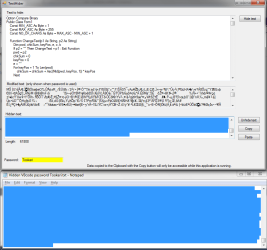
The VBscript version wasn't practical to use so here's a better version: View attachment TextHider.zip
It contains the EXE file and all VB code, "hidden" in a txt document with password Tookeri. A nice demo of the purpose with this app.

TextHider.png

To hide text
1. Enter/paste text in the 'Text to hide' box
2. Set a password (optional)
3. Click button 'Hide text'
4. Press Ctrl+C or the Copy button
5. Paste somewhere, for example Notepad. To replace any previous text press Ctrl+A before pasting

To unhide text
1. Copy the hidden text from where you saved it. Tip: use Ctrl+A and Ctrl+C to copy all text
2. Click the Paste button
3. Set the password
4. Click the 'Unhide text' button
5. The unhidden text is shown in the 'Text to hide' box

Additional info

  • If a password is used the 2nd textbox(gray) will show the modified text (before it's "hidden")
  • Every char is converted to 8 0's and 1's representing the binary ascii code (incl. linefeeds, tabs etc)
    So the hidden text will be 8 times longer
  • The 0's and 1's are then converted to spaces and non-breaking spaces (ascii code 160)
  • Text hidden with the VBscript in post 1 is incompatible with this version
The 2 kinds of spaces may look the same visually. Most programs can store the non-breaking space but you should verify that you can unhide the hidden text from where you stored it.
 

My Computer

Computer type
Laptop
Computer Manufacturer/Model Number
HP Elitebook 8540p
OS
Windows 7 Pro 32
CPU
Intel(R) Core(TM) i5 CPU M 540 @ 2.53GHz
Motherboard
Hewlett-Packard 1521
Memory
4,00 GB (Usable 2,98)
Graphics Card(s)
NVIDIA NVS 5100M
Sound Card
NVIDIA High Definition Audio
Screen Resolution
1600x900
Hard Drives
INTEL SSDSA2CW120G3
Antivirus
F-Secure Internet Security
Browser
IE, Firefox, Opera
Other Info
Sandboxie,
SRP (Software Restriction Policy),
EMET (Enhanced Mitigation Experience Toolkit),
WFC (Windows Firewall Control by BiniSoft),
Malwarebytes Premium
TextHider works perfectly

Fantastic! It's much easier to use and I had no problems following your instructions.

Thanks very much indeed.

Can't rep you at the moment!
 
Last edited:

My Computer

Computer type
Laptop
Computer Manufacturer/Model Number
ASUS
OS
Microsoft Windows 7 Home Premium 64-bit 7601 Multiprocessor Free Service Pack 1
CPU
AMD C-60 APU with Radeon(tm) HD Graphics
Motherboard
ASUSTeK COMPUTER INC. X501U
Memory
4.00 GB
Graphics Card(s)
AMD Radeon HD 6290 Graphics
Sound Card
(1) AMD High Definition Audio Device (2) Realtek High Defi
Screen Resolution
1366 x 768 x 32 bits (4294967296 colors) @ 60 Hz
Hard Drives
Hitachi HTS545050A7E380 SATA Disk Device
Antivirus
Comodo CIS & FW, SecureAplus App Whitelisting, Threatfire
Browser
Cyberfox 64bit, Opera 64bit, Airfox
Other Info
Spy-The-Spy, HitmanPro.Alert, Norton Connect Safe, MJRegWatcher, BitDefender TrafficLight, Voodoo Shield, Zemana AntiMalware
Great, thanks :)

Forgot to add one thing: this version also tests that the process can be reversed when you hide some text. You can add this non-ascii character in the text for test purposes, and then click 'Hide text' to see what it looks like: β

I'll see if I can come up with some new features.....
 

My Computer

Computer type
Laptop
Computer Manufacturer/Model Number
HP Elitebook 8540p
OS
Windows 7 Pro 32
CPU
Intel(R) Core(TM) i5 CPU M 540 @ 2.53GHz
Motherboard
Hewlett-Packard 1521
Memory
4,00 GB (Usable 2,98)
Graphics Card(s)
NVIDIA NVS 5100M
Sound Card
NVIDIA High Definition Audio
Screen Resolution
1600x900
Hard Drives
INTEL SSDSA2CW120G3
Antivirus
F-Secure Internet Security
Browser
IE, Firefox, Opera
Other Info
Sandboxie,
SRP (Software Restriction Policy),
EMET (Enhanced Mitigation Experience Toolkit),
WFC (Windows Firewall Control by BiniSoft),
Malwarebytes Premium
TextHider v2 - Invisibly store the "hidden" text in a file

Program description:

  • Converts text to a group of two types of space characters so the text appears invisible
  • Option to save the invisible text(or "hidden" text as I call it) to a file without modifying the file's original content or file size
  • Option to set a password which will transform the text to what looks like random garbage before it's converted to spaces

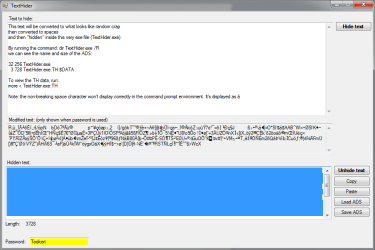
View attachment TextHider_v2.zip A pretty cool new feature I think. Some info is in the screenshot:
TextHider_v2.png

Additional info

  • 2 new buttons: Load ADS, and Save ADS. The Load button behaves like the Paste button, so after you have to set the password and click the "Unhide text" button
  • The Save button will overwrite any previous "hidden" text in the selected file (ADS named "TH")
  • Alternate Data Streams (ADS) are an NTFS feature. It's like an extra property for a file, and won't modify the files original content
  • By copying a file with an ADS to a non-NTFS disk, the ADS will be lost. This includes emailing the file or uploading it to a web site (that's why there's no ADS in the attached exe file)
As long as you don't see any error messages, everything is working :cool: Happy hiding!
 
Last edited:

My Computer

Computer type
Laptop
Computer Manufacturer/Model Number
HP Elitebook 8540p
OS
Windows 7 Pro 32
CPU
Intel(R) Core(TM) i5 CPU M 540 @ 2.53GHz
Motherboard
Hewlett-Packard 1521
Memory
4,00 GB (Usable 2,98)
Graphics Card(s)
NVIDIA NVS 5100M
Sound Card
NVIDIA High Definition Audio
Screen Resolution
1600x900
Hard Drives
INTEL SSDSA2CW120G3
Antivirus
F-Secure Internet Security
Browser
IE, Firefox, Opera
Other Info
Sandboxie,
SRP (Software Restriction Policy),
EMET (Enhanced Mitigation Experience Toolkit),
WFC (Windows Firewall Control by BiniSoft),
Malwarebytes Premium
This is really neat, nice work!
 

My Computer

Computer type
PC/Desktop
Computer Manufacturer/Model Number
Build #1
OS
Windows 8.1 Pro x64
CPU
Intel i7 3770K @4.5GHz
Motherboard
ASUS P8Z77-V PRO
Memory
Corsair Vengeance 2x4GB DDR3 1600MHz Low Profile (White)
Graphics Card(s)
Gigabyte Radeon HD 7850 (2GB GDDR5)
Sound Card
Integrated on motherboard
Monitor(s) Displays
23" LG LCD/LED IPS
Screen Resolution
1920*1080
Hard Drives
Samsung EVO 128GB SSD
Seagate Barracuda 2GB 7200rpm
2x Seagate FreeAgent [500gb]
PSU
Corsair TX650W V2 (80+ Bronze)
Case
NZXT Phantom 410 White
Cooling
Corsair H100 Water Cooler
Keyboard
Microsoft Desktop 2000 Wireless Keyboard
Mouse
Microsoft Desktop 2000 Wireless Mouse
Internet Speed
95 Mb/s Download 70 Mb/s Upload
Antivirus
MSE + MBAM Pro
Browser
Firefox
Requirements and related info

Thank you! That reminds me I have a new version almost finished that supports more than ASCII characters, although the current version is enough for the English language and some other languages that have additional characters covered in the extended ASCII table.

I forgot to add requirements and related info in case anyone is wondering:

  • .NET Framework 4 Client Profile (which should already be installed as a recommended update in Windows Update) or the full .NET Framework 4
  • Portable program - no installation
  • Standard user account (no administrator/UAC prompts)
  • Does not create network connections or read/write local files (other than what the .NET Framework does by itself or when you use the Load ADS and Save ADS buttons)
Note: saving as an ADS only works on NTFS drives! If you move/copy a file with an ADS file to for example a USB flash drive with FAT32 you'll get a warning that a "property" for the file will be lost. But if you upload the file somewhere or attach it to an email, you won't receive such a message but the ADS will still be lost. So any backups of these files should be done to another NTFS drive.
 

My Computer

Computer type
Laptop
Computer Manufacturer/Model Number
HP Elitebook 8540p
OS
Windows 7 Pro 32
CPU
Intel(R) Core(TM) i5 CPU M 540 @ 2.53GHz
Motherboard
Hewlett-Packard 1521
Memory
4,00 GB (Usable 2,98)
Graphics Card(s)
NVIDIA NVS 5100M
Sound Card
NVIDIA High Definition Audio
Screen Resolution
1600x900
Hard Drives
INTEL SSDSA2CW120G3
Antivirus
F-Secure Internet Security
Browser
IE, Firefox, Opera
Other Info
Sandboxie,
SRP (Software Restriction Policy),
EMET (Enhanced Mitigation Experience Toolkit),
WFC (Windows Firewall Control by BiniSoft),
Malwarebytes Premium
Text Hider

Well done! I really like this version and will find it very useful indeed.

:thumbsup:
 

My Computer

Computer type
Laptop
Computer Manufacturer/Model Number
ASUS
OS
Microsoft Windows 7 Home Premium 64-bit 7601 Multiprocessor Free Service Pack 1
CPU
AMD C-60 APU with Radeon(tm) HD Graphics
Motherboard
ASUSTeK COMPUTER INC. X501U
Memory
4.00 GB
Graphics Card(s)
AMD Radeon HD 6290 Graphics
Sound Card
(1) AMD High Definition Audio Device (2) Realtek High Defi
Screen Resolution
1366 x 768 x 32 bits (4294967296 colors) @ 60 Hz
Hard Drives
Hitachi HTS545050A7E380 SATA Disk Device
Antivirus
Comodo CIS & FW, SecureAplus App Whitelisting, Threatfire
Browser
Cyberfox 64bit, Opera 64bit, Airfox
Other Info
Spy-The-Spy, HitmanPro.Alert, Norton Connect Safe, MJRegWatcher, BitDefender TrafficLight, Voodoo Shield, Zemana AntiMalware
Thanks! Glad to hear others find it useful too :)

I have some lose plans for additional versions, for example replacing my own password algorithm with real encryption methods like TripleDES or AES. But with a long password I think my algorithm is pretty good too in case someone would get their hands on the hidden text and try a brute force attack or something.

The average user uses about 100 different characters(case sensitive) on the keyboard. If the password is 4 chars, it means 100 million possible combinations(100^4), which may sound much but not for a computer. If the password is 10 chars there are 100 Quintillion possible combinations (100 000 000 000 000 000 000). A huge difference! Personally I use 20 chars :p
 

My Computer

Computer type
Laptop
Computer Manufacturer/Model Number
HP Elitebook 8540p
OS
Windows 7 Pro 32
CPU
Intel(R) Core(TM) i5 CPU M 540 @ 2.53GHz
Motherboard
Hewlett-Packard 1521
Memory
4,00 GB (Usable 2,98)
Graphics Card(s)
NVIDIA NVS 5100M
Sound Card
NVIDIA High Definition Audio
Screen Resolution
1600x900
Hard Drives
INTEL SSDSA2CW120G3
Antivirus
F-Secure Internet Security
Browser
IE, Firefox, Opera
Other Info
Sandboxie,
SRP (Software Restriction Policy),
EMET (Enhanced Mitigation Experience Toolkit),
WFC (Windows Firewall Control by BiniSoft),
Malwarebytes Premium
Thanks! Glad to hear others find it useful too :)

I have some lose plans for additional versions, for example replacing my own password algorithm with real encryption methods like TripleDES or AES. But with a long password I think my algorithm is pretty good too in case someone would get their hands on the hidden text and try a brute force attack or something.

The average user uses about 100 different characters(case sensitive) on the keyboard. If the password is 4 chars, it means 100 million possible combinations(100^4), which may sound much but not for a computer. If the password is 10 chars there are 100 Quintillion possible combinations (100 000 000 000 000 000 000). A huge difference! Personally I use 20 chars :p

Same, until you run into some stupid website which caps passwords to 10 characters :p
 

My Computer

Computer type
PC/Desktop
Computer Manufacturer/Model Number
Build #1
OS
Windows 8.1 Pro x64
CPU
Intel i7 3770K @4.5GHz
Motherboard
ASUS P8Z77-V PRO
Memory
Corsair Vengeance 2x4GB DDR3 1600MHz Low Profile (White)
Graphics Card(s)
Gigabyte Radeon HD 7850 (2GB GDDR5)
Sound Card
Integrated on motherboard
Monitor(s) Displays
23" LG LCD/LED IPS
Screen Resolution
1920*1080
Hard Drives
Samsung EVO 128GB SSD
Seagate Barracuda 2GB 7200rpm
2x Seagate FreeAgent [500gb]
PSU
Corsair TX650W V2 (80+ Bronze)
Case
NZXT Phantom 410 White
Cooling
Corsair H100 Water Cooler
Keyboard
Microsoft Desktop 2000 Wireless Keyboard
Mouse
Microsoft Desktop 2000 Wireless Mouse
Internet Speed
95 Mb/s Download 70 Mb/s Upload
Antivirus
MSE + MBAM Pro
Browser
Firefox
Back
Top