Solved The sizing is off really bad. Please help!

angelleah1981

New member
Local time
10:27 AM
Messages
3
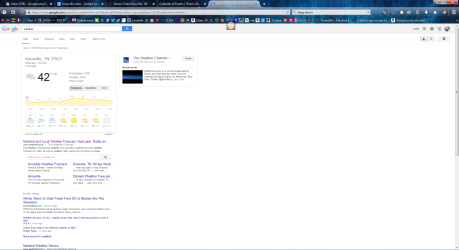
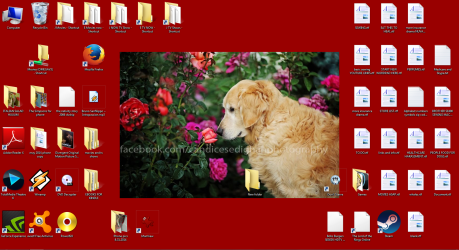
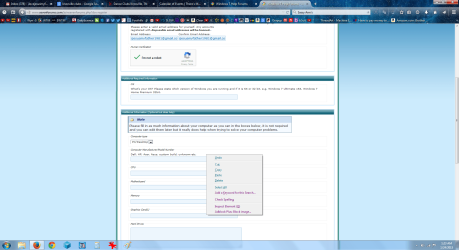
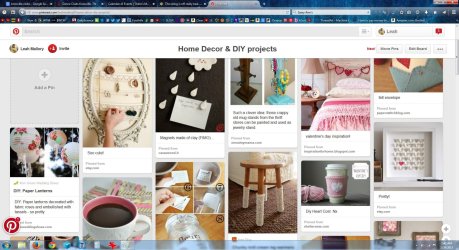
:cry: I am using a tv screen for a monitor and have done so for years. Nothing has changed. My wireless keyboard stays on the couch and (this isn't the first time) I think some buttons got pushed and mest SOMETHING up. I am attaching 4 photos to show you what it is doing. I saved them in a paint software. Anyways, I came home and found that everything was SO BIG it wouldn't even fit on the screen. I didn't want to mess with the sizing because the desktop was fine and it fitted on tv screen fine...it was the icons and the web and the writing that was huge. My friend attempted to fix it and I ended up with a problem just as bad. All the words are so tiny I can barely read them. I enlarged the icons on the desktop but the words stay the same size, tiny (picture 2). I can zoom in and out when I am on the internet to be able to read what I am looking up (picture 4)but my tabs, bookmarks, taskbar, etc ..and even settings and menus on the computer itself (example - control panel)... stays extra small. Please somebody help me fix this? Thank you for your time. Leah :) :(:confused::sick:
 

Attachments

  • 1.png
    1.png
    144.1 KB · Views: 6
  • ntitled.png
    ntitled.png
    1.7 MB · Views: 5
  • ed.png
    ed.png
    136.1 KB · Views: 6
  • 8tled.jpg
    8tled.jpg
    248.8 KB · Views: 3

My Computer My Computer

Computer type
PC/Desktop
Computer Manufacturer/Model Number
custom build, using tv for screen
OS
Windows 7, 64 bit
hello AngelLea, Welcome to SevenForums.

On your Browser, using your keyboard. press this buttons: Hold Ctrl then press "+" .. not the + sign on the Numpad.

+ is for bigger view.
- for smaller view.

Edit:
Or Hold "Ctrl" then use the scroll on your mouse.
 

My Computer My Computer

Computer type
PC/Desktop
Computer Manufacturer/Model Number
HP
OS
Windows 7 Pro 32bit
CPU
Dual Core
Antivirus
Trend Micro
I've tried that. It only affects what I am reading online and does nothing on the desktop. In fact that is what I did on picture 3 and 4.
 

My Computer My Computer

Computer type
PC/Desktop
Computer Manufacturer/Model Number
custom build, using tv for screen
OS
Windows 7, 64 bit
okay, on your desktop: right click > choose Screen Resolution > then choose "Make Text and other items bigger or smaller". you can choose the sizes you want there.
 

My Computer My Computer

Computer type
PC/Desktop
Computer Manufacturer/Model Number
HP
OS
Windows 7 Pro 32bit
CPU
Dual Core
Antivirus
Trend Micro
(1) Right-click on desktop, select screen resolution. What does it show as your current resolution?

Now click on "make text and other items larger or smaller". What does it show... smaller (100%), medium - 125%, larger - 150%, or something else (i.e. custom)?

Now, on the left, click on "set custom text size (DPI)". What does it show... is "use Windows XP style DPI scaling" checked or not?

(2) Right-click on desktop, select View. What size icons are checked... small, medium, or large?

(3) What is the TV you're using as your display? 16x9 HDTV full-HD (i.e. 1920x1080) or something else?
 

My Computer My Computer

Computer type
PC/Desktop
Computer Manufacturer/Model Number
Home-built, two systems (1) and (2)
OS
Windows 7 Pro x64 (1), Win7 Pro X64 (2)
CPU
i5-3350p 3.1Ghz/6MB-cache (1); E8400 3.0Ghz/6MB-cache (2)
Motherboard
ASUS P8Z77-V Pro (1); ASUS P5Q3 (2)
Memory
8GB PC3-12800 DDR3 (1); 4GB PC3-10600 DDR3 (2)
Graphics Card(s)
ATI HD7750 (1), (see TV cards); ATI R7 250 (2)
Sound Card
Realtek ALC892 HD Audio (1); Realtek ALC1200 HD Audio (2)
Monitor(s) Displays
Eizo HD2441W LCD, Eizo S2433W (1); Eizo 24" S2433W (2)
Screen Resolution
1920x1200, 1920x1200 (1); 1920x1200 (2)
Hard Drives
(1) 1TB SATA-II (7200RPM), 2x2TB SATA-III (7200RPM), 250GB SATA-III (10000RPM) for OS; 2x2TB external USB 3.0

(2) 320GB SATA-II (7200RPM), 750GB SATA-II (7200RPM), 150GB SATA-II (10000RPM) for OS; 2TB external USB 3.0
PSU
Nesteq ECS-6001 600W (1); Nesteq ECS-5001 500W (2)
Case
Acousti-Case 360 (1) and (2)
Cooling
Noctua NH-U12P SE2 for CPU, 2x120mm case fans (1) and (2)
Keyboard
IBM PS/2 (1) and (2)
Mouse
Logitech MX Revolution wireless (1); Microsoft wired (2)
Internet Speed
100mbps down / 10mbps up
Antivirus
Microsoft Security Essentials; Malwarebyte Anti-Malware Pro
Browser
Firefox
Other Info
Ceton InfiniTV 4-tuner cablecard-enabled TV card as well as Hauppauge HVR-2250 OTA/ATSC 2-tuner TV card in (1), running under Win7 WMC
Right-click on desktop, select personalize, select window color, select advanced appearance settings.

Select "icon" in dropdown list. Default standard icon text font is Segoe UI, size 11 (actually, that's my setting so it may correspond to my font size of "medium 125%"). But you can adjust this font and size to be whatever you want.
 

My Computer My Computer

Computer type
PC/Desktop
Computer Manufacturer/Model Number
Home-built, two systems (1) and (2)
OS
Windows 7 Pro x64 (1), Win7 Pro X64 (2)
CPU
i5-3350p 3.1Ghz/6MB-cache (1); E8400 3.0Ghz/6MB-cache (2)
Motherboard
ASUS P8Z77-V Pro (1); ASUS P5Q3 (2)
Memory
8GB PC3-12800 DDR3 (1); 4GB PC3-10600 DDR3 (2)
Graphics Card(s)
ATI HD7750 (1), (see TV cards); ATI R7 250 (2)
Sound Card
Realtek ALC892 HD Audio (1); Realtek ALC1200 HD Audio (2)
Monitor(s) Displays
Eizo HD2441W LCD, Eizo S2433W (1); Eizo 24" S2433W (2)
Screen Resolution
1920x1200, 1920x1200 (1); 1920x1200 (2)
Hard Drives
(1) 1TB SATA-II (7200RPM), 2x2TB SATA-III (7200RPM), 250GB SATA-III (10000RPM) for OS; 2x2TB external USB 3.0

(2) 320GB SATA-II (7200RPM), 750GB SATA-II (7200RPM), 150GB SATA-II (10000RPM) for OS; 2TB external USB 3.0
PSU
Nesteq ECS-6001 600W (1); Nesteq ECS-5001 500W (2)
Case
Acousti-Case 360 (1) and (2)
Cooling
Noctua NH-U12P SE2 for CPU, 2x120mm case fans (1) and (2)
Keyboard
IBM PS/2 (1) and (2)
Mouse
Logitech MX Revolution wireless (1); Microsoft wired (2)
Internet Speed
100mbps down / 10mbps up
Antivirus
Microsoft Security Essentials; Malwarebyte Anti-Malware Pro
Browser
Firefox
Other Info
Ceton InfiniTV 4-tuner cablecard-enabled TV card as well as Hauppauge HVR-2250 OTA/ATSC 2-tuner TV card in (1), running under Win7 WMC
In Firefox, I recommend that you install add-on NoSquint. Excellent addition for Firefox's memory of unique zoom-level by each domain web site you visit. NoSquint makes it very visible what your current zoom level is for each page displayed.

Then, in Tools -> add-ons -> extensions, for NoSquint push the Options button.

Select zooming tab, change default page zoom level to 100%. Change zoom increment to 5%. Click OK.

Customize your toolbar buttons to have explicit buttons for "zoom out", "zoom in", and "NoSquint current page zoom value".

Each page will now display at 100% zoom by default. And your +/- zooming will be at 5% increments.

ZGlbM7.jpg


Note that NoSquint's button initially appears on the Add-On Bar (at the bottom of the window, when you select View -> Toolbars -> add-on bar. While in "customize" mode you'll have to drag it up off of the add-on bar into the general holding tank area, and then drag it again from the holding tank up to the top button bar area. Then exit customize.
 

My Computer My Computer

Computer type
PC/Desktop
Computer Manufacturer/Model Number
Home-built, two systems (1) and (2)
OS
Windows 7 Pro x64 (1), Win7 Pro X64 (2)
CPU
i5-3350p 3.1Ghz/6MB-cache (1); E8400 3.0Ghz/6MB-cache (2)
Motherboard
ASUS P8Z77-V Pro (1); ASUS P5Q3 (2)
Memory
8GB PC3-12800 DDR3 (1); 4GB PC3-10600 DDR3 (2)
Graphics Card(s)
ATI HD7750 (1), (see TV cards); ATI R7 250 (2)
Sound Card
Realtek ALC892 HD Audio (1); Realtek ALC1200 HD Audio (2)
Monitor(s) Displays
Eizo HD2441W LCD, Eizo S2433W (1); Eizo 24" S2433W (2)
Screen Resolution
1920x1200, 1920x1200 (1); 1920x1200 (2)
Hard Drives
(1) 1TB SATA-II (7200RPM), 2x2TB SATA-III (7200RPM), 250GB SATA-III (10000RPM) for OS; 2x2TB external USB 3.0

(2) 320GB SATA-II (7200RPM), 750GB SATA-II (7200RPM), 150GB SATA-II (10000RPM) for OS; 2TB external USB 3.0
PSU
Nesteq ECS-6001 600W (1); Nesteq ECS-5001 500W (2)
Case
Acousti-Case 360 (1) and (2)
Cooling
Noctua NH-U12P SE2 for CPU, 2x120mm case fans (1) and (2)
Keyboard
IBM PS/2 (1) and (2)
Mouse
Logitech MX Revolution wireless (1); Microsoft wired (2)
Internet Speed
100mbps down / 10mbps up
Antivirus
Microsoft Security Essentials; Malwarebyte Anti-Malware Pro
Browser
Firefox
Other Info
Ceton InfiniTV 4-tuner cablecard-enabled TV card as well as Hauppauge HVR-2250 OTA/ATSC 2-tuner TV card in (1), running under Win7 WMC
dsperber, thank you for saving me!! I could barely read the settings to change them but you were right. I changed the text size under resolution and changed the icons back to normal size. THANK YOU!!!!!!!! Now I can use my computer again. That was AWFUL. :) THUMBS UP! :)
 

My Computer My Computer

Computer type
PC/Desktop
Computer Manufacturer/Model Number
custom build, using tv for screen
OS
Windows 7, 64 bit
Excellent news! Glad you're back in business.

I still do suggest you install the NoSquint add-on in Firefox. It's a nice way to display and adjust current zoom value for any page. (see my screenshot above, for how I've got it placed on the toolbar next to the zoom-in/zoom-out buttons)
 

My Computer My Computer

Computer type
PC/Desktop
Computer Manufacturer/Model Number
Home-built, two systems (1) and (2)
OS
Windows 7 Pro x64 (1), Win7 Pro X64 (2)
CPU
i5-3350p 3.1Ghz/6MB-cache (1); E8400 3.0Ghz/6MB-cache (2)
Motherboard
ASUS P8Z77-V Pro (1); ASUS P5Q3 (2)
Memory
8GB PC3-12800 DDR3 (1); 4GB PC3-10600 DDR3 (2)
Graphics Card(s)
ATI HD7750 (1), (see TV cards); ATI R7 250 (2)
Sound Card
Realtek ALC892 HD Audio (1); Realtek ALC1200 HD Audio (2)
Monitor(s) Displays
Eizo HD2441W LCD, Eizo S2433W (1); Eizo 24" S2433W (2)
Screen Resolution
1920x1200, 1920x1200 (1); 1920x1200 (2)
Hard Drives
(1) 1TB SATA-II (7200RPM), 2x2TB SATA-III (7200RPM), 250GB SATA-III (10000RPM) for OS; 2x2TB external USB 3.0

(2) 320GB SATA-II (7200RPM), 750GB SATA-II (7200RPM), 150GB SATA-II (10000RPM) for OS; 2TB external USB 3.0
PSU
Nesteq ECS-6001 600W (1); Nesteq ECS-5001 500W (2)
Case
Acousti-Case 360 (1) and (2)
Cooling
Noctua NH-U12P SE2 for CPU, 2x120mm case fans (1) and (2)
Keyboard
IBM PS/2 (1) and (2)
Mouse
Logitech MX Revolution wireless (1); Microsoft wired (2)
Internet Speed
100mbps down / 10mbps up
Antivirus
Microsoft Security Essentials; Malwarebyte Anti-Malware Pro
Browser
Firefox
Other Info
Ceton InfiniTV 4-tuner cablecard-enabled TV card as well as Hauppauge HVR-2250 OTA/ATSC 2-tuner TV card in (1), running under Win7 WMC
Back
Top