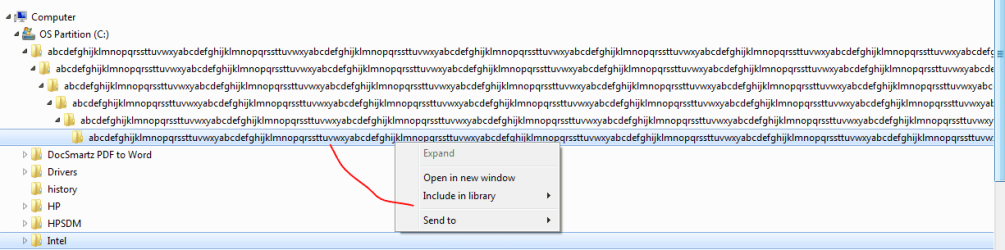
There is a very long folder name is shown in the C partition.

Hadramawt

New member
Local time
7:36 AM
Messages
177
Hi,

I really got shocked with seeing so long folder name that I couldn't believe it is normal when I checked the C partition.
abcdefghijklmnopqrssttuvwxyabcdefghijklmnopqrssttuvwxyabcdefghijklmnopqrssttuvwxyabcdefghijklmnopqrssttuvwxyabcdefghijklmnopqrssttuvwxyabcdefghijklmnopqrssttuvwxyabcdefghijklmnopqrssttuvwxyabcdefghijklmnopqrssttuvwxy

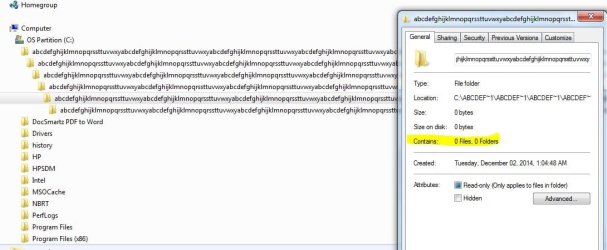
There are six long folder names, each of which is inside the other one which is before it.
The first five folders have properties when clicking on it right-click, like the first screen shot.
The final folder doesn't have any properties when clicking on it right-click
.

I don't know what created it, it was created on 02/12/2014, although I have Microsoft security essentials, and Malwarebytes are installed on my laptop.

If I am going to delete it, what might be resulting in?
 

Attachments
  • a very long folder name was saved in the C partition1.JPG
    a very long folder name was saved in the C partition1.JPG
    69.1 KB · Views: 9
  • a very long folder name was saved in the C partition2.png
    a very long folder name was saved in the C partition2.png
    8.6 KB · Views: 8
Last edited:

My Computer My Computer

At a glance

Windows 7 Home Premium 64BitIntel Core i5, 2.3GHzDDR3- 6GBIntel Graphics Family, Radeon HD 6770M
Computer type
Laptop
Computer Manufacturer/Model Number
HP, Pavilion
OS
Windows 7 Home Premium 64Bit
CPU
Intel Core i5, 2.3GHz
Motherboard
Hewlett-Packard- Model 1657
Memory
DDR3- 6GB
Graphics Card(s)
Intel Graphics Family, Radeon HD 6770M
Hard Drives
Toshiba 700GB
Antivirus
Microsot Secuirty Eessentials
Browser
MS IE, Google Chrom, and FireFox
I scanned my system, and it found errors, but it could resolve them. Hot to do?

I tried to get the log file, however, I found access is denied.
 

Attachments

  • sfc.JPG
    sfc.JPG
    38.5 KB · Views: 53
  • Access is denied.JPG
    Access is denied.JPG
    27.2 KB · Views: 2

My Computer My Computer

At a glance

Windows 7 Home Premium 64BitIntel Core i5, 2.3GHzDDR3- 6GBIntel Graphics Family, Radeon HD 6770M
Computer type
Laptop
Computer Manufacturer/Model Number
HP, Pavilion
OS
Windows 7 Home Premium 64Bit
CPU
Intel Core i5, 2.3GHz
Motherboard
Hewlett-Packard- Model 1657
Memory
DDR3- 6GB
Graphics Card(s)
Intel Graphics Family, Radeon HD 6770M
Hard Drives
Toshiba 700GB
Antivirus
Microsot Secuirty Eessentials
Browser
MS IE, Google Chrom, and FireFox
Install and run the System Update Readiness Tool (SURT): See here What is the System Update Readiness Tool?

Open a Elevated Command Prompt.

Click on the Start button and type cmd.
DO NOT press Enter or click Go.
Look at the upper part of the window and you will see cmd.exe.
Right click on it and select Run as Administrator.
Type SFC /scannow and press Enter. See if the Component store problems are fixed. Run 2-3 times if necessary.
 

My Computer My Computer

At a glance

Windows 10 Pro X64Intel Quad Core i7-4770 @ 3.4Ghz16.0GB PC3-12800 DDR3 SDRAM 1600 MHzIntel Integrated HD Graphics
Computer type
PC/Desktop
Computer Manufacturer/Model Number
Lenovo IdeaCenter 450
OS
Windows 10 Pro X64
CPU
Intel Quad Core i7-4770 @ 3.4Ghz
Memory
16.0GB PC3-12800 DDR3 SDRAM 1600 MHz
Graphics Card(s)
Intel Integrated HD Graphics
Sound Card
Realtek HD Audio
Monitor(s) Displays
HP 22" LCD
Screen Resolution
1680 x 1050
Hard Drives
250GB Samsung EVO SATA-3 SSD
2TB Seagate ST2000DM001 SATA-2
1.5TB Seagate ST3150041AS SATA
Keyboard
Dell USB
Mouse
Lenovo USB
Internet Speed
Cable via Road Runner 3MB Upload, 30MB Download
Antivirus
Windows Defender, MBAM Pro, MBAE
Browser
Seamonkey
Other Info
UEFI/GPT
PLDS DVD-RW DH16AERSH
if you wish to access the logs copy and paste them to the desktop first, you will be able to access them and zip them up for upload if required
 

My Computer My Computer

At a glance

Win7 Ultimate X64Intel i5 3570K8GB DDR3 1600Onboard
Computer type
PC/Desktop
Computer Manufacturer/Model Number
Pauly Special
OS
Win7 Ultimate X64
CPU
Intel i5 3570K
Motherboard
Gigabyte Z77X-DS3H
Memory
8GB DDR3 1600
Graphics Card(s)
Onboard
Sound Card
Onboard
Screen Resolution
1280x1024
Hard Drives
Samsung 840 Evo SSD (OS)
1TB Spinner (Data)
PSU
800W Arctic
Case
Cooler Master
Cooling
3x120mm Fans
Keyboard
MS Wireless
Mouse
MS Wireless
Internet Speed
20M
Install and run the System Update Readiness Tool (SURT): See here What is the System Update Readiness Tool?

Open a Elevated Command Prompt.
Click on the Start button and type cmd.
DO NOT press Enter or click Go.
Look at the upper part of the window and you will see cmd.exe.
Right click on it and select Run as Administrator.
Type SFC /scannow and press Enter. See if the Component store problems are fixed. Run 2-3 times if necessary.


Thanks a lot both of you

Could you please understand, and concentrate with me? Have you seen my screen shots posted previously.
I really know that my system has some system files corrupted since there are some problems with that there are network devices are visible in the network even although the Network discovery is off. Also, when trying to connect a Android Samsung mobile Bleutooth with my Windows HP laptop Bleutooth, I didn't find that connection was established properly since the Windows didn't detect drivers. However, when I restored my Windows System which came from the HP Factory with using Recovery Discs, then all problem(Network, and Bluetooth, and others) were solved.

I scanned my system three times with 'Type SFC /scannow ', at each of which it found errors, but it could NOT resolve them. How to Fix corrupt files found by running command 'Sfc /scannow'?


I really don't need to throw my existing system, although it seems to have some problems. It has some programs and settings configured which require me to re-set them if I want to install a fresh Windows.


if you wish to access the logs copy and paste them to the desktop first, you will be able to access them and zip them up for upload if required
I do have tried to open the log file once the 'SFC /scannow ' command was completed, however, I found 'access is denied'. So, you would suggest for me to first copy and paste the log file to desktop, and then open from there. It would be working.
 
Last edited:

My Computer My Computer

At a glance

Windows 7 Home Premium 64BitIntel Core i5, 2.3GHzDDR3- 6GBIntel Graphics Family, Radeon HD 6770M
Computer type
Laptop
Computer Manufacturer/Model Number
HP, Pavilion
OS
Windows 7 Home Premium 64Bit
CPU
Intel Core i5, 2.3GHz
Motherboard
Hewlett-Packard- Model 1657
Memory
DDR3- 6GB
Graphics Card(s)
Intel Graphics Family, Radeon HD 6770M
Hard Drives
Toshiba 700GB
Antivirus
Microsot Secuirty Eessentials
Browser
MS IE, Google Chrom, and FireFox
Could anyone at this splendid forum take some of his precious time out to really address my problem above?
 

My Computer My Computer

At a glance

Windows 7 Home Premium 64BitIntel Core i5, 2.3GHzDDR3- 6GBIntel Graphics Family, Radeon HD 6770M
Computer type
Laptop
Computer Manufacturer/Model Number
HP, Pavilion
OS
Windows 7 Home Premium 64Bit
CPU
Intel Core i5, 2.3GHz
Motherboard
Hewlett-Packard- Model 1657
Memory
DDR3- 6GB
Graphics Card(s)
Intel Graphics Family, Radeon HD 6770M
Hard Drives
Toshiba 700GB
Antivirus
Microsot Secuirty Eessentials
Browser
MS IE, Google Chrom, and FireFox
There are some suggestions for how to repair those irreparable files in SFC /SCANNOW Command
but what I have found is that if they will not repair after 3 times running SFC and you have corruption as evidenced by the permissioning error you got just for trying to access the CBS log, then I would consider doing a Repair Install which reinstalls the OS while keeping all of your programs and files in place. Only if caused by a corrupt setting that is allowed to pass back through will this not suffice.

This is also very much contingent on whether you had a decent Win7 install to begin with. If this is the original HP install then that is the worst possible install one can have, larded with the worst load of bloatware in the industry, smothering Win7 with useless duplicate utilties that interfere with better versions built into Win7. So in that case I would strongly consider doing a Clean Reinstall Windows 7
which compiles what works best in thousands of installs we've helped with here, and has been used by over a million consumers without a single complaint.
 
1. Can i delete these files?. Answer Yes.

Also you should do another scan, often malwarebytes don't catch everything. So Hitman Pro should do the trick. Just to be safe. Its ok to have more than one Malware scanner, just don't run the scans at the same time. 2 heads is better than one.

HitmanPro 3 - SurfRight

2.Bluetooth is not showing up. Answer

Try the Toggle switch. Verify the device is turned on and enable HP Network Assistant and Mobility Center
- Reinstall / update device drivers. HP Support & Drivers | United States


3. How to view the contents of the log file.

Click Start button, type cmd in the Start Search box, right-click cmd in the Programs list, and then click Run as administrator.

User Account Control permission If you are prompted for an administrator password or for a confirmation, type your password, or click Continue.
Type the following command, and then press ENTER:
findstr /c:"[SR]" %windir%\logs\cbs\cbs.log >sfcdetails.txt

Now all you have to do is search for SfCdetails.txt and now you can read the contents.


4. If all else fails backup your files and use HP Recovery, Factory Reset. Fix your other concerns.

[url=http://h10025.www1.hp.com/ewfrf/wc/document?docname=c01867418&cc=us&dlc=en&lc=en]Performing an HP system recovery (Windows 7) | HP® Support


5. If you'd rather not have any overlapping, programs which are pre installed on systems like HP.Which does the same job that windows 7 do anyway. (bloatware or PUP) I would highly advise taking Gregrocker's Guide into consideration.

http://www.sevenforums.com/tutorials/219487-clean-reinstall-factory-oem-windows-7-a.html#post1839164
 
Last edited:

My Computer My Computer

At a glance

Windows 7 Ultimate 64-bit SP1Intel Core i7 3930K @ 3.20GHz 4.24 OC Sandy B...16 GB RipJaws 2400mhz OC - operating 16.0GB D...NVIDIA GeForce GTX 770 x2 SLI Enabled
Computer type
PC/Desktop
Computer Manufacturer/Model Number
Custom
OS
Windows 7 Ultimate 64-bit SP1
CPU
Intel Core i7 3930K @ 3.20GHz 4.24 OC Sandy Bridge-E Tech
Motherboard
ASUSTeK COMPUTER INC. RAMPAGE IV EXTREME (LGA2011)
Memory
16 GB RipJaws 2400mhz OC - operating 16.0GB DDR3 @ 833MHz x2
Graphics Card(s)
NVIDIA GeForce GTX 770 x2 SLI Enabled
Sound Card
Yamaha Steinberg USB Audio
Monitor(s) Displays
ASUS PB278
Screen Resolution
ASUS PB278 (2560x1440@60Hz)
Hard Drives
2TB Western Digital WDC WD2002FAEX-007BA SCSI Disk Device (SATA)
250GB Samsung SSD 840 EVO 120G SCSI Disk Device (SSD) 32 °C
2TB Hitachi HDS722020ALA330 SCSI Disk Device (SATA)
PSU
1200watts.
Case
Switch 810 GunMetal
Cooling
H100i + 12 fans
Keyboard
Razer DeathStalker
Mouse
Logitech G502
Internet Speed
60/Mbs
Antivirus
AVG/Malwarebytes/Hitman Pro
Browser
Chrome
HP Factory install is the worst install one can have, with the worst load of corrupting bloatware in the industry along with a dozen duplicate utilities that interfere with better versions built into Win7. No tech enthusiast would run that install which will never even allow one to experience native Win7 performance.

Do a Clean Reinstall Windows 7 to experience perfect Win7 performance on that PC for the first time. Stick with the tools and methods given to keep it that way.
 
You can always uninstall the bloatware once things are back to normal. You get all your drivers.

How many times do you intended to post that link? it seems to be the answer to everything you comment on. I don't need help with that.My PC is fine. I just offered a way to help the OP. Since no one else seemed to know how.
 

My Computer My Computer

At a glance

Windows 7 Ultimate 64-bit SP1Intel Core i7 3930K @ 3.20GHz 4.24 OC Sandy B...16 GB RipJaws 2400mhz OC - operating 16.0GB D...NVIDIA GeForce GTX 770 x2 SLI Enabled
Computer type
PC/Desktop
Computer Manufacturer/Model Number
Custom
OS
Windows 7 Ultimate 64-bit SP1
CPU
Intel Core i7 3930K @ 3.20GHz 4.24 OC Sandy Bridge-E Tech
Motherboard
ASUSTeK COMPUTER INC. RAMPAGE IV EXTREME (LGA2011)
Memory
16 GB RipJaws 2400mhz OC - operating 16.0GB DDR3 @ 833MHz x2
Graphics Card(s)
NVIDIA GeForce GTX 770 x2 SLI Enabled
Sound Card
Yamaha Steinberg USB Audio
Monitor(s) Displays
ASUS PB278
Screen Resolution
ASUS PB278 (2560x1440@60Hz)
Hard Drives
2TB Western Digital WDC WD2002FAEX-007BA SCSI Disk Device (SATA)
250GB Samsung SSD 840 EVO 120G SCSI Disk Device (SSD) 32 °C
2TB Hitachi HDS722020ALA330 SCSI Disk Device (SATA)
PSU
1200watts.
Case
Switch 810 GunMetal
Cooling
H100i + 12 fans
Keyboard
Razer DeathStalker
Mouse
Logitech G502
Internet Speed
60/Mbs
Antivirus
AVG/Malwarebytes/Hitman Pro
Browser
Chrome
The bloatware is corrupting to the point there will never be anything near native Win7 performance even with everything possible done to Clean Up Factory Bloatware.

Drivers are never an issue in a driver-complete OS. Did you think we're talking about XP? No one has ever not been able to find a driver for Win7 who has come here that I've seen.

Although I help with at least 50% other issues daily, I will continue to advocate Clean Reinstall Windows 7 which has been used by over a million consumers worldwide without a single complaint or anyone coming back here with problems who stick with its steps. This changed the equation on these reinstalls which previously were considered risky and not even supported by OEM's who tried to bully users to keep the bloated factory installs they were paid to load with crapware. Now not a single OEM will dare interfere with Clean Reinstall and most agree it is vastly superior and even recommend it.

All of this is due to the advocacy by these forums for getting and keeping the best possible install of Win7 which is compiled in Clean Reinstall Windows 7 and based on tens of thousands of installs we've directly helped with here.

Your help was good otherwise so please stick around, but don't insult the work we do here which has helped make this the undisputed top tech forums of all times on the web.
 
So you're telling me that Windows 7 ISO comes with a complete list of every driver known to existence? I've ran into many issues with drivers while upgrading or downgrading PC's. I only came here to help... If the OP Chooses to take your advice thats fine. What ever his choice maybe, as long as he's happy with the outcome, then so am I.

I appreciate the effort and your advice but once again I'm not the one who's seeking help. I've Clean Your guide is very good / informative and i'm sure it works.But it doesn't tell me anything that I didn't already know. Also There has also been reported problems with Windows 7 USB-DVD Download tool. But you have that in your first step without any alternatives.

I'm not here to insult anyone or anything, I also edited my post and recommend your method if that would suit the OP better. He purchased the PC and used it with all the bloat on it for this duration, I assumed. So i figured going back to factory settings wouldn't hurt. Some people, seem to like those pre installed apps for some reason... Plus its the best way to get the exact drivers that made the hardware work in the first place. Or get stuck with some generic device drivers signed by microsoft, which don't always perform the best.

Im here to learn and give advice I will stay around.
 
Last edited:

My Computer My Computer

At a glance

Windows 7 Ultimate 64-bit SP1Intel Core i7 3930K @ 3.20GHz 4.24 OC Sandy B...16 GB RipJaws 2400mhz OC - operating 16.0GB D...NVIDIA GeForce GTX 770 x2 SLI Enabled
Computer type
PC/Desktop
Computer Manufacturer/Model Number
Custom
OS
Windows 7 Ultimate 64-bit SP1
CPU
Intel Core i7 3930K @ 3.20GHz 4.24 OC Sandy Bridge-E Tech
Motherboard
ASUSTeK COMPUTER INC. RAMPAGE IV EXTREME (LGA2011)
Memory
16 GB RipJaws 2400mhz OC - operating 16.0GB DDR3 @ 833MHz x2
Graphics Card(s)
NVIDIA GeForce GTX 770 x2 SLI Enabled
Sound Card
Yamaha Steinberg USB Audio
Monitor(s) Displays
ASUS PB278
Screen Resolution
ASUS PB278 (2560x1440@60Hz)
Hard Drives
2TB Western Digital WDC WD2002FAEX-007BA SCSI Disk Device (SATA)
250GB Samsung SSD 840 EVO 120G SCSI Disk Device (SSD) 32 °C
2TB Hitachi HDS722020ALA330 SCSI Disk Device (SATA)
PSU
1200watts.
Case
Switch 810 GunMetal
Cooling
H100i + 12 fans
Keyboard
Razer DeathStalker
Mouse
Logitech G502
Internet Speed
60/Mbs
Antivirus
AVG/Malwarebytes/Hitman Pro
Browser
Chrome
I did not say that.

It tells how drivers are best handled in Clean Reinstall Windows 7 and is important enough that the steps are printed in red so we don't have to repeatedly have those who force a bunch of drivers Win7 doesn't want do it over because of problems down the line. Most are in the installer but then many of those and more come in via WIndows Update after you Enable hardware auto-updating via Windows Update (Step 3). Then there's rarely more than 2-3 to import from the PC's or device's Support Downloads webpage.

There is nothing wrong with advising Factory Recovery as I offer it myself in Troubleshooting Windows 7 Failure to Start however whenever anyone does that alone I always give them the cleaner option. Neither is wrong or right, just different and IMO better. Others have different opinions which I always try to respect even if I differ.

The problems with Win7 download tool are almost always with unauthorized ISO's. If you use the ISO's provided in tutorial you will not have these problems. For UEFI it requires using another app for flash stick.
 
Back
Top