ThinkPad X131e -network problem

ered

New member
Hi Roomies,

I have a Lenovo ThinkPad X131e and since one month I'm not able to log in to the internet via LAN or Wireless. All of this happen since it came out the Lenovo had ADspyware installed on their products.

I have uninstalled the drivers and networks adapter more then 3 times without any positive solutions. I hope some one here can help me with this small problem. I will be around all day till I can fix it.

I'm working from my main PC with win8.1.1.

Thanks @ll :cool:
PS:Lenovo ThinkPad X131e.
 

My Computer

Computer type
PC/Desktop
Computer Manufacturer/Model Number
Lenevo ThinkPad X131e
OS
Windows 7 PRO x64
CPU
Intel Core i3 2367M
Motherboard
Lenevo 33682FU
Memory
4 GB
Graphics Card(s)
Intel HD graphics 3000
Screen Resolution
11
Where did you get the drivers that you have installed?
 

My Computer

Computer type
PC/Desktop
Computer Manufacturer/Model Number
HP
OS
Windows 7 Pro 32bit
CPU
Dual Core
Antivirus
Trend Micro
All of this happen since it came out the Lenovo had ADspyware installed on their products.
what did you do when you have found out about this?

Did you scan your system using any antivirus or antimalware programs?

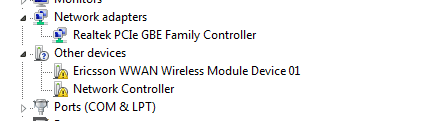
Can you post a screen shot of your device manager on your next reply.
 

My Computer

Computer type
PC/Desktop
Computer Manufacturer/Model Number
HP
OS
Windows 7 Pro 32bit
CPU
Dual Core
Antivirus
Trend Micro
@ShoTTaS, 1. When I first read about it, I looked to see if my Laptop was part of this spyware and it was not. I ran Kaspersky internet solutions and it found nothing. I ran spybot, nothing. I ran Adware, nothing. My Laptop is always clean and I try to maintain is so.
2. Yes, answered above.
3. yes.

I all happen with the bootup last month. So I think if they(lenovo) did something, they did it before it bootup. Win & Pro is running fine, but no connections.
 

Attachments

  • L1.png
    L1.png
    6.6 KB · Views: 8

My Computer

Computer type
PC/Desktop
Computer Manufacturer/Model Number
Lenevo ThinkPad X131e
OS
Windows 7 PRO x64
CPU
Intel Core i3 2367M
Motherboard
Lenevo 33682FU
Memory
4 GB
Graphics Card(s)
Intel HD graphics 3000
Screen Resolution
11
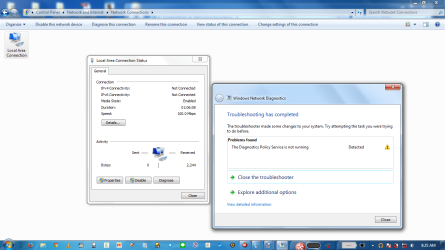
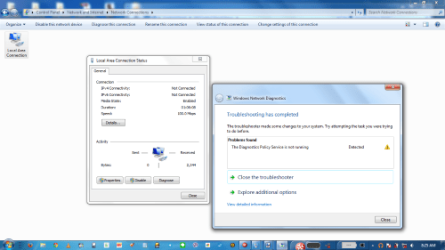
@ShoTTaS, I just ran this test.
 

Attachments

  • L2.png
    L2.png
    238.7 KB · Views: 1
  • L3.png
    L3.png
    63.6 KB · Views: 8

My Computer

Computer type
PC/Desktop
Computer Manufacturer/Model Number
Lenevo ThinkPad X131e
OS
Windows 7 PRO x64
CPU
Intel Core i3 2367M
Motherboard
Lenevo 33682FU
Memory
4 GB
Graphics Card(s)
Intel HD graphics 3000
Screen Resolution
11
On your start menu, type services.

on the Services(Local), you can find the Diagnostics Policy Services there. Check if it is started/running.

also on start menu, type msconfig.

Under the services tab, make sure that the Diagnostics Policy Services was check marked.
if you cant see it, make sure that the "Hide all Microsoft Services" is unchecked.
 

My Computer

Computer type
PC/Desktop
Computer Manufacturer/Model Number
HP
OS
Windows 7 Pro 32bit
CPU
Dual Core
Antivirus
Trend Micro
On your device manager screen shot. it seems you are missing your network controller, i am thinking of the chipset driver. try installing from the link you have posted earlier.
 

My Computer

Computer type
PC/Desktop
Computer Manufacturer/Model Number
HP
OS
Windows 7 Pro 32bit
CPU
Dual Core
Antivirus
Trend Micro
@ShoTTaS, I did installed the Chipset and still nothing. Diagnostics Policy Services done.
 

My Computer

Computer type
PC/Desktop
Computer Manufacturer/Model Number
Lenevo ThinkPad X131e
OS
Windows 7 PRO x64
CPU
Intel Core i3 2367M
Motherboard
Lenevo 33682FU
Memory
4 GB
Graphics Card(s)
Intel HD graphics 3000
Screen Resolution
11
You still cannot connect to LAN or Wireless?
Do you get any error when you try to connect?
 

My Computer

Computer type
PC/Desktop
Computer Manufacturer/Model Number
HP
OS
Windows 7 Pro 32bit
CPU
Dual Core
Antivirus
Trend Micro
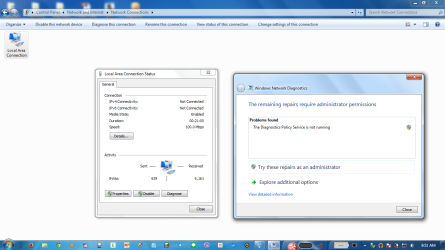
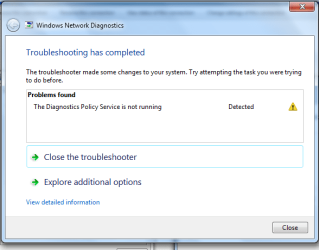
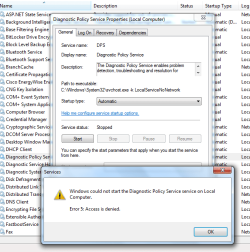
No, I'm not able to connect and I'm still getting the same Diagnostics Policy Services is not running even if is on Automatic. Here are some shots.
 

Attachments

  • l22.png
    l22.png
    213.7 KB · Views: 0
  • l33.png
    l33.png
    60.9 KB · Views: 4
  • l44.png
    l44.png
    108.7 KB · Views: 4

My Computer

Computer type
PC/Desktop
Computer Manufacturer/Model Number
Lenevo ThinkPad X131e
OS
Windows 7 PRO x64
CPU
Intel Core i3 2367M
Motherboard
Lenevo 33682FU
Memory
4 GB
Graphics Card(s)
Intel HD graphics 3000
Screen Resolution
11
I tried and giving up.....I will post in another sub folder....please close this topic.
@thanks ALL
 

My Computer

Computer type
PC/Desktop
Computer Manufacturer/Model Number
Lenevo ThinkPad X131e
OS
Windows 7 PRO x64
CPU
Intel Core i3 2367M
Motherboard
Lenevo 33682FU
Memory
4 GB
Graphics Card(s)
Intel HD graphics 3000
Screen Resolution
11
Back
Top