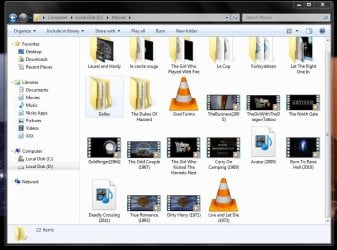
Thumbnail previews for .mp4's not showing but all other formats are

icekool

New member
Local time
11:09 PM
Messages
15
Hi to everyone on here.

I know it's not a big problem, but for me this is for some strange reason, important. I recently tried 'Registry Mechanic" by PC Tools and it seems to be ok, but I will possibly stick to just CCleaner from now on.

My issue is that all video (wmv & avi) and image files are displaying in their folders correctly with nice thumbnails but now mp4's don't have thumbs anymore, just an icon. they were showing fine until recently.

I would really like to get them back if possible, so if anyone can help me I would be very grateful indeed. I am quite sure the folder options are all ok because all the other usual formats are displaying the thumbs correctly.

(Win 7 Home Premium 32-bit, fully updated, no system errors at all so far)
 

My Computer My Computer

At a glance

Win 7 Ultimate 64 bit
Computer type
PC/Desktop
OS
Win 7 Ultimate 64 bit

My Computer My Computer

At a glance

Windows 7 x64Intel i7 2600kG.skill Ripjaw 16gigs @ 1866Nvidia gtx580 (evga)
Computer Manufacturer/Model Number
Insane hobo technologies. ;-)
OS
Windows 7 x64
CPU
Intel i7 2600k
Motherboard
Asrock z68 extreme 4 gen 3
Memory
G.skill Ripjaw 16gigs @ 1866
Graphics Card(s)
Nvidia gtx580 (evga)
Sound Card
Integrated HD audio + hdmi
Monitor(s) Displays
24" ASUS widescreen + 42" insignia
Screen Resolution
1080p (1920x1080)
Hard Drives
128 Samsung 830
256 Samsung 840
3 x 1tb storage drive (various)
1 western digital 1tb (eSATA)
1 Seagate 1tb (eSATA)
PSU
1 kilowatt SLI/Crossfire rated Silverstone modular
Case
NZXT Phantom + additional 220 fan
Cooling
Zalmann
Keyboard
Microsoft wireless 3000 (v2)
Mouse
MS - wireless 5000 (bluetrack)
Internet Speed
depends on if you ask me or my provider.
Other Info
The above information is provided as is, and the author assumes no responsibility for issues it may cause with your sanity or fanboyism.
Hi Maguscreed, thanks for your reply. Just before I try your suggestions, perhaps I should explain that the file association, as far as I can see, is perfectly ok. In that, any mp4 file opens and plays perfectly fine with WMP, so the 'association' is there already (please correct me if I'm wrong).

Secondly, your second link points to a solution for someonw who had probs with "shortcuts to" .mp4's, in my case I dont have the thumbs showing for the actual files themselves.

So, bearing this in mind, should I still try your 1st registry re-association step??
 

My Computer My Computer

At a glance

Win 7 Ultimate 64 bit
Computer type
PC/Desktop
OS
Win 7 Ultimate 64 bit
I tried your above suggestions and it is stil the same, as I said in my second post above the files (.mp4's) are opening and playing with wmp ok, i'm just not getting thumbs showing.

I have attached a screenshot.

screenshot.JPG
 

My Computer My Computer

At a glance

Win 7 Ultimate 64 bit
Computer type
PC/Desktop
OS
Win 7 Ultimate 64 bit

My Computer My Computer

At a glance

Windows 7 x64Intel i7 2600kG.skill Ripjaw 16gigs @ 1866Nvidia gtx580 (evga)
Computer Manufacturer/Model Number
Insane hobo technologies. ;-)
OS
Windows 7 x64
CPU
Intel i7 2600k
Motherboard
Asrock z68 extreme 4 gen 3
Memory
G.skill Ripjaw 16gigs @ 1866
Graphics Card(s)
Nvidia gtx580 (evga)
Sound Card
Integrated HD audio + hdmi
Monitor(s) Displays
24" ASUS widescreen + 42" insignia
Screen Resolution
1080p (1920x1080)
Hard Drives
128 Samsung 830
256 Samsung 840
3 x 1tb storage drive (various)
1 western digital 1tb (eSATA)
1 Seagate 1tb (eSATA)
PSU
1 kilowatt SLI/Crossfire rated Silverstone modular
Case
NZXT Phantom + additional 220 fan
Cooling
Zalmann
Keyboard
Microsoft wireless 3000 (v2)
Mouse
MS - wireless 5000 (bluetrack)
Internet Speed
depends on if you ask me or my provider.
Other Info
The above information is provided as is, and the author assumes no responsibility for issues it may cause with your sanity or fanboyism.
thanks very much for your quick reply. The thing is, mp4 support must have been there before because I had the thumbs showing until my use of registry Mechanic, and they do open & play perfectly. i didnt install any additional codecs previously, only VLC which I believe has its own all self contained.
 

My Computer My Computer

At a glance

Win 7 Ultimate 64 bit
Computer type
PC/Desktop
OS
Win 7 Ultimate 64 bit
Maguscreed,

Just got a big surprise, I re-installed Windows Live Movie Maker + Live Photo Gallery and ALL thumbs are back!!

I guess I was wrong to assume it was anything to do with Registry Mechanic, I didnt think that it might be something to do with uninstalling both of the above (I did that because i got hold of a copy of Movie Maker 6 and found it to be a better version so ripped out the live version previously)

Hopefully if anyone else does as I did and loses their mp4 thumb previews, they can try this.

Thanks for your efforts anyway Maguscreed.
 

My Computer My Computer

At a glance

Win 7 Ultimate 64 bit
Computer type
PC/Desktop
OS
Win 7 Ultimate 64 bit
Actually reinstalling those apps would have replaced any registry keys potentially deleted by the registry app.
More and more I'm seeing a consensus that those apps cause more problems than they solve with win 7, which actually manages its registry much better than the previous versions to begin with.
Some time those 'blank keys' are actually needed.
 

My Computer My Computer

At a glance

Windows 7 x64Intel i7 2600kG.skill Ripjaw 16gigs @ 1866Nvidia gtx580 (evga)
Computer Manufacturer/Model Number
Insane hobo technologies. ;-)
OS
Windows 7 x64
CPU
Intel i7 2600k
Motherboard
Asrock z68 extreme 4 gen 3
Memory
G.skill Ripjaw 16gigs @ 1866
Graphics Card(s)
Nvidia gtx580 (evga)
Sound Card
Integrated HD audio + hdmi
Monitor(s) Displays
24" ASUS widescreen + 42" insignia
Screen Resolution
1080p (1920x1080)
Hard Drives
128 Samsung 830
256 Samsung 840
3 x 1tb storage drive (various)
1 western digital 1tb (eSATA)
1 Seagate 1tb (eSATA)
PSU
1 kilowatt SLI/Crossfire rated Silverstone modular
Case
NZXT Phantom + additional 220 fan
Cooling
Zalmann
Keyboard
Microsoft wireless 3000 (v2)
Mouse
MS - wireless 5000 (bluetrack)
Internet Speed
depends on if you ask me or my provider.
Other Info
The above information is provided as is, and the author assumes no responsibility for issues it may cause with your sanity or fanboyism.
Good point. Yes, I'm going to just stick to CCleaner from now on as it doesn't go anywhere near as 'deep' into the registry as the other more heavy duty paid reg' cleaners seem to. Never had a prob before just using CCleaner.

I am wondering if my situation was caused by uninstalling the above apps alone or was it down to using Registry Mechanic after??, or maybe the combo of both?, I guess I wont know but I do know that I will stay with what i've got now as all is working well.

Regards
 

My Computer My Computer

At a glance

Win 7 Ultimate 64 bit
Computer type
PC/Desktop
OS
Win 7 Ultimate 64 bit
The only problem I know of with ccleaner specifically is, that if you have an nvidia graphics card it intentionally puts some blank registry entries that are actually used now and then. And ccleaner will sometimes try to remove those entries. If you just block them the first time you use it you should generally be alright.
 

My Computer My Computer

At a glance

Windows 7 x64Intel i7 2600kG.skill Ripjaw 16gigs @ 1866Nvidia gtx580 (evga)
Computer Manufacturer/Model Number
Insane hobo technologies. ;-)
OS
Windows 7 x64
CPU
Intel i7 2600k
Motherboard
Asrock z68 extreme 4 gen 3
Memory
G.skill Ripjaw 16gigs @ 1866
Graphics Card(s)
Nvidia gtx580 (evga)
Sound Card
Integrated HD audio + hdmi
Monitor(s) Displays
24" ASUS widescreen + 42" insignia
Screen Resolution
1080p (1920x1080)
Hard Drives
128 Samsung 830
256 Samsung 840
3 x 1tb storage drive (various)
1 western digital 1tb (eSATA)
1 Seagate 1tb (eSATA)
PSU
1 kilowatt SLI/Crossfire rated Silverstone modular
Case
NZXT Phantom + additional 220 fan
Cooling
Zalmann
Keyboard
Microsoft wireless 3000 (v2)
Mouse
MS - wireless 5000 (bluetrack)
Internet Speed
depends on if you ask me or my provider.
Other Info
The above information is provided as is, and the author assumes no responsibility for issues it may cause with your sanity or fanboyism.
thanks again, I'm fine re gpu as I have a core i3 with integrated so no worries there.
 

My Computer My Computer

At a glance

Win 7 Ultimate 64 bit
Computer type
PC/Desktop
OS
Win 7 Ultimate 64 bit
Back
Top