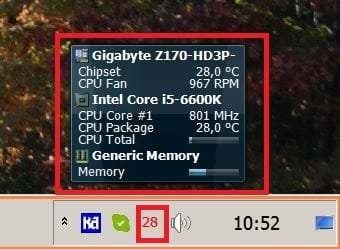
Tiny app that displays CPU frequency / load in sys tray

trale

New member
Local time
11:57 AM
Messages
20
My rig setup:

Core i7-860 2.80GHz
Gigabyte board
Windows 7, 64 bit

I'm currently using Real Temp, which displays the temperature of the CPU in a nice little icon in the system tray / notification area.

Now I'm looking for a similar app that does the same for the CPU's actual running frequency and it's load. I know Window's native Task Manager can display CPU usage with its Performance Tab, but it also takes up space in the task bar. It doesn't shrink to JUST the notification area.

Is there such an app that's tiny, quick, and lightweight?

On a related note, does my CPU have the feature to vary its frequency depending on load or even user preference? I'm not talking about overclocking here. I haven't OCed my CPU in the BIOS yet, but I guess I'm asking if this processor has some sort of "Speedstep" technology found in laptops. Or does it simply run at 2.80 GHz all the time?
 

My Computer

OS
Windows 7 Ultimate 64 bit

My Computer

Computer type
PC/Desktop
Computer Manufacturer/Model Number
HomieJunker
OS
W7 Prof 64 bit
CPU
i7-3770k
Motherboard
Sabertooth Z77
Memory
G.Skill Sniper 1866 16 GB
Graphics Card(s)
Evga GTX 770
Sound Card
Sound Blaster Z
Monitor(s) Displays
Asus VG278HE
Screen Resolution
1920 x 1080
Hard Drives
4 Seagate Barracudas 250 GB
2 Intel® X25-M 160GB
PSU
Corsair H1000X
Case
Lian-Li A77B
Cooling
Phantek 120 dual fans
Keyboard
Corsair K70 RGB
Mouse
Logitech G502
Internet Speed
FiOS Quantum
Antivirus
Avira
Browser
Chrome
The i7 will run higher if it needs too - check your BIOS for detailed settings.
 

My Computer

Computer Manufacturer/Model Number
Sony Vaio Z46GDU
OS
Windows 7 Ultimate x86-64
CPU
[email protected] 1066MHz FSB
Motherboard
Sony branded
Memory
6GB DDR3 1066MHz
Graphics Card(s)
9300M GS 256MB Dedicated (Speed) + Intel4500MHD (Stamina)
Sound Card
Realtek HD Audio
Monitor(s) Displays
13.1' WXGA
Screen Resolution
1600x900
Hard Drives
320GB 7200RPM w/ 16MB cache
Internet Speed
1MB/s
My rig setup:

Core i7-860 2.80GHz


On a related note, does my CPU have the feature to vary its frequency depending on load or even user preference? I'm not talking about overclocking here. I haven't OCed my CPU in the BIOS yet, but I guess I'm asking if this processor has some sort of "Speedstep" technology found in laptops. Or does it simply run at 2.80 GHz all the time?

How do you have this CPU and not know what it can do? Did you build it?
Right, so, the 860 can run@~3.5Ghz on max single core throttle in turbo mode. I know that if you overclock, it is good for ~4G and more with better cooling.
 

My Computer

Computer Manufacturer/Model Number
SevenForums
OS
7 Prof
CPU
Q9550
Motherboard
Maximus II Formula
Memory
2x2 Mushkin Ascent 8500
Graphics Card(s)
4870X2
Sound Card
X-Fi Xtreme Gamer
Monitor(s) Displays
LN32A550
Screen Resolution
1920x1080
Hard Drives
Intel G2 80GB
5x1TB
PSU
Corsair 1000
Case
Cosmos
Cooling
Yates^13
Keyboard
G15v1
Mouse
MX518
Internet Speed
6Mbps
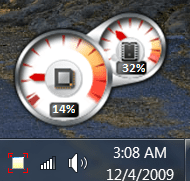
I like the built-in CPU/RAM gadget. Right click on your desktop. Smallify or largit.

Capture.PNG
 
I hate those thing with a passion.

It's like those memento optimizers.

This is 2009,. not 1995
 

My Computer

Computer Manufacturer/Model Number
Cheap $399.00 E-Machine
OS
Windows 7 Pro & Vista Home Premium
CPU
Athlon 64 3800+ (Orleans) 2.40GHz
Motherboard
Winfast
Memory
2GB DDR2 RAM DIMM
Graphics Card(s)
NVIDIA GeForce 8500 GT 512 MB memory HDMI out
Sound Card
creative X-Fi Exteme 7..1 channel
Monitor(s) Displays
Acer V223W 22" widescreen DVI
Screen Resolution
1680x1050
Hard Drives
WDC WD5 500GB
WDC WD25 250GB
PSU
OCZ 550 watt
Case
Gateway
Cooling
2 fans
Keyboard
Dell
Mouse
Sony Vaio
Internet Speed
18MB/s down - .72MB /s up
I hate widgets. I was on that bandwagon since Konfabulator...any one.?.., But some how they just got really annoying and became the resource hog they really are. Something light and simple and out of the way like taskmanager/coretemp at the system tray is what I use now.
 

My Computer

Computer Manufacturer/Model Number
SevenForums
OS
7 Prof
CPU
Q9550
Motherboard
Maximus II Formula
Memory
2x2 Mushkin Ascent 8500
Graphics Card(s)
4870X2
Sound Card
X-Fi Xtreme Gamer
Monitor(s) Displays
LN32A550
Screen Resolution
1920x1080
Hard Drives
Intel G2 80GB
5x1TB
PSU
Corsair 1000
Case
Cosmos
Cooling
Yates^13
Keyboard
G15v1
Mouse
MX518
Internet Speed
6Mbps
I don't know of any app that will do both. But, here is an app which can display the temperature of the CPU in the system tray. It is called I8kfanGUI.

You can find it at: http://www.diefer.de/i8kfan/index.html

If you find any program which can do both please let me know.
 

My Computer

Computer Manufacturer/Model Number
Hp dv6833us
OS
Windows 7 Ultimate
CPU
Intel Core2duo
Motherboard
Intel
Memory
3 GB
I hate widgets. I was on that bandwagon since Konfabulator...any one.?.., But some how they just got really annoying and became the resource hog they really are. Something light and simple and out of the way like taskmanager/coretemp at the system tray is what I use now.

Gadgets in Win7 were completely re-engineered to stabilize and run low resource.

They are not in any way comparable to Vista Sidebar's mess, or Yahoo Widgets.

In a year, they have never even hesitated.
 
Hm, wonder if widgets will run from Rocket Dock bar. That is to say, run hidden until I hover over the dock. In this way, I can have access to what I need when I need to and not have to deal with the mess.:)
 

My Computer

Computer Manufacturer/Model Number
SevenForums
OS
7 Prof
CPU
Q9550
Motherboard
Maximus II Formula
Memory
2x2 Mushkin Ascent 8500
Graphics Card(s)
4870X2
Sound Card
X-Fi Xtreme Gamer
Monitor(s) Displays
LN32A550
Screen Resolution
1920x1080
Hard Drives
Intel G2 80GB
5x1TB
PSU
Corsair 1000
Case
Cosmos
Cooling
Yates^13
Keyboard
G15v1
Mouse
MX518
Internet Speed
6Mbps
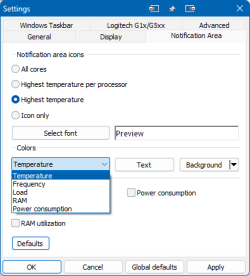
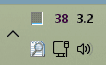
I am using Core Temp for years now (currently 1.18.1); gives 'CPU frequency' as an option to show in the system tray, besides a.o. temperature. That works, but is seems to show the fixed MHz rate (3.2 Ghz in my case) and not the dynamic value (when the CPU throttles back).

image.png image.png

( I know, response to old post, but might still be relevant info)
 

My Computers

System One System Two

  • Computer type
    PC/Desktop
    Computer Manufacturer/Model Number
    Custom build
    OS
    Windows 11
    CPU
    Intel I7 8700
    Motherboard
    Gigabyte Z370M D3H
    Memory
    16Gb 2x8 DDR4 SDRAM
    Graphics Card(s)
    NVIDIA GeForce GTX 1060 6GB
    Hard Drives
    C: Samsung SSD 970 EVO 500GB (500 GB, PCI-E 3.0 x4)
    D: ST6000DM003-2CY186 (6 TB, 5000 RPM, SATA-III)
    USB: Seagate Expansion HDD SCSI Disk Device (5589 GB)
    Antivirus
    Windows 11
    Browser
    Chrome
  • Computer type
    PC/Desktop

Attachments

  • Hard_mon1.JPG
    Hard_mon1.JPG
    139.2 KB · Views: 0
  • Hard_mon.JPG
    Hard_mon.JPG
    43.1 KB · Views: 4

My Computers

System One System Two

  • Computer type
    PC/Desktop
    Computer Manufacturer/Model Number
    custom build
    OS
    Windows 7 HP 64
    CPU
    i5 6600K - 800MHz to 4200MHz
    Motherboard
    GA-Z170-HD3P
    Memory
    4+4G GSkill DDR4 3000
    Graphics Card(s)
    IG - Intel 530
    Monitor(s) Displays
    Samsung 226BW
    Screen Resolution
    1680x1050
    Hard Drives
    (1) -1 SM951 – 128GB M.2 AHCI PCIe SSD drive for Windows 7 and Lubuntu
    (2) -1 WD SATA 3 - 1T for Data
    (3) -1 WD SATA 3 - 1T for backup
    PSU
    Thermaltake 450W TR2 gold
    Keyboard
    Old and good Chicony mechanical keyboard
    Mouse
    Logitech mX performance - 9 buttons (had to disable some)
    Internet Speed
    500Mb/s
    Browser
    Firefox 64
    Other Info
    TinyWall firewall
  • Computer type
    Laptop
    System Manufacturer/Model Number
    Asus Q550LF
    OS
    Windows 7 Pro
    CPU
    i7-4500U 800MHz to 3.0GHz
    Motherboard
    Asus Q550LF
    Memory
    (4+4)G DDR3 1600
    Graphics Card(s)
    IG intel 4400 + NVIDIA GeForce GT 745M
    Sound Card
    Realtek
    Monitor(s) Displays
    LG Display LP156WF4-SPH1
    Screen Resolution
    1920 x 1080
    Hard Drives
    BX500 120G SSD for Windows and programs +
    1T HDD for data
    Internet Speed
    500 Mb/s
    Browser
    Firefox
    Other Info
    TinyWall firewall
Back
Top