Too Many Rows (MS WORKS)

DickH

New member
Local time
12:05 PM
Messages
21
When I copy 6 or 7 rows of data and attempt to paste it into a Works spreadsheet I get this error message.
"There are too many rows. Works does not allow more than 16,384 rows." It will only put in about 4 rows of data.
How can I get rid of the error message?
 

My Computer

Computer type
PC/Desktop
Computer Manufacturer/Model Number
e-machines
OS
Windows 7 64 bit
Browser
Firefox
With 152 views and no one knows the answer? It's hard to believe.
 

My Computer

Computer type
PC/Desktop
Computer Manufacturer/Model Number
e-machines
OS
Windows 7 64 bit
Browser
Firefox
Well I haven't used MS Works in a long time but I can take a guess.

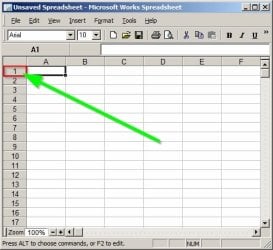
When you've selected multiple rows to be copied right click a place in the margin where you want to start pasting and then paste.

MSWorks.jpg

That's the way most spreadsheet software works anyway!
 

My Computer

Computer type
Laptop
Computer Manufacturer/Model Number
ASUS
OS
Microsoft Windows 7 Home Premium 64-bit 7601 Multiprocessor Free Service Pack 1
CPU
AMD C-60 APU with Radeon(tm) HD Graphics
Motherboard
ASUSTeK COMPUTER INC. X501U
Memory
4.00 GB
Graphics Card(s)
AMD Radeon HD 6290 Graphics
Sound Card
(1) AMD High Definition Audio Device (2) Realtek High Defi
Screen Resolution
1366 x 768 x 32 bits (4294967296 colors) @ 60 Hz
Hard Drives
Hitachi HTS545050A7E380 SATA Disk Device
Antivirus
Comodo CIS & FW, SecureAplus App Whitelisting, Threatfire
Browser
Cyberfox 64bit, Opera 64bit, Airfox
Other Info
Spy-The-Spy, HitmanPro.Alert, Norton Connect Safe, MJRegWatcher, BitDefender TrafficLight, Voodoo Shield, Zemana AntiMalware
Unfortunately I cannot help you. I was only amazed that somebody is still using Works. I wish you lots of luck in resolving the problem.
 

My Computer

Computer Manufacturer/Model Number
HP, Dell, Gateway, Toshiba - 4 laptops and 2 desktops
OS
Vista, Windows7, Mint Mate, Zorin, Windows 8
CPU
from 1.6GHz Duo to i7
Monitor(s) Displays
2x HP w2207
Hard Drives
5x HDD, 7x SSD, 12x Externals
Keyboard
with trackball - no mices
Mouse
Trackball mice
Internet Speed
DSL 6000
I think Callender is on track.

Perhaps your spread sheet has the max number of rows as a default thus you cannot add more. You couldm try going own to the last row you hav in use, drop down a dozen rows then select all rows down to the en d and delete the rows (not just the empty content of the rows).

You should then be able to paste in new rows, not just the contents of the rows.

Regards,
GEWB
 

My Computer

Computer type
PC/Desktop
Computer Manufacturer/Model Number
(7 different computers booting up to 10 systems)
OS
Linux Mint / XP / Win7 Home, Pro, Ultimate / Win8.1 / Win10
Other Info
Four desktops, two laptops, one notebook and one tablet
I think Callender is on track.

Perhaps your spread sheet has the max number of rows as a default thus you cannot add more. You couldm try going own to the last row you hav in use, drop down a dozen rows then select all rows down to the en d and delete the rows (not just the empty content of the rows).

You should then be able to paste in new rows, not just the contents of the rows.

Regards,
GEWB

Thanks. That sounds good.
 

My Computer

Computer type
PC/Desktop
Computer Manufacturer/Model Number
e-machines
OS
Windows 7 64 bit
Browser
Firefox
Unfortunately I cannot help you. I was only amazed that somebody is still using Works. I wish you lots of luck in resolving the problem.

Works came on my Windows 7 PC. It "works" for me.
 

My Computer

Computer type
PC/Desktop
Computer Manufacturer/Model Number
e-machines
OS
Windows 7 64 bit
Browser
Firefox
Well I haven't used MS Works in a long time but I can take a guess.

When you've selected multiple rows to be copied right click a place in the margin where you want to start pasting and then paste.
That's the way most spreadsheet software works anyway!

You can't Paste in 1, only A1.
 

My Computer

Computer type
PC/Desktop
Computer Manufacturer/Model Number
e-machines
OS
Windows 7 64 bit
Browser
Firefox
Back
Top