toshiba satelite a15-s1292 and need a video controller

seadog59

New member
Local time
1:29 AM
Messages
6
Hi,
I put windows 7 on this older laptop that is an a15-s1292 satelite and everything works great but under the device manager it shows no drivers for the video controller! I went to toshibas website and they do not have this model listes as supported by them for windows 7 Any help you can give would be appreciated!!
thanks
 

My Computer My Computer

At a glance

windows 7
OS
windows 7
Is it suported by vista? You may even be able to install an XP driver this way. Follow this tutorial. http://www.sevenforums.com/tutorials/316-compatibility-mode.html >(edit) I don't see it listed at all. So go to device manager click on display adapter>properties>details>drop down menu hardware id. Then post a screen shot of what's listed and we'll seee about getting you a driver. Welcome to seven forums. Fabe http://www.sevenforums.com/general-...ed-method-uploading-posting-screen-shots.html
 

My Computer My Computer

At a glance

Windows 7 ultimate 64 bit / XP Home sp3intel Core 2 Duo E8400 3.0ghz8 gigs 1066 OCZ Fata1tyEVGA GTX 580 Call of Duty Black Ops Edition
Computer Manufacturer/Model Number
Self Built
OS
Windows 7 ultimate 64 bit / XP Home sp3
CPU
intel Core 2 Duo E8400 3.0ghz
Motherboard
Asus P5ND bios 1401
Memory
8 gigs 1066 OCZ Fata1ty
Graphics Card(s)
EVGA GTX 580 Call of Duty Black Ops Edition
Sound Card
Creative Soundblaster Audigy 2zs
Monitor(s) Displays
Asus 24in LCD's 2MS X2
Screen Resolution
1920x1080p @60Hz
Hard Drives
WD Caviar 500 Black/ WD Caviar 200 Blue
PSU
OCZ 700W GameXtreme
Case
NZXT Apollo
Cooling
Corsair H50 CPU/120mm x3 /60mm x2 /Corsair Dominator Ram
Keyboard
Logitech Bluetooth Wireless MX5000
Mouse
Logitech Bluetooth Wireless MX1000
Internet Speed
Download 19.83 Upload 0.97
Other Info
Logitech Z2300 Speakers/ Bose Noise Cancelling Headphones/Avermedia PCI-e Hybrid TV Bravo/Epson NX415 all in one/ 4 Port Powered USB Hub/ LG 10x Bluray Burner /TSST Corp DVDRW External
fabe thanks for the welcome

Not sure how to do a screen shot and when I tried to click on properties it would not copy so tried to just copy the property sheet under details


Standard VGA Graphics Adapter


Is it suported by vista? You may even be able to install an XP driver this way. Follow this tutorial. http://www.sevenforums.com/tutorials/316-compatibility-mode.html >(edit) I don't see it listed at all. So go to device manager click on display adapter>properties>details>drop down menu hardware id. Then post a screen shot of what's listed and we'll seee about getting you a driver. Welcome to seven forums. Fabe http://www.sevenforums.com/general-...ed-method-uploading-posting-screen-shots.html
 

My Computer My Computer

At a glance

windows 7
OS
windows 7
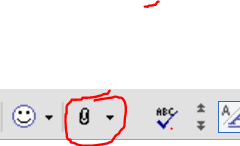
Use start menu>the snipping tool. Now next to it the arrow drop down choose retangular,Paste> copy> save to file. Use the paperclip above and browse to the file then upload and attachment. Papperclip 2.PNG
 

My Computer My Computer

At a glance

Windows 7 ultimate 64 bit / XP Home sp3intel Core 2 Duo E8400 3.0ghz8 gigs 1066 OCZ Fata1tyEVGA GTX 580 Call of Duty Black Ops Edition
Computer Manufacturer/Model Number
Self Built
OS
Windows 7 ultimate 64 bit / XP Home sp3
CPU
intel Core 2 Duo E8400 3.0ghz
Motherboard
Asus P5ND bios 1401
Memory
8 gigs 1066 OCZ Fata1ty
Graphics Card(s)
EVGA GTX 580 Call of Duty Black Ops Edition
Sound Card
Creative Soundblaster Audigy 2zs
Monitor(s) Displays
Asus 24in LCD's 2MS X2
Screen Resolution
1920x1080p @60Hz
Hard Drives
WD Caviar 500 Black/ WD Caviar 200 Blue
PSU
OCZ 700W GameXtreme
Case
NZXT Apollo
Cooling
Corsair H50 CPU/120mm x3 /60mm x2 /Corsair Dominator Ram
Keyboard
Logitech Bluetooth Wireless MX5000
Mouse
Logitech Bluetooth Wireless MX1000
Internet Speed
Download 19.83 Upload 0.97
Other Info
Logitech Z2300 Speakers/ Bose Noise Cancelling Headphones/Avermedia PCI-e Hybrid TV Bravo/Epson NX415 all in one/ 4 Port Powered USB Hub/ LG 10x Bluray Burner /TSST Corp DVDRW External
every time i try to snip the window

I try to use the snip function but when I do the window under details that I have opened goes back up and just shows device description AAArrrrrggghhh Any ideas

thanks

Use start menu>the snipping tool. Now next to it the arrow drop down choose retangular,Paste> copy> save to file. Use the paperclip above and browse to the file then upload and attachment. View attachment 35074
 

My Computer My Computer

At a glance

windows 7
OS
windows 7
the graphics controller is

NOt sure if this helps but the graphic controller for this model laptop according to the toshiba website is an intel 852gm intergrated graphic controller. Does that help at all??
thanks again for all your help

I try to use the snip function but when I do the window under details that I have opened goes back up and just shows device description AAArrrrrggghhh Any ideas

thanks

Use start menu>the snipping tool. Now next to it the arrow drop down choose retangular,Paste> copy> save to file. Use the paperclip above and browse to the file then upload and attachment. View attachment 35074
 

My Computer My Computer

At a glance

windows 7
OS
windows 7
Back
Top