Touchpad wont disable when using external (usb) mouse

sleepless

New member
Local time
4:26 PM
Messages
84
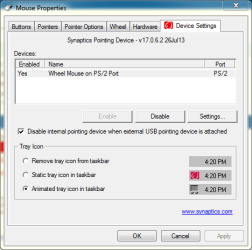
i have the latest lenovo driver installed and the checkbox "disable internal pointing device when external usb pointing device is attached" is checked (as seen below). still it won't disable, and the touchpad is driving me nuts. :(

synaptic.PNG

any thoughts?
 

My Computer

Computer type
Laptop
Computer Manufacturer/Model Number
Asus K52N
OS
Windows 7 Ultimate x64 SP1
CPU
AMD Turion II P540
Motherboard
Asus
Memory
6 GB
Graphics Card(s)
ATI Radeon HD 4200
Antivirus
Avast
Browser
Chrome
First thought: check the Asus website and see if there is an updated Synaptics driver.

Second thought: go to Device Manager and uninstall the touchpad, including the driver (if asked). Restart and then re-install the driver, then see if the setting will stick.
 

My Computer

Computer type
PC/Desktop
Computer Manufacturer/Model Number
Home Built - Jan 2013
OS
Windows 7 64 Bit Home Premium SP1
CPU
i7-3820
Motherboard
Asus P9X79-PRO - Bios 4608
Memory
GSkill F3-14900CL9Q - 16GB
Graphics Card(s)
EVGA GeForce GTX660 - Driver 352.86
Sound Card
On board Realtek ALC898
Monitor(s) Displays
Acer S271HL
Screen Resolution
1920 x 1080
Hard Drives
#1- Samsung 840 Pro Series
#2- Western Digital WD1002FAEX Sata3 Black
#3- Western Digital WD1002FAEX Sata3 Black
PSU
Corsair CMPSU-850TX-V2 - 850 watt (by Seasonic)
Case
Corsair Obsidian 550D
Cooling
Standard 3 120mm case fans, Cooler Master Hyper 212 EVO
Keyboard
MS KC-0405
Mouse
Intellimouse 5-button
Internet Speed
56 Mbits/Sec (on a good day)
Antivirus
Avast & Malwarebytes
Browser
Firefox
Other Info
Asus DVD - DRW-24B1ST 24X
not sure why but i went to the asus website and installed a 3-years older version and it worked. i thought it was always better to get drivers directly from the manufacturers website but i guess not. i'd rather have a newer driver but at least this one works.
 

My Computer

Computer type
Laptop
Computer Manufacturer/Model Number
Asus K52N
OS
Windows 7 Ultimate x64 SP1
CPU
AMD Turion II P540
Motherboard
Asus
Memory
6 GB
Graphics Card(s)
ATI Radeon HD 4200
Antivirus
Avast
Browser
Chrome
Asus touchpads are atrocious. The one on my G74SX drove me totally crazy until I disabled it completely in bios. Not a solution for everyone I know, but it works ;)!
 

My Computer

Computer type
Laptop
Computer Manufacturer/Model Number
MSI GE72VR Apache Pro-416
OS
Windows 10x64 Build 1709
CPU
Intel i7 7700HQ Kaby Lake
Motherboard
Micro-Star Intl. MS-179B (U3C1)
Memory
16 GB DDR4 @2400
Graphics Card(s)
Nvidia Geforce GTX 1060
Screen Resolution
1920x1080 120Hz
Hard Drives
256 GB Nvme M.2 SSD

1TB HDD@7200
Cooling
Cooler Blast 4
Keyboard
Steel Series
Antivirus
Bit Defender Free
Browser
Edge
Normally you want the newest drivers. But it is quite common for new drivers to cause problems. When that happens you need to shift gears and use the driver that works. Perfectly fine to use the older driver if it works!
 

My Computer

Computer type
PC/Desktop
Computer Manufacturer/Model Number
Home Built - Jan 2013
OS
Windows 7 64 Bit Home Premium SP1
CPU
i7-3820
Motherboard
Asus P9X79-PRO - Bios 4608
Memory
GSkill F3-14900CL9Q - 16GB
Graphics Card(s)
EVGA GeForce GTX660 - Driver 352.86
Sound Card
On board Realtek ALC898
Monitor(s) Displays
Acer S271HL
Screen Resolution
1920 x 1080
Hard Drives
#1- Samsung 840 Pro Series
#2- Western Digital WD1002FAEX Sata3 Black
#3- Western Digital WD1002FAEX Sata3 Black
PSU
Corsair CMPSU-850TX-V2 - 850 watt (by Seasonic)
Case
Corsair Obsidian 550D
Cooling
Standard 3 120mm case fans, Cooler Master Hyper 212 EVO
Keyboard
MS KC-0405
Mouse
Intellimouse 5-button
Internet Speed
56 Mbits/Sec (on a good day)
Antivirus
Avast & Malwarebytes
Browser
Firefox
Other Info
Asus DVD - DRW-24B1ST 24X
Back
Top