
transparent icon is black?

leemoonx

New member
Hello, i have an issue with my icons on desktop. I have made a folder and tryed to make its icon transparent. So i right-clicked it, Properties, Customize, Change icon... and selected the 13th one in 2., 3. and 4. row witch is suposed to be transparent. However, whenever i turn on my pc after that, the icon seems to be black, completely black square shaped icon. Is there any way to somehow fix this so i don't have a stupid black square on my desktop anymore? I don't know why, this is not anything big, but i'm getting pretty bored with this...:mad:
 

My Computer

OS
Windows 7 Ultimate x32
Hello, i have an issue with my icons on desktop. I have made a folder and tryed to make its icon transparent. So i right-clicked it, Properties, Customize, Change icon... and selected the 13th one in 2., 3. and 4. row witch is suposed to be transparent. However, whenever i turn on my pc after that, the icon seems to be black, completely black square shaped icon. Is there any way to somehow fix this so i don't have a stupid black square on my desktop anymore? I don't know why, this is not anything big, but i'm getting pretty bored with this...:mad:

Welcome to the Seven Forums
Try this http://www.sevenforums.com/tutorials/49819-icon-cache-rebuild.html
I did what you did and it works for me after a restart.
Jerry
 

My Computer

Computer type
Laptop
Computer Manufacturer/Model Number
Sager NP9170
OS
Win 7 Pro x64 / Win 10 Pro
CPU
Intel(R) Core(TM) i7-3630QM CPU @ 2.40GHz
Motherboard
CLEVO P170EM
Memory
12 GB
Graphics Card(s)
(1) Intel(R) HD Graphics 4000 (2) NVIDIA GeForce GTX 675M
Sound Card
(1) Realtek High Definition Audio (2) Intel(R) Display Aud
Monitor(s) Displays
17.3
Screen Resolution
1920x1080
Hard Drives
(1) Samsung 860 EVO 500GB(OS) (1) Samsung 860 EVO 500GB(Data)
Keyboard
Backlite
Antivirus
MSE, Malwarebytes Pro
Browser
Firefox
Other Info
DESKTOP: Custom-built.
OS: Win 10 Pro x64.
CASE: Rosewill R5.
CPU: Intel I5 4670K CPU @ 3.40GHz.
CPU COOLER: Cool Master Hyper 212 EVO.
MOTHERBOARD: Asus Z87-A.
MEMORY: Kingston HyperX 2x4 GB.
GPU: Nvidia Geforce 650 TI.
PSU: Corsair TX750.
DRIVES: (1) Samsung 840 120 GB SSD (2) Western Digital blue 500 GB 7200 RPM.
it looks like it didn't work :( i restarted yesterday and the icon was transparent, but i didn't reply bewcouse i wanted to se if it will be like that for good. I turd on my pc today and the icon is black :mad::mad::mad::mad::mad::mad::mad:
 

My Computer

OS
Windows 7 Ultimate x32
I turd on my pc today and the icon is black :mad::mad::mad::mad::mad::mad::mad:
I can imagine if you turd on your PC is going to change the color :haha:
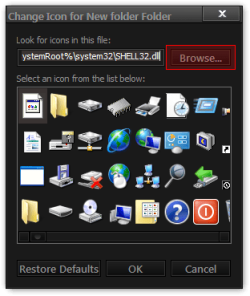
Let's try something else I have a transparent.ico in a zip download it and put it somewhere like documents folder and then Properties>Customize>Change icon but browse to the location of the transparent.ico and try that.
Change Icon for New folder Folder.png
Jerry
 

Attachments

My Computer

Computer type
Laptop
Computer Manufacturer/Model Number
Sager NP9170
OS
Win 7 Pro x64 / Win 10 Pro
CPU
Intel(R) Core(TM) i7-3630QM CPU @ 2.40GHz
Motherboard
CLEVO P170EM
Memory
12 GB
Graphics Card(s)
(1) Intel(R) HD Graphics 4000 (2) NVIDIA GeForce GTX 675M
Sound Card
(1) Realtek High Definition Audio (2) Intel(R) Display Aud
Monitor(s) Displays
17.3
Screen Resolution
1920x1080
Hard Drives
(1) Samsung 860 EVO 500GB(OS) (1) Samsung 860 EVO 500GB(Data)
Keyboard
Backlite
Antivirus
MSE, Malwarebytes Pro
Browser
Firefox
Other Info
DESKTOP: Custom-built.
OS: Win 10 Pro x64.
CASE: Rosewill R5.
CPU: Intel I5 4670K CPU @ 3.40GHz.
CPU COOLER: Cool Master Hyper 212 EVO.
MOTHERBOARD: Asus Z87-A.
MEMORY: Kingston HyperX 2x4 GB.
GPU: Nvidia Geforce 650 TI.
PSU: Corsair TX750.
DRIVES: (1) Samsung 840 120 GB SSD (2) Western Digital blue 500 GB 7200 RPM.
Great! I tryed once to download a transparent PNG picture but it was allso black. this one isn't when i'm selecting it as the icon for the folder :) it worked now, i'm just gonna wait untill tomorow to see if it is "permanent"( if it isn't then my win is a fail :P ) Thanks anyway :D
 

My Computer

OS
Windows 7 Ultimate x32
Let us know
Jerry
 

My Computer

Computer type
Laptop
Computer Manufacturer/Model Number
Sager NP9170
OS
Win 7 Pro x64 / Win 10 Pro
CPU
Intel(R) Core(TM) i7-3630QM CPU @ 2.40GHz
Motherboard
CLEVO P170EM
Memory
12 GB
Graphics Card(s)
(1) Intel(R) HD Graphics 4000 (2) NVIDIA GeForce GTX 675M
Sound Card
(1) Realtek High Definition Audio (2) Intel(R) Display Aud
Monitor(s) Displays
17.3
Screen Resolution
1920x1080
Hard Drives
(1) Samsung 860 EVO 500GB(OS) (1) Samsung 860 EVO 500GB(Data)
Keyboard
Backlite
Antivirus
MSE, Malwarebytes Pro
Browser
Firefox
Other Info
DESKTOP: Custom-built.
OS: Win 10 Pro x64.
CASE: Rosewill R5.
CPU: Intel I5 4670K CPU @ 3.40GHz.
CPU COOLER: Cool Master Hyper 212 EVO.
MOTHERBOARD: Asus Z87-A.
MEMORY: Kingston HyperX 2x4 GB.
GPU: Nvidia Geforce 650 TI.
PSU: Corsair TX750.
DRIVES: (1) Samsung 840 120 GB SSD (2) Western Digital blue 500 GB 7200 RPM.
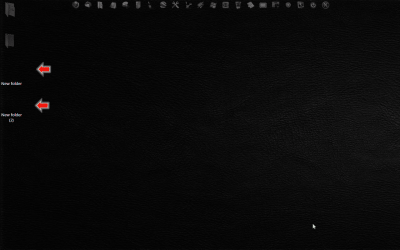
Just switched on, icon's black. OMG O.o This is so retarded..... So it probably has something to do with turning on. Every time i log on it probably does something that "resets" the icons or something. I'm not quite familiar with these things so excuse my terminology with PC stuff. I'm allso not english but i try to put things together and make them mean something :P anyway, this thing is very, very anoying now...
 

My Computer

OS
Windows 7 Ultimate x32
Have you at any point used third party software to change the shortcut overlay icon- that's the arrow that shows on most icons?
 

My Computer

Computer type
PC/Desktop
OS
Windows 7
Thinking about it, I'd try changing the shortcut overlay icon to test whether this is the problem (changing the icon is likely the best way to confirm either way)?

There is a SevenForums tutorial that shows you how to change this icon. I'd suggest you try this, and if it works you can refine the look later if required.

Follow the tutorial below using the *attached icon* as the replacement

BACKUP your system first and follow METHOD ONE

How to Change the Windows 7 Shortcut Arrow Overlay Icon

View attachment shortcut arrow[alt].zip
 

My Computer

Computer type
PC/Desktop
OS
Windows 7
No i have not use any programs that change the shortcut overlay icon :( Basicly, if i download a change the icon to be transparent, it will be, till the next time i log on... if i download a transparent .ICO file, it is transparent, but if i download transparent .PNG file, it's black :S Allthough, when i was on XP i used WindowBlinds to make my system look like Win7, there was one thing called "refresh icons cache" or something like that... Is there any posibility that that SOMEHOW stayed here when i switched to Windows 7 and SOMEHOW does this? Btw. i don't even know what that program did, it was just there with other things in the theme i used with windowblinds...
 

My Computer

OS
Windows 7 Ultimate x32
Sorry I don't understand the relevance of the .PNG file? You said you tried this once which is not related here as far as I can tell?

At this time you want to use a transparent .ICO file as the icon for your folder- yes?

Is this happening with any other icons other than for the folder you have mentioned?

Try rebuilding the icon cache again as suggested above.

Then restart Explorer *cleanly* by typing TSKILL EXPLORER in the Start/Search box and hit Enter.

Additionally flush the Thumbnail Cache also. You can do this via CCleaner if you have or follow this forum tutorial...

Thumbnail Cache - Clear and Reset

Again restart Explorer *cleanly* as before.

Reboot and test???
 

My Computer

Computer type
PC/Desktop
OS
Windows 7

My Computer

Computer type
Laptop
Computer Manufacturer/Model Number
Sager NP9170
OS
Win 7 Pro x64 / Win 10 Pro
CPU
Intel(R) Core(TM) i7-3630QM CPU @ 2.40GHz
Motherboard
CLEVO P170EM
Memory
12 GB
Graphics Card(s)
(1) Intel(R) HD Graphics 4000 (2) NVIDIA GeForce GTX 675M
Sound Card
(1) Realtek High Definition Audio (2) Intel(R) Display Aud
Monitor(s) Displays
17.3
Screen Resolution
1920x1080
Hard Drives
(1) Samsung 860 EVO 500GB(OS) (1) Samsung 860 EVO 500GB(Data)
Keyboard
Backlite
Antivirus
MSE, Malwarebytes Pro
Browser
Firefox
Other Info
DESKTOP: Custom-built.
OS: Win 10 Pro x64.
CASE: Rosewill R5.
CPU: Intel I5 4670K CPU @ 3.40GHz.
CPU COOLER: Cool Master Hyper 212 EVO.
MOTHERBOARD: Asus Z87-A.
MEMORY: Kingston HyperX 2x4 GB.
GPU: Nvidia Geforce 650 TI.
PSU: Corsair TX750.
DRIVES: (1) Samsung 840 120 GB SSD (2) Western Digital blue 500 GB 7200 RPM.
Hello, i have an issue with my icons on desktop. I have made a folder and tryed to make its icon transparent. So i right-clicked it, Properties, Customize, Change icon... and selected the 13th one in 2., 3. and 4. row witch is suposed to be transparent. However, whenever i turn on my pc after that, the icon seems to be black, completely black square shaped icon. Is there any way to somehow fix this so i don't have a stupid black square on my desktop anymore? I don't know why, this is not anything big, but i'm getting pretty bored with this...:mad:

Hello, you have in Personalization,on the left side, Change desktop icons,there is checkbox Allow themes to change desktop icons,uncheck that and you will have transparent icons.
 

My Computer

Computer type
PC/Desktop
OS
Win7
It's just weird, it is transparent sometimes, and sometimes it's just a black square.

Hello, you have in Personalization,on the left side, Change desktop icons,there is checkbox Allow themes to change desktop icons,uncheck that and you will have transparent icons.
I did that, now I might reply here to confirm if that works in a couple of days, just to make sure it stays this way now, but forgive me if I don't, got a lot of stuff going on right now.

Thank you for your replies.
 

My Computer

OS
Windows 7 Ultimate x32
Nope. Thing is just crazy. Changes from transparent to black when it pleases. Whatever, I'll be surprised if my PC doesn't explode soon, so the icon thing is the least of my worries, but it wasn't even that big of a deal in the first place. Don't know why I was making it with those older posts. Sorry, LOL. We all have to grow up :P
 

My Computer

OS
Windows 7 Ultimate x32
None of above helped me. I have the shortcuts darts set as transparent and some icons as transparent and both are black even after doing all of these tips.
 

My Computer

Computer type
PC/Desktop
Computer Manufacturer/Model Number
Multi
OS
w7_homeprem_x64
CPU
Intel Core 2 @ 2.13GHz
Motherboard
acer something
Memory
4 GB ddr2
Graphics Card(s)
integrated
Antivirus
Avast Free
Browser
Firefox
Back
Top