
Solved Trashed Desktop Icons

melmitts

New member
Local time
2:32 AM
Messages
6
Location
Harrisonville, MO
I was playing around when I shouldn't have been, I downloaded and installed Windows 7 Manager v2.1.7. After about 15 minutes I decided to delete it. I rebooted the system after the uninstall. Now my Desktop icons have an additional box overlayed on the highlighted icon (see attachment). When I could not find any other solution, I elected to do a System Restore. Unfortunately, none of the Restore Points prior to the installation of Windows 7 Manager will restore. Any suggestion on correcting the icons?

PS. I have already tried deleting the icon cache and cleaning the Thumbnails...
Mel
 

Attachments
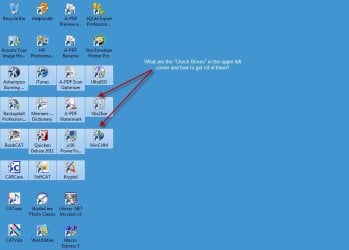
  • Desktop-8-7-2011 8-15-18 AM.jpg
    Desktop-8-7-2011 8-15-18 AM.jpg
    44.9 KB · Views: 23

My Computer My Computer

Computer type
PC/Desktop
Computer Manufacturer/Model Number
PowerSpec (MicroCenter)
OS
Windows 7 Professional 64bit
CPU
i7
Memory
16GB
Monitor(s) Displays
24" x 2
I was playing around when I shouldn't have been, I downloaded and installed Windows 7 Manager v2.1.7. After about 15 minutes I decided to delete it. I rebooted the system after the uninstall. Now my Desktop icons have an additional box overlayed on the highlighted icon (see attachment). When I could not find any other solution, I elected to do a System Restore. Unfortunately, none of the Restore Points prior to the installation of Windows 7 Manager will restore. Any suggestion on correcting the icons?

PS. I have already tried deleting the icon cache and cleaning the Thumbnails...
Mel
Hi melmitts, Welcome to the forums , Did try rebuilding the icon cache ? http://www.sevenforums.com/tutorials/49819-icon-cache-rebuild.html ;)
 

My Computer My Computer

Computer type
PC/Desktop
Computer Manufacturer/Model Number
self build
OS
win 7 ultimate32bit, Win8.1pro wmc 32bit
CPU
amd phenom x4 9600
Motherboard
asus m2n32-sli deluxe
Memory
corsair twinxs 2x2gb
Graphics Card(s)
2x nvidia 1gb 8500gt
Sound Card
onboard
Monitor(s) Displays
23" PB Viseo 233d
Screen Resolution
1920x1080
Hard Drives
maxtor sata 500gb
maxtor sata 320gb
fujitsu sata200gb
PSU
oryxx tornado 750w
Case
thermaltake xaser lll
Cooling
artic freezer64 pro + 7 case fans
Open Folder Options, click View, scroll down and uncheck "Use check boxes to select items".
 

Attachments

  • asdf.png
    asdf.png
    14.2 KB · Views: 7

My Computer My Computer

OS
Windows 7 Enterprise x64 SP1
ZyanWu a BIG thanks, problen solved. (At least until I play with something else that I should leave alone...)
 

My Computer My Computer

Computer type
PC/Desktop
Computer Manufacturer/Model Number
PowerSpec (MicroCenter)
OS
Windows 7 Professional 64bit
CPU
i7
Memory
16GB
Monitor(s) Displays
24" x 2
Back
Top