
Solved Trying to find a way to script making these icons on the desktop.

shanew919

New member
Member
Local time
1:36 PM
Messages
13
hello all,

For: Windows 7 professional x64

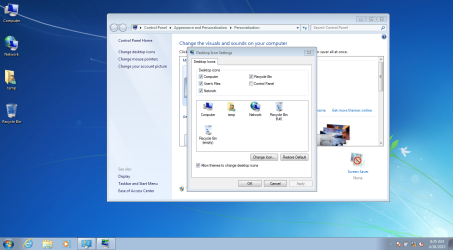
My boss wants me to find a way to add these specfic icons to the desktop (see pic) with a script. I know how to make shortcuts with command line with mklink but these are not .lnk files that he wants. the pic shows how we do this manually when I left click on say computer it has different options than a shortcut does by clicking properties it takes you to computer properties and not the icons properties.

if anyone knows how this can be done with a .bat, .vbs, or a .reg file that would be awesome. I prefer these.
 

Attachments
  • desktoppic.PNG
    desktoppic.PNG
    198.3 KB · Views: 4
Last edited:

My Computer My Computer

At a glance

win7 pro x64, win7 ultimate x64 win8.1 x64,
Computer type
PC/Desktop
OS
win7 pro x64, win7 ultimate x64 win8.1 x64,
Hi and welcome to SevenForums,
That's because those aren't shortcuts as far as I know :/
It's not the greatest place to have non-shortcuts because the desktop can easily be corrupted via virus's/ malware/....

I suppose the work around is to install programs to your desktop then they won't be shortcuts any more
I don't know if they will be listed on the page you show but they definitely won't have the shortcut arrow head on them,
They will however show a security shield
Script wise possibly someone will have that for you later :/
Cheers.
 

My Computer My Computer

At a glance

Win-7-Pro64bit 7-H-Prem-64biti7-5930K 2nd i9-9940x both water blocked VRM'...Trident-z 3200C14 2nd Trident-z 3600C16EVGA 1080ti ftw3 2nd Titan Xp both water blocked
Computer type
PC/Desktop
Computer Manufacturer/Model Number
Custom assembled by me :}
OS
Win-7-Pro64bit 7-H-Prem-64bit
CPU
i7-5930K 2nd i9-9940x both water blocked VRM's too
Motherboard
ASUS SABERTOOTH X99 2nd ASUS x299 Apex
Memory
Trident-z 3200C14 2nd Trident-z 3600C16
Graphics Card(s)
EVGA 1080ti ftw3 2nd Titan Xp both water blocked
Sound Card
Built-in Realtek
Monitor(s) Displays
1-AOC G2460PG 24"G-Sync 144Hz/ 2nd 1-ASUS VG248QE 24" 144Hz
Screen Resolution
1920 x 1080 144Hz
Hard Drives
2-Samsung M.2 Evo & Evo Plus
2-Samsung 850 EVO 500GB SSD's/ 3-2.5 W.D. Black 1tb-&3-1tb/3-3.5 WD Black 1tb hdd's
PSU
EVGA SuperNOVA 1000-P2 2nd 1200-P2
Case
2-Corsair Obsidian Series 450D Black ATX Mid Tower
Cooling
Custom water loops
Keyboard
Logitech G710+/ 2nd Logitech G910
Mouse
2-RedDragon M901 Perdition 16400 dpi Gaming mouse = wired
Internet Speed
Comcast Ping 19ms 89.31mbps download speed 6.12mbps upload
Antivirus
Malwarebytes Pro/ Superantispyware Pro
Browser
FireFox & Pale moon
Other Info
2nd ASUS X299 Apex/Intel i9-9940x with Custom water loop/7H-Prem-x64/Corsair 450D case/Ram Trident-z 3600C16 4x8gb / Samsung970Evo plus 500gb SSD/Dual ssd EZ swap evo/PSU EVGA SuperNova 1200w-P2 80+Platinum/GPU Titan Xp /8-ML-140 on push-pull on 2-280GTX rads
Thanks Thrashzone
The specific icons that I need are as the pic shows.. not any other programs. I'm trying to get them on the desktop without having to do it manually... the only other alterative I know of would be to just make shortcuts to these locations through the command line with mklink.
 

My Computer My Computer

At a glance

win7 pro x64, win7 ultimate x64 win8.1 x64,
Computer type
PC/Desktop
OS
win7 pro x64, win7 ultimate x64 win8.1 x64,
A reg script would seem the obvious way to alter the specific value to show or hide the individual icons but I don't think it would be possible as the reg entry to do what you want is located within the HK user/current user tree so the string would be different between machines unless all machines are deployed images using exactly the same settings ie users etc
Not sure how you would do it with a bat or vbs unless someone else has an idea ?
 

My Computer My Computer

At a glance

Win7 Ultimate X64Intel i5 3570K8GB DDR3 1600Onboard
Computer type
PC/Desktop
Computer Manufacturer/Model Number
Pauly Special
OS
Win7 Ultimate X64
CPU
Intel i5 3570K
Motherboard
Gigabyte Z77X-DS3H
Memory
8GB DDR3 1600
Graphics Card(s)
Onboard
Sound Card
Onboard
Screen Resolution
1280x1024
Hard Drives
Samsung 840 Evo SSD (OS)
1TB Spinner (Data)
PSU
800W Arctic
Case
Cooler Master
Cooling
3x120mm Fans
Keyboard
MS Wireless
Mouse
MS Wireless
Internet Speed
20M
yes, the reg file should apply the icons to either the current user or if you can do it to all users of the machine then I could build an image and use the reg file to make this apply the icons.
 

My Computer My Computer

At a glance

win7 pro x64, win7 ultimate x64 win8.1 x64,
Computer type
PC/Desktop
OS
win7 pro x64, win7 ultimate x64 win8.1 x64,
I figured it out by doing a little digging on google...I found the setting location in the registry and exported the setting to a reg file that can be scripted.

here is the code of my reg file if anyone eles wants it just copy paste into a notepad and save as a .reg file.
Windows Registry Editor Version 5.00
[HKEY_CURRENT_USER\Software\Microsoft\Windows\CurrentVersion\Explorer\HideDesktopIcons\NewStartPanel]
"{59031a47-3f72-44a7-89c5-5595fe6b30ee}"=dword:00000000
"{20D04FE0-3AEA-1069-A2D8-08002B30309D}"=dword:00000000
"{F02C1A0D-BE21-4350-88B0-7367FC96EF3C}"=dword:00000000
 

My Computer My Computer

At a glance

win7 pro x64, win7 ultimate x64 win8.1 x64,
Computer type
PC/Desktop
OS
win7 pro x64, win7 ultimate x64 win8.1 x64,
Cheers for sharing your solution :)

Not sure what would happen if one or all got accidently deleted :/
 

My Computer My Computer

At a glance

Win-7-Pro64bit 7-H-Prem-64biti7-5930K 2nd i9-9940x both water blocked VRM'...Trident-z 3200C14 2nd Trident-z 3600C16EVGA 1080ti ftw3 2nd Titan Xp both water blocked
Computer type
PC/Desktop
Computer Manufacturer/Model Number
Custom assembled by me :}
OS
Win-7-Pro64bit 7-H-Prem-64bit
CPU
i7-5930K 2nd i9-9940x both water blocked VRM's too
Motherboard
ASUS SABERTOOTH X99 2nd ASUS x299 Apex
Memory
Trident-z 3200C14 2nd Trident-z 3600C16
Graphics Card(s)
EVGA 1080ti ftw3 2nd Titan Xp both water blocked
Sound Card
Built-in Realtek
Monitor(s) Displays
1-AOC G2460PG 24"G-Sync 144Hz/ 2nd 1-ASUS VG248QE 24" 144Hz
Screen Resolution
1920 x 1080 144Hz
Hard Drives
2-Samsung M.2 Evo & Evo Plus
2-Samsung 850 EVO 500GB SSD's/ 3-2.5 W.D. Black 1tb-&3-1tb/3-3.5 WD Black 1tb hdd's
PSU
EVGA SuperNOVA 1000-P2 2nd 1200-P2
Case
2-Corsair Obsidian Series 450D Black ATX Mid Tower
Cooling
Custom water loops
Keyboard
Logitech G710+/ 2nd Logitech G910
Mouse
2-RedDragon M901 Perdition 16400 dpi Gaming mouse = wired
Internet Speed
Comcast Ping 19ms 89.31mbps download speed 6.12mbps upload
Antivirus
Malwarebytes Pro/ Superantispyware Pro
Browser
FireFox & Pale moon
Other Info
2nd ASUS X299 Apex/Intel i9-9940x with Custom water loop/7H-Prem-x64/Corsair 450D case/Ram Trident-z 3600C16 4x8gb / Samsung970Evo plus 500gb SSD/Dual ssd EZ swap evo/PSU EVGA SuperNova 1200w-P2 80+Platinum/GPU Titan Xp /8-ML-140 on push-pull on 2-280GTX rads
Back
Top