Trying to upgrade from Vista 32bit to Win7 64bit both Home Premium

rag2mop

New member
Local time
5:57 AM
Messages
8
Trying to clean install from Vista 32bit to Win7 64bit both Home Premium. I put the Win 7 DVD in the tray, shut down the computer, restarted with hard button and nothing happened. It rebooted into Vista. Opened DVD drive and double clicked on setup.exe and got the following message "The version of this file is not compatible with the version of Windows you're running. Check your computer's system information to see whether you need an x86 (32-bit) or x64 (64-bit) version of the program and then contact the software publisher."
How do I get Windows 7 to install?
 

My Computer My Computer

At a glance

Microsoft® Windows Vista™ Home Premium 32-bit...Intel(R) Core(TM)2 Quad CPU @ 2.40GHz3.00 GBNVIDIA GeForce 9500 GT
Computer type
PC/Desktop
Computer Manufacturer/Model Number
HP Pavillon Media Center TV M8120N PC
OS
Microsoft® Windows Vista™ Home Premium 32-bit 6002 Multiprocessor Free Service Pack 2
CPU
Intel(R) Core(TM)2 Quad CPU @ 2.40GHz
Motherboard
ASUSTek Computer INC. Basswood3G
Memory
3.00 GB
Graphics Card(s)
NVIDIA GeForce 9500 GT
Sound Card
Realtek High Definition Audio
Screen Resolution
1600 x 900 x 32 bits (4294967296 colors) @ 60 Hz
Hard Drives
(1) Hitachi HDT725032VLA380 (2) Hitachi HDT725032VLA380 (3) Generic- Compact Flash USB Device (4) Generic- MS/MS-Pro USB Device (5) Generic- SD/MMC USB Device (6) Generic- SM/xD-Picture USB Device (7) HP Photosmart C309a USB Device (8)
Antivirus
Bitdefender Total Security 2015
Browser
Internet Explorer & Mozilla Firefox

My Computer My Computer

At a glance

W7 Pro x64 SP1 | W10 Pro IP x64 | W8.1 Pro x6...i7-4790k @ 4GHz (4.4GHz Boost)16GB DDR3 Kingston HyperX Fury @ 1600MHz CL 9...EVGA GTX 980 Classified
Computer type
PC/Desktop
Computer Manufacturer/Model Number
Custom Build
OS
W7 Pro x64 SP1 | W10 Pro IP x64 | W8.1 Pro x64 VM | Linux Mint VM
CPU
i7-4790k @ 4GHz (4.4GHz Boost)
Motherboard
ASUS Sabertooth Z87 (BIOS Rev 2004)
Memory
16GB DDR3 Kingston HyperX Fury @ 1600MHz CL 9-9-9-27
Graphics Card(s)
EVGA GTX 980 Classified
Sound Card
Realtek Onboard
Monitor(s) Displays
Samsung S27D390
Screen Resolution
1920 x 1080
Hard Drives
240GB Intel 520 Series SSD |
Samsung 850 EVO 120GB SSD |
2TB WD Caviar Black |
2TB WD Caviar Green
PSU
Corsair HX850-80 Gold Modular
Case
Cooler Master Silencio 650
Cooling
Corsair H80i w/2 x Corsair SP120 | 2 x 120mm Noctua NF-S12B
Keyboard
Microsoft Sidewinder X4
Mouse
Gigabyte M6900 optical
Internet Speed
152mb
Antivirus
F-Secure
Browser
Firefox 38.0
Other Info
Backup Rig: Win 7 Pro 64-bit | AMD A10-5800k | ASUS F2A85-V Pro | 8GB Samsung DDR3 @1600MHz | 120GB Toshiba SDD | 2TB Seagate HDD | Cooler Master Silencio 550
Where did you get the Windows 7 64bit DVD?
Is it a retail one or one you burned yourself?
If your burned it, how did you do this (what tutorial did you follow)?

If the DVD is good and bootable then you need to get into BIOS Setup and set the DVD drive as the first bootable device, or press whatever Fn key is set to bring up the Boot menu when you press it during boot, then select the DVD drive.

Filling out your System Specs will make it easier for us to help you.

See here: How to See Your System Specs with "System Info"
 

My Computer My Computer

At a glance

Windows 10 Pro X64Intel Quad Core i7-4770 @ 3.4Ghz16.0GB PC3-12800 DDR3 SDRAM 1600 MHzIntel Integrated HD Graphics
Computer type
PC/Desktop
Computer Manufacturer/Model Number
Lenovo IdeaCenter 450
OS
Windows 10 Pro X64
CPU
Intel Quad Core i7-4770 @ 3.4Ghz
Memory
16.0GB PC3-12800 DDR3 SDRAM 1600 MHz
Graphics Card(s)
Intel Integrated HD Graphics
Sound Card
Realtek HD Audio
Monitor(s) Displays
HP 22" LCD
Screen Resolution
1680 x 1050
Hard Drives
250GB Samsung EVO SATA-3 SSD
2TB Seagate ST2000DM001 SATA-2
1.5TB Seagate ST3150041AS SATA
Keyboard
Dell USB
Mouse
Lenovo USB
Internet Speed
Cable via Road Runner 3MB Upload, 30MB Download
Antivirus
Windows Defender, MBAM Pro, MBAE
Browser
Seamonkey
Other Info
UEFI/GPT
PLDS DVD-RW DH16AERSH
I don't understand the instructions under "tip" - maybe you can help.
I have 3GB RAM and purchased the computer in August 2007. One tip is "Sometimes you may have a problem with installing Win 7 with more than 2GB of Ram installed on some older motherboards." I don't know anything about motherboards, but assume that's considered an older model. Anyway, it talks about "need to flash motherboard BIOS" and I have no idea what that means or how to do it.
The other tip is "Before doing this clean install, you should download and save all of your device drivers." I don't know how to do that.
Can you help in these two areas as well. I can follow instructions, but they have to be basic and specific. Thanks.
 

My Computer My Computer

At a glance

Microsoft® Windows Vista™ Home Premium 32-bit...Intel(R) Core(TM)2 Quad CPU @ 2.40GHz3.00 GBNVIDIA GeForce 9500 GT
Computer type
PC/Desktop
Computer Manufacturer/Model Number
HP Pavillon Media Center TV M8120N PC
OS
Microsoft® Windows Vista™ Home Premium 32-bit 6002 Multiprocessor Free Service Pack 2
CPU
Intel(R) Core(TM)2 Quad CPU @ 2.40GHz
Motherboard
ASUSTek Computer INC. Basswood3G
Memory
3.00 GB
Graphics Card(s)
NVIDIA GeForce 9500 GT
Sound Card
Realtek High Definition Audio
Screen Resolution
1600 x 900 x 32 bits (4294967296 colors) @ 60 Hz
Hard Drives
(1) Hitachi HDT725032VLA380 (2) Hitachi HDT725032VLA380 (3) Generic- Compact Flash USB Device (4) Generic- MS/MS-Pro USB Device (5) Generic- SD/MMC USB Device (6) Generic- SM/xD-Picture USB Device (7) HP Photosmart C309a USB Device (8)
Antivirus
Bitdefender Total Security 2015
Browser
Internet Explorer & Mozilla Firefox
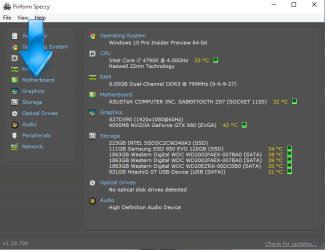
Can you download Speccy linked in my signature and run it then click on the motherboard tab on the left hand side, that will tell you what motherboard you have and what BIOS revision you're on.
Capture.PNG
 

My Computer My Computer

At a glance

W7 Pro x64 SP1 | W10 Pro IP x64 | W8.1 Pro x6...i7-4790k @ 4GHz (4.4GHz Boost)16GB DDR3 Kingston HyperX Fury @ 1600MHz CL 9...EVGA GTX 980 Classified
Computer type
PC/Desktop
Computer Manufacturer/Model Number
Custom Build
OS
W7 Pro x64 SP1 | W10 Pro IP x64 | W8.1 Pro x64 VM | Linux Mint VM
CPU
i7-4790k @ 4GHz (4.4GHz Boost)
Motherboard
ASUS Sabertooth Z87 (BIOS Rev 2004)
Memory
16GB DDR3 Kingston HyperX Fury @ 1600MHz CL 9-9-9-27
Graphics Card(s)
EVGA GTX 980 Classified
Sound Card
Realtek Onboard
Monitor(s) Displays
Samsung S27D390
Screen Resolution
1920 x 1080
Hard Drives
240GB Intel 520 Series SSD |
Samsung 850 EVO 120GB SSD |
2TB WD Caviar Black |
2TB WD Caviar Green
PSU
Corsair HX850-80 Gold Modular
Case
Cooler Master Silencio 650
Cooling
Corsair H80i w/2 x Corsair SP120 | 2 x 120mm Noctua NF-S12B
Keyboard
Microsoft Sidewinder X4
Mouse
Gigabyte M6900 optical
Internet Speed
152mb
Antivirus
F-Secure
Browser
Firefox 38.0
Other Info
Backup Rig: Win 7 Pro 64-bit | AMD A10-5800k | ASUS F2A85-V Pro | 8GB Samsung DDR3 @1600MHz | 120GB Toshiba SDD | 2TB Seagate HDD | Cooler Master Silencio 550
I did the automatic completetion of system specs as you said. It says Motherboard ASUS Tek Computer Inc. Basswood 3G & BIOS Phoenix - AwardBIOS v6.0PG.
I purchased the DVD from Tiger Direct. It was advertised as "Microsoft Windows & Home Premium Operating System Software - 64-Bit, DVD-GFC-02733 OEM."
 

My Computer My Computer

At a glance

Microsoft® Windows Vista™ Home Premium 32-bit...Intel(R) Core(TM)2 Quad CPU @ 2.40GHz3.00 GBNVIDIA GeForce 9500 GT
Computer type
PC/Desktop
Computer Manufacturer/Model Number
HP Pavillon Media Center TV M8120N PC
OS
Microsoft® Windows Vista™ Home Premium 32-bit 6002 Multiprocessor Free Service Pack 2
CPU
Intel(R) Core(TM)2 Quad CPU @ 2.40GHz
Motherboard
ASUSTek Computer INC. Basswood3G
Memory
3.00 GB
Graphics Card(s)
NVIDIA GeForce 9500 GT
Sound Card
Realtek High Definition Audio
Screen Resolution
1600 x 900 x 32 bits (4294967296 colors) @ 60 Hz
Hard Drives
(1) Hitachi HDT725032VLA380 (2) Hitachi HDT725032VLA380 (3) Generic- Compact Flash USB Device (4) Generic- MS/MS-Pro USB Device (5) Generic- SD/MMC USB Device (6) Generic- SM/xD-Picture USB Device (7) HP Photosmart C309a USB Device (8)
Antivirus
Bitdefender Total Security 2015
Browser
Internet Explorer & Mozilla Firefox
Thanks for filling out your specs. That allowed me to find the manual for your computer.

It says to press F11 at boot (and continue to tap every second or so) until you get the Boot menu.
Pick the DVD drive the install DVD is in then press Enter.

Press Enter again when you get the prompt to Press any key to boot from CD/DVD.

That should start the install.

As for drivers, the only one you really need initially is the LAN driver. With a working LAN you can use Windows Update and also download any other needed driver from the P website.

There are no Windows 7 specific drivers listed but you should be able to use the Vista drivers. I also don't see any 64bit drivers so I'm not sure how well you are going to make out. All I can suggest is try it and see how it goes.

Drivers are here: Contact HP Support and Customer Service | HP® Support

If you're lucky, Windows will have a working driver for your Ethernet connection. If so then you can do Windows Update several times until all updates are installed. That often gets all the right drivers installed for you.
 

My Computer My Computer

At a glance

Windows 10 Pro X64Intel Quad Core i7-4770 @ 3.4Ghz16.0GB PC3-12800 DDR3 SDRAM 1600 MHzIntel Integrated HD Graphics
Computer type
PC/Desktop
Computer Manufacturer/Model Number
Lenovo IdeaCenter 450
OS
Windows 10 Pro X64
CPU
Intel Quad Core i7-4770 @ 3.4Ghz
Memory
16.0GB PC3-12800 DDR3 SDRAM 1600 MHz
Graphics Card(s)
Intel Integrated HD Graphics
Sound Card
Realtek HD Audio
Monitor(s) Displays
HP 22" LCD
Screen Resolution
1680 x 1050
Hard Drives
250GB Samsung EVO SATA-3 SSD
2TB Seagate ST2000DM001 SATA-2
1.5TB Seagate ST3150041AS SATA
Keyboard
Dell USB
Mouse
Lenovo USB
Internet Speed
Cable via Road Runner 3MB Upload, 30MB Download
Antivirus
Windows Defender, MBAM Pro, MBAE
Browser
Seamonkey
Other Info
UEFI/GPT
PLDS DVD-RW DH16AERSH
OK, I'll give it a go and see how I come out. Thanks for your time and help. I'll get back if I get in a jamb.
 

My Computer My Computer

At a glance

Microsoft® Windows Vista™ Home Premium 32-bit...Intel(R) Core(TM)2 Quad CPU @ 2.40GHz3.00 GBNVIDIA GeForce 9500 GT
Computer type
PC/Desktop
Computer Manufacturer/Model Number
HP Pavillon Media Center TV M8120N PC
OS
Microsoft® Windows Vista™ Home Premium 32-bit 6002 Multiprocessor Free Service Pack 2
CPU
Intel(R) Core(TM)2 Quad CPU @ 2.40GHz
Motherboard
ASUSTek Computer INC. Basswood3G
Memory
3.00 GB
Graphics Card(s)
NVIDIA GeForce 9500 GT
Sound Card
Realtek High Definition Audio
Screen Resolution
1600 x 900 x 32 bits (4294967296 colors) @ 60 Hz
Hard Drives
(1) Hitachi HDT725032VLA380 (2) Hitachi HDT725032VLA380 (3) Generic- Compact Flash USB Device (4) Generic- MS/MS-Pro USB Device (5) Generic- SD/MMC USB Device (6) Generic- SM/xD-Picture USB Device (7) HP Photosmart C309a USB Device (8)
Antivirus
Bitdefender Total Security 2015
Browser
Internet Explorer & Mozilla Firefox
Back
Top