Tweak will make Your seven easier ;)

I personally have a liking for the old quicklaunch bar which I use on Windows 7 and remove all pinned icons from the taskbar. Then I dragged the Computer icon from the desktop to the quicklaunch which created a shortcut and now I have a shortcut that opens on Computer without openning a new explorer.exe process.
 
Last edited:

My Computer My Computer

Computer Manufacturer/Model Number
Selfbuilt
OS
Windows 7 Ultimate 64bit
CPU
i7 2600k
Motherboard
asus P8Z68-V LE
Memory
16GB (4x4) corsair vengeance
Graphics Card(s)
Intel HD3000 iGPU / AMD HD6870 1024MB
Sound Card
bitstreamed to an Onkyo 609
Monitor(s) Displays
Asus VE278 27" LED / Bravia EX7 60" LED
Screen Resolution
native 1080p x2
Hard Drives
4x 2TB int. + 2x 2TB external and a SSD for the boot drive.
PSU
650w Antec
Case
NZXT tempest evo
Cooling
air/stock
Keyboard
Dell
Mouse
logitech m505
Internet Speed
dual: cable/blackberry tether for travel use
Other Info
BD re-writer //
asus notebook G73Jw
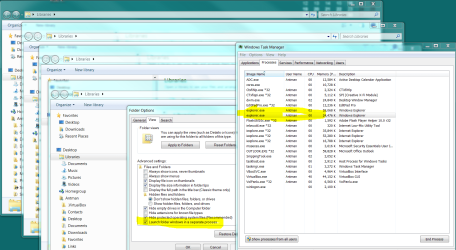
And, opening new instances only increases the mem footprint without creating a new explorer process.

.
 

Attachments

  • Capture.PNG
    Capture.PNG
    164.9 KB · Views: 48
Furthermore, closing all Explorer windows does not kill the process or release all the memory.

Beautiful.

.
 

Attachments

  • Capture.PNG
    Capture.PNG
    46.9 KB · Views: 25
I personally have a liking for the old quicklaunch bar which I use on Windows 7 and remove all pinned icons from the taskbar. Then I dragged the Computer icon from the desktop to the quicklaunch which created a shortcut and now I have a shortcut that opens on Computer without openning a new explorer.exe process.


I am testing with my own shortcut, it does not open a new process.
It does ramp up the memory used by explorer.exe.
My shortcut functions exactly like the desktop shortcut, Computer.

In my testing the memory is released, just not immediately.
It takes a few minutes. 3-4 minutes to be exact.

To create the quicklaunch, I used an AutoIt script acquired from here
The script needs to be compiled and functions on English systems only, and the quicklaunch it creates can be disabled using a rightclick on the taskbar, browsing to toolbar, and unchecking 'quick launch'. I could have provided you with a compiled exe but that would take all the fun out of it.
 
Last edited:

My Computer My Computer

Computer Manufacturer/Model Number
Selfbuilt
OS
Windows 7 Ultimate 64bit
CPU
i7 2600k
Motherboard
asus P8Z68-V LE
Memory
16GB (4x4) corsair vengeance
Graphics Card(s)
Intel HD3000 iGPU / AMD HD6870 1024MB
Sound Card
bitstreamed to an Onkyo 609
Monitor(s) Displays
Asus VE278 27" LED / Bravia EX7 60" LED
Screen Resolution
native 1080p x2
Hard Drives
4x 2TB int. + 2x 2TB external and a SSD for the boot drive.
PSU
650w Antec
Case
NZXT tempest evo
Cooling
air/stock
Keyboard
Dell
Mouse
logitech m505
Internet Speed
dual: cable/blackberry tether for travel use
Other Info
BD re-writer //
asus notebook G73Jw
OK.

After further testing, I am hapy to report -

The tweak provided in the long standing SF tutorial works properly. Yes, multiple instances of Explorer.exe occur in Task Manager. Yes, their slightly higher combined memory usage is greater than the sum total of multiple windows using the default link. Yes, the instances stay resident once the window is closed.

BUT, all instances close out of TaskMan after a short duration after the window is closed.

The tweak behaves properly in terms of min/max.

This may be odd behavior, but the tweak meets the usage requirements of the Antman.
 
Nipples are fun but...

i'm afraid of mice :(

WinKey-E will open up Windows Explorer as desired WITHOUT any
'tweaking' at all.

cheers
Catherine
 

My Computer My Computer

Computer Manufacturer/Model Number
Specs? I was unaware that computers needed glasses?
OS
Wndows 7 Build 7100
Wait a minute. Opening any Windows explorer window, regardless of the tweak or not, will have a second instance of explorer.exe after it is closed, that isn't released until a minute or two has passed. :huh:
 

My Computer My Computer

Computer type
PC/Desktop
Computer Manufacturer/Model Number
Airbot 2.0
OS
Windows 7 Ultimate x64 SP1
CPU
Core i7 920 (D0) @ 4Ghz, *26c idle *65c full load on air
Motherboard
Asus P6X58D Premium - Sata 6Gb/s - USB 3.0
Memory
12GB DDR3 Corsair Dominator -CMD12GX3M6A1600C8 at 1600MHz
Graphics Card(s)
Zotac Geforce GTX 770
Sound Card
ASUS Xonar D2X
Monitor(s) Displays
1 LG 24" Flatron W2453V-PF 1 Samsung 24" P2450H both 2ms RT
Screen Resolution
1920x1080@60hz
Hard Drives
1 Samsung 250GB 840 Evo SSD
1 OCZ Vertex2 180GB SSD
1 TB Samsung Spinpoint F1 7200RPM 32MB cache
2 500GB WD Caviar Blacks 7200RPM 32MB cache (WD5001AALS)

Pioneer DVD Burner DVR-S18M
PSU
Corsair HX1000W
Case
Cooler Master HAF 932
Cooling
Case Fans *3 230mm, *1 140mm/CPU - *Tuniq Tower 120 Extreme
Keyboard
Logitech Wireless MK700
Mouse
Logitech Wireless MK700
Internet Speed
DL 15 Mbps UL 0.98 Mbps
Antivirus
None
Browser
Firefox Nightly
Other Info
Processor-7.7 *RAM- 7.9 *Graphics-7.9 *Gaming Graphics- 7.9 *SSD- 7.8 W.E.I final score= 7.7
*Phone- LG Nexus 5
Wait a minute. Opening any Windows explorer window, regardless of the tweak or not, will have a second instance of explorer.exe after it is closed, that isn't released until a minute or two has passed. :huh:
Roger that.

The alarm was multiple instances, many more than two. The tweak causes many. Untweaked causes two.

@catherine - I don't like using my keyboard.

My work is done here. I will take my embarassment with me.
 
Ah, didn't read the whole thing. The tutorial has both %windir% and %systemroot%, the latter posted by Limneos a few posts down the tutorial. I do not use the tweak, if Antman says the %windir% string works properly, and not the %systemroot%, then perhaps it should be brought to Brinks attention in the tutorial, so the %systemroot% strings can be taken out, or an warning issued about it.

The %windir% is the correct command to use. I have updated Limneos's post to replace %systemroot%. :)
 

My Computer My Computer

Computer type
PC/Desktop
Computer Manufacturer/Model Number
Self built custom
OS
64-bit Windows 11 Pro for Workstations
CPU
Intel i7-8700K OC'd to 5 GHz
Motherboard
ASUS ROG Maximus XI Formula Z390
Memory
64 GB (4x16GB) G.SKILL TridentZ RGB DDR4 3600 MHz
Graphics Card(s)
ASUS ROG-STRIX-GTX1080TI-O11G-GAMING
Sound Card
Integrated
Monitor(s) Displays
2 x Samsung Odyssey G7 27"
Screen Resolution
2560x1440
Hard Drives
1TB Samsung 990 PRO M.2,
4TB Samsung 990 PRO PRO M.2,
TerraMaster F8 SSD Plus NAS
PSU
Seasonic Prime Titanium 850W
Case
Thermaltake Core P3
Cooling
Corsair Hydro H115i
Keyboard
Logitech wireless K800
Mouse
Logitech MX Master 4
Internet Speed
2 Gb/s Download and 100 Mb/s Upload
Antivirus
Malwarebyte Anti-Malware Premium
Browser
Google Chrome
Other Info
Logitech Z625 speaker system,
Logitech BRIO 4K Pro webcam,
HP Color LaserJet Pro MFP M477fdn,
APC SMART-UPS RT 1000 XL - SURT1000XLI,
Galaxy S23 Plus phone
Well I do AGREE with what was said 100% this tweak is a little strange.
it opens multible proccess of Explorer.exe and it takes a few minutes to be released
but if u r running windows seven so u should have a machine with high Specs so when u open explorer it takes about 30 mb less or more (30 maximum) and u have about 2 Gb. or more of RAM so this won't kill u or hang ur machine but yes it does that things.

So i suggest this:
IF U LIKE IT AND U WANT IT U CAN USE IT ITS IS MINTIONED AT THE BEGINING OF THE THREAD .
IF U DON'T LIKE SO DON'T USE.
IF U ALREADY DID IT U CAN REVERT IT ,JUST REPLACE WITH:

%windir%\explorer.exe


THANK u ANTMAN u did lot of effort analyzing this tweak n u was so fair
and oppsss i didn't see it in Tutorials
but really i'm using it and i didn't tweak my Seven much but this was helpful for me..
:D:D:D;)
 

My Computer My Computer

Computer Manufacturer/Model Number
ECS
OS
Windows 7 Ultimate x64 - XP Pro. Sp3
CPU
Intel P4 HT 631-OC 3.75-
Motherboard
ECS G31T-M7
Memory
2*1GB
Graphics Card(s)
Intel GMA3100 - G33/G31 Express Chipset -
Sound Card
VIA HD Built-in
Monitor(s) Displays
Samsung
Screen Resolution
1152 x 864
Hard Drives
WDC320 SATA
PSU
40W
Cooling
Stock Fan
Keyboard
Media
Mouse
Optical
Internet Speed
1Mb
Other Info
LAN:
Realtek8139/810x
Atheros L2 10/100
OK.


BUT, all instances close out of TaskMan after a short duration after the window is closed.

The tweak behaves properly in terms of min/max.
That is enough for me
:D
 

My Computer My Computer

Computer Manufacturer/Model Number
ECS
OS
Windows 7 Ultimate x64 - XP Pro. Sp3
CPU
Intel P4 HT 631-OC 3.75-
Motherboard
ECS G31T-M7
Memory
2*1GB
Graphics Card(s)
Intel GMA3100 - G33/G31 Express Chipset -
Sound Card
VIA HD Built-in
Monitor(s) Displays
Samsung
Screen Resolution
1152 x 864
Hard Drives
WDC320 SATA
PSU
40W
Cooling
Stock Fan
Keyboard
Media
Mouse
Optical
Internet Speed
1Mb
Other Info
LAN:
Realtek8139/810x
Atheros L2 10/100
Anyways... If you don't want to edit this entry to open Computer Window, you can easily use shortcut: WIN+E ;)
 

My Computer My Computer

Computer type
PC/Desktop
Computer Manufacturer/Model Number
Self Built
OS
Windows 7 Home Premium x32 SP1
CPU
x2 2.6 GHz
Motherboard
Asus
Memory
A-Data 2GB DDR2-800
Graphics Card(s)
ATI X1250
Sound Card
SB 5.1 Live!
Hard Drives
WD and Seagate FAP
PSU
Tagan TG-480-U01
Keyboard
BTC 6300
Mouse
Logitech VX Nano
Antivirus
None
Hi there

Not wishing to discourage decent efforts but what's wrong in just clicking the Computer Icon - then you'll get the same view anyway.

You can link a short cut to the computer icon or have it on the desktop anyway.

I'm always dubious about "registry" or other tweaks like this as you have to remember to do them when you upgrade systems or they can cause funny errors when Windows does an update.

Keep registry fixes as the ULTIMATE LAST RESORT if no other solution is possible.


+ also the WIN +E that has been mentioned --also a good one - mind you some people are totally afraid of using the keyboard - they have to use the mouse at every opportunity.


Just my 0.02EUR BTW.

Cheers
jimbo
 

My Computer My Computer

Computer type
PC/Desktop
Computer Manufacturer/Model Number
Custom built, several laptops HP/ASUS
OS
Linux CENTOS 7 / various Windows OS'es and servers
CPU
Intel i7 Intel i5
Memory
8GB, 16GB
Graphics Card(s)
On Motherboard
Sound Card
Realtek HD audio
Monitor(s) Displays
Apple Cinema display, Samsung LCD
Screen Resolution
1920 X 1080
Hard Drives
4 X 1TB SATA
Mouse
Toshiba wireless laser
Internet Speed
> 20MB up
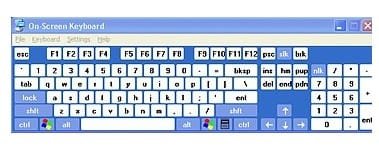
Just fingering things out...7 come 11

@catherine - I don't like using my keyboard.
I will take my embarassment with me.

You blush easily! Join the 'digit'al age.
Fingers are 'key' ; fingers are our friends [wink]

It seems a bit slow to me. But if you find it easier
to use, then who am I to argue?


Just point and click and....
point and click and point and click and point and click and
point and click and point and click and point and click...giggle
 

Attachments

  • osk.jpg
    osk.jpg
    15.4 KB · Views: 20

My Computer My Computer

Computer Manufacturer/Model Number
Specs? I was unaware that computers needed glasses?
OS
Wndows 7 Build 7100
Back
Top