Solved Typing cursor always active

ROBO731

New member
Member
VIP
Local time
11:03 AM
Messages
223
Whenever a window is active, the typing cursor appears on whatever object is selected. It's difficult to explain, please look at the video attached. I'm not sure why it has started doing this, but I can't find anyway to stop it.
 

Attachments

My Computer My Computer

OS
Windows 7 Home Premium x64
CPU
Intel i7-2600K
Motherboard
ASUS Sabertooth Z77
Memory
G.SKILL Ripjaws (16 GB Total)
Graphics Card(s)
EVGA GeForce GTX 560 Ti
Monitor(s) Displays
ASUS
Screen Resolution
1920x1080 (2 Monitors)
Hard Drives
Hitachi GST Deskstar 2 TB (HDD)
Samsung 840 Pro 256 GB (SSD)
PSU
SeaSonic X Series X650 Gold
Case
Antec DF 85
Keyboard
Microsoft SideWinder X4
Mouse
MadCatz M.M.O. 7 & Logitech G35
Internet Speed
50 down
Antivirus
Avast Free, SuperAntiSpyware Free, Malwarebytes Free
Browser
Mozilla Firefox
If you have a restore point going back some time, that may be worth a try. You could make a restore point now, then if using the old restore point does not fix it, at least you can get back current.

=============================

Welcome to Windows Seven Forums.

To avoid a lot of Q & A about your hardware and OS configuration, please click on this link to
Edit System Specs
 

My Computer My Computer

Computer Manufacturer/Model Number
HP Media Center
OS
Windows 7 32 bit
CPU
AMD 5200+ dual core
Memory
2 GB
Graphics Card(s)
NVidia GeForce 6150SE 128 MB
Monitor(s) Displays
CRT
Screen Resolution
1280x1024
Hard Drives
500 GB Sata internal :

SIIG USB 3.0 docking stations w/WD Caviar Black 6 Gb/s drives
Keyboard
PS/2
Mouse
PS/2 Wheel Mouse
Other Info
SIIG USB 3.0 PCIexpress card.
Unfortunately it doesn't look like there are any restore points that predate the problem. Any other ideas?
 

My Computer My Computer

OS
Windows 7 Home Premium x64
CPU
Intel i7-2600K
Motherboard
ASUS Sabertooth Z77
Memory
G.SKILL Ripjaws (16 GB Total)
Graphics Card(s)
EVGA GeForce GTX 560 Ti
Monitor(s) Displays
ASUS
Screen Resolution
1920x1080 (2 Monitors)
Hard Drives
Hitachi GST Deskstar 2 TB (HDD)
Samsung 840 Pro 256 GB (SSD)
PSU
SeaSonic X Series X650 Gold
Case
Antec DF 85
Keyboard
Microsoft SideWinder X4
Mouse
MadCatz M.M.O. 7 & Logitech G35
Internet Speed
50 down
Antivirus
Avast Free, SuperAntiSpyware Free, Malwarebytes Free
Browser
Mozilla Firefox
Filling in system specs is a good idea. Laptop/Desktop is radically different. I'm finding that out as a new first time laptop owner. I have no clue what you are running on.
 

My Computer My Computer

Computer Manufacturer/Model Number
HP Media Center
OS
Windows 7 32 bit
CPU
AMD 5200+ dual core
Memory
2 GB
Graphics Card(s)
NVidia GeForce 6150SE 128 MB
Monitor(s) Displays
CRT
Screen Resolution
1280x1024
Hard Drives
500 GB Sata internal :

SIIG USB 3.0 docking stations w/WD Caviar Black 6 Gb/s drives
Keyboard
PS/2
Mouse
PS/2 Wheel Mouse
Other Info
SIIG USB 3.0 PCIexpress card.
Check that you do not have "hide pointer when typing" set. Open Control Panel select Mouse then Pointer Options. Untick hide pointer when typing. This might fix your problem.
 

My Computer My Computer

Computer type
PC/Desktop
Computer Manufacturer/Model Number
Self built using existing case
OS
Windows 7 Home Premium 64 bit sp1
CPU
Intel i5 3570 3.4Ghz Ivy Bridge SKT 1155 quad core
Motherboard
Gigabyte Z77-HD3 SKT 1155 2xSata 3, 4x USB 3.0
Memory
G-Skill Rip Jaws 16Gb (8x2) DDR3 -1600 PC3 12800 CL 10 red
Graphics Card(s)
Gigabyte NVIDIA GT610 1Gb DDR3 810/1200 PCI-E 2.0 Silent
Sound Card
NVIDIA High Definition & Realtech High Definition Audio
Monitor(s) Displays
2 x Philips 226V4L 16:9 aspect ratio
Screen Resolution
1920 x 1080 HD
Hard Drives
Samsung 840 Pro 256gb SSD, SATA 3.
Hitachi Touro Portable 1tb, USB 3.0 HDD used for image b/ups.
PSU
Corsair VS450
Case
Codeng
Cooling
PSU fan & CPU fan
Keyboard
Logitech
Mouse
Logitech Wireless trackball M570
Internet Speed
Wireless 3G. 3mg down & 550kb up.
Antivirus
Bitdefender Internet Security 2020
Browser
Opera (Current Version) & Firefox
Other Info
MS Office 2013 Pro. Davis weather station software. MGE Nova 600 avr UPS.
Filling in system specs is a good idea. Laptop/Desktop is radically different. I'm finding that out as a new first time laptop owner. I have no clue what you are running on.

Sorry, I didn't realize, I'll fill those in as soon as I get the chance.

Check that you do not have "hide pointer when typing" set. Open Control Panel select Mouse then Pointer Options. Untick hide pointer when typing. This might fix your problem.

Unfortunately, didn't work.
 

My Computer My Computer

OS
Windows 7 Home Premium x64
CPU
Intel i7-2600K
Motherboard
ASUS Sabertooth Z77
Memory
G.SKILL Ripjaws (16 GB Total)
Graphics Card(s)
EVGA GeForce GTX 560 Ti
Monitor(s) Displays
ASUS
Screen Resolution
1920x1080 (2 Monitors)
Hard Drives
Hitachi GST Deskstar 2 TB (HDD)
Samsung 840 Pro 256 GB (SSD)
PSU
SeaSonic X Series X650 Gold
Case
Antec DF 85
Keyboard
Microsoft SideWinder X4
Mouse
MadCatz M.M.O. 7 & Logitech G35
Internet Speed
50 down
Antivirus
Avast Free, SuperAntiSpyware Free, Malwarebytes Free
Browser
Mozilla Firefox
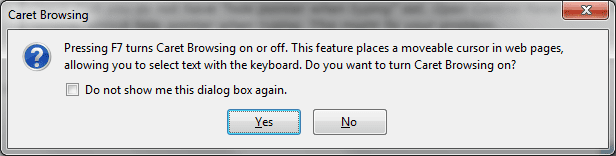
If it's on Firefox (it might the same on other browsers) it's because the F7 was pressed which
enables Caret Browsing that causes that courser to appear.
What browser are you using?

caret.png
 

My Computer My Computer

Computer type
PC/Desktop
OS
Windows 10
CPU
Intel Core i5 3570K
Motherboard
Asus P8Z77V-PRO
Memory
16GB 1600Mhz G.Skill
Graphics Card(s)
Gigabyte GTX 970 G1-Gaming
PSU
Seasonic 1000W Platinum
Case
Fractal Design Define R4
Cooling
Noctua NH-D14
Thanks, that was it, I must have turned that on at some point and forgotten to turn it off. I had originally thought that it was an issue that encompassed more than just Firefox because Skype has been doing something strange as well, as you can see in the pictures. It is putting a dotted box around whatever is clicked on. However it must be unrelated, it's not happening with any other programs. Thanks for pointing that out YoYo155.
 

Attachments

  • 3.jpg
    3.jpg
    8.2 KB · Views: 11
  • 1.jpg
    1.jpg
    9.4 KB · Views: 11
  • 2.jpg
    2.jpg
    9.5 KB · Views: 11

My Computer My Computer

OS
Windows 7 Home Premium x64
CPU
Intel i7-2600K
Motherboard
ASUS Sabertooth Z77
Memory
G.SKILL Ripjaws (16 GB Total)
Graphics Card(s)
EVGA GeForce GTX 560 Ti
Monitor(s) Displays
ASUS
Screen Resolution
1920x1080 (2 Monitors)
Hard Drives
Hitachi GST Deskstar 2 TB (HDD)
Samsung 840 Pro 256 GB (SSD)
PSU
SeaSonic X Series X650 Gold
Case
Antec DF 85
Keyboard
Microsoft SideWinder X4
Mouse
MadCatz M.M.O. 7 & Logitech G35
Internet Speed
50 down
Antivirus
Avast Free, SuperAntiSpyware Free, Malwarebytes Free
Browser
Mozilla Firefox
You're welcome, it happened to me once before and it was really irritating!
If you feel the issue is solved please mark the thread as so as well :) .
 

My Computer My Computer

Computer type
PC/Desktop
OS
Windows 10
CPU
Intel Core i5 3570K
Motherboard
Asus P8Z77V-PRO
Memory
16GB 1600Mhz G.Skill
Graphics Card(s)
Gigabyte GTX 970 G1-Gaming
PSU
Seasonic 1000W Platinum
Case
Fractal Design Define R4
Cooling
Noctua NH-D14
Sure, thanks.
 

My Computer My Computer

OS
Windows 7 Home Premium x64
CPU
Intel i7-2600K
Motherboard
ASUS Sabertooth Z77
Memory
G.SKILL Ripjaws (16 GB Total)
Graphics Card(s)
EVGA GeForce GTX 560 Ti
Monitor(s) Displays
ASUS
Screen Resolution
1920x1080 (2 Monitors)
Hard Drives
Hitachi GST Deskstar 2 TB (HDD)
Samsung 840 Pro 256 GB (SSD)
PSU
SeaSonic X Series X650 Gold
Case
Antec DF 85
Keyboard
Microsoft SideWinder X4
Mouse
MadCatz M.M.O. 7 & Logitech G35
Internet Speed
50 down
Antivirus
Avast Free, SuperAntiSpyware Free, Malwarebytes Free
Browser
Mozilla Firefox
Back
Top