UEFI Install of Windows 7 Pro

Here we go! Thanks for the Description Megahertz07!
 

Attachments

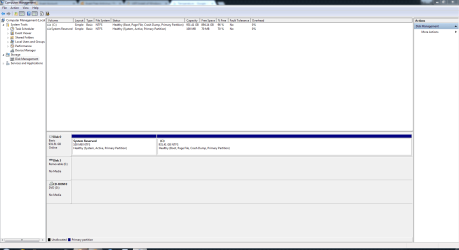
  • Disk Management 660s.PNG
    Disk Management 660s.PNG
    34.6 KB · Views: 4
Last edited:

My Computer My Computer

At a glance

Windows 7 Home Premium 64bitAMD A8-3520M6.00GB DDR3 @ 674MHz (9-9-9-24)512MB ATI AMD Radeon HD 6620G
Computer type
Laptop
Computer Manufacturer/Model Number
HP Pavilion dv7-6c23cl
OS
Windows 7 Home Premium 64bit
CPU
AMD A8-3520M
Motherboard
Hewlett-Packard 180B (Socket FS1)
Memory
6.00GB DDR3 @ 674MHz (9-9-9-24)
Graphics Card(s)
512MB ATI AMD Radeon HD 6620G
Sound Card
IDT High Definition Audio CODEC
Monitor(s) Displays
Generic PnP Monitor
Screen Resolution
(1600x900@60Hz)
Hard Drives
Samsung 850 EVO 250GB SSD
Mouse
Logitec M525
Internet Speed
30-75Mbps
Antivirus
Avast Free, Unfortunately
Browser
Google Chrome, Firefox, IE
I guess I'm posting Images properly?
 
Last edited:

My Computer My Computer

At a glance

Windows 7 Home Premium 64bitAMD A8-3520M6.00GB DDR3 @ 674MHz (9-9-9-24)512MB ATI AMD Radeon HD 6620G
Computer type
Laptop
Computer Manufacturer/Model Number
HP Pavilion dv7-6c23cl
OS
Windows 7 Home Premium 64bit
CPU
AMD A8-3520M
Motherboard
Hewlett-Packard 180B (Socket FS1)
Memory
6.00GB DDR3 @ 674MHz (9-9-9-24)
Graphics Card(s)
512MB ATI AMD Radeon HD 6620G
Sound Card
IDT High Definition Audio CODEC
Monitor(s) Displays
Generic PnP Monitor
Screen Resolution
(1600x900@60Hz)
Hard Drives
Samsung 850 EVO 250GB SSD
Mouse
Logitec M525
Internet Speed
30-75Mbps
Antivirus
Avast Free, Unfortunately
Browser
Google Chrome, Firefox, IE
To post images:
- Go Advanced (below)
- Manage Attachments
- Browse
- Upload
 

My Computers My Computers

  • At a glance

    Windows 7 HP 64i5 6600K - 800MHz to 4200MHz4+4G GSkill DDR4 3000IG - Intel 530
    Computer type
    PC/Desktop
    Computer Manufacturer/Model Number
    custom build
    OS
    Windows 7 HP 64
    CPU
    i5 6600K - 800MHz to 4200MHz
    Motherboard
    GA-Z170-HD3P
    Memory
    4+4G GSkill DDR4 3000
    Graphics Card(s)
    IG - Intel 530
    Monitor(s) Displays
    Samsung 226BW
    Screen Resolution
    1680x1050
    Hard Drives
    (1) -1 SM951 – 128GB M.2 AHCI PCIe SSD drive for Windows 7 and Lubuntu
    (2) -1 WD SATA 3 - 1T for Data
    (3) -1 WD SATA 3 - 1T for backup
    PSU
    Thermaltake 450W TR2 gold
    Keyboard
    Old and good Chicony mechanical keyboard
    Mouse
    Logitech mX performance - 9 buttons (had to disable some)
    Internet Speed
    500Mb/s
    Browser
    Firefox 64
    Other Info
    TinyWall firewall
  • At a glance

    Windows 7 Proi7-4500U 800MHz to 3.0GHz(4+4)G DDR3 1600IG intel 4400 + NVIDIA GeForce GT 745M
    Computer type
    Laptop
    System Manufacturer/Model Number
    Asus Q550LF
    OS
    Windows 7 Pro
    CPU
    i7-4500U 800MHz to 3.0GHz
    Motherboard
    Asus Q550LF
    Memory
    (4+4)G DDR3 1600
    Graphics Card(s)
    IG intel 4400 + NVIDIA GeForce GT 745M
    Sound Card
    Realtek
    Monitor(s) Displays
    LG Display LP156WF4-SPH1
    Screen Resolution
    1920 x 1080
    Hard Drives
    BX500 120G SSD for Windows and programs +
    1T HDD for data
    Internet Speed
    500 Mb/s
    Browser
    Firefox
    Other Info
    TinyWall firewall
Ya you want to upload pictures to this forum, not some other website.

Just click the paperclip icon to upload a picture.

What is on Disk 0 now ?

Windows 7 Pro installed in Legacy mode on a MBR drive ?

That`s what it looks like.

If so just steal some space from C to create another partition for W10, I`d make it a Primary partition.

Use Partition Wizard free to create it. Post another shot of Disk Management after you`ve done that.

Best Free Partition Manager for Windows | MiniTool Partition Free
 

Attachments

  • Capture.JPG
    Capture.JPG
    163.7 KB · Views: 5

My Computer My Computer

At a glance

Windows 10 Pro x64Intel Core i7 6700KGSkill TridentZ RGB 16GB 3600 16-16-16-36EVGA GTX 980 Ti SC x2
Computer type
PC/Desktop
Computer Manufacturer/Model Number
Skylake Special #666
OS
Windows 10 Pro x64
CPU
Intel Core i7 6700K
Motherboard
Asus Sabertooth Z170 Mark 1
Memory
GSkill TridentZ RGB 16GB 3600 16-16-16-36
Graphics Card(s)
EVGA GTX 980 Ti SC x2
Sound Card
Realtek High Definition
Monitor(s) Displays
AOC G2460PG
Screen Resolution
1920 x 1080 144Hz
Hard Drives
Samsung 860 Pro 256GB, Seagate Barracuda 4TB x2
PSU
EVGA 1000 P2, EVGA White Custom Braided Cables
Case
Corsair Vengeance C70 Gunmetal Black
Cooling
Corsair H100i v2, Corsair ML120 x2, Thermal Grizzly Kryonaut
Keyboard
Logitech G910 Orion Spectrum
Mouse
Logitech G700s
Internet Speed
Verizon Fios Quantum Gateway 75/75
Antivirus
Windows Defender, Malwarebytes Free 3.8.3
Browser
Chrome
Other Info
Corsair SP120 x4, LG Blu-ray Drive, Durabrand HT-395 100 Watt Dolby Digital Amp, Corsair H2100 Wireless 7.1 Headset
Windows 7 Pro installed in Legacy mode on a MBR drive ?
Yes, that is what it is, I will do this soon.

I wonder if I should do as Megahertz07 said and put W10 at the end of the drive? The only disadvantage might be Installing Linux in a Triple Boot later and keep all storage at the end?

Thanks, Nasty7
 

My Computer My Computer

At a glance

Windows 7 Home Premium 64bitAMD A8-3520M6.00GB DDR3 @ 674MHz (9-9-9-24)512MB ATI AMD Radeon HD 6620G
Computer type
Laptop
Computer Manufacturer/Model Number
HP Pavilion dv7-6c23cl
OS
Windows 7 Home Premium 64bit
CPU
AMD A8-3520M
Motherboard
Hewlett-Packard 180B (Socket FS1)
Memory
6.00GB DDR3 @ 674MHz (9-9-9-24)
Graphics Card(s)
512MB ATI AMD Radeon HD 6620G
Sound Card
IDT High Definition Audio CODEC
Monitor(s) Displays
Generic PnP Monitor
Screen Resolution
(1600x900@60Hz)
Hard Drives
Samsung 850 EVO 250GB SSD
Mouse
Logitec M525
Internet Speed
30-75Mbps
Antivirus
Avast Free, Unfortunately
Browser
Google Chrome, Firefox, IE
You said you may erase Win 10, so to put Win 10 at the end will make it easy as you'll be adding the space to the data partition.
If you put Win 10 after Win 7, if you erase Win 10 the space will be added to Win 7, and will be useless.
 

My Computers My Computers

  • At a glance

    Windows 7 HP 64i5 6600K - 800MHz to 4200MHz4+4G GSkill DDR4 3000IG - Intel 530
    Computer type
    PC/Desktop
    Computer Manufacturer/Model Number
    custom build
    OS
    Windows 7 HP 64
    CPU
    i5 6600K - 800MHz to 4200MHz
    Motherboard
    GA-Z170-HD3P
    Memory
    4+4G GSkill DDR4 3000
    Graphics Card(s)
    IG - Intel 530
    Monitor(s) Displays
    Samsung 226BW
    Screen Resolution
    1680x1050
    Hard Drives
    (1) -1 SM951 – 128GB M.2 AHCI PCIe SSD drive for Windows 7 and Lubuntu
    (2) -1 WD SATA 3 - 1T for Data
    (3) -1 WD SATA 3 - 1T for backup
    PSU
    Thermaltake 450W TR2 gold
    Keyboard
    Old and good Chicony mechanical keyboard
    Mouse
    Logitech mX performance - 9 buttons (had to disable some)
    Internet Speed
    500Mb/s
    Browser
    Firefox 64
    Other Info
    TinyWall firewall
  • At a glance

    Windows 7 Proi7-4500U 800MHz to 3.0GHz(4+4)G DDR3 1600IG intel 4400 + NVIDIA GeForce GT 745M
    Computer type
    Laptop
    System Manufacturer/Model Number
    Asus Q550LF
    OS
    Windows 7 Pro
    CPU
    i7-4500U 800MHz to 3.0GHz
    Motherboard
    Asus Q550LF
    Memory
    (4+4)G DDR3 1600
    Graphics Card(s)
    IG intel 4400 + NVIDIA GeForce GT 745M
    Sound Card
    Realtek
    Monitor(s) Displays
    LG Display LP156WF4-SPH1
    Screen Resolution
    1920 x 1080
    Hard Drives
    BX500 120G SSD for Windows and programs +
    1T HDD for data
    Internet Speed
    500 Mb/s
    Browser
    Firefox
    Other Info
    TinyWall firewall
Back at it!

- Open disk management.
- Shrink the Win 7 right side partition. Leave 85G for Win 7
- On the un allocated right partition, make two more partition. A big one and a 120 G at the right. Format them as NTFS
- From left to right
- (MS reserved - 120M) + (Win 7 - 85G) + (Data - Big NTFS) + Win 10 - 120G)
- Boot from Win 10 and install it at the last partition = 120G

I really want to follow through with this great advice from Megahertz soon, if not immediately. I think this is very well lay'ed out, and will use MiniTool Partition Editor to do it.

I am wondering, am I going to run into any Permission Issues when sharing a Partition with Windows 10? Which is not a big problem, but just want to get an idea. In fact, Linux may go here (To the last Partition), don't know yet. I won't worry about permission issue with Linux, I keep most my files on USB's.

Also wondering if there will be any issues with Windows 10 Major Updates, while using only One Partition for it instead of the traditional Two? Won't Windows Ten try to add/create another partition during a Major Update?

I want to get this done mostly for getting some files onto this new Storage Partition, lot's of iso's in particular. The reason for this in my head, is to make it easier to Image my Windows 7 OS, am I thinking correctly here?

Thanks guys, no hurry, Nasty7
 

My Computer My Computer

At a glance

Windows 7 Home Premium 64bitAMD A8-3520M6.00GB DDR3 @ 674MHz (9-9-9-24)512MB ATI AMD Radeon HD 6620G
Computer type
Laptop
Computer Manufacturer/Model Number
HP Pavilion dv7-6c23cl
OS
Windows 7 Home Premium 64bit
CPU
AMD A8-3520M
Motherboard
Hewlett-Packard 180B (Socket FS1)
Memory
6.00GB DDR3 @ 674MHz (9-9-9-24)
Graphics Card(s)
512MB ATI AMD Radeon HD 6620G
Sound Card
IDT High Definition Audio CODEC
Monitor(s) Displays
Generic PnP Monitor
Screen Resolution
(1600x900@60Hz)
Hard Drives
Samsung 850 EVO 250GB SSD
Mouse
Logitec M525
Internet Speed
30-75Mbps
Antivirus
Avast Free, Unfortunately
Browser
Google Chrome, Firefox, IE
Another thing you need to take into consideration is that w7 has no support for native 4KB partitioning for disks, and that only means that your HDD will be running in 512 byte sectors logical with 4096 byte sector physical (512e "emulated") and that's not the best for performance in these days HDDs. for SSDs it is 512 byte logical/physical so no problem. If w10 didn't have those "report to microsoft featues" built-in and windows 8 had a better desktop experience I would recommend you that. But those OSs are still better than w7 from a pure performance point of view (they will also have a lower ram footprint).
 

My Computer My Computer

At a glance

Windows 7 x64 Pro
OS
Windows 7 x64 Pro
Another thing you need to take into consideration is that w7 has no support for native 4KB partitioning for disks, and that only means that your HDD will be running in 512 byte sectors logical with 4096 byte sector physical (512e "emulated") and that's not the best for performance in these days HDDs. for SSDs it is 512 byte logical/physical so no problem. If w10 didn't have those "report to microsoft featues" built-in and windows 8 had a better desktop experience I would recommend you that. But those OSs are still better than w7 from a pure performance point of view (they will also have a lower ram footprint).
Well that's interesting, I'll need to take a good look at this asap!

I'm certain I have a newer Drive as I just bought it from Bestbuy, and they normally only carry the newer ones in Store...I checked. Not on that pc right now so will check this later.

Basically you are saying, Windows 7 will not out perform W8-W10 either way. And that W8 and W10 will utilize these newer drives better due to the 4KB ability to add to that?

Will Windows 7 run better/faster on an older drive, SATA-III, or is it that it just won't run as fast as W8 and W10 on the newer Drives?

This won't affect a Dual Boot will it?
Suppose I install Windows 8 or 10 in dual boot with my now windows 7, will it still be able to take advantage of the 4KB Partitioning on those new partions?
I am considering a Dual Boot, and don't mind Windows 8, but I do help others with computers, and most these days are using Windows 10, so would be smartest for me to install W10. My pc came with Windows 8.1, so if it wasn't for supporting others I would just install that.

Hope that wasn't too many questions.
 

My Computer My Computer

At a glance

Windows 7 Home Premium 64bitAMD A8-3520M6.00GB DDR3 @ 674MHz (9-9-9-24)512MB ATI AMD Radeon HD 6620G
Computer type
Laptop
Computer Manufacturer/Model Number
HP Pavilion dv7-6c23cl
OS
Windows 7 Home Premium 64bit
CPU
AMD A8-3520M
Motherboard
Hewlett-Packard 180B (Socket FS1)
Memory
6.00GB DDR3 @ 674MHz (9-9-9-24)
Graphics Card(s)
512MB ATI AMD Radeon HD 6620G
Sound Card
IDT High Definition Audio CODEC
Monitor(s) Displays
Generic PnP Monitor
Screen Resolution
(1600x900@60Hz)
Hard Drives
Samsung 850 EVO 250GB SSD
Mouse
Logitec M525
Internet Speed
30-75Mbps
Antivirus
Avast Free, Unfortunately
Browser
Google Chrome, Firefox, IE
Basically you are saying, Windows 7 will not out perform W8-W10 either way. And that W8 and W10 will utilize these newer drives better due to the 4KB ability to add to that?
No, that's not necessarily true. Although Win8/10 support native 4KB sector sizes while Win7 does not, that is irrelevant if your partition is properly aligned.

When you format a NTFS partition the default storage allocation unit (aka, "cluster") size is 4KB (eight 512-byte or 512e sectors). The file system (NTFS) reads and writes whole clusters at a time. That means NTFS partitions are never reading or writing chunks of less than 4KB at a time, anyway. Even if what you want to write to disk is less than the size of one 512-byte sector, it will always write a full 4KB cluster. There is no difference in performance vs. writing one 4KB native sector (4Kn).

The key is to make sure your partitions are aligned--which diskpart in Win7 and later do by default anyway. If the partition boundaries are not properly aligned, you run the risk that the 4KB cluster the file system wants to write may span two physical 4Kn sectors on an Advanced Format drive, and that will result in a performance hit. That's true regardless of OS.
 

My Computer My Computer

At a glance

Windows 7/8.1/10 multibootIntel Core i7-770048GB (2x16GB Crucial DDR4-3200 + 2x8GB Hynix ...Intel HD630 + AMD Radeon R7 450 PCIe
Computer type
PC/Desktop
Computer Manufacturer/Model Number
Dell Optiplex 7050
OS
Windows 7/8.1/10 multiboot
CPU
Intel Core i7-7700
Motherboard
Dell, Intel Q270 chipset
Memory
48GB (2x16GB Crucial DDR4-3200 + 2x8GB Hynix DDR4-2400)
Graphics Card(s)
Intel HD630 + AMD Radeon R7 450 PCIe
Monitor(s) Displays
Asus VC279 (27")
Screen Resolution
1920x1080
Hard Drives
Toshiba M.2 NVMe (256GB),
Samsung 960 Evo (500GB),
WD Red Plus 80EFBX (8TB)
I don't have benchmarks to show off.

But HDD vendors say 4kb native is more efficient or as a matter or fact any type of native formatting... that is, if your drive is native 512, that's what it is best for. https://www.seagate.com/tech-insights/advanced-format-4k-sector-hard-drives-master-ti/

foir instance, from linux fdisk you could get something like:

Disk /dev/sda: 320.1 GB, 320072933376 bytes 255 heads, 63 sectors/track, 38913 cylinders, total 625142448 sectors Units = sectors of 1 * 512 = 512 bytes Sector size (logical/physical): 512 bytes / 4096 bytes I/O size (minimum/optimal): 4096 bytes / 4096 bytes


so According to that, you do loose performance based on an emulation layer carried out by the HDD firmware... now how discernable is that? maybe it is undiscernable as it is the case with most computer technologies.... most new (if not all) hdds are capable of 512e which is what w7 runs so no need to worry about that.

As for me, I'm sticking with w7 due to better desktop experience, and no default spyware that you only become aware of years after you've been running it... But if I needed performance for server I'd choose w10 with no doubt.
 

My Computer My Computer

At a glance

Windows 7 x64 Pro
OS
Windows 7 x64 Pro
But HDD vendors say 4kb native is more efficient or as a matter or fact any type of native formatting... that is, if your drive is native 512, that's what it is best for.
The link you've cited isn't arguing the merits of 4Kn vs. 512e, it's arguing that native 4KB sectors are better than native 512-byte sectors, as well as arguing for proper partition alignment.

I'm not disagreeing that reading/writing a 4KB physical sector on an AF drive is more efficient than reading/writing a 512-byte physical sector on a legacy drive, but that's missing the point. We're not discussing the difference between using a legacy drive vs. AF drive, we're talking only about using an AF drive, with Win7 vs. with Win8+. And there, assuming proper partition alignment, it makes no difference.

On an AF drive, it makes no difference if you're writing eight 512e sectors or one 4Kn sector--you're writing 4KB either way, and the underlying hardware is writing just once, to the same 4KB physical sector. Just because one may be using 512e, don't mistake that to mean there are eight writes. There is only one 4KB write, and the drive is writing exactly the same number of bits (including error correction and housekeeping) that it would if you were using 4Kn sectors. Indeed, the hardware can *only* write 4KB at a time; writing 512-bytes at a time is physically impossible.

It would be a different discussion if we were comparing native 512-byte sectors on a legacy drive vs. native 4KB sectors on an AF drive, but we're not. (If we were, AF wins because of more efficient overhead.) We're only talking about how to use an AF drive.

It would be different if we were talking about accessing a single block of 512 bytes from a legacy drive vs. from an AF drive, but we're not. (If we were, AF loses because it would have to read an entire 4KB sector before extracting the 512-byte piece.)

But NTFS does not access by sectors, it accesses by storage allocation units or "clusters", so 512-byte segments are never part of the equation. NTFS is always (assuming the default allocation unit size) accessing 4KB at a time, regardless of the underlying physical sector size. Whether one uses 512e or 4Kn, you're still reading a single physical sector and transferring the entire 4KB of data to the OS.

And, of course, it would be different if the partition is not properly aligned, but we've stipulated the partition must be properly aligned for the purposes of this discussion. It's more efficient if the 4KB of data the NTFS file system wants to write lines up with one 4KB physical sector instead of overlapping two sectors.

 

My Computer My Computer

At a glance

Windows 7/8.1/10 multibootIntel Core i7-770048GB (2x16GB Crucial DDR4-3200 + 2x8GB Hynix ...Intel HD630 + AMD Radeon R7 450 PCIe
Computer type
PC/Desktop
Computer Manufacturer/Model Number
Dell Optiplex 7050
OS
Windows 7/8.1/10 multiboot
CPU
Intel Core i7-7700
Motherboard
Dell, Intel Q270 chipset
Memory
48GB (2x16GB Crucial DDR4-3200 + 2x8GB Hynix DDR4-2400)
Graphics Card(s)
Intel HD630 + AMD Radeon R7 450 PCIe
Monitor(s) Displays
Asus VC279 (27")
Screen Resolution
1920x1080
Hard Drives
Toshiba M.2 NVMe (256GB),
Samsung 960 Evo (500GB),
WD Red Plus 80EFBX (8TB)
Back
Top