
I am running Win 7 Profession x 64 on an HP Pavilion HPE (brand new).
I use ChartScript.net for my job doing medical transcription. On my old XP PC running IE 6 I had no problems at all with the site or setup. Because this site is reported to be incompatible with any IE above 6, I have installed Avant browser which reports to be compatible with IE 6. I was able to completely setup the access and usage of the site normally except for setting up the foot pedal, an IN-USB2. I get the following error:
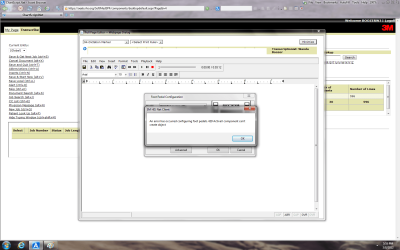
"An error has occurred configuring foot pedals: Active X component cannot create object."
I have already tried using XP Mode and it will not recognize the pedal either. It flat won't find it at all even using the USB attach function.
The pedal is showing in Devices and Printers as Unspecified: VEC USB foot pedal. Changing USB ports has no effect.
I am enclosing a screen shot as well.
Needless to say I am extremely frustrated and need to be using this new PC and not the 8 year-old worn out one.
Thank you in advance for any help and suggestions.
I use ChartScript.net for my job doing medical transcription. On my old XP PC running IE 6 I had no problems at all with the site or setup. Because this site is reported to be incompatible with any IE above 6, I have installed Avant browser which reports to be compatible with IE 6. I was able to completely setup the access and usage of the site normally except for setting up the foot pedal, an IN-USB2. I get the following error:
"An error has occurred configuring foot pedals: Active X component cannot create object."
I have already tried using XP Mode and it will not recognize the pedal either. It flat won't find it at all even using the USB attach function.
The pedal is showing in Devices and Printers as Unspecified: VEC USB foot pedal. Changing USB ports has no effect.
I am enclosing a screen shot as well.
Needless to say I am extremely frustrated and need to be using this new PC and not the 8 year-old worn out one.
Thank you in advance for any help and suggestions.
Attachments
My Computer
- Computer Manufacturer/Model Number
- HP Pavilion HPE h8z series
- OS
- Win 7 Professional 64 bit
- CPU
- AMD FX-8100 eight-core processor
- Memory
- 8GB DDR3-1333MHz SDRAM
- Graphics Card(s)
- NVIDIA GeForce GT 530
- Sound Card
- Beats Audio
- Monitor(s) Displays
- V7 22-inch
- Hard Drives
- 1TB 7200 rpm SATA hard drive
- PSU
- 460W Power supply
