Unable to delete registry keys

Tegewaldt

New member
Member
Local time
9:09 AM
Messages
61
Location
Jutland, Denmark
Hello Sevenforums

Whilst trying to delete the registry keys Mpfilt and subkeys, i encounter different errors depending on my approach.

Trying to just delete the keys usually results in a problem with permissions.

Running in admin mode etc. changning permissions reports that "an error has occurred" while trying to delete.

Essentially, i need a failsafe way to remove the keys.

Thank you in advance Sevenforums members

-Tegewaldt
 

My Computer My Computer

At a glance

Windows Home Premium 64bitIntel core i5 3.4Ghz Clarkdale Chipset6Gb DDR3nVidia Geforce GT 440
Computer Manufacturer/Model Number
Packardbell ixtreme m5801
OS
Windows Home Premium 64bit
CPU
Intel core i5 3.4Ghz Clarkdale Chipset
Motherboard
Packard Bell ipower G5800 Intel Havendale/Clarkdale
Memory
6Gb DDR3
Graphics Card(s)
nVidia Geforce GT 440
Sound Card
The unit High Definition Audio ( according to SIW )
Monitor(s) Displays
Samsung 22" and Phillips 24"
Screen Resolution
Samsung: 1680*1050. Phillips 1920*1280
Hard Drives
1TB Western digital HDD and 1 465GB Western digital HDD
PSU
Unable to locate in SIW
Case
Packard Bell ixtreme "hull" (it's quite heavy)
Cooling
Unnamed coolermaster fans
Keyboard
Logitech G110 Macro Gamer keyboard
Mouse
Logitech MX518
Internet Speed
10/1Mbips
Why are you deleting them?

Try running regedit through - GiveMePower Download
make sure you backup the registry, or create a manual System Restore point
 

My Computer My Computer

At a glance

Windows 7 Ultimate x64 SP1AMD Phenom 2 1090T2x8GB Kingston HyperX Fury Black 1600Mhz Unga...MSI GTX 970 Gaming 4G
Computer type
PC/Desktop
Computer Manufacturer/Model Number
Custom Build
OS
Windows 7 Ultimate x64 SP1
CPU
AMD Phenom 2 1090T
Motherboard
Gigabyte GA-890FXA-UD5
Memory
2x8GB Kingston HyperX Fury Black 1600Mhz Unganged
Graphics Card(s)
MSI GTX 970 Gaming 4G
Sound Card
Realtek On-Board HD 7.1 Audio / Logitech G35
Monitor(s) Displays
3xAcer GD245HQ
Screen Resolution
1920x1080
Hard Drives
Samsung 850 Pro 512GB SSD - OS /
WD Caviar Black SATA 3 - 1 TBx2 - Dynamic RAID 0 /
WD Caviar Green SATA 2 - 640GBx2 - Dynamic RAID 0 /
WD Caviar Green SATA 2 - 640GB - Internal Backup /
Seagate Barracude SATA 3 - 3TB - External Backup/ Sync
PSU
HighPower 1000W
Case
Cooler Master HAF 932
Cooling
Noctua NH-D14
Keyboard
Logitech G19
Mouse
Logitech G500
Internet Speed
100/4 Mbit Cable (100GB quota)
Antivirus
ZoneAlarm Extreme Security / MBAM Pro / MBAE Free / SAS Free
Browser
IE 11 - Firefox - Chrome
Other Info
Logitech F710/ G27/ G940/ Z5500 // TrackIR 5 // Nvidia 3D Surround Vision
To attempt to fix my usb ports.

The link you gave me reads error 552 when i try to open it
 

My Computer My Computer

At a glance

Windows Home Premium 64bitIntel core i5 3.4Ghz Clarkdale Chipset6Gb DDR3nVidia Geforce GT 440
Computer Manufacturer/Model Number
Packardbell ixtreme m5801
OS
Windows Home Premium 64bit
CPU
Intel core i5 3.4Ghz Clarkdale Chipset
Motherboard
Packard Bell ipower G5800 Intel Havendale/Clarkdale
Memory
6Gb DDR3
Graphics Card(s)
nVidia Geforce GT 440
Sound Card
The unit High Definition Audio ( according to SIW )
Monitor(s) Displays
Samsung 22" and Phillips 24"
Screen Resolution
Samsung: 1680*1050. Phillips 1920*1280
Hard Drives
1TB Western digital HDD and 1 465GB Western digital HDD
PSU
Unable to locate in SIW
Case
Packard Bell ixtreme "hull" (it's quite heavy)
Cooling
Unnamed coolermaster fans
Keyboard
Logitech G110 Macro Gamer keyboard
Mouse
Logitech MX518
Internet Speed
10/1Mbips
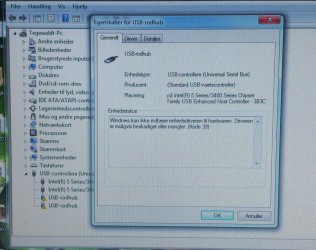
What is the problem with your USB ports?. Usually USB problems are associated with drivers. Could you show a screen shot of your Device Manager with the USB section expanded.
 

My Computer My Computer

At a glance

Windows 7 Home Premium 64 bit sp1Intel i5 3570 3.4Ghz Ivy Bridge SKT 1155 quad...G-Skill Rip Jaws 16Gb (8x2) DDR3 -1600 PC3 12...Gigabyte NVIDIA GT610 1Gb DDR3 810/1200 PCI-E...
Computer type
PC/Desktop
Computer Manufacturer/Model Number
Self built using existing case
OS
Windows 7 Home Premium 64 bit sp1
CPU
Intel i5 3570 3.4Ghz Ivy Bridge SKT 1155 quad core
Motherboard
Gigabyte Z77-HD3 SKT 1155 2xSata 3, 4x USB 3.0
Memory
G-Skill Rip Jaws 16Gb (8x2) DDR3 -1600 PC3 12800 CL 10 red
Graphics Card(s)
Gigabyte NVIDIA GT610 1Gb DDR3 810/1200 PCI-E 2.0 Silent
Sound Card
NVIDIA High Definition & Realtech High Definition Audio
Monitor(s) Displays
2 x Philips 226V4L 16:9 aspect ratio
Screen Resolution
1920 x 1080 HD
Hard Drives
Samsung 840 Pro 256gb SSD, SATA 3.
Hitachi Touro Portable 1tb, USB 3.0 HDD used for image b/ups.
PSU
Corsair VS450
Case
Codeng
Cooling
PSU fan & CPU fan
Keyboard
Logitech
Mouse
Logitech Wireless trackball M570
Internet Speed
Wireless 3G. 3mg down & 550kb up.
Antivirus
Bitdefender Internet Security 2020
Browser
Opera (Current Version) & Firefox
Other Info
MS Office 2013 Pro. Davis weather station software. MGE Nova 600 avr UPS.
Hi Tegewaldt,

If you believe it's the permission settings that prevent you from deleting those keys, start up a PowerShell session, run a line similar to the below and paste it's output here. This will allow us to view all the key's permissions.

Code:
"[COLOR=red]HKCU:\Path\To\Key[/COLOR]" | %{$a = Get-Acl $_} ; ''; $env:Username; $a.Owner; $a.Access | ft -A -Wr
 

My Computer My Computer

At a glance

Windows 10, Windows 8.1 Pro, Windows 7 Profes...
Computer type
PC/Desktop
OS
Windows 10, Windows 8.1 Pro, Windows 7 Professional, OS X El Capitan
First of all, i found this thread, which i thought i'd give a try since the problem sounded almost identical to that of mine.
http://www.sevenforums.com/hardware-devices/230064-usb-problem-driving-me-nuts-3.html

The USB ports do not work with any devices plugged into them, and it's been like this since a recent power surge.

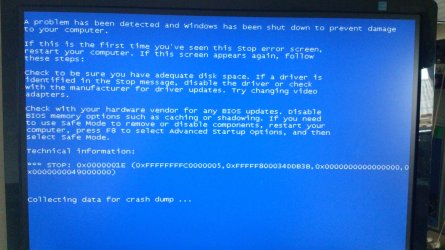
i encountered a BSOD for some reason while trying to navigate using the keyboard (PS/2 & USB mouse not working)

@Pyprohly how do i use the powershell, and should i just replace the "red text" with like "C:\Windows\...\Key"?

On a sidenote: Sorry for foreign language :)
And i am posting "screenshots" from my phone since i cant easily transfer files from the affected PC.
 

Attachments

  • DSC_0112.jpg
    DSC_0112.jpg
    868.8 KB · Views: 0
  • DSC_0111.JPG
    DSC_0111.JPG
    516.8 KB · Views: 1

My Computer My Computer

At a glance

Windows Home Premium 64bitIntel core i5 3.4Ghz Clarkdale Chipset6Gb DDR3nVidia Geforce GT 440
Computer Manufacturer/Model Number
Packardbell ixtreme m5801
OS
Windows Home Premium 64bit
CPU
Intel core i5 3.4Ghz Clarkdale Chipset
Motherboard
Packard Bell ipower G5800 Intel Havendale/Clarkdale
Memory
6Gb DDR3
Graphics Card(s)
nVidia Geforce GT 440
Sound Card
The unit High Definition Audio ( according to SIW )
Monitor(s) Displays
Samsung 22" and Phillips 24"
Screen Resolution
Samsung: 1680*1050. Phillips 1920*1280
Hard Drives
1TB Western digital HDD and 1 465GB Western digital HDD
PSU
Unable to locate in SIW
Case
Packard Bell ixtreme "hull" (it's quite heavy)
Cooling
Unnamed coolermaster fans
Keyboard
Logitech G110 Macro Gamer keyboard
Mouse
Logitech MX518
Internet Speed
10/1Mbips
Load defaults in BIOS.
Download and make a bootable DVD/USB Linux Mint MATE, boot with it and see if USB devices work with it.

For Powershell, open a cmd and enter powershell
 

My Computer My Computer

At a glance

Windows 7 Ultimate x64 SP1AMD Phenom 2 1090T2x8GB Kingston HyperX Fury Black 1600Mhz Unga...MSI GTX 970 Gaming 4G
Computer type
PC/Desktop
Computer Manufacturer/Model Number
Custom Build
OS
Windows 7 Ultimate x64 SP1
CPU
AMD Phenom 2 1090T
Motherboard
Gigabyte GA-890FXA-UD5
Memory
2x8GB Kingston HyperX Fury Black 1600Mhz Unganged
Graphics Card(s)
MSI GTX 970 Gaming 4G
Sound Card
Realtek On-Board HD 7.1 Audio / Logitech G35
Monitor(s) Displays
3xAcer GD245HQ
Screen Resolution
1920x1080
Hard Drives
Samsung 850 Pro 512GB SSD - OS /
WD Caviar Black SATA 3 - 1 TBx2 - Dynamic RAID 0 /
WD Caviar Green SATA 2 - 640GBx2 - Dynamic RAID 0 /
WD Caviar Green SATA 2 - 640GB - Internal Backup /
Seagate Barracude SATA 3 - 3TB - External Backup/ Sync
PSU
HighPower 1000W
Case
Cooler Master HAF 932
Cooling
Noctua NH-D14
Keyboard
Logitech G19
Mouse
Logitech G500
Internet Speed
100/4 Mbit Cable (100GB quota)
Antivirus
ZoneAlarm Extreme Security / MBAM Pro / MBAE Free / SAS Free
Browser
IE 11 - Firefox - Chrome
Other Info
Logitech F710/ G27/ G940/ Z5500 // TrackIR 5 // Nvidia 3D Surround Vision
The USB devices work while in BIOS, and resetting to defaults doesn't change anything as far as i can see.

Since the problem occurs when windows loads up, why would trying the ports on Linux make any difference? Just curious
 

My Computer My Computer

At a glance

Windows Home Premium 64bitIntel core i5 3.4Ghz Clarkdale Chipset6Gb DDR3nVidia Geforce GT 440
Computer Manufacturer/Model Number
Packardbell ixtreme m5801
OS
Windows Home Premium 64bit
CPU
Intel core i5 3.4Ghz Clarkdale Chipset
Motherboard
Packard Bell ipower G5800 Intel Havendale/Clarkdale
Memory
6Gb DDR3
Graphics Card(s)
nVidia Geforce GT 440
Sound Card
The unit High Definition Audio ( according to SIW )
Monitor(s) Displays
Samsung 22" and Phillips 24"
Screen Resolution
Samsung: 1680*1050. Phillips 1920*1280
Hard Drives
1TB Western digital HDD and 1 465GB Western digital HDD
PSU
Unable to locate in SIW
Case
Packard Bell ixtreme "hull" (it's quite heavy)
Cooling
Unnamed coolermaster fans
Keyboard
Logitech G110 Macro Gamer keyboard
Mouse
Logitech MX518
Internet Speed
10/1Mbips

My Computer My Computer

At a glance

Windows 7 Ultimate x64 SP1AMD Phenom 2 1090T2x8GB Kingston HyperX Fury Black 1600Mhz Unga...MSI GTX 970 Gaming 4G
Computer type
PC/Desktop
Computer Manufacturer/Model Number
Custom Build
OS
Windows 7 Ultimate x64 SP1
CPU
AMD Phenom 2 1090T
Motherboard
Gigabyte GA-890FXA-UD5
Memory
2x8GB Kingston HyperX Fury Black 1600Mhz Unganged
Graphics Card(s)
MSI GTX 970 Gaming 4G
Sound Card
Realtek On-Board HD 7.1 Audio / Logitech G35
Monitor(s) Displays
3xAcer GD245HQ
Screen Resolution
1920x1080
Hard Drives
Samsung 850 Pro 512GB SSD - OS /
WD Caviar Black SATA 3 - 1 TBx2 - Dynamic RAID 0 /
WD Caviar Green SATA 2 - 640GBx2 - Dynamic RAID 0 /
WD Caviar Green SATA 2 - 640GB - Internal Backup /
Seagate Barracude SATA 3 - 3TB - External Backup/ Sync
PSU
HighPower 1000W
Case
Cooler Master HAF 932
Cooling
Noctua NH-D14
Keyboard
Logitech G19
Mouse
Logitech G500
Internet Speed
100/4 Mbit Cable (100GB quota)
Antivirus
ZoneAlarm Extreme Security / MBAM Pro / MBAE Free / SAS Free
Browser
IE 11 - Firefox - Chrome
Other Info
Logitech F710/ G27/ G940/ Z5500 // TrackIR 5 // Nvidia 3D Surround Vision
Will try it, as well as the powershell as soon as i get home.

On a sidenote; i have a backup system.image on a secondary drive (which i have access to)

If All fals, it'd be handy to know how to reset the system through it
 

My Computer My Computer

At a glance

Windows Home Premium 64bitIntel core i5 3.4Ghz Clarkdale Chipset6Gb DDR3nVidia Geforce GT 440
Computer Manufacturer/Model Number
Packardbell ixtreme m5801
OS
Windows Home Premium 64bit
CPU
Intel core i5 3.4Ghz Clarkdale Chipset
Motherboard
Packard Bell ipower G5800 Intel Havendale/Clarkdale
Memory
6Gb DDR3
Graphics Card(s)
nVidia Geforce GT 440
Sound Card
The unit High Definition Audio ( according to SIW )
Monitor(s) Displays
Samsung 22" and Phillips 24"
Screen Resolution
Samsung: 1680*1050. Phillips 1920*1280
Hard Drives
1TB Western digital HDD and 1 465GB Western digital HDD
PSU
Unable to locate in SIW
Case
Packard Bell ixtreme "hull" (it's quite heavy)
Cooling
Unnamed coolermaster fans
Keyboard
Logitech G110 Macro Gamer keyboard
Mouse
Logitech MX518
Internet Speed
10/1Mbips

My Computer My Computer

At a glance

Windows 7 Ultimate x64 SP1AMD Phenom 2 1090T2x8GB Kingston HyperX Fury Black 1600Mhz Unga...MSI GTX 970 Gaming 4G
Computer type
PC/Desktop
Computer Manufacturer/Model Number
Custom Build
OS
Windows 7 Ultimate x64 SP1
CPU
AMD Phenom 2 1090T
Motherboard
Gigabyte GA-890FXA-UD5
Memory
2x8GB Kingston HyperX Fury Black 1600Mhz Unganged
Graphics Card(s)
MSI GTX 970 Gaming 4G
Sound Card
Realtek On-Board HD 7.1 Audio / Logitech G35
Monitor(s) Displays
3xAcer GD245HQ
Screen Resolution
1920x1080
Hard Drives
Samsung 850 Pro 512GB SSD - OS /
WD Caviar Black SATA 3 - 1 TBx2 - Dynamic RAID 0 /
WD Caviar Green SATA 2 - 640GBx2 - Dynamic RAID 0 /
WD Caviar Green SATA 2 - 640GB - Internal Backup /
Seagate Barracude SATA 3 - 3TB - External Backup/ Sync
PSU
HighPower 1000W
Case
Cooler Master HAF 932
Cooling
Noctua NH-D14
Keyboard
Logitech G19
Mouse
Logitech G500
Internet Speed
100/4 Mbit Cable (100GB quota)
Antivirus
ZoneAlarm Extreme Security / MBAM Pro / MBAE Free / SAS Free
Browser
IE 11 - Firefox - Chrome
Other Info
Logitech F710/ G27/ G940/ Z5500 // TrackIR 5 // Nvidia 3D Surround Vision
Okay, trying to boot up windows now keeps resulting in random BSODS for unknown reasons. the last time i used the machine, it "worked fine".

Seeing as a fix to the usb problem and possibly PS/2 port probably wouldn't do anything abouth the system instability, i've decided that "loading" the system image might be a better idea.

So... does anybody here know exactly how to do this?
 

My Computer My Computer

At a glance

Windows Home Premium 64bitIntel core i5 3.4Ghz Clarkdale Chipset6Gb DDR3nVidia Geforce GT 440
Computer Manufacturer/Model Number
Packardbell ixtreme m5801
OS
Windows Home Premium 64bit
CPU
Intel core i5 3.4Ghz Clarkdale Chipset
Motherboard
Packard Bell ipower G5800 Intel Havendale/Clarkdale
Memory
6Gb DDR3
Graphics Card(s)
nVidia Geforce GT 440
Sound Card
The unit High Definition Audio ( according to SIW )
Monitor(s) Displays
Samsung 22" and Phillips 24"
Screen Resolution
Samsung: 1680*1050. Phillips 1920*1280
Hard Drives
1TB Western digital HDD and 1 465GB Western digital HDD
PSU
Unable to locate in SIW
Case
Packard Bell ixtreme "hull" (it's quite heavy)
Cooling
Unnamed coolermaster fans
Keyboard
Logitech G110 Macro Gamer keyboard
Mouse
Logitech MX518
Internet Speed
10/1Mbips
Back
Top