Hi all,
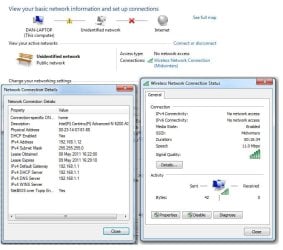
I'm having a problem getting my laptop connected to some wireless networks. I can connect to the wireless connections at work and home without issues, but I'm currently house sitting for my parents and unable to connect to theirs. Apparently I have 'Limited Connectivity' on an 'Unidentifed Network.
DHCP works and is issuing an IP address (plus gateway and dns), but when I try to ping anything on the network I get 'destination host unreachable'. I've tried using a valid static IP and it's no different. I've tried using the Win7 troubleshooting tool and it's complaining that it can't connect to the gateway. I've reset and reconfigured the wireless router but that hasn't helped either. I can connect to this network fine with my phone and an old vista laptop.
Below is the output of ifconfig /all (using DHCP)Windows IP Configuration
Host Name . . . . . . . . . . . . : Dan-Laptop
Primary Dns Suffix . . . . . . . :
Node Type . . . . . . . . . . . . : Broadcast
IP Routing Enabled. . . . . . . . : No
WINS Proxy Enabled. . . . . . . . : No
DNS Suffix Search List . . . . . . : home
Wireless LAN adapter Wireless Network Connection:
Connection-specific DNS Suffix . : home
Description . . . . . . . . . . . : Intel(R) Centrino (R) Advanced-N 6200 AGN
Physical Address. . . . . . . . . : 00-23-14-07-81-88
DHCP Enabled. . . . . . . . . . . : Yes
Autoconfiguration Enabled . . . . : Yes
IPv4 Address. . : 192.168.1.7(Preferred)
Subnet Mask . . . . . . . . . . . : 255.255.255.0
Lease Obtained . . . . . . : 01 May 2011 11:52:08
Lease Expires . . . . . . : 02 May 2011 11:52:07
Default Gateway . . . . . . . . . : 192.168.1.1
DHCP Server . . . . . . : 192.168.1.1
DNS Servers . . . . . . : 192.168.1.1
NetBIOS over Tcpip. . . . . . . . : Enabled
I'm running 64bit Win7 Ultimate and the wireless device is an Engenius Senao LR Multi-Client Bridge. I have already reloaded my laptop - there is now no software installed other than Photoshop, Office and Inkscape. I have no software firewall and no anti-virus. I've tried changing the wireless mode to 802.11g, but that didn't work. Bonjour doesn't seem to be installed. I have disabled security on the network, but that didn't help either.
Any suggestions? Thanks in advance!
I'm having a problem getting my laptop connected to some wireless networks. I can connect to the wireless connections at work and home without issues, but I'm currently house sitting for my parents and unable to connect to theirs. Apparently I have 'Limited Connectivity' on an 'Unidentifed Network.
DHCP works and is issuing an IP address (plus gateway and dns), but when I try to ping anything on the network I get 'destination host unreachable'. I've tried using a valid static IP and it's no different. I've tried using the Win7 troubleshooting tool and it's complaining that it can't connect to the gateway. I've reset and reconfigured the wireless router but that hasn't helped either. I can connect to this network fine with my phone and an old vista laptop.
Below is the output of ifconfig /all (using DHCP)Windows IP Configuration
Host Name . . . . . . . . . . . . : Dan-Laptop
Primary Dns Suffix . . . . . . . :
Node Type . . . . . . . . . . . . : Broadcast
IP Routing Enabled. . . . . . . . : No
WINS Proxy Enabled. . . . . . . . : No
DNS Suffix Search List . . . . . . : home
Wireless LAN adapter Wireless Network Connection:
Connection-specific DNS Suffix . : home
Description . . . . . . . . . . . : Intel(R) Centrino (R) Advanced-N 6200 AGN
Physical Address. . . . . . . . . : 00-23-14-07-81-88
DHCP Enabled. . . . . . . . . . . : Yes
Autoconfiguration Enabled . . . . : Yes
IPv4 Address. . : 192.168.1.7(Preferred)
Subnet Mask . . . . . . . . . . . : 255.255.255.0
Lease Obtained . . . . . . : 01 May 2011 11:52:08
Lease Expires . . . . . . : 02 May 2011 11:52:07
Default Gateway . . . . . . . . . : 192.168.1.1
DHCP Server . . . . . . : 192.168.1.1
DNS Servers . . . . . . : 192.168.1.1
NetBIOS over Tcpip. . . . . . . . : Enabled
I'm running 64bit Win7 Ultimate and the wireless device is an Engenius Senao LR Multi-Client Bridge. I have already reloaded my laptop - there is now no software installed other than Photoshop, Office and Inkscape. I have no software firewall and no anti-virus. I've tried changing the wireless mode to 802.11g, but that didn't work. Bonjour doesn't seem to be installed. I have disabled security on the network, but that didn't help either.
Any suggestions? Thanks in advance!
Last edited:
My Computer
- OS
- 7 Ultimate 64bit