- Local time
- 10:02 AM
- Messages
- 173
Hi Everyone,
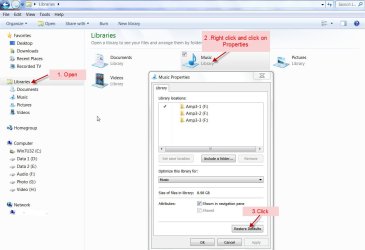
I am unable to RIP CDs using Windows Media Player 12 (my OS is Windows 7 Professional 32 Bit). Whenever I attempt to RIP a CD I am presented with the following message -

I have a CD in the computer, and the RIP tab of WMP12 is selected, however when I go to Options I notice that no destination folder is set for the "Rip music to this location" folder. Furthermore when I click on the "Change" button nothing happens.

I want to fix this so that when I click on "Change" I am then able to choose a destination folder for my ripped music.
Any help will be greatly appreciated.
Kind Regards,
Davo
I am unable to RIP CDs using Windows Media Player 12 (my OS is Windows 7 Professional 32 Bit). Whenever I attempt to RIP a CD I am presented with the following message -
I have a CD in the computer, and the RIP tab of WMP12 is selected, however when I go to Options I notice that no destination folder is set for the "Rip music to this location" folder. Furthermore when I click on the "Change" button nothing happens.
I want to fix this so that when I click on "Change" I am then able to choose a destination folder for my ripped music.
Any help will be greatly appreciated.
Kind Regards,
Davo
My Computer
At a glance
Windows 7 (XP, by Virtualization)Intel i7 3820 (@ 3.6GHz)16 Gig DDR3 2133 (overclocked @ 2933MHz - 22G...ATI Radeon HD7800
- Computer type
- PC/Desktop
- Computer Manufacturer/Model Number
- Velocity
- OS
- Windows 7 (XP, by Virtualization)
- CPU
- Intel i7 3820 (@ 3.6GHz)
- Motherboard
- Gigabtye X79-UP4
- Memory
- 16 Gig DDR3 2133 (overclocked @ 2933MHz - 22GB/s)
- Graphics Card(s)
- ATI Radeon HD7800
- Monitor(s) Displays
- 3
- Screen Resolution
- 6400 x 1440 (3 Monitors, 1 Extra High Def!)
- Hard Drives
- 500G SSD RAID 0 (Seq Read @ 889MB/s | Seq Write @ 844MB/s)
- PSU
- 700 Watt
- Case
- Thermaltake
- Keyboard
- Microsoft
- Mouse
- Logitech
- Internet Speed
- 20Mbps
- Antivirus
- AVG Internet Security Business Edition
- Browser
- Chrome
- Other Info
- 7.7 on the Windows 7 INDEX! Not quite 7.9!!!