Solved Unidentifiable Network LAN

forrestgp

New member
Hello and thank you,

So it all started when i updated my bios, i then had the issue of unidentifiable network. Then i tried to do a clean install of Windows. Didn't help. I then connected the usb wireless adapter we have and had no problem. Then some how the network got connected and my LAN had the name of the wireless but worked. Then i was being retarded and tried to update the driver and it got messed up again. We got a new router from att so i know its not the router. When i go on the router page it shows my pc connected fine and when i go into details of the connection on my comp it shows all the correct information (ie. IP, default gateway, ect.). So i don't know what to do. Please help me figure this bugger out.

Thanks a million,
Forrest
 

My Computer

Computer Manufacturer/Model Number
Started Asus CM5571 then customized
OS
Windows 7 Ultimate x64
CPU
Pentium Dual Core
Motherboard
ASUS CM5571
Memory
6 GB
Graphics Card(s)
AMD Radeon HD 6670
Sound Card
AMD High Definition Audio Device
Monitor(s) Displays
Acer 20" LED (DVI) and Samsung 32" LCD TV (HDMI)
Screen Resolution
1600x900 and 1280x720
Hard Drives
1 Tb HDD
PSU
Consair GS600
Case
Antec nine hundered two
Cooling
case fans
Mouse
Logitec G500
Hi Forrest,

I would suggest you to try the below mentioned steps one by one.


STEP 1:Update the network driver.
Steps to update network driver:
1. Click on start button.
2. in the search box type “devmgmt.msc” and then press enter.
3. Select the network card device and right click on it
4. Now select properties.
5. In the properties window, under “Driver tab”, click on “Update Driver button”.
6. After installing the updates restart the computer.

STEP 2:Try resetting the TCP/IP stack.
To reset the TCP/IP stack go to this article and either click on "Fix it for me" or follow the instructions to fix it yourself:http://support.microsoft.com/kb/299357

If still the same problem persists then try the next method.

STEP 3: You need to troubleshootusing the Network troubleshooter inWindows 7and check for the issue. To do that click the below mentioned link:
http://windows.microsoft.com/en-US/windows7/Using-the-Network-troubleshooter-in-Windows-7

Kindly let me know for further clarifications.
 

My Computer

OS
Windows 7 Enterprise x64
Hi Debbie,
thank you for the suggestions however they did not solve the issue. When I ran the troubleshooter it tells me that the default gateway is unavailable. This does not make any sense because the default gateway has not changed and I also had run the trouble shooter on the old router and it said the same thing.
 

My Computer

Computer Manufacturer/Model Number
Started Asus CM5571 then customized
OS
Windows 7 Ultimate x64
CPU
Pentium Dual Core
Motherboard
ASUS CM5571
Memory
6 GB
Graphics Card(s)
AMD Radeon HD 6670
Sound Card
AMD High Definition Audio Device
Monitor(s) Displays
Acer 20" LED (DVI) and Samsung 32" LCD TV (HDMI)
Screen Resolution
1600x900 and 1280x720
Hard Drives
1 Tb HDD
PSU
Consair GS600
Case
Antec nine hundered two
Cooling
case fans
Mouse
Logitec G500
hi forest man, you have to go to network setting and then change ip address setting to automatic detect
 

My Computer

Computer Manufacturer/Model Number
Hp compaq 7800 mini otwer
OS
windows 7 ultimate 32 bit
CPU
cor 2 duo
Motherboard
intel
Memory
1 gb
Graphics Card(s)
intel q33
Sound Card
builtin
Monitor(s) Displays
1
Hard Drives
160 gb HDD
PSU
i dont know
Case
ho compaq
Cooling
what
Thank you for the advice however I have tried this and made sure it is automatic and it still does not solve the issue.
 

My Computer

Computer Manufacturer/Model Number
Started Asus CM5571 then customized
OS
Windows 7 Ultimate x64
CPU
Pentium Dual Core
Motherboard
ASUS CM5571
Memory
6 GB
Graphics Card(s)
AMD Radeon HD 6670
Sound Card
AMD High Definition Audio Device
Monitor(s) Displays
Acer 20" LED (DVI) and Samsung 32" LCD TV (HDMI)
Screen Resolution
1600x900 and 1280x720
Hard Drives
1 Tb HDD
PSU
Consair GS600
Case
Antec nine hundered two
Cooling
case fans
Mouse
Logitec G500
If you can ping the lan side of the router and a real world IP then there isn't any real problem other than the connection being reported as Unidentifiable. You haven't stated that your internet works or not. Im just assuming it does as you have a IP/gateway.

If it was brought about by a Bios flash to your PC, then perhaps the easiest option is to reflash to the previous version of Bios. Was the new bios a beta? Have you checked for an updated NIC driver for that version of BIOS? If a network driver update doesn't fix it I would be reflashing to the previous or other known good version of Bios.

Unrelated but similar, I tried some of those D-Link 500 EoP devices and like your issue, Win7 said it was an unidentified network as well. No driver update was required, it just worked.

Did the problem exist before the new router or after? Does the new router have a newer BIOS available?
 

My Computer

Computer Manufacturer/Model Number
Custom / Daily / In Progess
OS
Win 7 Ultimate x64
CPU
QuadCore Intel Nehalem Core i7-950, 3200 MHz
Motherboard
Gigabyte GA-X58A-UD3R Rev2.0
Memory
Patriot Sector 7 ViperII 2000Mhz Enhanced Low Lantency 3x4GB
Graphics Card(s)
Gigabyte GTX470
Sound Card
ICH10 / Realtek 8-ch
Monitor(s) Displays
Asus VE278Q 27" Widescreen LCD with LED AI backlight 1080p
Hard Drives
OCZ Vertex Agillity3
Seagate 500GB 7200rpm
PSU
Antex TruePower 750w
Case
Custom by me / Work in progress
Cooling
Corsair H80 / SilenX 38x120mm and 2x 25x80mm fans.......
Just to clarify no i cannot access the internet over this connection and my bios is not beta. The unfortunate thing is that i cannot roll back the bios because the built in flash tool tells me that it is out of date and cannot be used. I have updated and backdated the NIC driver. Nothing seems to be working. And yes the problem existed with the old router. The connection i feel is not the problem because i tried the same ethernet connection in a different comp which gained internet access no problem.
 

My Computer

Computer Manufacturer/Model Number
Started Asus CM5571 then customized
OS
Windows 7 Ultimate x64
CPU
Pentium Dual Core
Motherboard
ASUS CM5571
Memory
6 GB
Graphics Card(s)
AMD Radeon HD 6670
Sound Card
AMD High Definition Audio Device
Monitor(s) Displays
Acer 20" LED (DVI) and Samsung 32" LCD TV (HDMI)
Screen Resolution
1600x900 and 1280x720
Hard Drives
1 Tb HDD
PSU
Consair GS600
Case
Antec nine hundered two
Cooling
case fans
Mouse
Logitec G500
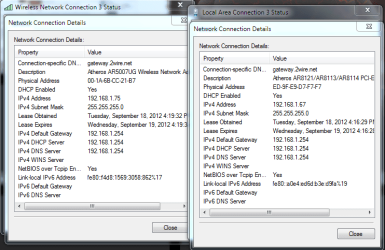
here is the details of the networks. one the local connection that has the issue and the other is the wireless network connection through the usb wireless adapter connected for me to access the internet.
 

Attachments

  • network details.PNG
    network details.PNG
    115.2 KB · Views: 23

My Computer

Computer Manufacturer/Model Number
Started Asus CM5571 then customized
OS
Windows 7 Ultimate x64
CPU
Pentium Dual Core
Motherboard
ASUS CM5571
Memory
6 GB
Graphics Card(s)
AMD Radeon HD 6670
Sound Card
AMD High Definition Audio Device
Monitor(s) Displays
Acer 20" LED (DVI) and Samsung 32" LCD TV (HDMI)
Screen Resolution
1600x900 and 1280x720
Hard Drives
1 Tb HDD
PSU
Consair GS600
Case
Antec nine hundered two
Cooling
case fans
Mouse
Logitec G500
Just to clarify no i cannot access the internet over this connection and my bios is not beta. The unfortunate thing is that i cannot roll back the bios because the built in flash tool tells me that it is out of date and cannot be used. I have updated and backdated the NIC driver. Nothing seems to be working. And yes the problem existed with the old router. The connection i feel is not the problem because i tried the same ethernet connection in a different comp which gained internet access no problem.

After you update the bios it is sometimes required that you go into the bios and set the bios back to default settings and reboot the machine. After that, Restart and go into the bios to make sure all settings are correct.

You may also need to clear the cmos and start over again from scratch. This should get your network interface to work again.
 

My Computer

Computer type
PC/Desktop
Computer Manufacturer/Model Number
Home built
OS
Windows 7 Ult, Windows 8.1 Pro,
CPU
Q9650-4.275GHz, E8600 4.5GHz, E6750-3.8GHz
Motherboard
Evga 780i FTW
Memory
G.Skill PC2 9600 1200Mhz 5 5 5 15 2T
Graphics Card(s)
GTX480
Sound Card
Asus Xonar D2
Monitor(s) Displays
HannsG
Screen Resolution
1680X1050
Hard Drives
GSkill Phoenix Pro 120GB SSD
PSU
ThermalTake Toughpower 1000Watt modular
Case
ThermalTake XaserV
Cooling
Xigmatek S1283
Keyboard
Logitech G15
Mouse
Logitech G9
Internet Speed
T1
Unfortunately neither of these things solved the problem :( any other suggestions? Thank you again everyone.
 

My Computer

Computer Manufacturer/Model Number
Started Asus CM5571 then customized
OS
Windows 7 Ultimate x64
CPU
Pentium Dual Core
Motherboard
ASUS CM5571
Memory
6 GB
Graphics Card(s)
AMD Radeon HD 6670
Sound Card
AMD High Definition Audio Device
Monitor(s) Displays
Acer 20" LED (DVI) and Samsung 32" LCD TV (HDMI)
Screen Resolution
1600x900 and 1280x720
Hard Drives
1 Tb HDD
PSU
Consair GS600
Case
Antec nine hundered two
Cooling
case fans
Mouse
Logitec G500
Unfortunately neither of these things solved the problem :( any other suggestions? Thank you again everyone.

If you can post a screen shot of the ipconfig/all from this machine it would be most helpful. :)
 

My Computer

Computer type
PC/Desktop
Computer Manufacturer/Model Number
Home built
OS
Windows 7 Ult, Windows 8.1 Pro,
CPU
Q9650-4.275GHz, E8600 4.5GHz, E6750-3.8GHz
Motherboard
Evga 780i FTW
Memory
G.Skill PC2 9600 1200Mhz 5 5 5 15 2T
Graphics Card(s)
GTX480
Sound Card
Asus Xonar D2
Monitor(s) Displays
HannsG
Screen Resolution
1680X1050
Hard Drives
GSkill Phoenix Pro 120GB SSD
PSU
ThermalTake Toughpower 1000Watt modular
Case
ThermalTake XaserV
Cooling
Xigmatek S1283
Keyboard
Logitech G15
Mouse
Logitech G9
Internet Speed
T1
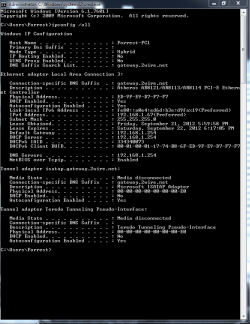
Here is the screen shot. I hope this can help you solve the problem :)
 

Attachments

  • ipconfig.all.PNG
    ipconfig.all.PNG
    127.8 KB · Views: 12

My Computer

Computer Manufacturer/Model Number
Started Asus CM5571 then customized
OS
Windows 7 Ultimate x64
CPU
Pentium Dual Core
Motherboard
ASUS CM5571
Memory
6 GB
Graphics Card(s)
AMD Radeon HD 6670
Sound Card
AMD High Definition Audio Device
Monitor(s) Displays
Acer 20" LED (DVI) and Samsung 32" LCD TV (HDMI)
Screen Resolution
1600x900 and 1280x720
Hard Drives
1 Tb HDD
PSU
Consair GS600
Case
Antec nine hundered two
Cooling
case fans
Mouse
Logitec G500
You got 2 network cards in the same machine set on the same range and getting 2x ip's from the same DHCP server. Try disabling one of the connections and trying it again with just one network adapter enabled and vice versa. Restarting the machine might be a good idea after disabling, before trying to ping a real world IP like google.

You can obviously ping the LAN side as you have been assigned a dhcp address which would suggest the NIC is functioning correctly thus far. Can you ping the Internet side of the router? (not 192.168.1.254)
 

My Computer

Computer Manufacturer/Model Number
Custom / Daily / In Progess
OS
Win 7 Ultimate x64
CPU
QuadCore Intel Nehalem Core i7-950, 3200 MHz
Motherboard
Gigabyte GA-X58A-UD3R Rev2.0
Memory
Patriot Sector 7 ViperII 2000Mhz Enhanced Low Lantency 3x4GB
Graphics Card(s)
Gigabyte GTX470
Sound Card
ICH10 / Realtek 8-ch
Monitor(s) Displays
Asus VE278Q 27" Widescreen LCD with LED AI backlight 1080p
Hard Drives
OCZ Vertex Agillity3
Seagate 500GB 7200rpm
PSU
Antex TruePower 750w
Case
Custom by me / Work in progress
Cooling
Corsair H80 / SilenX 38x120mm and 2x 25x80mm fans.......
So here is the screen shot of the lan ipconfig /all only when the usb wireless adapter is not plugged in and computer restarted. I dont know what you mean by pinging the internet side of the router. Also if it helps i have att uverse so its one of there gateways for internet and tv.
 

Attachments

  • ipconfig only lan.PNG
    ipconfig only lan.PNG
    107.5 KB · Views: 9

My Computer

Computer Manufacturer/Model Number
Started Asus CM5571 then customized
OS
Windows 7 Ultimate x64
CPU
Pentium Dual Core
Motherboard
ASUS CM5571
Memory
6 GB
Graphics Card(s)
AMD Radeon HD 6670
Sound Card
AMD High Definition Audio Device
Monitor(s) Displays
Acer 20" LED (DVI) and Samsung 32" LCD TV (HDMI)
Screen Resolution
1600x900 and 1280x720
Hard Drives
1 Tb HDD
PSU
Consair GS600
Case
Antec nine hundered two
Cooling
case fans
Mouse
Logitec G500
According to the ipconfig you should be online.

Most likely which ever A/V software you have installed is somehow blocking the connection.
 

My Computer

Computer type
PC/Desktop
Computer Manufacturer/Model Number
Home built
OS
Windows 7 Ult, Windows 8.1 Pro,
CPU
Q9650-4.275GHz, E8600 4.5GHz, E6750-3.8GHz
Motherboard
Evga 780i FTW
Memory
G.Skill PC2 9600 1200Mhz 5 5 5 15 2T
Graphics Card(s)
GTX480
Sound Card
Asus Xonar D2
Monitor(s) Displays
HannsG
Screen Resolution
1680X1050
Hard Drives
GSkill Phoenix Pro 120GB SSD
PSU
ThermalTake Toughpower 1000Watt modular
Case
ThermalTake XaserV
Cooling
Xigmatek S1283
Keyboard
Logitech G15
Mouse
Logitech G9
Internet Speed
T1
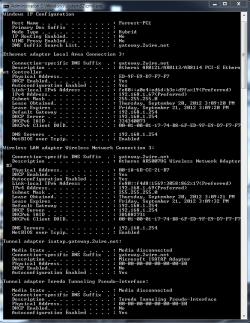
I think the 2 screenshots in post 12 were taken when the USB wireless adapter was active.

The screenshot in post 14 is saying there is no network card installed as no real interface has been detected. I would be using the original network driver from the motherboard cd and make sure it's turned on in the BIOS.
If the OS is 64bit, are you installing a 64bit network card driver?
If reinstalling windows didn't fix it and you are using the correct driver, Im leaning towards faulty adapter.


What chev65 said is also possible, even if it was previously working normally some of the Internet Security programs can without warning add your computer to the wrong 'zone' or add restrictions to make your connection not work. I am leaning away from this solution though as that pic in post 14 shows no interface/network. I've never seen Internet Security disable/hide an adapter though.
 

My Computer

Computer Manufacturer/Model Number
Custom / Daily / In Progess
OS
Win 7 Ultimate x64
CPU
QuadCore Intel Nehalem Core i7-950, 3200 MHz
Motherboard
Gigabyte GA-X58A-UD3R Rev2.0
Memory
Patriot Sector 7 ViperII 2000Mhz Enhanced Low Lantency 3x4GB
Graphics Card(s)
Gigabyte GTX470
Sound Card
ICH10 / Realtek 8-ch
Monitor(s) Displays
Asus VE278Q 27" Widescreen LCD with LED AI backlight 1080p
Hard Drives
OCZ Vertex Agillity3
Seagate 500GB 7200rpm
PSU
Antex TruePower 750w
Case
Custom by me / Work in progress
Cooling
Corsair H80 / SilenX 38x120mm and 2x 25x80mm fans.......
Thanks guys for the input and yes it should be the x64 driver as that is what the title of it has in it versus the x86. Also very strange but again I randomly did a ip config /all with the wireless adapter disconnected after it was connected and this is what I got along with no internet access. (see pic) Also do Ethernet adapter go bad normally? And it is built into the mobo so would it be a good idea to get a new NIC?
 

Attachments

  • ipconfig only lan redo.PNG
    ipconfig only lan redo.PNG
    99.1 KB · Views: 9
Last edited:

My Computer

Computer Manufacturer/Model Number
Started Asus CM5571 then customized
OS
Windows 7 Ultimate x64
CPU
Pentium Dual Core
Motherboard
ASUS CM5571
Memory
6 GB
Graphics Card(s)
AMD Radeon HD 6670
Sound Card
AMD High Definition Audio Device
Monitor(s) Displays
Acer 20" LED (DVI) and Samsung 32" LCD TV (HDMI)
Screen Resolution
1600x900 and 1280x720
Hard Drives
1 Tb HDD
PSU
Consair GS600
Case
Antec nine hundered two
Cooling
case fans
Mouse
Logitec G500
Also on a somewhat related note of the internet that you guys might be able to answer quickly is that when i test my speed through like speedtest.net I get around 2Mbps but on my downloads I never get this and get lucky if the mythical 400Kbps shows up. Is it possible that it is the NIC? also is it a NIC if it is on-board Ethernet?
 

My Computer

Computer Manufacturer/Model Number
Started Asus CM5571 then customized
OS
Windows 7 Ultimate x64
CPU
Pentium Dual Core
Motherboard
ASUS CM5571
Memory
6 GB
Graphics Card(s)
AMD Radeon HD 6670
Sound Card
AMD High Definition Audio Device
Monitor(s) Displays
Acer 20" LED (DVI) and Samsung 32" LCD TV (HDMI)
Screen Resolution
1600x900 and 1280x720
Hard Drives
1 Tb HDD
PSU
Consair GS600
Case
Antec nine hundered two
Cooling
case fans
Mouse
Logitec G500
Also on a somewhat related note of the internet that you guys might be able to answer quickly is that when i test my speed through like speedtest.net I get around 2Mbps but on my downloads I never get this and get lucky if the mythical 400Kbps shows up. Is it possible that it is the NIC? also is it a NIC if it is on-board Ethernet?

According to your ipconfig you are in fact online, therefore something is blocking the connection or the network stack is corrupted.

You can try starting up in safe mode with networking to determine if an installed program is causing the problem or not. http://www.sevenforums.com/tutorials/69585-safe-mode.html

You should only be trying to use one connection at a time as Windows can only use one connection at a time to go online.

Do you have McAfee installed on this system? If not which A/V software do you have installed?

In case the network stack or winsock is corrupted you should save the file below, unzip and run the file, your machine will reboot automatically.
 

Attachments

My Computer

Computer type
PC/Desktop
Computer Manufacturer/Model Number
Home built
OS
Windows 7 Ult, Windows 8.1 Pro,
CPU
Q9650-4.275GHz, E8600 4.5GHz, E6750-3.8GHz
Motherboard
Evga 780i FTW
Memory
G.Skill PC2 9600 1200Mhz 5 5 5 15 2T
Graphics Card(s)
GTX480
Sound Card
Asus Xonar D2
Monitor(s) Displays
HannsG
Screen Resolution
1680X1050
Hard Drives
GSkill Phoenix Pro 120GB SSD
PSU
ThermalTake Toughpower 1000Watt modular
Case
ThermalTake XaserV
Cooling
Xigmatek S1283
Keyboard
Logitech G15
Mouse
Logitech G9
Internet Speed
T1
Thank you for the help and obvious work you put in with the bat/exe you made. Again both attempts with the safe mode and your bat resulted in the same issue. Also i would only use one connection but the lan is the problem so i connect the wireless to get internet. and i as far as a/v i use avira free antivirus.
again cheers
 

My Computer

Computer Manufacturer/Model Number
Started Asus CM5571 then customized
OS
Windows 7 Ultimate x64
CPU
Pentium Dual Core
Motherboard
ASUS CM5571
Memory
6 GB
Graphics Card(s)
AMD Radeon HD 6670
Sound Card
AMD High Definition Audio Device
Monitor(s) Displays
Acer 20" LED (DVI) and Samsung 32" LCD TV (HDMI)
Screen Resolution
1600x900 and 1280x720
Hard Drives
1 Tb HDD
PSU
Consair GS600
Case
Antec nine hundered two
Cooling
case fans
Mouse
Logitec G500
Back
Top