unidentified network issue

baffled photog

New member
Local time
6:05 PM
Messages
7
Hi... I work for a web based wholesale company, and we have been having issues with our network recently, particularly in the office I share with another employee... periodically we would loose our connection to the rest of the network, and therefore the internet, for extended lengths of time(usually from the time we arrived till around 12-1pm... though this week it has been pretty much a constant thing...a bit of an issue, since the other employee I share the office with and myself are, among other things, in charge of updating and editing our website and several sales postings on other websites)... I really have no tech training or experience, but I believe I may have narrowed the problem down... there is one network cable coming into our office, and to split that between the two computers, we have been using an ethernet switch... when we loose our connection, it appears(and remember, I am really just guessing here) that our computers are seeing the switch as an unidentified network, and can't see anything beyond it... when this happens, unplugging the network cable from the switch and plugging it directly into one of the computers allows us to connect with no issue(other than the fairly obvious one of the other computer not having any access)... we have tried several different switches and routers all with the same results, so I am fairly convinced that it is not the switches/routers themselves, but how they are interacting with the rest of the network ... I have found several references to similar problems other people have had, but none of the fixes I have been confident enough in my understanding of them to attempt have helped... I honestly have no clue what to do ... can anyone offer advice?..
 

My Computer

OS
7 32bit
Oh... and I will add that before, when the network connection came back in the afternoon, we would go from only seeing one unidentified network, to seeing an unidentified network and our "work" network... as soon as that happened rebooting, or disabling our LAN adapter and re-enabling it would fix the no internet issue...
 

My Computer

OS
7 32bit
This problem can have many causes but it usually relates to a problem with the machine not being able to obtain a proper default gateway from the router.


This problem can usually be fixed by typing in the correct default gateway of the router into your Windows 7 network adaptor's IPv4 settings. You will need to know your router's default gateway for this which you can get from the routers set up page. Or by looking it up, depends on who makes the router.

The link shows you how to do this.
Windows 7 Unidentified Network, Limited Access, No Internet Connection Problem Resolved

If you are still having problems after this please post a screen shot of your ipconfig/all here and I'll have a look at it. :)
 

My Computer

Computer type
PC/Desktop
Computer Manufacturer/Model Number
Home built
OS
Windows 7 Ult, Windows 8.1 Pro,
CPU
Q9650-4.275GHz, E8600 4.5GHz, E6750-3.8GHz
Motherboard
Evga 780i FTW
Memory
G.Skill PC2 9600 1200Mhz 5 5 5 15 2T
Graphics Card(s)
GTX480
Sound Card
Asus Xonar D2
Monitor(s) Displays
HannsG
Screen Resolution
1680X1050
Hard Drives
GSkill Phoenix Pro 120GB SSD
PSU
ThermalTake Toughpower 1000Watt modular
Case
ThermalTake XaserV
Cooling
Xigmatek S1283
Keyboard
Logitech G15
Mouse
Logitech G9
Internet Speed
T1
This problem can have many causes but it usually relates to a problem with the machine not being able to obtain a proper default gateway from the router.


This problem can usually be fixed by typing in the correct default gateway of the router into your Windows 7 network adaptor's IPv4 settings. You will need to know your router's default gateway for this which you can get from the routers set up page. Or by looking it up, depends on who makes the router.

The link shows you how to do this.
Windows 7 Unidentified Network, Limited Access, No Internet Connection Problem Resolved

If you are still having problems after this please post a screen shot of your ipconfig/all here and I'll have a look at it. :)

that was actually one of the methods I did try...not I necessarily saying did it right... as stated, I really don't know what I am doing...
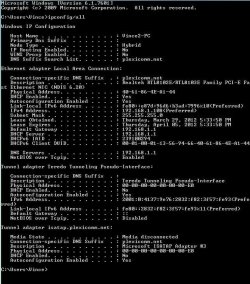
here is a screenshot of my ipconfig/all... I hope it can help
 

Attachments

  • Capture.JPG
    Capture.JPG
    117.8 KB · Views: 34

My Computer

OS
7 32bit
This problem can have many causes but it usually relates to a problem with the machine not being able to obtain a proper default gateway from the router.


This problem can usually be fixed by typing in the correct default gateway of the router into your Windows 7 network adaptor's IPv4 settings. You will need to know your router's default gateway for this which you can get from the routers set up page. Or by looking it up, depends on who makes the router.

The link shows you how to do this.
Windows 7 Unidentified Network, Limited Access, No Internet Connection Problem Resolved

If you are still having problems after this please post a screen shot of your ipconfig/all here and I'll have a look at it. :)

that was actually one of the methods I did try...not I necessarily saying did it right... as stated, I really don't know what I am doing...
here is a screenshot of my ipconfig/all... I hope it can help

Everything looks good there.

In the link I posted where it says to type in the default gateway into your IPv4 settings, use your default gateway for that, then hit the apply button and reboot.
192.168.1.1

If that doesn't work do this.

Lets try flushing DNS cache and renewing your IP.

Flush the DNS cache and restore MS's Hosts file ...
Copy and paste these lines in Note pad.

@Echo on
pushd\windows\system32\drivers\etc
attrib -h -s -r hosts
echo 127.0.0.1 localhost>HOSTS
attrib +r +h +s hosts
popd
ipconfig /release
ipconfig /renew
ipconfig /flushdns
netsh winsock reset all
netsh int ip reset all
shutdown -r -t 1
del %0

Save as flush.bat to your desktop. Right click on the flush.bat file to run it as Administrator.

Your computer will reboot itself.

The other possibility for this problem is that you installed iTunes which includes something called Bonjour, which also can cause the unidentified network issue.

To fix ...
Run MsConfig

Under the Services tab uncheck the service called "##Id_String1.6844[... and then a bunch of numbers]" by Apple

Reboot and problem solved

To get rid of Bonjour for good do this.
1. Navigate to C:\Program Files\Bonjour
2. Rename the mdnsNSP.dll file in that folder to mdnsNSP.old
3. Restart your computer
4. Delete the Program Files\Bonjour folder
 
Last edited:

My Computer

Computer type
PC/Desktop
Computer Manufacturer/Model Number
Home built
OS
Windows 7 Ult, Windows 8.1 Pro,
CPU
Q9650-4.275GHz, E8600 4.5GHz, E6750-3.8GHz
Motherboard
Evga 780i FTW
Memory
G.Skill PC2 9600 1200Mhz 5 5 5 15 2T
Graphics Card(s)
GTX480
Sound Card
Asus Xonar D2
Monitor(s) Displays
HannsG
Screen Resolution
1680X1050
Hard Drives
GSkill Phoenix Pro 120GB SSD
PSU
ThermalTake Toughpower 1000Watt modular
Case
ThermalTake XaserV
Cooling
Xigmatek S1283
Keyboard
Logitech G15
Mouse
Logitech G9
Internet Speed
T1
This problem can have many causes but it usually relates to a problem with the machine not being able to obtain a proper default gateway from the router.


This problem can usually be fixed by typing in the correct default gateway of the router into your Windows 7 network adaptor's IPv4 settings. You will need to know your router's default gateway for this which you can get from the routers set up page. Or by looking it up, depends on who makes the router.

The link shows you how to do this.
Windows 7 Unidentified Network, Limited Access, No Internet Connection Problem Resolved

If you are still having problems after this please post a screen shot of your ipconfig/all here and I'll have a look at it. :)

that was actually one of the methods I did try...not I necessarily saying did it right... as stated, I really don't know what I am doing...
here is a screenshot of my ipconfig/all... I hope it can help

Everything looks good there.

In the link I posted where it says to type in the default gateway into your IPv4 settings, use your default gateway for that, then hit the apply button and reboot.
192.168.1.1

If that doesn't work do this.

Lets try flushing DNS cache and renewing your IP.

Flush the DNS cache and restore MS's Hosts file ...
Copy and paste these lines in Note pad.

@Echo on
pushd\windows\system32\drivers\etc
attrib -h -s -r hosts
echo 127.0.0.1 localhost>HOSTS
attrib +r +h +s hosts
popd
ipconfig /release
ipconfig /renew
ipconfig /flushdns
netsh winsock reset all
netsh int ip reset all
shutdown -r -t 1
del %0

Save as flush.bat to your desktop. Right click on the flush.bat file to run it as Administrator.

Your computer will reboot itself.

nope... no change... still have an unidentified network with no internet access when we try to use the switch...
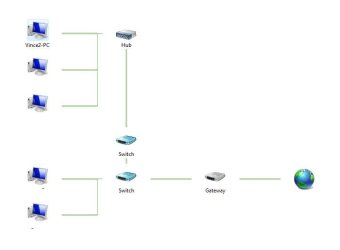
not sure if it matters, but apparently there are two switches and a hub between the gateway and our office( looked at the network map with the network cable plugged into my PC, then confirmed by tracing the cables through the building)
 

My Computer

OS
7 32bit
I listed another possibility that this could be a bonjour problem.

If you haven't installed anything from Apple recently you should be ok.

In your network you mention having two switches and a hub, now to me a hub is the same as a switch, do you mean a wireless access point or another router is being used as a hub or switch?
 

My Computer

Computer type
PC/Desktop
Computer Manufacturer/Model Number
Home built
OS
Windows 7 Ult, Windows 8.1 Pro,
CPU
Q9650-4.275GHz, E8600 4.5GHz, E6750-3.8GHz
Motherboard
Evga 780i FTW
Memory
G.Skill PC2 9600 1200Mhz 5 5 5 15 2T
Graphics Card(s)
GTX480
Sound Card
Asus Xonar D2
Monitor(s) Displays
HannsG
Screen Resolution
1680X1050
Hard Drives
GSkill Phoenix Pro 120GB SSD
PSU
ThermalTake Toughpower 1000Watt modular
Case
ThermalTake XaserV
Cooling
Xigmatek S1283
Keyboard
Logitech G15
Mouse
Logitech G9
Internet Speed
T1
I listed another possibility that this could be a bonjour problem.

If you haven't installed anything from Apple recently you should be ok.

In your network you mention having two switches and a hub, now to me a hub is the same as a switch, do you mean a wireless access point or another router is being used as a hub or switch?

here is a screenshot of the network map
the hub is strapped to the ceiling in our shipping dept. so I cant get a close look at it, but it is labeled "DUAL SPEED HUB" and has I think eight ports on it, the two switches are actually routers... there are at least 5 other computers on the network, that aren't showing up on the map( though I can see them on the network and share files too)
 

Attachments

  • Capture.JPG
    Capture.JPG
    25.7 KB · Views: 12

My Computer

OS
7 32bit
I listed another possibility that this could be a bonjour problem.

If you haven't installed anything from Apple recently you should be ok.

In your network you mention having two switches and a hub, now to me a hub is the same as a switch, do you mean a wireless access point or another router is being used as a hub or switch?

here is a screenshot of the network map
the hub is strapped to the ceiling in our shipping dept. so I cant get a close look at it, but it is labeled "DUAL SPEED HUB" and has I think eight ports on it, the two switches are actually routers... there are at least 5 other computers on the network, that aren't showing up on the map( though I can see them on the network and share files too)

Ok the two switches which are actually routers is not the way to go here.

Someone may have disabled DHCP on those two routers but often times this is not enough to get them working correctly as a switch. There are other settings that have to be correct for that to work and often times you end up with a less than reliable network with problems such as you are describing.

You only want a single router assigning DHCP per network, the other switches which are actually routers should just be switches.

If those switches are being used as wireless access points then you would need to make sure that DHCP is turned off on both of them and that DHCP is only enabled on the first router which shows up as the gateway.

If those two routers are being used as wired switches you would be much better off replacing those with regular gigabit switches.

If you can't access or replace the hardware you might try using the default gateway address from your main router, first router on the list and type in that routers default gateway into your IPv4 settings. The link below show you how.
http://pocketpccentral.net/blog/200...cess-no-internet-connection-problem-resolved/
 

My Computer

Computer type
PC/Desktop
Computer Manufacturer/Model Number
Home built
OS
Windows 7 Ult, Windows 8.1 Pro,
CPU
Q9650-4.275GHz, E8600 4.5GHz, E6750-3.8GHz
Motherboard
Evga 780i FTW
Memory
G.Skill PC2 9600 1200Mhz 5 5 5 15 2T
Graphics Card(s)
GTX480
Sound Card
Asus Xonar D2
Monitor(s) Displays
HannsG
Screen Resolution
1680X1050
Hard Drives
GSkill Phoenix Pro 120GB SSD
PSU
ThermalTake Toughpower 1000Watt modular
Case
ThermalTake XaserV
Cooling
Xigmatek S1283
Keyboard
Logitech G15
Mouse
Logitech G9
Internet Speed
T1
thanks... I checked to see if the other 2 computers coming off the same hub had the same issue(hooked up the switch we had in our office between their computers and the network)... same exact thing happened... unidentified network, no internet... so replacing the router "switches" with actual switches should solve this, then?
 

My Computer

OS
7 32bit
It's certainly a good start. There are ways to make a router work as a switch but it seems to create more problems than it solves.

I'd wouldn't set up a network that way and expect it to be very reliable, there are just too many variables when trying to use a router as a switch.
 

My Computer

Computer type
PC/Desktop
Computer Manufacturer/Model Number
Home built
OS
Windows 7 Ult, Windows 8.1 Pro,
CPU
Q9650-4.275GHz, E8600 4.5GHz, E6750-3.8GHz
Motherboard
Evga 780i FTW
Memory
G.Skill PC2 9600 1200Mhz 5 5 5 15 2T
Graphics Card(s)
GTX480
Sound Card
Asus Xonar D2
Monitor(s) Displays
HannsG
Screen Resolution
1680X1050
Hard Drives
GSkill Phoenix Pro 120GB SSD
PSU
ThermalTake Toughpower 1000Watt modular
Case
ThermalTake XaserV
Cooling
Xigmatek S1283
Keyboard
Logitech G15
Mouse
Logitech G9
Internet Speed
T1
It's certainly a good start. There are ways to make a router work as a switch but it seems to create more problems than it solves.

I'd wouldn't set up a network that way and expect it to be very reliable, there are just too many variables when trying to use a router as a switch.

I'll have to talk to my boss when he gets back, see what we can do about replacing the routers... to my understanding, our network was sort of pieced together bit by bit as we needed more people on it, and I imagine they used routers because of availability and/or because they didn't know the difference between a router and a switch(heck, I didn't know the difference until last week)
 

My Computer

OS
7 32bit
Back
Top