Unknown Router displaying on my Network

Track7

New member
I have a home network connecting 4 computers, 2 print servers, and a media bridge to a Linksys wireless router. Pretty much the same setup from XP to Vista to Win7.

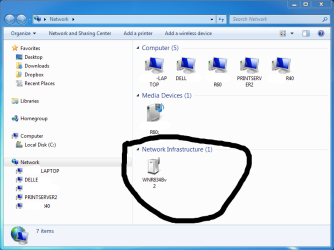
After installing Windows 7 x64, I am seeing a device under the category "Infrastructure (1)" on my Windows Network screen. It identifies itself as "WNR843Bv" - a Netgear router - which is definitely NOT a device on my network! Maybe it belongs to a neighbor, I can't verify this. Other than this - the network is functioning as expected.

I use WPA2 encryption and MAC Address filtering on my Linksys router, so I am (reasonably) confident that this device is not connected to my network. However, I am not comfortable with this.

Can anyone help me understand :

(1) What is an "Infrastructure (1) device?
(2) Why is it showing up on my Network screen in Windows 7?
(3) How can I get rid of it?

Thanks.
 

My Computer

Computer Manufacturer/Model Number
Lenovo ThinkPad R60
OS
Windows 7 64 bit
BUMP!

I attached a screenshot to illustrate the problem. The mysterious network device is circled. Thanks!
 

Attachments

  • Network_Screenshot.png
    Network_Screenshot.png
    116.7 KB · Views: 476

My Computer

Computer Manufacturer/Model Number
Lenovo ThinkPad R60
OS
Windows 7 64 bit
That's your router. I'm willing to bet 20:1 that you installed a 3rd party Linux based firmware on it, right? Something like DD-WRT? I dunno really though. Just a guess.
 

My Computer

Computer Manufacturer/Model Number
self built
OS
7600.20510 x86
CPU
P4 550 3.4 GHz HT running at 3.5 GHz
Motherboard
MSI PM8M3-V (MS-7211 v1.x) Micro-ATX mainboard
Memory
OCZ 2 GB(2x1GB) DDR400mHz running @ 414 mHz
Graphics Card(s)
HIS Radeon HD 3850 IceQ 3 Turbo HDMI Dual DL-DVI AGP
Sound Card
MOTU Traveler firewire studio interface 192 kHz 24 bit
Monitor(s) Displays
22" widescreen Acer X223W LCD, 17" Compaq P75 CRT
Screen Resolution
1680x1050 and 1280x1024
Hard Drives
SATA I x2 WD, 400 GB and 120 GB, SATA 2 WD Caviar Black 1 TB
PSU
350W generic
Case
Cybertronpc, it glows blue
Cooling
stock cpu fan, Ice-Q 3 gpu and system, many case fans
Keyboard
Logitch Classical Keyboard 200
Mouse
Logitech Mediaplay cordless
Internet Speed
1792/448 kbits/sec
Other Info
SATA II PCI fake RAID adapter, 1 GB Readyboost, original ATI Remote Wonder (even works with WMC perfectly), Logitech Rumblepad 2 game controller x2
That's your router. I'm willing to bet 20:1 that you installed a 3rd party Linux based firmware on it, right? Something like DD-WRT? I dunno really though. Just a guess.

You can put your $20 bill away! :geek: I appreciate any assistance!

You're partially right - I do have 3rd party firmware on MY Linksys router - however, the device showing as "Infrastructure (1)" is not my router. How do I know this?

(1) When I do Right Click > Properties on the device in My Network, it reveals its MAC Address, and that it's a Netgear RangeMax Wireless-N Router - which I do not own.

(2) I did a WiFi scan with inSSIDer (cool app.) and it clearly identifies that one of my neighbors is using this Netgear Router on his network. inSSIDER identifies it by the MAC Address, so I am pretty sure this is the router.

(3) My wireless network is locked down with WPA and MAC Filtering. I use Channel 1. The neighbor's wireless router uses WEP and is on Channel 11.

So, why is this device displaying as "Infrastructure (1)" on my network?
 

My Computer

Computer Manufacturer/Model Number
Lenovo ThinkPad R60
OS
Windows 7 64 bit
Hi Track7

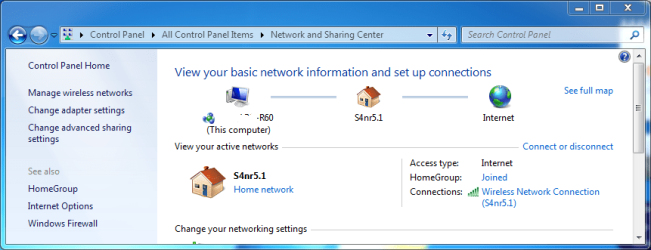
Can you repost your network configuration as shown below. You've stated that you have 3rd party firmware installed on your router - it is possible that this is where the problem lies and it is actually your router which is being mis-identified.
Capture.PNG
 

My Computer

Computer type
PC/Desktop
Computer Manufacturer/Model Number
Dwarf Dwf/11/2012 r09/2013
OS
Windows 8.1 Pro RTM x64
CPU
Intel Core-i5-3570K 4-core @ 3.4GHz (Ivy Bridge) (OC 4.4GHz)
Motherboard
ASRock Z77 Extreme4-M
Memory
4 x 4GB DDR3-1600 Corsair Vengeance CMZ8GX3M2A1600C9B (16GB)
Graphics Card(s)
MSI GeForce GTX770 Gaming OC 2GB
Sound Card
Realtek High Definition on board solution (ALC 898)
Monitor(s) Displays
ViewSonic VA1912w Widescreen (VGA)
Screen Resolution
1440x900
Hard Drives
OCZ Agility 3 SSD 120GB SATA III x2 (RAID 0)
Samsung HD501LJ 500GB SATA II x2
Hitachi HDS721010CLA332 1TB SATA II
Iomega 1.5TB Ext USB 2.0
WD 2.0TB Ext USB 3.0
PSU
XFX Pro Series 850W Semi-Modular
Case
Gigabyte IF233
Cooling
1 x 120mm Front Inlet 1 x 120mm Rear Exhaust
Keyboard
Microsoft Comfort Curve Keyboard 3000 (USB)
Mouse
Microsoft Comfort Mouse 3000 for Business (USB)
Internet Speed
NetGear DG834Gv3 ADSL Modem/Router (Ethernet) ~4.0 Mb/s (O2)
Antivirus
Avast! 8.0.1497
Browser
IE 11
Other Info
Optical Drive: HL-DT-ST BD-RE BH10LS30 SATA Bluray
Lexmark S305 Printer/Scanner/Copier (USB)
WEI Score: 8.1/8.1/8.5/8.5/8.25
Asus Eee PC 1011PX Netbook (Windows 7 x86 Starter)
Thanks Dwarf

Here is my network configuration:
 

Attachments

  • Network_Center.png
    Network_Center.png
    113.1 KB · Views: 230

My Computer

Computer Manufacturer/Model Number
Lenovo ThinkPad R60
OS
Windows 7 64 bit
A couple of questions

Are you in a highly populated area?

Is your router set to the default settings?

What i am thinking is that this could be a neighbour's router that is set with the default IP address range. There is also a chance that the SSID could be the same - a lot of people call the network something such as Home or Wireless and the chance is there that two nearby systems could be named the same - this is more likely when the routers are from the same manufacturer and are left at default
 

My Computers

System One System Two

  • Computer type
    PC/Desktop
    Computer Manufacturer/Model Number
    ChillBlast - Custom to my design
    OS
    Windows 11 Pro x64 [Latest Release and Release Preview]
    CPU
    Ryzen 9 5950X, 3.8 - 5.2 MHz
    Motherboard
    Asus Prime X570-Pro
    Memory
    64GB [2 x 32GB] DDR4 3200MHz
    Graphics Card(s)
    4GB NVIDIA GEFORCE GTX 1650 Ti
    Sound Card
    On-board SPDIF to 5.1 System + HDMI [5.1 system]
    Monitor(s) Displays
    32" UHD 32 Bit HDR Monitor + 43" UHD 4K 32Bit HDR TV
    Screen Resolution
    2 x 3840 x 2160 @60Hz
    Hard Drives
    1TB M2 SSD OS, 500GB Fast Access SSD, 2 x 8TB Data + Various Externals from 1TB to 4TB, 10TB NAS
    PSU
    NZXT C750 80 PLUS Gold 750W Modular PSU
    Case
    Workstation Case [Matt Black]
    Cooling
    NZXT Kraken X63 280mm CPU Cooler +2x Quiet Case fans
    Keyboard
    Logitech Wireless MX Keys & K400 + others
    Mouse
    Logitech Wireless MX Master 3S
    Internet Speed
    920 MB Down 50 MB Up
    Antivirus
    BitDefender Total Security Pro
    Browser
    Chrome (always run latest Non-Beta)
    Other Info
    Also run ...
    Laptop - Quad 8GB - Windows 10 Pro x64
    Nexus 7 Android tablet x2
    Samsung 10.2" tablet
    Blackview TAB 8 4G Android Tablet c/w Keyboard
    Wacom Intuos Pro Medium Pen Pad
    Wacom Intuos Pro Small Pen Pad
    Wacom Expresskeys Remote
    Loopdeck+ Graphics Controller
    Shuttle Pro v2 Control
  • Computer type
    Laptop
    System Manufacturer/Model Number
    Dell XPS 17 10750H
    OS
    Windows 11 Pro x64 Latest RP
    CPU
    Intel I7 10750H 5.0GHz
    Motherboard
    Dell XPS
    Memory
    32GB [2x16GB] DDR4 2933 MHz
    Graphics Card(s)
    nVidia GTX1650Ti 4 GB GDDR6
    Sound Card
    Stock [Realtek] 4 Speaker
    Monitor(s) Displays
    17" IPS UHD+ Infinity Edge Touchscreen
    Screen Resolution
    3840 x 2400
    Hard Drives
    2TB M2 NVMe, 4TB External + various 500GB & 1TB External NVMe (also have access to spinner HDD from
    PSU
    Stock
    Case
    Stock XPS Aluminium & Carbon Fibre
    Cooling
    Stock - Active Fan Control
    Keyboard
    Backlit + Various Logitech
    Mouse
    Stock Track Pad + Logitech MX Trackball
    Internet Speed
    72 MB Down 18MB Up
    Browser
    Chrome
    Other Info
    Also run ...
    Laptop - Quad 8GB - Windows 10 Pro x64
    Nexus 7 Android tablet x2
    10.2" tablet
    Sony Z3 Android Smartphone
    Wacom Intuos Pro Medium Pen Pad
    Wacom Intuos Pro Small Pen Pad
    Wacom Expresskeys Remote
    Loopdeck+ Graphics Controller
    Shuttle Pro v2 Control Pad
    10TB NAS
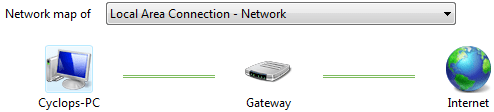
Can you repost your network layout - this time click on See full map.
 

My Computer

Computer type
PC/Desktop
Computer Manufacturer/Model Number
Dwarf Dwf/11/2012 r09/2013
OS
Windows 8.1 Pro RTM x64
CPU
Intel Core-i5-3570K 4-core @ 3.4GHz (Ivy Bridge) (OC 4.4GHz)
Motherboard
ASRock Z77 Extreme4-M
Memory
4 x 4GB DDR3-1600 Corsair Vengeance CMZ8GX3M2A1600C9B (16GB)
Graphics Card(s)
MSI GeForce GTX770 Gaming OC 2GB
Sound Card
Realtek High Definition on board solution (ALC 898)
Monitor(s) Displays
ViewSonic VA1912w Widescreen (VGA)
Screen Resolution
1440x900
Hard Drives
OCZ Agility 3 SSD 120GB SATA III x2 (RAID 0)
Samsung HD501LJ 500GB SATA II x2
Hitachi HDS721010CLA332 1TB SATA II
Iomega 1.5TB Ext USB 2.0
WD 2.0TB Ext USB 3.0
PSU
XFX Pro Series 850W Semi-Modular
Case
Gigabyte IF233
Cooling
1 x 120mm Front Inlet 1 x 120mm Rear Exhaust
Keyboard
Microsoft Comfort Curve Keyboard 3000 (USB)
Mouse
Microsoft Comfort Mouse 3000 for Business (USB)
Internet Speed
NetGear DG834Gv3 ADSL Modem/Router (Ethernet) ~4.0 Mb/s (O2)
Antivirus
Avast! 8.0.1497
Browser
IE 11
Other Info
Optical Drive: HL-DT-ST BD-RE BH10LS30 SATA Bluray
Lexmark S305 Printer/Scanner/Copier (USB)
WEI Score: 8.1/8.1/8.5/8.5/8.25
Asus Eee PC 1011PX Netbook (Windows 7 x86 Starter)
If this device is not yours than it's your neighbour's. Why not go around and ask them. Btw, can u disabled it?
 

My Computer

Computer Manufacturer/Model Number
Lenovo ThinkPad T60
OS
Windows 7 Ultimate 64Bit
CPU
GenuineIntel Intel(R) Core(TM) DuoCore T2400 @ 1.83GHz
Motherboard
Intel(R) 82801G (ICH7 Family)
Memory
2.00 GB
Graphics Card(s)
Mobile Intel(R) 945 Express Chipset
Sound Card
SoundMAX Integrated Digital HD Audio
Monitor(s) Displays
ThinkPad Display
Screen Resolution
1400x1050
Hard Drives
100Gb SATA
Keyboard
Standard Keyboard
Mouse
HID-compliant Mouse
Internet Speed
Cable Broadband - 54Mbps
Other Info
Intel(R) PRO/1000 PL Network Connection
11a/b/g Wireless LAN Mini PCI Express Adapter
A couple of questions

Are you in a highly populated area?

Is your router set to the default settings?

What i am thinking is that this could be a neighbour's router that is set with the default IP address range. There is also a chance that the SSID could be the same - a lot of people call the network something such as Home or Wireless and the chance is there that two nearby systems could be named the same - this is more likely when the routers are from the same manufacturer and are left at default

I detected more than 10 other wireless networks here, so YES -- it's a highly populated area. Neither my router nor the neighbor's are set at default. We both have different customized SSID names, mine uses WPA - his WEP. Mine is a Linksys, his is a Netgear.

If this device is not yours than it's your neighbour's. Why not go around and ask them. Btw, can u disabled it?
aem: I have talked to my neighbor, and confirmed that I am seeing his router on my network. I can't ask him to shut it off - it is HIS device, and it feeds HIS network. I am seeking to learn why Win7 is showing this particular device as Infrastructure (1) on MY network - while ignoring 8 or 9 other routers in the vicinity. The neighbor is a nice guy, but I'd feel much better (and secure) if my network only listed devices I control.

Thanks
 

My Computer

Computer Manufacturer/Model Number
Lenovo ThinkPad R60
OS
Windows 7 64 bit
I would suggest that you change the working IP range of one of the routers - probably yours would be the easier ;).

I think the two systems are using the same range so your network is "discovering" the device as it's whithin the IP range for it's segment.

If you are using DHCP simply go into the router and change the settings from 192.168.001.001 to 255 to something like 192.168.010 001 to 255.

You should find that once you reboot all your devices the issue will be gone
 

My Computers

System One System Two

  • Computer type
    PC/Desktop
    Computer Manufacturer/Model Number
    ChillBlast - Custom to my design
    OS
    Windows 11 Pro x64 [Latest Release and Release Preview]
    CPU
    Ryzen 9 5950X, 3.8 - 5.2 MHz
    Motherboard
    Asus Prime X570-Pro
    Memory
    64GB [2 x 32GB] DDR4 3200MHz
    Graphics Card(s)
    4GB NVIDIA GEFORCE GTX 1650 Ti
    Sound Card
    On-board SPDIF to 5.1 System + HDMI [5.1 system]
    Monitor(s) Displays
    32" UHD 32 Bit HDR Monitor + 43" UHD 4K 32Bit HDR TV
    Screen Resolution
    2 x 3840 x 2160 @60Hz
    Hard Drives
    1TB M2 SSD OS, 500GB Fast Access SSD, 2 x 8TB Data + Various Externals from 1TB to 4TB, 10TB NAS
    PSU
    NZXT C750 80 PLUS Gold 750W Modular PSU
    Case
    Workstation Case [Matt Black]
    Cooling
    NZXT Kraken X63 280mm CPU Cooler +2x Quiet Case fans
    Keyboard
    Logitech Wireless MX Keys & K400 + others
    Mouse
    Logitech Wireless MX Master 3S
    Internet Speed
    920 MB Down 50 MB Up
    Antivirus
    BitDefender Total Security Pro
    Browser
    Chrome (always run latest Non-Beta)
    Other Info
    Also run ...
    Laptop - Quad 8GB - Windows 10 Pro x64
    Nexus 7 Android tablet x2
    Samsung 10.2" tablet
    Blackview TAB 8 4G Android Tablet c/w Keyboard
    Wacom Intuos Pro Medium Pen Pad
    Wacom Intuos Pro Small Pen Pad
    Wacom Expresskeys Remote
    Loopdeck+ Graphics Controller
    Shuttle Pro v2 Control
  • Computer type
    Laptop
    System Manufacturer/Model Number
    Dell XPS 17 10750H
    OS
    Windows 11 Pro x64 Latest RP
    CPU
    Intel I7 10750H 5.0GHz
    Motherboard
    Dell XPS
    Memory
    32GB [2x16GB] DDR4 2933 MHz
    Graphics Card(s)
    nVidia GTX1650Ti 4 GB GDDR6
    Sound Card
    Stock [Realtek] 4 Speaker
    Monitor(s) Displays
    17" IPS UHD+ Infinity Edge Touchscreen
    Screen Resolution
    3840 x 2400
    Hard Drives
    2TB M2 NVMe, 4TB External + various 500GB & 1TB External NVMe (also have access to spinner HDD from
    PSU
    Stock
    Case
    Stock XPS Aluminium & Carbon Fibre
    Cooling
    Stock - Active Fan Control
    Keyboard
    Backlit + Various Logitech
    Mouse
    Stock Track Pad + Logitech MX Trackball
    Internet Speed
    72 MB Down 18MB Up
    Browser
    Chrome
    Other Info
    Also run ...
    Laptop - Quad 8GB - Windows 10 Pro x64
    Nexus 7 Android tablet x2
    10.2" tablet
    Sony Z3 Android Smartphone
    Wacom Intuos Pro Medium Pen Pad
    Wacom Intuos Pro Small Pen Pad
    Wacom Expresskeys Remote
    Loopdeck+ Graphics Controller
    Shuttle Pro v2 Control Pad
    10TB NAS
I didnt say to ask him to shut his device down, lol, i said could u do it on your machine, as to get rid of it.

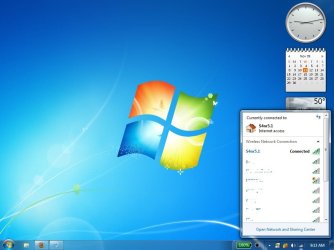
As far as detection is concern, it might not be him that is accessing your network, rather you accessing his. Cos after all, you are able to connect to that device in some form. What's in your internet connections (bottom right sign icon), screenshot it.
 

My Computer

Computer Manufacturer/Model Number
Lenovo ThinkPad T60
OS
Windows 7 Ultimate 64Bit
CPU
GenuineIntel Intel(R) Core(TM) DuoCore T2400 @ 1.83GHz
Motherboard
Intel(R) 82801G (ICH7 Family)
Memory
2.00 GB
Graphics Card(s)
Mobile Intel(R) 945 Express Chipset
Sound Card
SoundMAX Integrated Digital HD Audio
Monitor(s) Displays
ThinkPad Display
Screen Resolution
1400x1050
Hard Drives
100Gb SATA
Keyboard
Standard Keyboard
Mouse
HID-compliant Mouse
Internet Speed
Cable Broadband - 54Mbps
Other Info
Intel(R) PRO/1000 PL Network Connection
11a/b/g Wireless LAN Mini PCI Express Adapter
I would suggest that you change the working IP range of one of the routers - probably yours would be the easier ;).

I think the two systems are using the same range so your network is "discovering" the device as it's whithin the IP range for it's segment.

If you are using DHCP simply go into the router and change the settings from 192.168.001.001 to 255 to something like 192.168.010 001 to 255.

You should find that once you reboot all your devices the issue will be gone

Thanks Barman58 - it seemed like a logical thing to try!

I changed MY router's local IP Address from 192.168.0.1 to 192.168.10.1 and rebooted the router. Then I changed the static address on my laptop from 192.168.0.x to 192.168.10.x - and rebooted.

Unfortunately, the undesired router continues to be displayed as Infrastructure (1) on my network.
 

My Computer

Computer Manufacturer/Model Number
Lenovo ThinkPad R60
OS
Windows 7 64 bit
Try going to Change Advanced sharing settings>Home Network and disable network discovery.

Then run gpedit.msc go to Computer Configuration>Windows Settings>Security Settings>Network List Manager Policies Under Network Name enter the name of your network and under Unidentified and Identifying networks set to private.. reboot
 

My Computer

Computer Manufacturer/Model Number
Home Built
OS
Windows 7 Ultimate x64 RTM
CPU
AMD Athlon II X2 240 @ 3.2Ghz
Motherboard
Gigabyte GA-MA785GMT-UD2H
Memory
6GB Mushkin DDR3 PC-1333
Graphics Card(s)
ATI Radeon HD 4200 IGP Hybrid CrossFireX w\ Sapphire HD3450
Sound Card
Onboard Realtek HD audio controller
Monitor(s) Displays
D-SUB: LG W2343T-PF 23" LCD HDMI: LG 32LH20 32" LCD
Screen Resolution
1920*1080
Hard Drives
WD Caviar Green 1TB SATA3
PSU
Cooler Master Elite Power 400W
Case
Cooler Master Elite 360
Cooling
AMD Stock :)
Keyboard
Crappy wirelss logitech
Mouse
crappy wireless logitech
Internet Speed
792k
I didnt say to ask him to shut his device down, lol, i said could u do it on your machine, as to get rid of it.

As far as detection is concern, it might not be him that is accessing your network, rather you accessing his. Cos after all, you are able to connect to that device in some form. What's in your internet connections (bottom right sign icon), screenshot it.

Here is a screenshot. It shows that I am only connected to one network - S4nr5.1 - which is mine. The 2nd network on the list (it starts with the letter "p") is the one with the Netgear Router that comes up as Infrastructure (1) on My Network. According to internet connections, I am not connected to it.

I am stumped. Thanks.
 

Attachments

  • networks.jpg
    networks.jpg
    125.3 KB · Views: 210

My Computer

Computer Manufacturer/Model Number
Lenovo ThinkPad R60
OS
Windows 7 64 bit
What concerns me more is that some of your machines aren't even showing up as officially connected to the network map. That usually indicates a problem.

I would completely reassemble the network starting from square one. All of your networked machines should be part of the network string on that map. Unless you have them outside your network for some reason?

As for figuring out if that netgear router is using your internet connection use wireshark to map all the network machines using your network.
http://www.wireshark.org/
 
Last edited:

My Computer

Computer type
PC/Desktop
Computer Manufacturer/Model Number
Home built
OS
Windows 7 Ult, Windows 8.1 Pro,
CPU
Q9650-4.275GHz, E8600 4.5GHz, E6750-3.8GHz
Motherboard
Evga 780i FTW
Memory
G.Skill PC2 9600 1200Mhz 5 5 5 15 2T
Graphics Card(s)
GTX480
Sound Card
Asus Xonar D2
Monitor(s) Displays
HannsG
Screen Resolution
1680X1050
Hard Drives
GSkill Phoenix Pro 120GB SSD
PSU
ThermalTake Toughpower 1000Watt modular
Case
ThermalTake XaserV
Cooling
Xigmatek S1283
Keyboard
Logitech G15
Mouse
Logitech G9
Internet Speed
T1
Wireless transmission between your router and the transceiver on your machine takes place over one of several frequency channels. Have you tried using a different channel?
 

My Computer

Computer type
PC/Desktop
Computer Manufacturer/Model Number
Dwarf Dwf/11/2012 r09/2013
OS
Windows 8.1 Pro RTM x64
CPU
Intel Core-i5-3570K 4-core @ 3.4GHz (Ivy Bridge) (OC 4.4GHz)
Motherboard
ASRock Z77 Extreme4-M
Memory
4 x 4GB DDR3-1600 Corsair Vengeance CMZ8GX3M2A1600C9B (16GB)
Graphics Card(s)
MSI GeForce GTX770 Gaming OC 2GB
Sound Card
Realtek High Definition on board solution (ALC 898)
Monitor(s) Displays
ViewSonic VA1912w Widescreen (VGA)
Screen Resolution
1440x900
Hard Drives
OCZ Agility 3 SSD 120GB SATA III x2 (RAID 0)
Samsung HD501LJ 500GB SATA II x2
Hitachi HDS721010CLA332 1TB SATA II
Iomega 1.5TB Ext USB 2.0
WD 2.0TB Ext USB 3.0
PSU
XFX Pro Series 850W Semi-Modular
Case
Gigabyte IF233
Cooling
1 x 120mm Front Inlet 1 x 120mm Rear Exhaust
Keyboard
Microsoft Comfort Curve Keyboard 3000 (USB)
Mouse
Microsoft Comfort Mouse 3000 for Business (USB)
Internet Speed
NetGear DG834Gv3 ADSL Modem/Router (Ethernet) ~4.0 Mb/s (O2)
Antivirus
Avast! 8.0.1497
Browser
IE 11
Other Info
Optical Drive: HL-DT-ST BD-RE BH10LS30 SATA Bluray
Lexmark S305 Printer/Scanner/Copier (USB)
WEI Score: 8.1/8.1/8.5/8.5/8.25
Asus Eee PC 1011PX Netbook (Windows 7 x86 Starter)
Changing channels would probably get rid of the rogue netgear router connection but that doesn't explain this strange network map which seems to have all the wired computers not included or being mapped. This isn't right.


My Computer

Computer type
PC/Desktop
Computer Manufacturer/Model Number
Home built
OS
Windows 7 Ult, Windows 8.1 Pro,
CPU
Q9650-4.275GHz, E8600 4.5GHz, E6750-3.8GHz
Motherboard
Evga 780i FTW
Memory
G.Skill PC2 9600 1200Mhz 5 5 5 15 2T
Graphics Card(s)
GTX480
Sound Card
Asus Xonar D2
Monitor(s) Displays
HannsG
Screen Resolution
1680X1050
Hard Drives
GSkill Phoenix Pro 120GB SSD
PSU
ThermalTake Toughpower 1000Watt modular
Case
ThermalTake XaserV
Cooling
Xigmatek S1283
Keyboard
Logitech G15
Mouse
Logitech G9
Internet Speed
T1
Back
Top