
To whom this may concern:
Not very important topic, but bothering all the same.
When I bought my computer a short while ago, it came loaded with quite an array of programs apart from Windows 7. Some were useful, others less so. Some I discarded, others I kept. Among the latter, a 'starter' set of Microsoft Office 2010 - in fact a somewhat reduced version of Word, which is more than sufficient for me.
The set also came with an offer from Microsoft to buy the full Office 2010 package "online". The user could either use the offer (to buy) or activate the package (after buying it) by opening a small program - in fact a launcher - called "Microsoft Click To Run 2010", which displayed both options.
Since I am not at all interested in acquiring this software, I wanted at least to get rid of the launcher. The properties of the shortcut triggering the launcher pointed to nothing and trying to go to the target folder only pointed to... another shortcut. Finally, I discovered a possible location, bearing the same name.
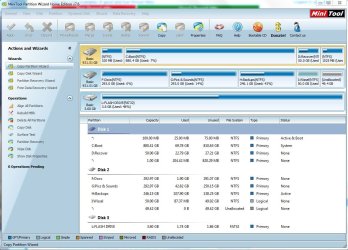
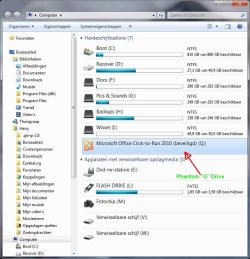
It was a whole drive partition, which carried the "Microsoft Click-to-Run" name and had been given the drive letter "Q" (which is indeed missing from the list of available drive letters). However, except under "My Computer" and Windows Explorer, that partition as such is nowhere to be found in order to get rid of it if only to recuperate the drive letter. It's not to be found under "Disk Management" in "Computer Management" and not in MiniTools Partition Wizard (far better than what comes with the OS!).
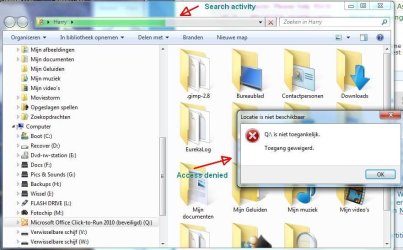
And when you click in Windows Explorer on that "partition", you get an error message saying: "Q not accessible (protected) / Access denied", while the green search bar on top of the window seems to be looking for something.
Now, my question.
How can I get rid of the unwanted and unasked for thing or at least empty it? It's not that it takes much space (the "partition" properties say 0 bytes - but I doubt it). And it's not a big deal as such. But it's just something that's in the way and it bothers me to know that an item has been installed on my computer which I don't want and that I can't discard.
And if you can give me a succinct explanation why this "partition" appears is there and then not there, so much the better.
Attached some screenshots to prove my point.
Can someone help? Thanks.
haku7
Not very important topic, but bothering all the same.
When I bought my computer a short while ago, it came loaded with quite an array of programs apart from Windows 7. Some were useful, others less so. Some I discarded, others I kept. Among the latter, a 'starter' set of Microsoft Office 2010 - in fact a somewhat reduced version of Word, which is more than sufficient for me.
The set also came with an offer from Microsoft to buy the full Office 2010 package "online". The user could either use the offer (to buy) or activate the package (after buying it) by opening a small program - in fact a launcher - called "Microsoft Click To Run 2010", which displayed both options.
Since I am not at all interested in acquiring this software, I wanted at least to get rid of the launcher. The properties of the shortcut triggering the launcher pointed to nothing and trying to go to the target folder only pointed to... another shortcut. Finally, I discovered a possible location, bearing the same name.
It was a whole drive partition, which carried the "Microsoft Click-to-Run" name and had been given the drive letter "Q" (which is indeed missing from the list of available drive letters). However, except under "My Computer" and Windows Explorer, that partition as such is nowhere to be found in order to get rid of it if only to recuperate the drive letter. It's not to be found under "Disk Management" in "Computer Management" and not in MiniTools Partition Wizard (far better than what comes with the OS!).
And when you click in Windows Explorer on that "partition", you get an error message saying: "Q not accessible (protected) / Access denied", while the green search bar on top of the window seems to be looking for something.
Now, my question.
How can I get rid of the unwanted and unasked for thing or at least empty it? It's not that it takes much space (the "partition" properties say 0 bytes - but I doubt it). And it's not a big deal as such. But it's just something that's in the way and it bothers me to know that an item has been installed on my computer which I don't want and that I can't discard.
And if you can give me a succinct explanation why this "partition" appears is there and then not there, so much the better.
Attached some screenshots to prove my point.
Can someone help? Thanks.
haku7
Attachments

My Computer
At a glance
Microsoft Windows 7 Home Premium 64-bits 7601...AMD A8-5500 APU with Radeon(tm) HD Graphics4,00 GB Usable 3,48 GB(1) AMD Radeon HD 7560D + 7670 Dual Graphics ...
- Computer type
- PC/Desktop
- Computer Manufacturer/Model Number
- Medion
- OS
- Microsoft Windows 7 Home Premium 64-bits 7601 Multiprocessor Free Service Pack 1
- CPU
- AMD A8-5500 APU with Radeon(tm) HD Graphics
- Motherboard
- MEDION MS-7800
- Memory
- 4,00 GB Usable 3,48 GB
- Graphics Card(s)
- (1) AMD Radeon HD 7560D + 7670 Dual Graphics (2) AMD Radeo
- Sound Card
- (1) AMD High Definition Audio Device (2) Realtek Hi Def Aud
- Screen Resolution
- 1680 x 1050 x 32 bits (4294967296 colors) @ 60 Hz
- Hard Drives
- (1) WDC WD10 EARX-00N0YB0 SATA Disk Device (2) Generic- Compact Flash USB Device (3) Generic- SD/MMC/MS PRO USB Device (4) Generic- SM/xD-Picture USB Device (5) Maxtor OneTouch USB Device (6) ST1000DM 003-9YN162 USB Device (7) TDKMedia Tr
- Browser
- Google Chrome


