
Updates and NVIDIA Driver not installing

Resprune

New member
Local time
9:23 PM
Messages
10
Location
Grand Est
After installing and activating windows 7 with struggles, I try to install my graphic driver for my GeForce GTX 750 Ti. It says "An unknown error has occured", same for GeForce Experience. I then try to launch Windows updates, after installing updates, it automatically redirects me to the startup repair, after which, I seem to have lost my download files before the updates and the update are gone they all have failed.

Does anyone know how to fix all of these issues I tried simplex, but it seems like Winrepair where has been occurred which doesn't seem to have done anything.

I really don't want to try to reinstall Windows yet again and I can't even install discord or any applications right now I cannot do any updates please help as soon as possible

Forgot to mention that I can't even solve windows with an MBR partition even when the USB is MBR I keep getting GPT.
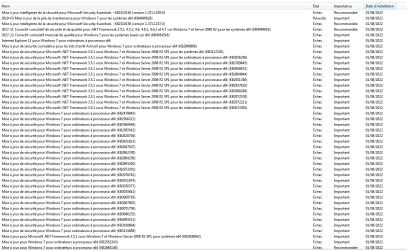
image.pngAfter these updates, my pc goes in startup repair automatically, and then they all fail, and it goes back to a restored savepoint or smth
 
Last edited:

My Computers

System One System Two

  • Computer type
    PC/Desktop
    Computer Manufacturer/Model Number
    custom build
    OS
    Windows 7 Professional x64
    CPU
    AMD Ryzen 5 1500X Quad-Core Processor
    Motherboard
    ASUS PRIME A320M-K
    Memory
    8gb
    Graphics Card(s)
    GeForce GTX 750 Ti
    Hard Drives
    SSD - 500Gb
    HDD - 2Tb
    Antivirus
    N/A
    Browser
    Google Chrome
  • Computer type
    PC/Desktop
you have to install the driver using the manual search.
After installing and activating windows 7 with struggles, I try to install my graphic driver for my GeForce GTX 750 Ti. It says "An unknown error has occured", same for GeForce Experience. I then try to launch Windows updates, after installing updates, it automatically redirects me to the startup repair, after which, I seem to have lost my download files before the updates and the update are gone they all have failed.

Does anyone know how to fix all of these issues I tried simplex, but it seems like Winrepair where has been occurred which doesn't seem to have done anything.

I really don't want to try to reinstall Windows yet again and I can't even install discord or any applications right now I cannot do any updates please help as soon as possible

Forgot to mention that I can't even solve windows with an MBR partition even when the USB is MBR I keep getting GPT.
View attachment 421875After these updates, my pc goes in startup repair automatically, and then they all fail, and it goes back to a restored savepoint or smth
 

My Computers

System One System Two

  • Computer type
    PC/Desktop
    Computer Manufacturer/Model Number
    ASUS
    OS
    Windows 7 Home Premium x64
    CPU
    i5 9400F
    Motherboard
    ASUS Prime Z390-P
    Memory
    16GB DDR4 4X4GB 3200MHz
    Graphics Card(s)
    Nvidia GeForce GTX 970
    Monitor(s) Displays
    Dell Ultrasharp 2007WFPb
    Screen Resolution
    1600x1200
    Hard Drives
    1TB Samsung 870 evo
    PSU
    EVGA Supernova 1000 GT
    Case
    Viper GX ATX
    Cooling
    Noctua NH-D15
    Keyboard
    Frutiger Aero
    Mouse
    HP M-UAE96
    Internet Speed
    900 MBPS download l 880 MBPS upload
    Antivirus
    Microsoft Security Essentials
    Browser
    Supermium
  • Computer type
    PC/Desktop
you have to install the driver using the manual search.

It's what I did though, I tried both manual and geforce experience, none of them work, it just does "An unknown error has occured"

Concerning Windows update, no luck either, even with Simplix.
 

My Computers

System One System Two

  • Computer type
    PC/Desktop
    Computer Manufacturer/Model Number
    custom build
    OS
    Windows 7 Professional x64
    CPU
    AMD Ryzen 5 1500X Quad-Core Processor
    Motherboard
    ASUS PRIME A320M-K
    Memory
    8gb
    Graphics Card(s)
    GeForce GTX 750 Ti
    Hard Drives
    SSD - 500Gb
    HDD - 2Tb
    Antivirus
    N/A
    Browser
    Google Chrome
  • Computer type
    PC/Desktop
that's not a good sign, can you send a picture of the graphics card
It's what I did though, I tried both manual and geforce experience, none of them work, it just does "An unknown error has occured"

Concerning Windows update, no luck either, even with Simplix.
 

My Computers

System One System Two

  • Computer type
    PC/Desktop
    Computer Manufacturer/Model Number
    ASUS
    OS
    Windows 7 Home Premium x64
    CPU
    i5 9400F
    Motherboard
    ASUS Prime Z390-P
    Memory
    16GB DDR4 4X4GB 3200MHz
    Graphics Card(s)
    Nvidia GeForce GTX 970
    Monitor(s) Displays
    Dell Ultrasharp 2007WFPb
    Screen Resolution
    1600x1200
    Hard Drives
    1TB Samsung 870 evo
    PSU
    EVGA Supernova 1000 GT
    Case
    Viper GX ATX
    Cooling
    Noctua NH-D15
    Keyboard
    Frutiger Aero
    Mouse
    HP M-UAE96
    Internet Speed
    900 MBPS download l 880 MBPS upload
    Antivirus
    Microsoft Security Essentials
    Browser
    Supermium
  • Computer type
    PC/Desktop
that's not a good sign, can you send a picture of the graphics card
Okay the issue seems solved now, but there's an issue now where on my azerty keyboard whenever I type ^ it types it twice.
 

My Computers

System One System Two

  • Computer type
    PC/Desktop
    Computer Manufacturer/Model Number
    custom build
    OS
    Windows 7 Professional x64
    CPU
    AMD Ryzen 5 1500X Quad-Core Processor
    Motherboard
    ASUS PRIME A320M-K
    Memory
    8gb
    Graphics Card(s)
    GeForce GTX 750 Ti
    Hard Drives
    SSD - 500Gb
    HDD - 2Tb
    Antivirus
    N/A
    Browser
    Google Chrome
  • Computer type
    PC/Desktop
Back
Top