Updating Infrequently Used Programs - How Important is this?

eldar

New member
Local time
1:08 PM
Messages
15
Hello guys,

I have a question with regards to updating your PC. I update windows, plugins, and software on a weekly basis to keep my PC secure.

When updating, I am always finding myself updating the most used programs, and skipping the programs I use very rarely. This has triggered the following question:

Q. Does an out of date program pose a 'security risk' when it is not being used very often? For example, If I haven't updated VLC player for months, but equally haven't used VLC player in months, does this pose a security risk? Should I even bother to update it, if not using it regularly?

Note: I used VLC as a random example, but of course there are many infrequently used programs on a PC. Alot of these programs you want to keep installed because they are useful from time to time.

Thanks guys,
Eldar
 

My Computer My Computer

Computer type
PC/Desktop
Computer Manufacturer/Model Number
Custom Build
OS
Windows 7 Home Premium 64bit
CPU
Intel 4690k (quad core)
Motherboard
Asus ROG Maximus VII Hero
Memory
Corsair Vengeance Pro 16GB (1866mhz)
Graphics Card(s)
EVGA Nvidia GTX970 ftw+
Hard Drives
Internal
1 x Samsung 850 EVO 250GB
1 x WD Black 1TB

External
1 x WD MyBook 2TB
Antivirus
Avast
Browser
Chrome/Mozilla
Hi i have not updated any programs unless it ask to be updated. for you example vlc player no need to update it if it is working for you. my modo is if it isn't broke dont fix it. of cource i always update maleware and anti virus programs and windows updates.
 

My Computer My Computer

Computer type
PC/Desktop
Computer Manufacturer/Model Number
dell xps 9000
OS
win 10
Personally I keep everything updated where possible.

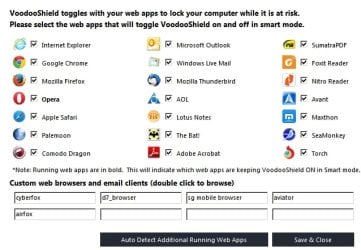
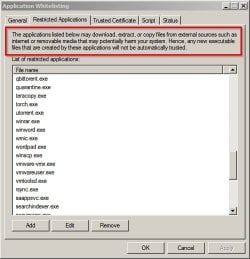
Re: VLC. What you mostly need to worry about is that it's a web facing application especially if you use the web plugin. Most of these exploits that target unpatched software are going to target web facing apps and browser plugins but may also exploit vulnerabilities in software used to open downloaded files or email attachments. Or anything that can launch a script.

Examples:

VoodooShield 1.jpg

Whitelisting.jpg

You can read about some threats and applications targetted here:

https://www.fireeye.com/blog/threat-research.html
 

My Computer My Computer

Computer type
Laptop
Computer Manufacturer/Model Number
ASUS
OS
Microsoft Windows 7 Home Premium 64-bit 7601 Multiprocessor Free Service Pack 1
CPU
AMD C-60 APU with Radeon(tm) HD Graphics
Motherboard
ASUSTeK COMPUTER INC. X501U
Memory
4.00 GB
Graphics Card(s)
AMD Radeon HD 6290 Graphics
Sound Card
(1) AMD High Definition Audio Device (2) Realtek High Defi
Screen Resolution
1366 x 768 x 32 bits (4294967296 colors) @ 60 Hz
Hard Drives
Hitachi HTS545050A7E380 SATA Disk Device
Antivirus
Comodo CIS & FW, SecureAplus App Whitelisting, Threatfire
Browser
Cyberfox 64bit, Opera 64bit, Airfox
Other Info
Spy-The-Spy, HitmanPro.Alert, Norton Connect Safe, MJRegWatcher, BitDefender TrafficLight, Voodoo Shield, Zemana AntiMalware
I update all windows and ms programs except IE and my dell optiplex gx520 is the fastest windows computer I have ever used
 

My Computer My Computer

Computer type
PC/Desktop
Computer Manufacturer/Model Number
Dell,Samsung,Compaq,oracle virtualbox
OS
Windows 7 Ultimate 32 bit,Chromium OS, windows server 2008 32bit
CPU
not sure
Motherboard
not sure
Memory
2.00GB
Graphics Card(s)
intel inside pentium 4,Vision AMD
Monitor(s) Displays
MAG Innovision
Keyboard
onn RF wireless
Mouse
onn RF wireless
Antivirus
Avast!
Browser
Google Chrome
if you dont use programs and they are not nessecary for your computer or os to run you should consider removing them
 

My Computer My Computer

Computer type
PC/Desktop
Computer Manufacturer/Model Number
Dell,Samsung,Compaq,oracle virtualbox
OS
Windows 7 Ultimate 32 bit,Chromium OS, windows server 2008 32bit
CPU
not sure
Motherboard
not sure
Memory
2.00GB
Graphics Card(s)
intel inside pentium 4,Vision AMD
Monitor(s) Displays
MAG Innovision
Keyboard
onn RF wireless
Mouse
onn RF wireless
Antivirus
Avast!
Browser
Google Chrome
A program that isn't run does exactly nothing to the system. Just wastes some storage space, but otherwise it doesn't influences the computer in any way (don't forget that drivers and services run in the background, so you might not realize they're running in some cases).
Most programs don't pose security risks at all, even if run every time and unupdated, and many updates don't tackle security problems specifically. Relatively few developers care or know about security, so it's mostly rare to come with security updates in many software. For those who really care, they're often quite noticeable.

Anyway, I generally follow a similar scheme to yours, often updating most programs together from time to time. I consider updates to be a risky operation. For one, they provide new features and bug fixes, but also may come with removed features and regression bugs, and maybe UI changes that makes it worse in general. You should evaluate if it's worth an update, read the release notes of the author to see what improvements it brings, or if it fixes a critical bug. My general personal approach is "if ain't broken, don't fix it".

It won't get desperate for leaving a non-current program on my computer, specially if it works, unless I know of a vulnerability or otherwise serious problem. For one I won't let update automatically anything. It's nice to have the last version of everything, but not of utmost importance, and must be a balance decision evaluating pros and cons.
 

My Computer My Computer

Computer type
Laptop
Computer Manufacturer/Model Number
Toshiba Sattelite A665-S6092
OS
Windows 7 Ultimate x64
CPU
Intel Core i7-740QM
Memory
8 GB DDR3
Graphics Card(s)
NVIDIA GeForce 330GT
Screen Resolution
1366x768
Hard Drives
Samsung 840 SSD 500GB
1TB USB3 external HD
Cooling
Coolermaster Notepal U3 notebook cooling pad
Internet Speed
3mbps ASDL
Antivirus
ClamWin 0.98.7
Browser
Opera 12.17 x86 (main), Firefox 38 (sec), IE11 (last resort)
I do all updates manually. No auto updates.

On programs I use seldom I check for update right after I start them for the seldom use. I check for what the update is suppose to do. I'm looking for security reasons to update the program if the program is working as it should and their no security updates I might not update it.

All updates are not created equal and that is the reason one should investigate what the update does.
 

My Computer My Computer

Computer type
PC/Desktop
Computer Manufacturer/Model Number
Home made Desktop
OS
Windows 10 Pro. 64/ version 1709 Windows 7 Pro/64
CPU
Intel i7-6800K @ 4.3
Motherboard
ASUS X-99 Deluxe II
Memory
Corsair Platinum 16 gig @2400
Graphics Card(s)
EVGA GTX 1070 OC
Monitor(s) Displays
Asus 27" LED LCD/VE278Q
Screen Resolution
1920-1080 or 1280-720 HDMI
Hard Drives
INTEL SSD 730-240 Gb Sata 3.0/
PSU
EVGA Platium 1200W
Case
Phanteks Luxe Tempered Glass 8 fans/ one radiator
Cooling
XSPC/ Water Cooled CPU
Keyboard
Das 4 Professional
Mouse
Logitech M705/MX Anywhere 2-S
Internet Speed
100 mbits
Antivirus
Microsoft Security Essentials/ Malwarebytes Premium 3.0/ SAS
Browser
I.E. 11 default/Firefox/ ISP Time Warner Cable/Spectrum
Other Info
LG BluRay Burner/
Sound system-KLipsch-THX/
Icy Dock ssd Hot Swap bays.
I keep all of my programs updated, but I do it manually. I like to see what is being done to the program and if I really need it.
 

My Computer My Computer

Computer type
PC/Desktop
Computer Manufacturer/Model Number
Mellon Labs (custom build)
OS
Win 7 Pro x64/Win 10 Pro x64 dual boot
CPU
AMD FX 8350 Vishera @ 4200
Motherboard
ASUS M5A97 R2.0
Memory
16 GB Mushkin Blackline DDR3-2400 @ 1866 (9-10-10-10-31)
Graphics Card(s)
XFX Radeon R9 280 Double D Black Edition
Sound Card
Realtek HD Audio on MB. Sounds great.
Monitor(s) Displays
Acer 24", Acer 22"
Screen Resolution
3840 x 1080
Hard Drives
1 x Mushkin Chronos 120 GB SSD (Win 10)
1 x Samsung 850 EVO 250 GB SSD (Win 7)
1 x WD 1TB SATA Blue
1 x WD 1TB SATA Green
PSU
Corsair TX-750
Case
CoolerMaster HAF 912+
Cooling
Coolermaster Seidon 240M Liquid AIO. 6 case fans
Keyboard
Logitech G710+
Mouse
Logitech G500s
Internet Speed
Much better since I got fiber, but still way overpriced.
Antivirus
MSE, Malware Bytes for scanning
Browser
Firefox
Other Info
Corsair VOID USB headphones.

A Mellon Labs X-1 - LCD Smartie driven system status display.

Brought to you by the letter E
Re: Autoupdates. The only auto-updates I allow are virus definitions databases. Everything else is manually checked. If a program checks for updates automatically I set it so that it doesn't. If that's not possible I block connection using my firewall.
 

My Computer My Computer

Computer type
Laptop
Computer Manufacturer/Model Number
ASUS
OS
Microsoft Windows 7 Home Premium 64-bit 7601 Multiprocessor Free Service Pack 1
CPU
AMD C-60 APU with Radeon(tm) HD Graphics
Motherboard
ASUSTeK COMPUTER INC. X501U
Memory
4.00 GB
Graphics Card(s)
AMD Radeon HD 6290 Graphics
Sound Card
(1) AMD High Definition Audio Device (2) Realtek High Defi
Screen Resolution
1366 x 768 x 32 bits (4294967296 colors) @ 60 Hz
Hard Drives
Hitachi HTS545050A7E380 SATA Disk Device
Antivirus
Comodo CIS & FW, SecureAplus App Whitelisting, Threatfire
Browser
Cyberfox 64bit, Opera 64bit, Airfox
Other Info
Spy-The-Spy, HitmanPro.Alert, Norton Connect Safe, MJRegWatcher, BitDefender TrafficLight, Voodoo Shield, Zemana AntiMalware
Back
Top