Solved Updating MSE defs from Microsoft site shows a blank white page

debodun

Member
Member
VIP
Local time
12:43 PM
Messages
295
Location
upstate NY
The last few days, when I try to download MSE updates from here:

www.microsoft.com/en-us/wdsi/definitions

It takes longer than it once did to open the page and then it just shows a blank page.

Any workarounds?
 

My Computer My Computer

At a glance

Windows 7 Ultimate x641.86 GHz Intrel Core 23 GB Dual Channel DDR2 @ 3.32 MHzIntel Q965/Q963 Express chipset
Computer type
PC/Desktop
Computer Manufacturer/Model Number
refurb in an HP/Compaq case
OS
Windows 7 Ultimate x64
CPU
1.86 GHz Intrel Core 2
Motherboard
HP 0A60h XU1
Memory
3 GB Dual Channel DDR2 @ 3.32 MHz
Graphics Card(s)
Intel Q965/Q963 Express chipset
Monitor(s) Displays
Dell CRT
Hard Drives
977GB Samsung HD 103 SI ATA
Case
HP Compaq DC5800
Mouse
wired optical
Antivirus
Microsoft Security Essentials, MalwareBytes, Spyware Blaster
Browser
Firefox 32-bit
It works for me. Try clearing your cache. Also you shouldn't have to update manually. MSE updates itself.
 

My Computers My Computers

  • At a glance

    Windows 7 pro/Windows 10 ProIntel i7 860 Quad core 2.8 ghz8 gbATI Radeon HD 5770 1 gb ram
    Computer type
    PC/Desktop
    Computer Manufacturer/Model Number
    HP Pavillion Elite HPE-250f
    OS
    Windows 7 pro/Windows 10 Pro
    CPU
    Intel i7 860 Quad core 2.8 ghz
    Memory
    8 gb
    Graphics Card(s)
    ATI Radeon HD 5770 1 gb ram
    Monitor(s) Displays
    Alienware 25 AW2521HF & Viewsonic
    Screen Resolution
    1920 x1080 & 1680x1050
    Hard Drives
    WD blue 1 tb & 500 gb.
    Browser
    FF of course.
    Other Info
    https://www.bestbuy.com/site/hp-pavilion-elite-desktop-intel-core-i7-processor-8gb-memory-1tb-hard-drive/9921493.p?skuId=9921493
  • At a glance

    Windows 2012 R2 Data center/Linux Minti3 9100 3.6GHz, 8M cache, 4C/4T8GB 2666MT/s DDR4 ECC UDIMM
    Computer type
    PC/Desktop
    System Manufacturer/Model Number
    Dell Poweredge T140
    OS
    Windows 2012 R2 Data center/Linux Mint
    CPU
    i3 9100 3.6GHz, 8M cache, 4C/4T
    Memory
    8GB 2666MT/s DDR4 ECC UDIMM
    Monitor(s) Displays
    Viewsonic
    Screen Resolution
    1680x1050
    Hard Drives
    1 TB & 750 GB
    Other Info
    https://www.dell.com/en-us/work/shop/productdetailstxn/poweredge-t140?~ck=bt

My Computers My Computers

  • At a glance

    7 X64i5 84002x8gb 3200mhz
    Computer type
    PC/Desktop
    OS
    7 X64
    CPU
    i5 8400
    Motherboard
    gigabyte b365m ds3h
    Memory
    2x8gb 3200mhz
    Hard Drives
    various
    PSU
    pure power 11 400w cm
    Case
    Coolermaster
    Cooling
    cryorig m9i
  • At a glance

    7x64g54008gb ddr4 2400
    Computer type
    PC/Desktop
    OS
    7x64
    CPU
    g5400
    Motherboard
    ga b365m ds3h
    Memory
    8gb ddr4 2400
    PSU
    xfx pro 450w
Thanks. I deleted Microsoft cookies and it works, for now.

BTW - MSE doesn't automatically update for me. If I let it go more than a few days, I get a red logo - not the usual green.
 

My Computer My Computer

At a glance

Windows 7 Ultimate x641.86 GHz Intrel Core 23 GB Dual Channel DDR2 @ 3.32 MHzIntel Q965/Q963 Express chipset
Computer type
PC/Desktop
Computer Manufacturer/Model Number
refurb in an HP/Compaq case
OS
Windows 7 Ultimate x64
CPU
1.86 GHz Intrel Core 2
Motherboard
HP 0A60h XU1
Memory
3 GB Dual Channel DDR2 @ 3.32 MHz
Graphics Card(s)
Intel Q965/Q963 Express chipset
Monitor(s) Displays
Dell CRT
Hard Drives
977GB Samsung HD 103 SI ATA
Case
HP Compaq DC5800
Mouse
wired optical
Antivirus
Microsoft Security Essentials, MalwareBytes, Spyware Blaster
Browser
Firefox 32-bit
I have found that if I let it go more than a couple of days, when updating from the app itself, it has trouble completing the download. If I update it ever day, no problem. If it's been awhile, I usually download the defs on a Linux computer, transfer it to a thumb drive, then run it on windows. Also a good idea to run Ccleaner or similar app frequently to clean things up, and ensure smooth operating.
 

My Computer My Computer

At a glance

Windows 7 x64 SP1AMD Athlon 64 X2 6000+ / 3.0 GHz6 GB
Computer type
PC/Desktop
Computer Manufacturer/Model Number
Gateway GT5656
OS
Windows 7 x64 SP1
CPU
AMD Athlon 64 X2 6000+ / 3.0 GHz
Motherboard
NVIDIA GeForce 6150 SE
Memory
6 GB
Monitor(s) Displays
Lenovo LED
Screen Resolution
1920 X 1080
Hard Drives
Windows on 500 GB spinner; Ubuntu 16 on Sandisk 250GB SSD; Bodhi5 on Samsung 250GB SSD; another old spinner for fooling around.
PSU
Original that came with computer
Keyboard
Logitech wireless
Mouse
Logitech wireless
Antivirus
Microsoft Sec Essentials
Browser
Vivaldi
BTW - MSE doesn't automatically update for me. If I let it go more than a few days, I get a red logo - not the usual green.
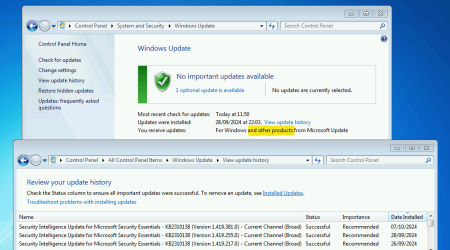
As I understand it MSE counts as 'other'. Your Windows Update needs to be configured to get updates 'For Windows and other products from Microsoft Update'.

I have found that if I let it go more than a couple of days, when updating from the app itself, it has trouble completing the download....
This is a Win7 VM that can go weeks between running. I just started it today to get this screenshot. Without me doing anything the latest MSE definitions had already downloaded and installed.

image.png
 

My Computers My Computers

  • At a glance

    Windows 7 Home Premium x64AMD V1204GB
    Computer type
    Laptop
    Computer Manufacturer/Model Number
    Toshiba satellite C650D
    OS
    Windows 7 Home Premium x64
    CPU
    AMD V120
    Memory
    4GB
    Internet Speed
    150 Mbps
    Antivirus
    MSE
    Browser
    IE11, Edge, Firefox
    Other Info
    I also have W7 Pro on my System Two, and several W7 Hyper-V VMs. My other machines run Windows 10/11. Their specs are in my Ten Forums & Eleven Forum profiles.
  • At a glance

    Windows 7 Pro x64Intel i5-3320M8 GB
    Computer type
    Laptop
    System Manufacturer/Model Number
    Lenovo Thinkpad T430
    OS
    Windows 7 Pro x64
    CPU
    Intel i5-3320M
    Memory
    8 GB
    Hard Drives
    250GB Samsung SSD 860 EVO
    Antivirus
    MSE
Back
Top