Solved Upgrade disk install on a replacement HDD

CCM

New member
Member
Local time
11:36 PM
Messages
24
Hi,

I have an ACER Aspire 7535g with a failing HDD.

I want to replace it with a spare HDD I have from a different company.

How would I go about transfering my valid copy of Windows on to the new drive? Originally the ACER had Vista installed, and I upgraded using an ACER branded 7 upgrade disk.

Cheers
 

My Computer My Computer

OS
Windows 7 Home Premium 32bit.
Thanks Bill.

I tried to do that and instead of booting to the CD, it shows 'BOOTMGR is Missing'.

Im assuming this has something to do with the replacement HDD? Though BIOS picks it up and recognises it.
 

My Computer My Computer

OS
Windows 7 Home Premium 32bit.
You need to set the boot order in the bios so the CD drive is at the top. Alternatively tap F12 repeatedly at boot to get the one time boot menu and select CD drive there. Also, is this spare hdd blank and unformatted or you already have partitions setup on it?
 

My Computer My Computer

Computer Manufacturer/Model Number
Too many to describe...
OS
Windows 7 x64 pro/ Windows 7 x86 Pro/ XP SP3 x86
Follow Bill2's advice.

Did Acer send you a Software/Drivers disk for your ACER Aspire 7535g, with the Upgrade DVD?
 

My Computer My Computer

OS
ME/XP/Vista/Win7
Yep, I have an ACER branded upgrade disk.

However, when I try and boot from it, I dont get the 'press any key to boot from CD/DVD' option, even though ive set the boot order in BIOS for CD first.

I have just discovered as well the spare HDD I have is now just two partitions full of music. It seems I wiped the previous Vista instal off it to use as storage. Can I still in theory format this drive and instal windows on it?
 

My Computer My Computer

OS
Windows 7 Home Premium 32bit.
Sorry, there wasnt two seperate disks. Just one that says..

ACER upgrade DVD, contains ACER upgrade Wizard, applications, drivers for Win 7.

However, I still had to manually instal some Win 7 drivers when I first upgraded.
 

My Computer My Computer

OS
Windows 7 Home Premium 32bit.

My Computer My Computer

Computer Manufacturer/Model Number
Too many to describe...
OS
Windows 7 x64 pro/ Windows 7 x86 Pro/ XP SP3 x86
I just spoke with ACER and apparently the Upgrade disk needs a recovery disk to go with it if I want to do a fresh install.

I dont have this unfortunately so its £51 for the pleasure. :rolleyes:

Thanks for your help..
 

My Computer My Computer

OS
Windows 7 Home Premium 32bit.
I just spoke with ACER and apparently the Upgrade disk needs a recovery disk to go with it if I want to do a fresh install.

I dont have this unfortunately so its £51 for the pleasure. :rolleyes:

Thanks for your help..
Its your decision but if your upgrade disk came with a retail upgrade key, you can use a full disk to install (beg, borrow, download), then use the registry workaround described in that tut I linked.

Also as far as I can make out those acer guys are BSing.
 

My Computer My Computer

Computer Manufacturer/Model Number
Too many to describe...
OS
Windows 7 x64 pro/ Windows 7 x86 Pro/ XP SP3 x86
Did you make your Acer Vista Recovery disk?
 

My Computer My Computer

OS
ME/XP/Vista/Win7
I just spoke with ACER and apparently the Upgrade disk needs a recovery disk to go with it if I want to do a fresh install.

I dont have this unfortunately so its £51 for the pleasure. :rolleyes:

Thanks for your help..
Its your decision but if your upgrade disk came with a retail upgrade key, you can use a full disk to install (beg, borrow, download), then use the registry workaround described in that tut I linked.

Also as far as I can make out those acer guys are BSing.

Well, im assuming I have a valid key.

Where can I get it from/check it?
 

My Computer My Computer

OS
Windows 7 Home Premium 32bit.
The Acer Upgrade kit contains a Win7 Installation DVD which is bootable to do a clean reinstall - apparently your DVD is not booting correctly. Press the f12 key at bootup to trigger the DVD to boot.

The kit should also have the Win7 Product Key included on the DVD envelope or as an insert.

In the dozen Acer Upgrade kit installs done here, we haven't had to use the CD included in the kit, since the DVD is a Win7 installer which is driver-complete, with newer drivers quickly arriving via optional Windows Updates. Any drivers then missing should be imported from the Acer Support Downloads webpage for your model.
 
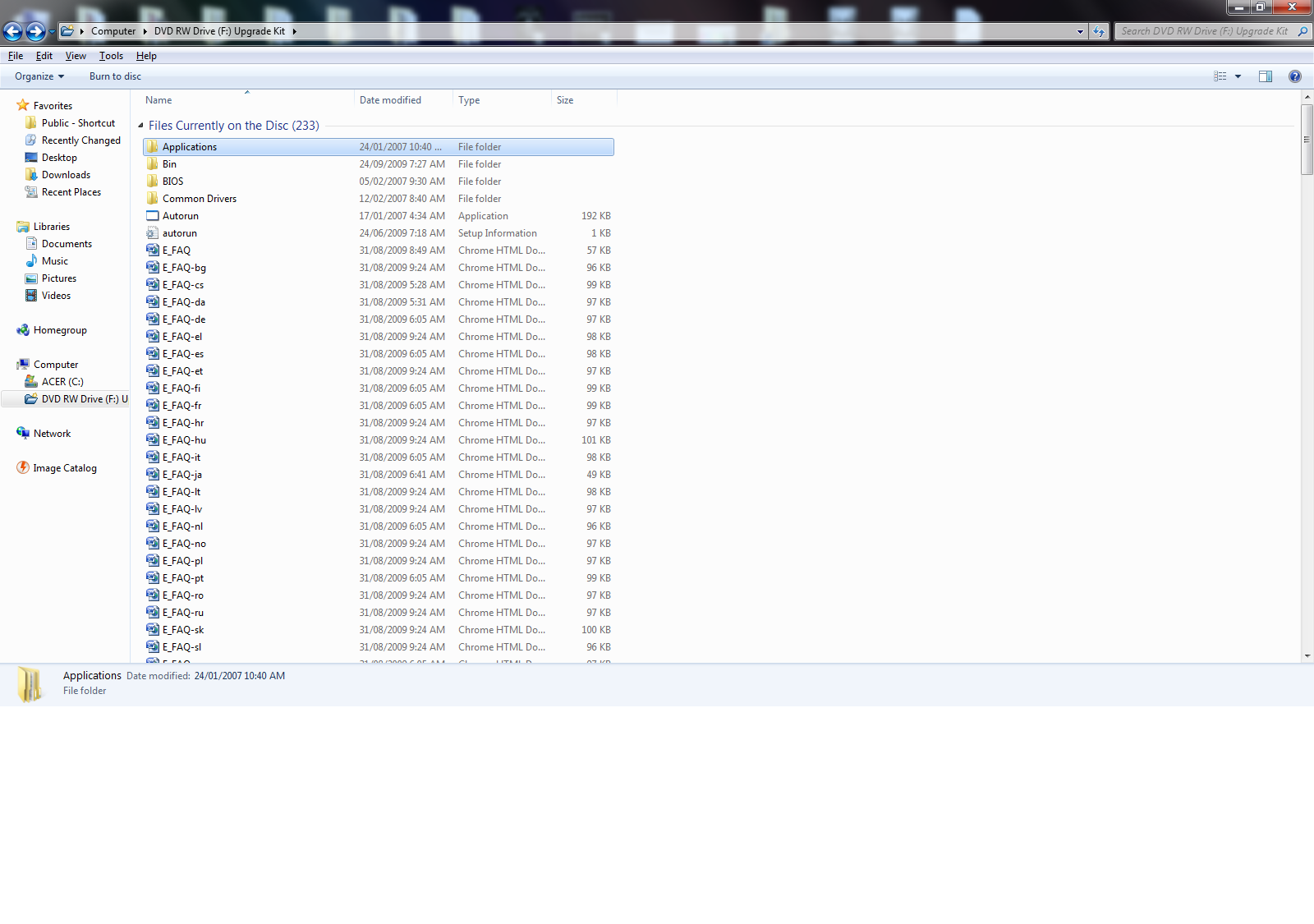
Ok, well it seems I only have one disk now. Ive been away for nearly a year.

Which is the upgrade disk, contents shown below. I dont think its the bootable DVD. I also dont have any cd wallets or anything with the code on. Can I get it via windows itself?

bxaw0.png


When I run it on the failing disk it shows as:

nU7f3.png
 

My Computer My Computer

OS
Windows 7 Home Premium 32bit.
I found my key, and someone gave me a win7 disk to try a clean install, so fingers crossed!
 

My Computer My Computer

OS
Windows 7 Home Premium 32bit.
Ok, well it seems I only have one disk now. Ive been away for nearly a year.

Which is the upgrade disk, contents shown below. I dont think its the bootable DVD. I also dont have any cd wallets or anything with the code on. Can I get it via windows itself?

bxaw0.png


When I run it on the failing disk it shows as:

nU7f3.png

Go to eRecovery, & see if can make your Recovery disks.
 

My Computer My Computer

OS
ME/XP/Vista/Win7
Well luckily the clean install and my old code worked so happy days!

Thanks everyone
 

My Computer My Computer

OS
Windows 7 Home Premium 32bit.
Back
Top