Solved Upgrading to NVME on my Asus P5QD Turbo.

roberthansjorg

New member
Local time
2:27 PM
Messages
24
Hi all,

I'm just wondering if it's even possible to use NVME SSD on my PC. I've got a PCI_2 slot available on my MOBO.

As I'm sure you all know adapters are available to allow an NVME SSD to be attached via a the PCI slot.

As always it's not that simple however. Does NVME require PCIe3 to attach to? And can the BIOS cope? It's

dated AMI BIOS 2009.

If I've only got PCI then is it even possible? My PCIEX16_1 has got my graphics card in it.

I believe Windows 10 is configured for NVME out of the box whilst Windows 7 Ult will require NVME drivers to be installed.

Ultimately I'll get a modern high spec mobo and use Win 10.

In the mean time however.......
 

My Computer My Computer

At a glance

Windows 7 Ultimate x64 SP1Intel Core 2 Duo8 gbNVidia
Computer type
PC/Desktop
Computer Manufacturer/Model Number
Built it myself
OS
Windows 7 Ultimate x64 SP1
CPU
Intel Core 2 Duo
Motherboard
Asus P5QD Turbo
Memory
8 gb
Graphics Card(s)
NVidia
Hard Drives
RAID Seagates
Antivirus
Avast
Browser
Yahoo
You need a pciE slot. Preferably pcie3.0 x4, though nvme disks can run from pcie2.0 x4 at a lower speed.

To boot from nvme via an adapter on a pcie slot, your bios needs to support nvme boot. Or you can use clover on older mobos.
 

My Computers My Computers

  • At a glance

    7 X64i5 84002x8gb 3200mhz
    Computer type
    PC/Desktop
    OS
    7 X64
    CPU
    i5 8400
    Motherboard
    gigabyte b365m ds3h
    Memory
    2x8gb 3200mhz
    Hard Drives
    various
    PSU
    pure power 11 400w cm
    Case
    Coolermaster
    Cooling
    cryorig m9i
  • At a glance

    7x64g54008gb ddr4 2400
    Computer type
    PC/Desktop
    OS
    7x64
    CPU
    g5400
    Motherboard
    ga b365m ds3h
    Memory
    8gb ddr4 2400
    PSU
    xfx pro 450w
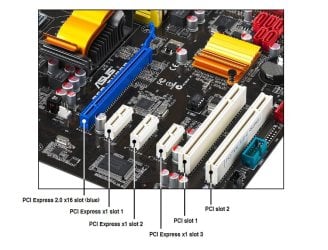
From your mobo manual, it doesnt look like you have anything suitable because your pcie2.0 x16 is occupied by the graphics card.

mobo.jpg


For general use and pottering around, there isn't much noticeable difference between a sata ssd ( on sata 3 port) and nvmne.

But I expect your mobo doesn't have sata 3 either. Attaching a sata ssd to a sata 2 port is still an improvement, so I would suggest that as a worthwhile move.
 

My Computers My Computers

  • At a glance

    7 X64i5 84002x8gb 3200mhz
    Computer type
    PC/Desktop
    OS
    7 X64
    CPU
    i5 8400
    Motherboard
    gigabyte b365m ds3h
    Memory
    2x8gb 3200mhz
    Hard Drives
    various
    PSU
    pure power 11 400w cm
    Case
    Coolermaster
    Cooling
    cryorig m9i
  • At a glance

    7x64g54008gb ddr4 2400
    Computer type
    PC/Desktop
    OS
    7x64
    CPU
    g5400
    Motherboard
    ga b365m ds3h
    Memory
    8gb ddr4 2400
    PSU
    xfx pro 450w
P5QD Turbo/NVME

Thanks SIW2,

I've got an attached SATA SSD. SATA 2 or 3 I don't know yet.
I'll migrate my OS to this drive using Macrium Reflect.
Should have done this before.
Thanks for your advice.
 

My Computer My Computer

At a glance

Windows 7 Ultimate x64 SP1Intel Core 2 Duo8 gbNVidia
Computer type
PC/Desktop
Computer Manufacturer/Model Number
Built it myself
OS
Windows 7 Ultimate x64 SP1
CPU
Intel Core 2 Duo
Motherboard
Asus P5QD Turbo
Memory
8 gb
Graphics Card(s)
NVidia
Hard Drives
RAID Seagates
Antivirus
Avast
Browser
Yahoo
Thanks SIW2,

I've got an attached SATA SSD. SATA 2 or 3 I don't know yet.
I'll migrate my OS to this drive using Macrium Reflect.
Should have done this before.
Thanks for your advice.

You've made a good choise.
I have a PCIe SSD (1900MB/s read) and for my surprise I only see the difference to a regular 2.5" SSD on the benchmark.

Please mark this thread as solved
 

My Computers My Computers

  • At a glance

    Windows 7 HP 64i5 6600K - 800MHz to 4200MHz4+4G GSkill DDR4 3000IG - Intel 530
    Computer type
    PC/Desktop
    Computer Manufacturer/Model Number
    custom build
    OS
    Windows 7 HP 64
    CPU
    i5 6600K - 800MHz to 4200MHz
    Motherboard
    GA-Z170-HD3P
    Memory
    4+4G GSkill DDR4 3000
    Graphics Card(s)
    IG - Intel 530
    Monitor(s) Displays
    Samsung 226BW
    Screen Resolution
    1680x1050
    Hard Drives
    (1) -1 SM951 – 128GB M.2 AHCI PCIe SSD drive for Windows 7 and Lubuntu
    (2) -1 WD SATA 3 - 1T for Data
    (3) -1 WD SATA 3 - 1T for backup
    PSU
    Thermaltake 450W TR2 gold
    Keyboard
    Old and good Chicony mechanical keyboard
    Mouse
    Logitech mX performance - 9 buttons (had to disable some)
    Internet Speed
    500Mb/s
    Browser
    Firefox 64
    Other Info
    TinyWall firewall
  • At a glance

    Windows 7 Proi7-4500U 800MHz to 3.0GHz(4+4)G DDR3 1600IG intel 4400 + NVIDIA GeForce GT 745M
    Computer type
    Laptop
    System Manufacturer/Model Number
    Asus Q550LF
    OS
    Windows 7 Pro
    CPU
    i7-4500U 800MHz to 3.0GHz
    Motherboard
    Asus Q550LF
    Memory
    (4+4)G DDR3 1600
    Graphics Card(s)
    IG intel 4400 + NVIDIA GeForce GT 745M
    Sound Card
    Realtek
    Monitor(s) Displays
    LG Display LP156WF4-SPH1
    Screen Resolution
    1920 x 1080
    Hard Drives
    BX500 120G SSD for Windows and programs +
    1T HDD for data
    Internet Speed
    500 Mb/s
    Browser
    Firefox
    Other Info
    TinyWall firewall
Thanks Megerhertz07,

I migrated my OS to the SATA SSD using EaseUS Partition Manager 15.8. Changed the BIOS boot up disk priority
to match and rebooted. It works fine.
There is a noticeable speed increase in start up functions and overall performance.
My mobo is dated 2008. Asus has long stopped BIOS upgrades for this unit.
I could install more SATA SSD's and even configure them to RAID if I wanted but for my purposes
on this PC I don't think it's necessary.
My next project is to build a high performance video editing PC from scratch and I'll have to
go to Windows 10.
Thanks everybody for the advice given.
 

My Computer My Computer

At a glance

Windows 7 Ultimate x64 SP1Intel Core 2 Duo8 gbNVidia
Computer type
PC/Desktop
Computer Manufacturer/Model Number
Built it myself
OS
Windows 7 Ultimate x64 SP1
CPU
Intel Core 2 Duo
Motherboard
Asus P5QD Turbo
Memory
8 gb
Graphics Card(s)
NVidia
Hard Drives
RAID Seagates
Antivirus
Avast
Browser
Yahoo
roberthansjorg, to use the old HDD as a data drive I suggest you boot from the SSD drive, open Disk manager (C:\Windows\System32\diskmgmt.msc) and delete all partitions till you have one and only one unallocated space. Than create a new primary partition and format as NTFS. Change the assigned letter to your needs.

The reason to clean the old disk is because it has some system files that can interfere on the boot of your SSD.
 

My Computers My Computers

  • At a glance

    Windows 7 HP 64i5 6600K - 800MHz to 4200MHz4+4G GSkill DDR4 3000IG - Intel 530
    Computer type
    PC/Desktop
    Computer Manufacturer/Model Number
    custom build
    OS
    Windows 7 HP 64
    CPU
    i5 6600K - 800MHz to 4200MHz
    Motherboard
    GA-Z170-HD3P
    Memory
    4+4G GSkill DDR4 3000
    Graphics Card(s)
    IG - Intel 530
    Monitor(s) Displays
    Samsung 226BW
    Screen Resolution
    1680x1050
    Hard Drives
    (1) -1 SM951 – 128GB M.2 AHCI PCIe SSD drive for Windows 7 and Lubuntu
    (2) -1 WD SATA 3 - 1T for Data
    (3) -1 WD SATA 3 - 1T for backup
    PSU
    Thermaltake 450W TR2 gold
    Keyboard
    Old and good Chicony mechanical keyboard
    Mouse
    Logitech mX performance - 9 buttons (had to disable some)
    Internet Speed
    500Mb/s
    Browser
    Firefox 64
    Other Info
    TinyWall firewall
  • At a glance

    Windows 7 Proi7-4500U 800MHz to 3.0GHz(4+4)G DDR3 1600IG intel 4400 + NVIDIA GeForce GT 745M
    Computer type
    Laptop
    System Manufacturer/Model Number
    Asus Q550LF
    OS
    Windows 7 Pro
    CPU
    i7-4500U 800MHz to 3.0GHz
    Motherboard
    Asus Q550LF
    Memory
    (4+4)G DDR3 1600
    Graphics Card(s)
    IG intel 4400 + NVIDIA GeForce GT 745M
    Sound Card
    Realtek
    Monitor(s) Displays
    LG Display LP156WF4-SPH1
    Screen Resolution
    1920 x 1080
    Hard Drives
    BX500 120G SSD for Windows and programs +
    1T HDD for data
    Internet Speed
    500 Mb/s
    Browser
    Firefox
    Other Info
    TinyWall firewall
Making a SATA SSD the boot drive

Thank you Megahertz07 once again,

I used EaseUS Partition Manager 15.8 to do exactly as you suggested.
I designated the SATA SSD drive as the C: drive using the Disk Management utility within Win 7.
I renamed the old HDD drive ( old boot up drive) as drive D: - it reads Healthy, Active, Primary Partition.

I've used this new setup several times now and not noticed any interference during the boot up process.
In BIOS I set my SATA SSD drive as drive number one and made it boot priority number 1.
So my PC is not confused and boots up from the SATA SSD very quickly.
Just as a matter of interest my HDD - D: drive still has all my windows files on it. The windows files I migrated to my SATA SSD drive. It's 65 GBytes worth.
Once I'm happy my new setup is stable I'll delete those files. I've got lots of backups anyway.
Thank you for your advice.
 

My Computer My Computer

At a glance

Windows 7 Ultimate x64 SP1Intel Core 2 Duo8 gbNVidia
Computer type
PC/Desktop
Computer Manufacturer/Model Number
Built it myself
OS
Windows 7 Ultimate x64 SP1
CPU
Intel Core 2 Duo
Motherboard
Asus P5QD Turbo
Memory
8 gb
Graphics Card(s)
NVidia
Hard Drives
RAID Seagates
Antivirus
Avast
Browser
Yahoo
Back
Top