Solved upgrd from xp to W7, but to a new HHD in same PC

rickharp

New member
Local time
10:19 AM
Messages
11
I am new to this forum and find it incredibly helpful and amped that I found it. Hats off to all who contribute.

I am the owner of a small office with 6 PC's running xp pro. Most are Dell, some are old enough to consider replacing, some will be fine for a 32 bit W7 environment and one I want to upgrade to a 64 bit W7.

I heard that with the price of hard drives so affordable ($50), it makes sense to install a new HDD in the upgrade pc's and proceed with the W7 install. But I'd like to confirm this makes sense and is easier, and is not a bad idea to get into a "green" HDD. I found this thread, and was wondering it there was a better one or not. http://www.sevenforums.com/installation-setup/80161-clean-install-win7-new-hdd-w-xp-old-hdd.html
I also think I could save some money by buying the Home Pre 3 pack and then using the upgrade anytime, and get into W7 Professional for $120 each. Any issues with that idea.

Bottom line for me is to confirm the new hard drive purchase makes the install much easier, cause the backup to external is not necessary. But want to make sure there is a tutorial, YouTube or thread here that describes the best way to accomplish that sort of backup. My plan is to come in on a weekend and upgrade several pc's at a time.

For a typical office user, email, word, outlook, etc, what series of Dell's are popular. Optiplex or Vostro's. One box will hold our UPS shipping server.

Would I install the Quickbooks Enterprise 5 seat edition on the PC of the person mainly using it or should that sit on a more idle pc, as others will need to access it once in a while.

Backup: perhaps another thread to itself, but I seem to be on a roll. Figuring a Synology DS211 with one WD 1TB green drive backing up our Buffalo Link Station file server. Is synology's (backup PC's to DiskStation) software better than what is built into W7. The DiskStation would backup the PC's and the Link Station.

Going to replace 10/100 switch with a gigabit switch. Thanks for any help or suggestions.
 

My Computer My Computer

At a glance

Windows 7 Home Premiumoem
Computer Manufacturer/Model Number
Dell XPS 410
OS
Windows 7 Home Premium
Graphics Card(s)
oem
All sounds good.

Keep in mind that if you get a new hd, that you first confirm whether the existing hd is pata (ide) or sata connections. If you want to go "green", those drives are typically sata and older mobos may or may not have sata connecters. If the mobo doesn't, consider a pci sata controller card. Also, consider space limitations on the Dells, dependeing on their form-factor.

I would install Quickbooks on an idle pc or even a server so others can access it more easily.

Kuddos for replacing the switch :)

Re backup. I am not familiar with Synology, however, I am not impressed with the software built into 7, so I'd go with Synology...

Good luck
 

My Computer My Computer

At a glance

Windows 7 Enterprise x64 SP1Intel Core i3-2100 @ 3.10GHz10 GB DDR3Asus EAH5450 series (Radeon)
Computer Manufacturer/Model Number
ATX Custom Build 2012
OS
Windows 7 Enterprise x64 SP1
CPU
Intel Core i3-2100 @ 3.10GHz
Motherboard
Intel DH67CL desktop ATX
Memory
10 GB DDR3
Graphics Card(s)
Asus EAH5450 series (Radeon)
Monitor(s) Displays
Samsung SyncMaster 226BW, Samsung Syncmaster P2450H
Screen Resolution
226BW: 1680 x 1050 & P2450H: 1920 x 1080
Hard Drives
Western Digital 320 GB sata (boot), Samsung 640 GB sata, Seagate 2 TB sata (data)
PSU
Cooler Master Extreme Power Plus 500W
Case
Thermaltake V3 Black Edition
Cooling
stock cooling with added intake fan
Keyboard
HP Wireless Elite Keyboard Wireless Keyboard
Mouse
Microsoft Touch
Internet Speed
Comcast Cable business class <=18Mb {averages 12Mb}
Other Info
Optical drives: LG SuperMulti Blue, HP DVD 1260T
Other: Kensington Bluetooth Receiver
Network: Buffalo Wireless N USB, DLink N router/DLink Ethernet Switch/DLink Xtreme N wireless bridge
Printer: HP Photosmart Plus, HP Officejet Pro 8600 Plus
PCs: HP dv6-3040us (7 x64 SP1), HP DM4-2165dx (7 x64 SP1), HP Pavilion zv6130us (7 x86), Apple Macbook Air (Lion)
************
I'll deal with the dual boot and leave the other questions to those more knowledgeable about office software.

For the dual boot desired unplug XP hd during install - just pull the two plugs firmly but carefully - then swap the cable to the new HD or set it to boot first in BIOS setup, after DVD drive.

After Win7 install, plug back in the XP HD to boot it via the one-time BIOS Boot Menu key which every computer and mobo has:
Asus - F8
HP/Compaq - Esc
Sony - F2
Acer - F12
Gateway - F10
eMachnes - F10
Toshiba - F12
Dell - F12
IBM/Lenovo - the blue Thinkvantage button

This keeps the HD's independent to come and go as you please, while each will still be accessible to the other for accessing data. If you have permissions issues for copying over files, just place this shortcut on your rightclick context menu to take control of any folder/file: http://www.sevenforums.com/tutorials/1911-take-ownership-shortcut.html

If you'd like to set up one HD as the template install for most of the other computers, after install and setting up all programs/settings you could SysPrep the HD which removes all drivers and activation to prepare the HD's image to start up on any hardware: Windows 7 Installation - Transfer to a New Computer. The image may start up on same models without SysPrep.

I'd keep Win7 backup images of each install anyway so you never have to reinstall again, just reimage the HD or it's replacement in 20 minutes using DVD with stored image.
http://www.sevenforums.com/tutorials/663-backup-complete-computer-create-image-backup.html
http://www.sevenforums.com/tutorials/615-backup-user-system-files.html

If you use the upgrade version to clean install Win7 without XP plugged in, the DVD will not see another OS to pass flag allowing Upgrade version key up front during install. So leave the box blank and after install do the simple registry workaround here to activate at Computer>Properties: http://www.sevenforums.com/tutorials/31402-clean-install-upgrade-windows-7-version.html
 

My Computer My Computer

At a glance

ME/XP/Vista/Win7
OS
ME/XP/Vista/Win7
I also think I could save some money by buying the Home Pre 3 pack and then using the upgrade anytime, and get into W7 Professional for $120 each. Any issues with that idea.
.

Why waste money on Home Pre 3 pack, when you can do a clean install with Pro.

http://www.sevenforums.com/tutorials/31402-clean-install-upgrade-windows-7-version.html?ltr=C

Well, the 3 pack would be $40 per pc, plus the Anytime which is $80, so for 120 I have an upgrade. Sounds like it would save a bit, and from what I read, it is all installed anyway in the home premium, just extra modules are turned on in the Anytime Upgrade.
 

My Computer My Computer

At a glance

Windows 7 Home Premiumoem
Computer Manufacturer/Model Number
Dell XPS 410
OS
Windows 7 Home Premium
Graphics Card(s)
oem
For the dual boot desired unplug XP hd during install - just pull the two plugs firmly but carefully - then swap the cable to the new HD or set it to boot first in BIOS setup, after DVD drive.

Sounds like the option to change the boot order is easiest. But, can we back up a bit. Install new HDD and format it ??(fat or ntsb)...?? restart dell and get into the Bios edit mode, change the boot order to DVD, then new HD then old drive. install upgrade DVD, continue boot up, into the upgrade UI. Good so far?

finish the install but ignore the Auto activate option for now.

If there are slave primary jumpers on the old drive, would I be switching them in the previous steps?

Do a restart if no upgrades are in progress, and F12 it (one-time BIOS Boot Menu key for Dell) and...... I think I am lost now. I know I want to change the boot order back to New HD, DVD, old HD, but when or how will the new upgrade install see the XP version on the old HD. Dang, almost to complicated.
 

My Computer My Computer

At a glance

Windows 7 Home Premiumoem
Computer Manufacturer/Model Number
Dell XPS 410
OS
Windows 7 Home Premium
Graphics Card(s)
oem
I also think I could save some money by buying the Home Pre 3 pack and then using the upgrade anytime, and get into W7 Professional for $120 each. Any issues with that idea.
.

http://www.sevenforums.com/tutorials/31402-clean-install-upgrade-windows-7-version.html?ltr=C

Theog,
Option one on the link above sounds pretty straight forward.
Install new drive, if there are jumpers on the old drive, leave them as is.
change boot order to dvd, new drive, old drive
accomplish clean install at boot without auto activating.
Somewhere along the line the install will see the XP image on the old drive.
If I encounter activation issues, refer to option 3, the registry workaround.

Am I getting this right?
thanks for your help.
 

My Computer My Computer

At a glance

Windows 7 Home Premiumoem
Computer Manufacturer/Model Number
Dell XPS 410
OS
Windows 7 Home Premium
Graphics Card(s)
oem
If you leave the XP HD plugged in, the Win7 installer will see it and allow use of Upgrade version key during install without having to do the registry workaround in tutorial. It will also autoconfigure a Windows-managed Dual Boot menu during install.

However the Win7 HD will then be interlocked with XP HD with the System boot files placed on XP HD. This will require recovering the System boot files back into Win7 partition in order to remove XP later.

It is easier to unplug the XP HD during install to set up a BIOS-based Dual Boot. It requires doing the quick registry workaround in tutorial in order to activate, but the drives remain independent booted only via the BIOS so that they can come and go as you please.

When you first plug in the new HD, you may need to initialize it in XP Disk Mgmt. If not, use the Win7 installer Custom>Drive Options to create New partitions and Format before install.
 
Last edited:
Re backup. I am not familiar with Synology, however, I am not impressed with the software built into 7, so I'd go with Synology...

What are some features of W7 backup that are weak in you opinion. at first glance it seems pretty user friendly.
 

My Computer My Computer

At a glance

Windows 7 Home Premiumoem
Computer Manufacturer/Model Number
Dell XPS 410
OS
Windows 7 Home Premium
Graphics Card(s)
oem
Re backup. I am not familiar with Synology, however, I am not impressed with the software built into 7, so I'd go with Synology...

What are some features of W7 backup that are weak in you opinion. at first glance it seems pretty user friendly.


Hello rickharp, welcome to Seven Forums!


A lot of people have serious issues with the Windows backup program.

If you have data for the business you don't want to lose, check into a paid option like Paragon.
 

My Computer My Computer

At a glance

W 7 64-bit UltimateIntel Q9550 Yorkfield8GB Dominator 8500C5DATI : XFX 5870
Computer Manufacturer/Model Number
* BFK Customs *
OS
W 7 64-bit Ultimate
CPU
Intel Q9550 Yorkfield
Motherboard
ASUS P5Q Pro
Memory
8GB Dominator 8500C5D
Graphics Card(s)
ATI : XFX 5870
Sound Card
Realtek HD Audio 7-1
Monitor(s) Displays
1x 47" LCD HDMI & 3x 26" LCD HDMI
Screen Resolution
1920x1080P & 1920x1200
Hard Drives
1x 80GB Intel X25-M G2 SSD : 1x 500GB & 1x 640GB WD Caviar Black(s)
PSU
Corsair 620HX
Case
Cooler Master RC-690
Cooling
Tuniq Tower 120, 2x 140mm and 3x 120mm case fans
Keyboard
Microsoft 500
Mouse
Razer Diamondback 3G
Internet Speed
14 Mb/s
Other Info
1x Koutech 3Gb/s SATA HDD Hot Swap Rack
I also think I could save some money by buying the Home Pre 3 pack and then using the upgrade anytime, and get into W7 Professional for $120 each. Any issues with that idea.
.

Why waste money on Home Pre 3 pack, when you can do a clean install with Pro.

http://www.sevenforums.com/tutorials/31402-clean-install-upgrade-windows-7-version.html?ltr=C

Well, the 3 pack would be $40 per pc, plus the Anytime which is $80, so for 120 I have an upgrade. Sounds like it would save a bit, and from what I read, it is all installed anyway in the home premium, just extra modules are turned on in the Anytime Upgrade.

Is your 3 pack, for home uses, or for Business uses?
 

My Computer My Computer

At a glance

ME/XP/Vista/Win7
OS
ME/XP/Vista/Win7
Business
 

My Computer My Computer

At a glance

Windows 7 Home Premiumoem
Computer Manufacturer/Model Number
Dell XPS 410
OS
Windows 7 Home Premium
Graphics Card(s)
oem
Have you studied the extra features in Pro version to see if you even need them?

Compare Windows - Microsoft Windows

You may want to wait before doing the Upgrade from Home Premium since most everything most users (including small businesses without domains) would need are in HP edition.
 
I'd go with your IT guy on that one since it's almost a $500 proposition.
 
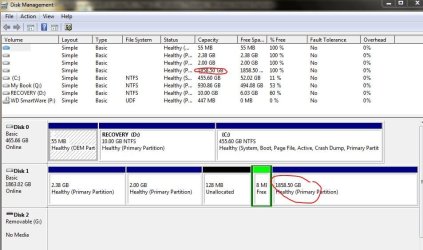
Home PC, Dell with two striped raid 250G drives on sata0 and 1. and I have a successful clean install of W7, that I still want to repair or clean up (reinstall again) but on one new WD 2tb green drive.

in the bios, I see the new WD in sata4 and non member, but in the W7 Disk Managment its a volume of the large partition of the striped drives.

I've tried booting from the cdrom drive with the W7 disk, and only having the WD disk sitting on sata0, (the raid disks are both disconnected) with the bootup order seeing the cdrom first and then the raid. I see the WD disk in the bootup, but I can't get the cdrom to continue reading. it spins up reads for a bit, and then spins down.

partial goal is to be able to go back to the two drives and recover the data, but i also have it on another disk.

would love to get some advise on how best to setup the raid, boot and configuration.

i have the option of deleting the "volume" in the disk managment, would that move it to its own location. It might need to be reformatted as I had it in a NAS at one time. i have upgraded my bios. thanks
 

Attachments

  • Capture.JPG
    Capture.JPG
    79.3 KB · Views: 5

My Computer My Computer

At a glance

Windows 7 Home Premiumoem
Computer Manufacturer/Model Number
Dell XPS 410
OS
Windows 7 Home Premium
Graphics Card(s)
oem
Here's what I would try first: Delete all partitions on the 1tb using Disk management, then use WD's excellent free Acronis cloning app to try to clone over the RAID to the 1tb. We have mixed reports on this working so it is worth the try. Read the easy Manual also on the Download page here: WD Support If cloning fails you can try imaging.

If this fails then back up your files from RAID, remove it and clean install to the 1tb after wiping with Diskpart: http://www.sevenforums.com/tutorials/91339-ssd-hdd-optimize-windows-reinstallation.html

http://www.sevenforums.com/tutorials/1649-clean-install-windows-7-a.html

Tips for a purrfect clean reinstall - use the ones which apply: http://www.sevenforums.com/installation-setup/125874-re-install-windows-7-a.html#post1086729
 
Thanks GregRocker,
I got it to work.
I did remove the volumes in the W7 diskmanager, and then did a format (about 4 hours). then tried to launch the install disk from the first CD drive with the striped drives unplugged. no luck again. then disabled the 1st cd drive in the bios and put the install disk in the 2nd cd drive and it took. i am installing win 7 on the new 2TB drive, and did the registry workaround again. it works great. I now plan on turning on and plugging in those two striped drives in the bios (set to load after the new HDD and the cd drives) and hope to be able to access that data via sata versus using my usb backup. thanks for your help.
 

My Computer My Computer

At a glance

Windows 7 Home Premiumoem
Computer Manufacturer/Model Number
Dell XPS 410
OS
Windows 7 Home Premium
Graphics Card(s)
oem
Back
Top