Usable RAM optimization?

dgebow

New member
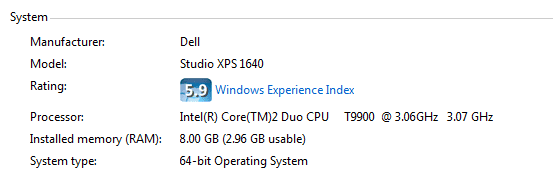
I have a Dell Laptop running Windows 7 Home Premium with the following specs:

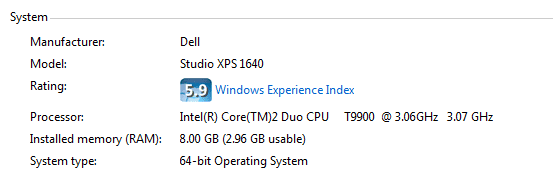
Intel Duo Core T9900 @ 3.06Ghz 3.07 GHz
8 GB Ram (2.96GB Usable)
64 Bit OS

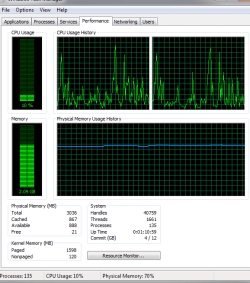
As you can see from the attached resource monitor, I'm only using 1/2 of the RAM. I'm trying to determine how to make the rest of the RAM usable. I've read the forums and done the following changes:

1. Update BIOS (the BIOS recognizes the full 8GB)
2. Increased Page Size

The only other solution I can find is that Windows is not "remapping" the memory. Some posts say you can change this setting in the BIOS...I can't seem to do that.

How would you proceed?
 

Attachments
  • Capture.PNG
    Capture.PNG
    11.6 KB · Views: 22
  • Capture2.PNG
    Capture2.PNG
    42.3 KB · Views: 77

My Computer

Computer Manufacturer/Model Number
Dell XPS1640
OS
Windows 7 home
CPU
Intel 2 duo CPU @ 3.06 Ghz 3.07 Ghz
Motherboard
Dell
Memory
8 GB
Graphics Card(s)
ATI movility radeon HD3670
Sound Card
ATI HD audio
Hard Drives
Samsung SSD PM800 256GB ATA
Try reseating the memory. When your computer boots up, do you see 8 GB listed (before Windows loads)?
 

My Computer

Computer Manufacturer/Model Number
Dell and Custom
OS
Systems 1 and 2: Windows 7 Enterprise x64, Win 8 Developer
CPU
System 1: i7 [email protected], System 2: AMD FX-4100 Zambezi 3.6G
Motherboard
System 1:Dell 06NWYK System 2: ASUS M5A97 AM3+
Memory
System 1: 8GB System 2: 8GB
Graphics Card(s)
System 1: ATI FirePro V4800 System 2: Radeon HD 6850
Sound Card
System 1: onboard System 2: onboard
Monitor(s) Displays
System1: Viewsonic HDMI 24"
Screen Resolution
System 1: 1920x1080 System 2: 1920x1080
Hard Drives
System 1: Mirrored .5B drives System 2: Seagate Barracuda ST1000DM003 1TB 7200 RPM 64MB Cache SATA 6.0Gb/s
Case
System 1: Dell System 2: Cooler Master
Internet Speed
10 MBPS
And your bios is A14? I know you indicated you upgraded.
 

My Computer

Computer Manufacturer/Model Number
Dell and Custom
OS
Systems 1 and 2: Windows 7 Enterprise x64, Win 8 Developer
CPU
System 1: i7 [email protected], System 2: AMD FX-4100 Zambezi 3.6G
Motherboard
System 1:Dell 06NWYK System 2: ASUS M5A97 AM3+
Memory
System 1: 8GB System 2: 8GB
Graphics Card(s)
System 1: ATI FirePro V4800 System 2: Radeon HD 6850
Sound Card
System 1: onboard System 2: onboard
Monitor(s) Displays
System1: Viewsonic HDMI 24"
Screen Resolution
System 1: 1920x1080 System 2: 1920x1080
Hard Drives
System 1: Mirrored .5B drives System 2: Seagate Barracuda ST1000DM003 1TB 7200 RPM 64MB Cache SATA 6.0Gb/s
Case
System 1: Dell System 2: Cooler Master
Internet Speed
10 MBPS
BIOS is A14 (as of yesterday)

If you mean "reseating" by removing memory and popping it back in, I'm concerned about doing this b/c its a laptop under warranty. Any other way?
 

My Computer

Computer Manufacturer/Model Number
Dell XPS1640
OS
Windows 7 home
CPU
Intel 2 duo CPU @ 3.06 Ghz 3.07 Ghz
Motherboard
Dell
Memory
8 GB
Graphics Card(s)
ATI movility radeon HD3670
Sound Card
ATI HD audio
Hard Drives
Samsung SSD PM800 256GB ATA
Reseating the RAM will not void a Dell warranty. They often recommend doing it when troubleshooting RAM related problems and they have no problem with users doing it on there own.

Source: 10+ years of owning only Dell computers.
 

My Computer

Computer type
Laptop
Computer Manufacturer/Model Number
Toshiba P775-S7100
OS
Windows 7 Professional SP1 64-bit
CPU
Intel Core i5-2450M @2.5 GHz
Memory
6 GB DDR3 1333MHz
Graphics Card(s)
Intel HD 3000
Monitor(s) Displays
Built-in 17.3" LED; 22" Insignia NS-L22Q-10A
Screen Resolution
1600x900; 1360x768
Hard Drives
750 GB Hitachi
1TB Seagate FreeAgent External
Internet Speed
Verizon DSL Speed(Down/Up): 3360 Kbps / 800 Kbps
Antivirus
MSE and MBAM Pro
Browser
IE10
You are correct about reseating. This should not void your warranty, but you can check with Dell if you'd like. Take precautions you are grounded, the PC is UNPLUGGED and BATTERY is OUT, and you handle the memory by the edges.

It comes standard with 4 GB, so I wanted to make sure they installed the other memory stick seated firmly in the slot.

So... really I'd like to know when you reboot your notebook if the bios show memory of 8 GB. That will scroll through before the operating system loads.

Afterward, please try this free memory test:

Memtest86+ - Advanced Memory Diagnostic Tool
 

My Computer

Computer Manufacturer/Model Number
Dell and Custom
OS
Systems 1 and 2: Windows 7 Enterprise x64, Win 8 Developer
CPU
System 1: i7 [email protected], System 2: AMD FX-4100 Zambezi 3.6G
Motherboard
System 1:Dell 06NWYK System 2: ASUS M5A97 AM3+
Memory
System 1: 8GB System 2: 8GB
Graphics Card(s)
System 1: ATI FirePro V4800 System 2: Radeon HD 6850
Sound Card
System 1: onboard System 2: onboard
Monitor(s) Displays
System1: Viewsonic HDMI 24"
Screen Resolution
System 1: 1920x1080 System 2: 1920x1080
Hard Drives
System 1: Mirrored .5B drives System 2: Seagate Barracuda ST1000DM003 1TB 7200 RPM 64MB Cache SATA 6.0Gb/s
Case
System 1: Dell System 2: Cooler Master
Internet Speed
10 MBPS
I don't think the memory is bad, but I wonder what would happen if you took out on stick of RAM for a while.
 

My Computer

Computer type
Laptop
Computer Manufacturer/Model Number
Toshiba P775-S7100
OS
Windows 7 Professional SP1 64-bit
CPU
Intel Core i5-2450M @2.5 GHz
Memory
6 GB DDR3 1333MHz
Graphics Card(s)
Intel HD 3000
Monitor(s) Displays
Built-in 17.3" LED; 22" Insignia NS-L22Q-10A
Screen Resolution
1600x900; 1360x768
Hard Drives
750 GB Hitachi
1TB Seagate FreeAgent External
Internet Speed
Verizon DSL Speed(Down/Up): 3360 Kbps / 800 Kbps
Antivirus
MSE and MBAM Pro
Browser
IE10
definitely find out first if the system sees all the memory before booting into windows.. that will help isolate the problem
 
OK - but before I do this, I want to confirm with you the following facts:

1. Right now BIOS recognizes 8, windows just says it is not usable. All the posts I've read so far say this is a function of windows not remapping the memory properly. Since I didn't install Windows, I'm not sure what the setting was.

2. You are saying that I should pull out 4GB and try booting that way?
 

My Computer

Computer Manufacturer/Model Number
Dell XPS1640
OS
Windows 7 home
CPU
Intel 2 duo CPU @ 3.06 Ghz 3.07 Ghz
Motherboard
Dell
Memory
8 GB
Graphics Card(s)
ATI movility radeon HD3670
Sound Card
ATI HD audio
Hard Drives
Samsung SSD PM800 256GB ATA
First, just for the heck of it, please verify your operating system is 64-bit.

Okay, so you can see 8 GB on the bios screen as the pc boots up (but before Windows boots up).

Please run the memory test I indicated above first.

Then, remove one stick of memory, reboot, and note what you see.
Repeat by putting only the other stick of memory in. PLEASE keep each stick in the slot it originated it. What do you see?

Finally put both sticks back, seated firmly. What do you see now?

Sorry, but this is a process of elimination.

If all the memory tests okay, and each stick shows 4GB (or less) and both sticks show < 4GB,
 

My Computer

Computer Manufacturer/Model Number
Dell and Custom
OS
Systems 1 and 2: Windows 7 Enterprise x64, Win 8 Developer
CPU
System 1: i7 [email protected], System 2: AMD FX-4100 Zambezi 3.6G
Motherboard
System 1:Dell 06NWYK System 2: ASUS M5A97 AM3+
Memory
System 1: 8GB System 2: 8GB
Graphics Card(s)
System 1: ATI FirePro V4800 System 2: Radeon HD 6850
Sound Card
System 1: onboard System 2: onboard
Monitor(s) Displays
System1: Viewsonic HDMI 24"
Screen Resolution
System 1: 1920x1080 System 2: 1920x1080
Hard Drives
System 1: Mirrored .5B drives System 2: Seagate Barracuda ST1000DM003 1TB 7200 RPM 64MB Cache SATA 6.0Gb/s
Case
System 1: Dell System 2: Cooler Master
Internet Speed
10 MBPS
OK - I will try this tonight. You can see in the attached img that the OS is 64 bit, however I'm not certain this means that Win 7 Home automatically utilizes it. On MS, it seems to indicate that.
 

Attachments

  • Capture.PNG
    Capture.PNG
    11.6 KB · Views: 16

My Computer

Computer Manufacturer/Model Number
Dell XPS1640
OS
Windows 7 home
CPU
Intel 2 duo CPU @ 3.06 Ghz 3.07 Ghz
Motherboard
Dell
Memory
8 GB
Graphics Card(s)
ATI movility radeon HD3670
Sound Card
ATI HD audio
Hard Drives
Samsung SSD PM800 256GB ATA
Yes, thanks. Please let us know how it goes tonight.
 

My Computer

Computer Manufacturer/Model Number
Dell and Custom
OS
Systems 1 and 2: Windows 7 Enterprise x64, Win 8 Developer
CPU
System 1: i7 [email protected], System 2: AMD FX-4100 Zambezi 3.6G
Motherboard
System 1:Dell 06NWYK System 2: ASUS M5A97 AM3+
Memory
System 1: 8GB System 2: 8GB
Graphics Card(s)
System 1: ATI FirePro V4800 System 2: Radeon HD 6850
Sound Card
System 1: onboard System 2: onboard
Monitor(s) Displays
System1: Viewsonic HDMI 24"
Screen Resolution
System 1: 1920x1080 System 2: 1920x1080
Hard Drives
System 1: Mirrored .5B drives System 2: Seagate Barracuda ST1000DM003 1TB 7200 RPM 64MB Cache SATA 6.0Gb/s
Case
System 1: Dell System 2: Cooler Master
Internet Speed
10 MBPS
OK - I sequentially removed the memory. Each time, same result: 4GB RAM, 2.96Gb usable. By the RAM usage meter, both showed 50% RAM usage at fresh boot/idle.

When I plugged the 2nd RAM back in, it says 8GB RAM, 2.96 GB usable again... now the guage hovers around 60% RAM usage.

Thoughts?
 

My Computer

Computer Manufacturer/Model Number
Dell XPS1640
OS
Windows 7 home
CPU
Intel 2 duo CPU @ 3.06 Ghz 3.07 Ghz
Motherboard
Dell
Memory
8 GB
Graphics Card(s)
ATI movility radeon HD3670
Sound Card
ATI HD audio
Hard Drives
Samsung SSD PM800 256GB ATA
I feel for ya.
One person gave this solution:
1)Run
2)type "msconfig"
3)Go under the "boot" tab
4)click "advanced options" button
5)UNCHECK! "Maximum memory"
6)Reboot

Another user suggested "memory remapping" in the bios

Many people, including myself, don't have this problem. But several do as well, and the answers seem to vary.
 

My Computer

Computer Manufacturer/Model Number
Dell and Custom
OS
Systems 1 and 2: Windows 7 Enterprise x64, Win 8 Developer
CPU
System 1: i7 [email protected], System 2: AMD FX-4100 Zambezi 3.6G
Motherboard
System 1:Dell 06NWYK System 2: ASUS M5A97 AM3+
Memory
System 1: 8GB System 2: 8GB
Graphics Card(s)
System 1: ATI FirePro V4800 System 2: Radeon HD 6850
Sound Card
System 1: onboard System 2: onboard
Monitor(s) Displays
System1: Viewsonic HDMI 24"
Screen Resolution
System 1: 1920x1080 System 2: 1920x1080
Hard Drives
System 1: Mirrored .5B drives System 2: Seagate Barracuda ST1000DM003 1TB 7200 RPM 64MB Cache SATA 6.0Gb/s
Case
System 1: Dell System 2: Cooler Master
Internet Speed
10 MBPS
Thinking back, the last person I helped with this much RAM being hardware reserved (this is where the non-usuable RAM goes), had ticked the maximum memory box and left the number as 0. Neither box should be checked. Despite common claims, it does not boost performance to check either.
 

My Computer

Computer type
Laptop
Computer Manufacturer/Model Number
Toshiba P775-S7100
OS
Windows 7 Professional SP1 64-bit
CPU
Intel Core i5-2450M @2.5 GHz
Memory
6 GB DDR3 1333MHz
Graphics Card(s)
Intel HD 3000
Monitor(s) Displays
Built-in 17.3" LED; 22" Insignia NS-L22Q-10A
Screen Resolution
1600x900; 1360x768
Hard Drives
750 GB Hitachi
1TB Seagate FreeAgent External
Internet Speed
Verizon DSL Speed(Down/Up): 3360 Kbps / 800 Kbps
Antivirus
MSE and MBAM Pro
Browser
IE10
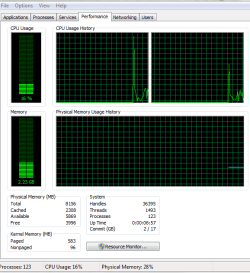
That did the trick... unchecking Max memory. Now it doesn't say 2.96GB available. I've attached a screen shot of the power meter, showing 5.9GB avail. Any suggested tweaks I should do to further enhance this?

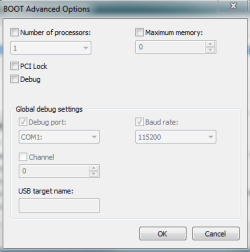
Also, In the misconfig, I noticed that "1 processor" on boot is checked. Since I have 2, would it help to activate the 2nd? See screenshot.
 

Attachments

  • Capture5.PNG
    Capture5.PNG
    35.7 KB · Views: 20
  • Capture4.PNG
    Capture4.PNG
    33 KB · Views: 7

My Computer

Computer Manufacturer/Model Number
Dell XPS1640
OS
Windows 7 home
CPU
Intel 2 duo CPU @ 3.06 Ghz 3.07 Ghz
Motherboard
Dell
Memory
8 GB
Graphics Card(s)
ATI movility radeon HD3670
Sound Card
ATI HD audio
Hard Drives
Samsung SSD PM800 256GB ATA
No it will not help to change processor setting. Windows will load both cores by default. That is for developers that want to test how there apps will run under different environments. Leave it unchecked.
 
Last edited:

My Computer

Computer Manufacturer/Model Number
Asus K60IJ
OS
Windows 7 Ultimate x64
CPU
Intel Pentium Dual Core T4200
Motherboard
HP Laptop
Memory
4gb PC-6400
Graphics Card(s)
Integrated Intel GMA 4500
Sound Card
onboard(laptop)
Monitor(s) Displays
16"
Screen Resolution
1300 X 766 with true 720p HD support
Hard Drives
320GB 5400RPM
Mouse
Microsoft 3000 laptop mouse
Internet Speed
15mbit+ down and 768kbit up
Other Info
1TB external Western Digital Essentials HDD
As I stated before, you should not check either. Both are used all the time. And, unlike housry said (sorry), it is meant for debugging purposes.
 

My Computer

Computer type
Laptop
Computer Manufacturer/Model Number
Toshiba P775-S7100
OS
Windows 7 Professional SP1 64-bit
CPU
Intel Core i5-2450M @2.5 GHz
Memory
6 GB DDR3 1333MHz
Graphics Card(s)
Intel HD 3000
Monitor(s) Displays
Built-in 17.3" LED; 22" Insignia NS-L22Q-10A
Screen Resolution
1600x900; 1360x768
Hard Drives
750 GB Hitachi
1TB Seagate FreeAgent External
Internet Speed
Verizon DSL Speed(Down/Up): 3360 Kbps / 800 Kbps
Antivirus
MSE and MBAM Pro
Browser
IE10
Actually we are both right! It is used for both debugging and for programmers to test their code in single core mode if they are running multi core system.

If you have a multiple core CPU (Ex: Intel Core Duo or Quad CPU) or multiple CPUs, then this will show you how to change the Number of Processors that will be used during boot up for troubleshooting and debugging purposes to be able to determine if there is a problem with a single processor/core, or for a programmer to test their code against a single core while running on their multi-core system.

Boot Advanced Options - Number of Processors - Vista Forums
 

My Computer

Computer Manufacturer/Model Number
Asus K60IJ
OS
Windows 7 Ultimate x64
CPU
Intel Pentium Dual Core T4200
Motherboard
HP Laptop
Memory
4gb PC-6400
Graphics Card(s)
Integrated Intel GMA 4500
Sound Card
onboard(laptop)
Monitor(s) Displays
16"
Screen Resolution
1300 X 766 with true 720p HD support
Hard Drives
320GB 5400RPM
Mouse
Microsoft 3000 laptop mouse
Internet Speed
15mbit+ down and 768kbit up
Other Info
1TB external Western Digital Essentials HDD
Back
Top