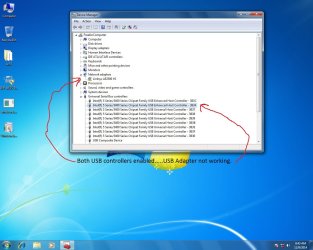
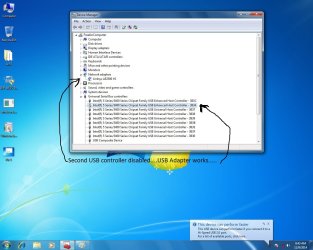
I'm trying to get my Linksys AE2500 USB wireless adapter to work with Windows 7 Ultimate 64 bit and an Intel DP55WB motherboard. I've narrowed down the problem but can't find a solution. When I install the USB adapter windows installs it but then generates a unable to start error in device manager. If I disable the second USB Enhanced host controller in device manager the adapter will work and I can go online. However if I restart or shutdown my computer the problem starts all over again. I've installed all the windows updates and have the latest driver from Linksys. I've attached two pics of before and after screenshots of the device manager.
This looks like a fresh W7 install and possibly a new build. (confirm please)
Your System Specs say this is a Haswell system. Yet the USB Controllers are Series 5?
Have you installed the most current chipset driver for the Maximus?
Have you installed all the motherboard drivers?
My Computer
Computer type
PC/Desktop
Computer Manufacturer/Model Number
Home Built - Jan 2013
OS
Windows 7 64 Bit Home Premium SP1
CPU
i7-3820
Motherboard
Asus P9X79-PRO - Bios 4608
Memory
GSkill F3-14900CL9Q - 16GB
Graphics Card(s)
EVGA GeForce GTX660 - Driver 352.86
Sound Card
On board Realtek ALC898
Monitor(s) Displays
Acer S271HL
Screen Resolution
1920 x 1080
Hard Drives
#1- Samsung 840 Pro Series
#2- Western Digital WD1002FAEX Sata3 Black
#3- Western Digital WD1002FAEX Sata3 Black
PSU
Corsair CMPSU-850TX-V2 - 850 watt (by Seasonic)
Case
Corsair Obsidian 550D
Cooling
Standard 3 120mm case fans, Cooler Master Hyper 212 EVO
Thanks for your reply TVeblen. Sorry I had put the specs of my other computer not the one causing me the problem. The specs of the problem computer are DP55WB Intel motherboard with an i5 750 processor. All drivers updated through windows update and Intel. SP1 installed. I just can't get the darn thing to work properly without disabling the second USB host controller as shown in the screenshots. Any help would be greatly appreciated.
Select each item under "Universal Serial Bus Controllers" and uninstall them. Then restart. Windows will reinstall all the drivers fresh. Then see if the device works as it should.
My Computer
Computer type
PC/Desktop
Computer Manufacturer/Model Number
Home Built - Jan 2013
OS
Windows 7 64 Bit Home Premium SP1
CPU
i7-3820
Motherboard
Asus P9X79-PRO - Bios 4608
Memory
GSkill F3-14900CL9Q - 16GB
Graphics Card(s)
EVGA GeForce GTX660 - Driver 352.86
Sound Card
On board Realtek ALC898
Monitor(s) Displays
Acer S271HL
Screen Resolution
1920 x 1080
Hard Drives
#1- Samsung 840 Pro Series
#2- Western Digital WD1002FAEX Sata3 Black
#3- Western Digital WD1002FAEX Sata3 Black
PSU
Corsair CMPSU-850TX-V2 - 850 watt (by Seasonic)
Case
Corsair Obsidian 550D
Cooling
Standard 3 120mm case fans, Cooler Master Hyper 212 EVO
I'm stumped.
The only other things I can think of is:
That the driver installed incorrectly - I would uninstall the device from Device Manager, clean the USB Stack again, and then reinstall the device drivers. I assume the driver is for W7 x64. You might also run the exe by right clicking and choosing "Run as Administrator".
That the USB port the device is plugged in is the problem. I would use a USB 2.0 port. A 3.0 port might throw up these kinds of problems.
Some devices require you to install driver first then plug device in. What do the installation instructions say?
That the driver has bugs. You might check the manufacturer's website for an updated driver, or see if this is mentioned on any forum they might have.
My Computer
Computer type
PC/Desktop
Computer Manufacturer/Model Number
Home Built - Jan 2013
OS
Windows 7 64 Bit Home Premium SP1
CPU
i7-3820
Motherboard
Asus P9X79-PRO - Bios 4608
Memory
GSkill F3-14900CL9Q - 16GB
Graphics Card(s)
EVGA GeForce GTX660 - Driver 352.86
Sound Card
On board Realtek ALC898
Monitor(s) Displays
Acer S271HL
Screen Resolution
1920 x 1080
Hard Drives
#1- Samsung 840 Pro Series
#2- Western Digital WD1002FAEX Sata3 Black
#3- Western Digital WD1002FAEX Sata3 Black
PSU
Corsair CMPSU-850TX-V2 - 850 watt (by Seasonic)
Case
Corsair Obsidian 550D
Cooling
Standard 3 120mm case fans, Cooler Master Hyper 212 EVO