Solved USB flash pen drive RAW 7.22GB used space

cyrilhubert

New member
Member
VIP
Local time
11:17 AM
Messages
175
Location
Asia
I have an 8GB USB pen or flashdrive that had gone RAW.
7.22 GB RAW Healthy Primary Partition according to Disk Management Console .

Recovered all data with TestDisk by cgsecurity.

Tried to recovered partition using MiniTool Partition Wizard Home Edition, a free partition manager designed by MT Solution Ltd.That failed.
I think I added more problem to it than solving it.

Using diskpart
DISKPART> list disk

Disk ### Status Size Free Dyn Gpt
-------- ------------- ------- ------- --- ---
Disk 0 Online 465 GB 0 B
Disk 1 No Media 0 B 0 B
Disk 2 Online 7395 MB 0 B

DISKPART> select disk 2

Disk 2 is now the selected disk.

DISKPART> detail disk

Kingston DataTraveler 2.0 USB Device
Disk ID: 00000001
Type : USB
Status : Online
Path : 0
Target : 0
LUN ID : 0
Location Path : UNAVAILABLE
Current Read-only State : No
Read-only : No
Boot Disk : No
Pagefile Disk : No
Hibernation File Disk : No
Crashdump Disk : No
Clustered Disk : No

Volume ### Ltr Label Fs Type Size Status Info
---------- --- ----------- ----- ---------- ------- --------- --------
Volume 6 E RAW Removable 7395 MB Healthy

DISKPART> list disk

Disk ### Status Size Free Dyn Gpt
-------- ------------- ------- ------- --- ---
Disk 0 Online 465 GB 0 B
Disk 1 No Media 0 B 0 B
* Disk 2 Online 7395 MB 0 B

DISKPART> select disk 2

Disk 2 is now the selected disk.

DISKPART> create partition primary

No usable free extent could be found. It may be that there is insufficient
free space to create a partition at the specified size and offset. Specify
different size and offset values or don't specify either to create the
maximum sized partition. It may be that the disk is partitioned using the MBR disk
partitioning format and the disk contains either 4 primary partitions, (no
more partitions may be created), or 3 primary partitions and one extended
partition, (only logical drives may be created).

Tried deleting volume
DISKPART> select Volume 6
Volume 6 is now the selected volume.
DISKPART> delete volume
DISKPART successfully deleted the volume as shown in http://www.sevenforums.com/tutorials/2668-partition-volume-delete.html

Volume 6 is still there.

Any advice is deeply appreciated.
Thank you
 

My Computer My Computer

At a glance

Windows 7 Home Premium 64bitIntel Core 2 Duo T6600 2.2 GHz 800MHz4GBNvidia Geforce G105M
Computer type
Laptop
Computer Manufacturer/Model Number
Acer Aspire 4736G
OS
Windows 7 Home Premium 64bit
CPU
Intel Core 2 Duo T6600 2.2 GHz 800MHz
Motherboard
Intel PM65
Memory
4GB
Graphics Card(s)
Nvidia Geforce G105M
Hard Drives
Toshiba MK5055GSX 99FKS993S LBAS 976773167
Antivirus
AVG Free AV 2015
Browser
IE & Chrome
Please post a screenshot of Windows Disk Management with only your USB flash drive connected.

Most probably it will show as "Unallocated"

In that case format that volume and assign a drive letter.
 

My Computer My Computer

At a glance

Windows 7 Home Premium 32 bit
OS
Windows 7 Home Premium 32 bit
How old is the Drive, As any flash media storage device ages and gets written and erased the amount of useable storage on the device declines. This is reported to the operating system as what you are likely seeing. You could theoretically try to connect the drive to a computer running Linux and run {sudo dd if=/dev/zero of=/dev/sdX (if is Input File, of is Output file)(sdX replace X with a b c d etc. use lsblk to figure out what device file is your flash drive)
 

My Computer My Computer

At a glance

Windows 7 Ultimate x64AMD FX 4130 Quad Core16 GB Corsair and Gskill (Paired)NVIDIA Geforce GTX 750 Ti
Computer type
PC/Desktop
Computer Manufacturer/Model Number
Custom Build
OS
Windows 7 Ultimate x64
CPU
AMD FX 4130 Quad Core
Motherboard
Gigabyte 78LMT-USB3
Memory
16 GB Corsair and Gskill (Paired)
Graphics Card(s)
NVIDIA Geforce GTX 750 Ti
Sound Card
On-board VIA HD Audio
Monitor(s) Displays
Acer H6 Series H226HQLbid Black 21.5"
Screen Resolution
1920 x 1080
Hard Drives
160 GB 10k RPM (Whitelabel)
150 GB PATA Drivd Pulled from Old Dell
PSU
EVGA 430W
Case
DIYPC FM08-W Black USB 3.0 ATX and Micro-ATX Mid Tower Case
Cooling
3x Rosewill RFX-120 - 120mm + 2x Generic 120mm
Keyboard
HP Wireless Keyboard
Mouse
HP Wireless Mouse
Internet Speed
18.14 Mbps Down/5.23 Mbps Up
Antivirus
Kasperesky Internet Security
Browser
Firefox
Other Info
Honeywell Adaptus 3800g Handheld Barcode Scanner Connected
^ In a situation where the memory cells can no longer save the data faithfully - meaning the flash drive has reached the end of life - the controller in the flash drive will turn the drive into write-protected making it impossible to write any data further.. So you will only get the message that the drive is write-protected. No operation including deleting the volume or formatting it will be possible.

In this case the flash drive has only turned RAW and it is not the end-of-life syndrome.

I am still waiting for the screenshot of Windows Disk Management from the OP.
 

My Computer My Computer

At a glance

Windows 7 Home Premium 32 bit
OS
Windows 7 Home Premium 32 bit
Hello Jumanji and LordShadowWing,
Thank you both you for your reply(ies).

To LordShadowWing:
The USB pendrive is an unused new pendrive. I kept it for a year before I used it for storing data and it went RAW. All data recovered using TestDisk by CGSecurity. The vendor told me to use it the day I bought it.When was that? 30th Aug 2013.
I used somewhere in Dec.2103.

To Jumanji:
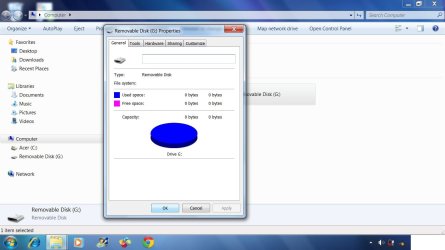
The pendrive showed all freespace used.
LOL!
I think made the situation worse by playing with it using TestDisk and MiniTool Partition Wizard Home Edition.I tried partition it and failed.

I am just trying to learn from this lesson what I did wrong. I am ready to dump it or claim warranty from the manufacturer.
 

Attachments

  • Disk properties.jpg
    Disk properties.jpg
    74.2 KB · Views: 1
  • diskmgmt.jpg
    diskmgmt.jpg
    100.7 KB · Views: 1

My Computer My Computer

At a glance

Windows 7 Home Premium 64bitIntel Core 2 Duo T6600 2.2 GHz 800MHz4GBNvidia Geforce G105M
Computer type
Laptop
Computer Manufacturer/Model Number
Acer Aspire 4736G
OS
Windows 7 Home Premium 64bit
CPU
Intel Core 2 Duo T6600 2.2 GHz 800MHz
Motherboard
Intel PM65
Memory
4GB
Graphics Card(s)
Nvidia Geforce G105M
Hard Drives
Toshiba MK5055GSX 99FKS993S LBAS 976773167
Antivirus
AVG Free AV 2015
Browser
IE & Chrome
It is still showing as RAW only.

Try to format your pen drive with HP USB Disk Storage Format Tool v2.2.3 HP USB Disk Storage Format Tool Download - Softpedia

(Right click on HPUSBDisk.exe and run as administrator.)

If it does not work, do a low level Format with HDD LLF Low Level Format Tool . Download the Windows executable version 4.40 HDDGURU: HDD LLF Low Level Format Tool

After a low level format is completed you may have to do a regular format. Let us know how things went.

( Neither TestDisk nor Partition Wizard can kill a drive.)
 

My Computer My Computer

At a glance

Windows 7 Home Premium 32 bit
OS
Windows 7 Home Premium 32 bit
Thank you Jumanji.
I did formatted my pen drive with HP USB Disk Storage Format Tool v2.2.3 HP USB Disk Storage Format Tool Download - Softpedia. It failed.So I will follow your advice and see what will happen next.
 

My Computer My Computer

At a glance

Windows 7 Home Premium 64bitIntel Core 2 Duo T6600 2.2 GHz 800MHz4GBNvidia Geforce G105M
Computer type
Laptop
Computer Manufacturer/Model Number
Acer Aspire 4736G
OS
Windows 7 Home Premium 64bit
CPU
Intel Core 2 Duo T6600 2.2 GHz 800MHz
Motherboard
Intel PM65
Memory
4GB
Graphics Card(s)
Nvidia Geforce G105M
Hard Drives
Toshiba MK5055GSX 99FKS993S LBAS 976773167
Antivirus
AVG Free AV 2015
Browser
IE & Chrome
Successfully low level formatted the flashdrive now going for high level formatting.
Windows was unable to complete the format.
Trying HP USB Disk Storage Format Tool v2.2.3.
HP USB Disk Storage Format Tool reported there is no specified media in the device.
 
Last edited:

My Computer My Computer

At a glance

Windows 7 Home Premium 64bitIntel Core 2 Duo T6600 2.2 GHz 800MHz4GBNvidia Geforce G105M
Computer type
Laptop
Computer Manufacturer/Model Number
Acer Aspire 4736G
OS
Windows 7 Home Premium 64bit
CPU
Intel Core 2 Duo T6600 2.2 GHz 800MHz
Motherboard
Intel PM65
Memory
4GB
Graphics Card(s)
Nvidia Geforce G105M
Hard Drives
Toshiba MK5055GSX 99FKS993S LBAS 976773167
Antivirus
AVG Free AV 2015
Browser
IE & Chrome
I think we have exhausted all the possibilities to revive the drive. Looks like it was a premature death due to bad quality chips inside. What brand is it?
 

My Computer My Computer

At a glance

Windows 7 Home Premium 32 bit
OS
Windows 7 Home Premium 32 bit
Kingston and possible a fake USB flashdrive of that make or brand.
Thank very much to Jumanji.
 

My Computer My Computer

At a glance

Windows 7 Home Premium 64bitIntel Core 2 Duo T6600 2.2 GHz 800MHz4GBNvidia Geforce G105M
Computer type
Laptop
Computer Manufacturer/Model Number
Acer Aspire 4736G
OS
Windows 7 Home Premium 64bit
CPU
Intel Core 2 Duo T6600 2.2 GHz 800MHz
Motherboard
Intel PM65
Memory
4GB
Graphics Card(s)
Nvidia Geforce G105M
Hard Drives
Toshiba MK5055GSX 99FKS993S LBAS 976773167
Antivirus
AVG Free AV 2015
Browser
IE & Chrome
Their has been reports of a lot of fake USB drives. Counterfeits from guess where.
 

My Computer My Computer

At a glance

Windows 10 Pro. 64/ version 1709 Windows 7 Pr...Intel i7-6800K @ 4.3Corsair Platinum 16 gig @2400EVGA GTX 1070 OC
Computer type
PC/Desktop
Computer Manufacturer/Model Number
Home made Desktop
OS
Windows 10 Pro. 64/ version 1709 Windows 7 Pro/64
CPU
Intel i7-6800K @ 4.3
Motherboard
ASUS X-99 Deluxe II
Memory
Corsair Platinum 16 gig @2400
Graphics Card(s)
EVGA GTX 1070 OC
Monitor(s) Displays
Asus 27" LED LCD/VE278Q
Screen Resolution
1920-1080 or 1280-720 HDMI
Hard Drives
INTEL SSD 730-240 Gb Sata 3.0/
PSU
EVGA Platium 1200W
Case
Phanteks Luxe Tempered Glass 8 fans/ one radiator
Cooling
XSPC/ Water Cooled CPU
Keyboard
Das 4 Professional
Mouse
Logitech M705/MX Anywhere 2-S
Internet Speed
100 mbits
Antivirus
Microsoft Security Essentials/ Malwarebytes Premium 3.0/ SAS
Browser
I.E. 11 default/Firefox/ ISP Time Warner Cable/Spectrum
Other Info
LG BluRay Burner/
Sound system-KLipsch-THX/
Icy Dock ssd Hot Swap bays.
China where workers who worked for the genuine makers would setup shops or factories sourcing the same parts and assembled themselves then sell for a fraction of the market price to dealers who want a fast buck.It sure wasted my sweat,toil,blood and my precious time.
 

My Computer My Computer

At a glance

Windows 7 Home Premium 64bitIntel Core 2 Duo T6600 2.2 GHz 800MHz4GBNvidia Geforce G105M
Computer type
Laptop
Computer Manufacturer/Model Number
Acer Aspire 4736G
OS
Windows 7 Home Premium 64bit
CPU
Intel Core 2 Duo T6600 2.2 GHz 800MHz
Motherboard
Intel PM65
Memory
4GB
Graphics Card(s)
Nvidia Geforce G105M
Hard Drives
Toshiba MK5055GSX 99FKS993S LBAS 976773167
Antivirus
AVG Free AV 2015
Browser
IE & Chrome
Back
Top