USB ports won't recognize external drives on Win 7 but will on Ubuntu

practicaldylan

New member
Local time
1:54 PM
Messages
7
Location
Wisconsin
Hello. This is my first post here so I apologize if my format is off. I've used the forums here quite a bit and they've fixed many problems in my workplace.

I have an issue with a Dell Latitude E5510 Laptop with Win. 7 Pro x64 that is hindering work. The laptop will not recognize any flash drives or hard drives unless it is in FAT format (sometimes it's even finicky about that). How ever if I boot from a flash drive with Ubuntu on it it can see everything that connects to it NTFS and FAT32. When I go into Disk Management it won't see anything and under Device Manager it sees a drive and puts the yellow triangle. When I try to update the drivers it just fails.

I've spent a lot of time online looking for a solution. I went to the dell website and they have no updated USB drivers. I went into Device Manager, uninstalled USB Root Hub's and drivers and rebooted, I repaired windows, Checked and Verified the HDD and even transferred the HDD to a similar laptop and it will have the same issue (guess it's not 100% hardware).

I have used a different drive with a clean install of windows and it works fine however I can't simply wipe the drive because there is company specific software that needs to remain on the computer.

Any help would be greatly appreciated.
 

My Computer My Computer

At a glance

Windows 10 Pro 64-bitIntel Core i7 6700K @ 4.00GHz32 GB Gskill TridentZ 3400Asus Strix GTX 1070
Computer type
PC/Desktop
Computer Manufacturer/Model Number
Custom Build
OS
Windows 10 Pro 64-bit
CPU
Intel Core i7 6700K @ 4.00GHz
Motherboard
Asus Z170 Pro Gaming
Memory
32 GB Gskill TridentZ 3400
Graphics Card(s)
Asus Strix GTX 1070
Monitor(s) Displays
BenQ XL2720Z 27'' 144Hz
Hard Drives
500 GB Samsung 950 pro
500 GB Samsung 850 Pro x2
4 TB WD Yellow drive
4 TB WD Red
6 TB WD Red
PSU
1000w Coolmaster Silent Pro
Case
Corsair Obsidian Series 650D
Cooling
Corsair H80i GT
Keyboard
Logitech G710+
Mouse
Steelseries Sensi RAW(HotS edition)
Internet Speed
"60" down
Antivirus
Security Essentials/Malwarebytes
Browser
Chrome Canary
Hello and welcome Dylan?? Am just wondering how you updated the drivers mate as personally I ma not a fan of the Windows feature preferring to go to the manufacturer of the machine or the device to get drivers for same.
The drivers fro your machine are here Product Support | Dell Australia I think it might be an idea to try the chipset one as I cannot make out a specific one for the USB stuff.

Now it might be an idea to run a chkdsk as well mate

http://www.sevenforums.com/tutorials/433-disk-check.html < use the /f option in Option 2 ifnecessary (and the /r if you think it needs it)
Another option is for you to use this to recover that data for the company.


BOOTABLE UBUNTU

Make a bootable Ubuntu disk http://www.ubuntu.com/download

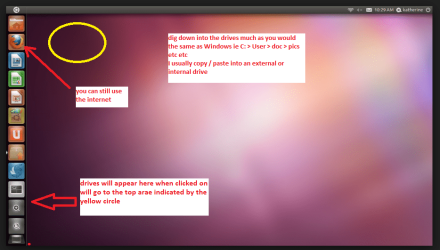
Set the BIOSto boot from the optical when the machine boots it will show you a screen with TRY or INSTALL >select TRY.You can of course remove the hard driveand any other drives when doing this as if the optical alone is the only driveleft in the machine then the BIOS willonly find it to boot from.

When it isfinished - it takes very little time you will get a screen like in the pic .

Open thedrive you want > User and dig down until you get to the data / settings you may be able to copy / paste the materialyou want to an external source or other installed drive doing this.

I am notsure if it will but I have recovered tons of data etc using this method both on"dead" or just plain drives that you cannot get data from using Windows.
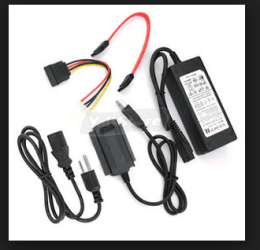
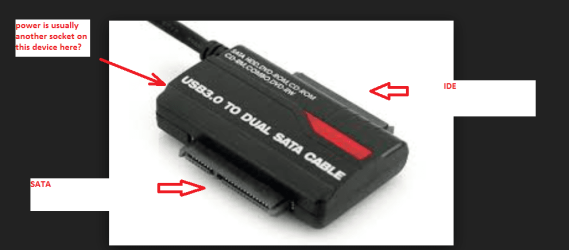
But you will need aa USB to SATA gadget to do that see pic/s


Attachments

  • UBUTUX.PNG
    UBUTUX.PNG
    128.9 KB · Views: 1
  • ADAPTOR.PNG
    ADAPTOR.PNG
    30.6 KB · Views: 11
  • ADAPTOR 3.PNG
    ADAPTOR 3.PNG
    49.1 KB · Views: 1

My Computer My Computer

At a glance

Desk1 7 Home Prem / Desk2 10 Pro / Main lap A...Desk1 i5 3750K / Laptop i7 GTX 860M / Desk2 i...Desk1 8GB (1866) / Desk2 16GB (1333) / Laptop...Desk 1& 2NVidia GTX 650 & Laptops on board Intel
Computer type
PC/Desktop
Computer Manufacturer/Model Number
Own build (new) Desk1 / Asus ROG Win 7 / Desk2 1st build
OS
Desk1 7 Home Prem / Desk2 10 Pro / Main lap Asus ROG 10 Pro 2 laptop Toshiba 7 Pro Asus P2520 7 & 10
CPU
Desk1 i5 3750K / Laptop i7 GTX 860M / Desk2 i5 2500
Motherboard
Desk1 Asus P877-V / Desk2 Gigabyte H67 UD3H / Laptop ?
Memory
Desk1 8GB (1866) / Desk2 16GB (1333) / Laptop 8Gb DDR3
Graphics Card(s)
Desk 1& 2NVidia GTX 650 & Laptops on board Intel
Sound Card
Desk 1 & 2 -XONAR DG Realtek High Def audio Laptop
Monitor(s) Displays
Desk 1 Benq HD 2450 / Desk2 Philips 24" / Laptop 17.5"
Screen Resolution
1920x1080 D1 & D2 & Laptop 1
Hard Drives
Desk1 Samsung 120GB 830 SSD
Asus ROG 256GB 850 Pro SSD
Desk2 Samsung 840 256 SSD
Toshiba 120GB EVO
PSU
Desk 1 Corsair HX 1050/ Laptop ? / Desk 2 Corsair HX 650
Case
Desk 1 Cooler HAF XM ? Toshiba laptop / Desk2 Coolermaster
Cooling
Fans on all Desk1 -2 Desk2 - all Coolermasters 5 Laptop ?
Keyboard
Desk 1 MS Sidewinder X6 Desk 2 MS Sidewinder X 4
Mouse
Desk 1&2 - Gigabyte MS 900 gamer - laptop - Logitec wireless
Internet Speed
ADSL2+
Other Info
One other Desktop (tester) and spare Toshba laptop both with SSD's
Running Kaspersky 2016 ISS on all machines config'd identically
Logitec audio stereo systems on each machine (x3)
Canon MG5250MFC
Router/modem TP-Link running WPA2SK
Thank you for the reply!

I went to the Dell site and downloaded all the drivers I could to no avail. I also ran both of the disk checks you suggested and neither of them helped my issue. The flash drives are getting power so the ports work, however Windows just does not want to see them.

I think I'll leave this open for a few days before I decide to bite the bullet and format and re-install Windows. There has to be some form of solution.
 

My Computer My Computer

At a glance

Windows 10 Pro 64-bitIntel Core i7 6700K @ 4.00GHz32 GB Gskill TridentZ 3400Asus Strix GTX 1070
Computer type
PC/Desktop
Computer Manufacturer/Model Number
Custom Build
OS
Windows 10 Pro 64-bit
CPU
Intel Core i7 6700K @ 4.00GHz
Motherboard
Asus Z170 Pro Gaming
Memory
32 GB Gskill TridentZ 3400
Graphics Card(s)
Asus Strix GTX 1070
Monitor(s) Displays
BenQ XL2720Z 27'' 144Hz
Hard Drives
500 GB Samsung 950 pro
500 GB Samsung 850 Pro x2
4 TB WD Yellow drive
4 TB WD Red
6 TB WD Red
PSU
1000w Coolmaster Silent Pro
Case
Corsair Obsidian Series 650D
Cooling
Corsair H80i GT
Keyboard
Logitech G710+
Mouse
Steelseries Sensi RAW(HotS edition)
Internet Speed
"60" down
Antivirus
Security Essentials/Malwarebytes
Browser
Chrome Canary
Dylan mate sorry for late reply and well it looks like a reinstall mate. Now how you do that is up to you whether it is a factory default / restore or go with the tutorial is up to you.
Personally I would put a new drive into the machine and use this tutorial
http://www.sevenforums.com/tutorials/219487-clean-reinstall-factory-oem-windows-7-a.html#post1839164 < this way you not only get a new drive and save some data you may want plus you do not get all the bloatware from Dell.
In any case it could also be the hard drive for some reason or other going south.

The fact it is not recognizing the NTFS system is pretty indicative of the system being corrupted beyond repair well normal repair as the chkdsk would have done that if it were simple with the /f and /r switches in my opinion anyway. But if you want to wait and se if anyone lese can give you a fix then by all means wait - I am not going anywhere soon if you need any further help from me:)
 

My Computer My Computer

At a glance

Desk1 7 Home Prem / Desk2 10 Pro / Main lap A...Desk1 i5 3750K / Laptop i7 GTX 860M / Desk2 i...Desk1 8GB (1866) / Desk2 16GB (1333) / Laptop...Desk 1& 2NVidia GTX 650 & Laptops on board Intel
Computer type
PC/Desktop
Computer Manufacturer/Model Number
Own build (new) Desk1 / Asus ROG Win 7 / Desk2 1st build
OS
Desk1 7 Home Prem / Desk2 10 Pro / Main lap Asus ROG 10 Pro 2 laptop Toshiba 7 Pro Asus P2520 7 & 10
CPU
Desk1 i5 3750K / Laptop i7 GTX 860M / Desk2 i5 2500
Motherboard
Desk1 Asus P877-V / Desk2 Gigabyte H67 UD3H / Laptop ?
Memory
Desk1 8GB (1866) / Desk2 16GB (1333) / Laptop 8Gb DDR3
Graphics Card(s)
Desk 1& 2NVidia GTX 650 & Laptops on board Intel
Sound Card
Desk 1 & 2 -XONAR DG Realtek High Def audio Laptop
Monitor(s) Displays
Desk 1 Benq HD 2450 / Desk2 Philips 24" / Laptop 17.5"
Screen Resolution
1920x1080 D1 & D2 & Laptop 1
Hard Drives
Desk1 Samsung 120GB 830 SSD
Asus ROG 256GB 850 Pro SSD
Desk2 Samsung 840 256 SSD
Toshiba 120GB EVO
PSU
Desk 1 Corsair HX 1050/ Laptop ? / Desk 2 Corsair HX 650
Case
Desk 1 Cooler HAF XM ? Toshiba laptop / Desk2 Coolermaster
Cooling
Fans on all Desk1 -2 Desk2 - all Coolermasters 5 Laptop ?
Keyboard
Desk 1 MS Sidewinder X6 Desk 2 MS Sidewinder X 4
Mouse
Desk 1&2 - Gigabyte MS 900 gamer - laptop - Logitec wireless
Internet Speed
ADSL2+
Other Info
One other Desktop (tester) and spare Toshba laptop both with SSD's
Running Kaspersky 2016 ISS on all machines config'd identically
Logitec audio stereo systems on each machine (x3)
Canon MG5250MFC
Router/modem TP-Link running WPA2SK
No worries about the late reply. We all got things to do and places to be.

I think I am going to end up getting a different drive and installing a fresh copy of Windows. I'll keep my old drive just in case but there doesn't seem to be a simple solution.

Thanks for your assistance. Sadly it was in vain.
 

My Computer My Computer

At a glance

Windows 10 Pro 64-bitIntel Core i7 6700K @ 4.00GHz32 GB Gskill TridentZ 3400Asus Strix GTX 1070
Computer type
PC/Desktop
Computer Manufacturer/Model Number
Custom Build
OS
Windows 10 Pro 64-bit
CPU
Intel Core i7 6700K @ 4.00GHz
Motherboard
Asus Z170 Pro Gaming
Memory
32 GB Gskill TridentZ 3400
Graphics Card(s)
Asus Strix GTX 1070
Monitor(s) Displays
BenQ XL2720Z 27'' 144Hz
Hard Drives
500 GB Samsung 950 pro
500 GB Samsung 850 Pro x2
4 TB WD Yellow drive
4 TB WD Red
6 TB WD Red
PSU
1000w Coolmaster Silent Pro
Case
Corsair Obsidian Series 650D
Cooling
Corsair H80i GT
Keyboard
Logitech G710+
Mouse
Steelseries Sensi RAW(HotS edition)
Internet Speed
"60" down
Antivirus
Security Essentials/Malwarebytes
Browser
Chrome Canary
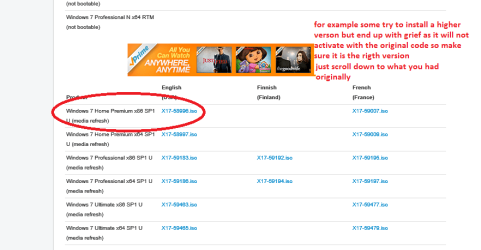
Dylan if you follow that tutorial mate you can still use the activation code on the sticker on the bottom of the machine you don't have to buy anything but the drive. See my pic you just need to pick the right / original version that was installed it you say pick Professional and the original was Home premium it will not activate and the grief starts. See my pic for the ISO.
If you have any problems post back to either myself or Greg for advice.

However if you want to buy an OEM it is up to you I ma just in favour of the tutorial ISO because it will be the "freshest" version available ie updates that you would have to download etc therefore it saves you a lot of time:)

Good luck and let us know how you get on - I will be interested as it has been a pleasure to try and help you out - makes a nice change from some that we get on this forum are really not that appreciative.
John
 

Attachments

  • ACTO STICKER.PNG
    ACTO STICKER.PNG
    35.1 KB · Views: 6
  • ISO.PNG
    ISO.PNG
    22.9 KB · Views: 1

My Computer My Computer

At a glance

Desk1 7 Home Prem / Desk2 10 Pro / Main lap A...Desk1 i5 3750K / Laptop i7 GTX 860M / Desk2 i...Desk1 8GB (1866) / Desk2 16GB (1333) / Laptop...Desk 1& 2NVidia GTX 650 & Laptops on board Intel
Computer type
PC/Desktop
Computer Manufacturer/Model Number
Own build (new) Desk1 / Asus ROG Win 7 / Desk2 1st build
OS
Desk1 7 Home Prem / Desk2 10 Pro / Main lap Asus ROG 10 Pro 2 laptop Toshiba 7 Pro Asus P2520 7 & 10
CPU
Desk1 i5 3750K / Laptop i7 GTX 860M / Desk2 i5 2500
Motherboard
Desk1 Asus P877-V / Desk2 Gigabyte H67 UD3H / Laptop ?
Memory
Desk1 8GB (1866) / Desk2 16GB (1333) / Laptop 8Gb DDR3
Graphics Card(s)
Desk 1& 2NVidia GTX 650 & Laptops on board Intel
Sound Card
Desk 1 & 2 -XONAR DG Realtek High Def audio Laptop
Monitor(s) Displays
Desk 1 Benq HD 2450 / Desk2 Philips 24" / Laptop 17.5"
Screen Resolution
1920x1080 D1 & D2 & Laptop 1
Hard Drives
Desk1 Samsung 120GB 830 SSD
Asus ROG 256GB 850 Pro SSD
Desk2 Samsung 840 256 SSD
Toshiba 120GB EVO
PSU
Desk 1 Corsair HX 1050/ Laptop ? / Desk 2 Corsair HX 650
Case
Desk 1 Cooler HAF XM ? Toshiba laptop / Desk2 Coolermaster
Cooling
Fans on all Desk1 -2 Desk2 - all Coolermasters 5 Laptop ?
Keyboard
Desk 1 MS Sidewinder X6 Desk 2 MS Sidewinder X 4
Mouse
Desk 1&2 - Gigabyte MS 900 gamer - laptop - Logitec wireless
Internet Speed
ADSL2+
Other Info
One other Desktop (tester) and spare Toshba laptop both with SSD's
Running Kaspersky 2016 ISS on all machines config'd identically
Logitec audio stereo systems on each machine (x3)
Canon MG5250MFC
Router/modem TP-Link running WPA2SK
Back
Top