USB serial interface driver problem associated file not found

videobruce

New member
Member
VIP
Local time
12:40 PM
Messages
182
Win 7 Pro, AMD based MB;
I have two devices; TV SLM (Signal Level Meter) & 2 Uniden radio Scanners that use a USB connection for programming & F/W updates etc. When I try to loads the drivers for either I get errors or the driver just doesn't load.

The current problem is these radio scanners where the Uniden driver is a small file that should be loaded thru DM. The error I get is that it found the software but couldn't find the file (typical M$ lamo error message). The interesting part is I can access the Micro SD interior data card on the scanner, but I can't 'see' the radios O/S itself for control or programming.

My assumption is I'm missing some related missing core O/S file of some unknown type. Now I have other devices that use to communicated functions (programming remote controls) that have no issue.

My question is; the scanners have a 'serial' type of communication (virtual serial port via USB), I'm not sure of the SLM, but I'm guessing it's the same or similar deal. The drivers are different for the two companies. What type of names of associated O/S files or even services (thou I doubt that) might be missing here?

Any more info please ask.


1023017149_DMErrormessage.png.6efab681efc2c31a13c25cead1ddb839.png


- - - Updated - - -

The specific driver is here;
http://info.uniden.com/twiki/pub/UnidenMan4/BCD996P2/uniden_usbser.zip
 

Attachments

My Computers

System One System Two

  • Computer type
    Laptop
    Computer Manufacturer/Model Number
    Toshiba
    OS
    Win7 x64
    CPU
    AMD
  • Computer type
    PC/Desktop
    System Manufacturer/Model Number
    AMD based MB
    OS
    Win 7 Pro x64
    CPU
    AMD FX-8350
    Motherboard
    Gigabyte GA-970A-D3P
    Memory
    16GB
    Graphics Card(s)
    nVidia GeForce 1060
    Monitor(s) Displays
    25"
    Screen Resolution
    1920x1200
    Hard Drives
    two SSD;
    two 4TB HDD
    PSU
    700watt Seasonic
    Internet Speed
    300MB up & down
    Browser
    Firefox
    Other Info
    BD Recorder
the zip you linked has only inf and cat files. Drivers files are .sys.
 

Attachments

  • serial..jpg
    serial..jpg
    137.7 KB · Views: 1

My Computers

System One System Two

  • Computer type
    PC/Desktop
    OS
    7 X64
    CPU
    i5 8400
    Motherboard
    gigabyte b365m ds3h
    Memory
    2x8gb 3200mhz
    Hard Drives
    various
    PSU
    pure power 11 400w cm
    Case
    Coolermaster
    Cooling
    cryorig m9i
  • Computer type
    PC/Desktop
    OS
    7x64
    CPU
    g5400
    Motherboard
    ga b365m ds3h
    Memory
    8gb ddr4 2400
    PSU
    xfx pro 450w
I was using the term "drivers" to cover any files needed to accomplish the task. If you read thru the inf file you would of saw almost a dozen references to "drivers" in the text.

That does work in my XP Laptop and others W7 PC's.
 
Last edited:

My Computers

System One System Two

  • Computer type
    Laptop
    Computer Manufacturer/Model Number
    Toshiba
    OS
    Win7 x64
    CPU
    AMD
  • Computer type
    PC/Desktop
    System Manufacturer/Model Number
    AMD based MB
    OS
    Win 7 Pro x64
    CPU
    AMD FX-8350
    Motherboard
    Gigabyte GA-970A-D3P
    Memory
    16GB
    Graphics Card(s)
    nVidia GeForce 1060
    Monitor(s) Displays
    25"
    Screen Resolution
    1920x1200
    Hard Drives
    two SSD;
    two 4TB HDD
    PSU
    700watt Seasonic
    Internet Speed
    300MB up & down
    Browser
    Firefox
    Other Info
    BD Recorder
Hi. I seem to remember you from Radio Reference. I was a member there for some 15 years until the overzealous mods decided to put my post's in moderation queue and then finally ban me. Sucks because I'm about to get my technician Ham ticket which I should have got some 25+ years ago!

Anyway, you have the wrong driver linked up there. Look at the URL. It says it's for the BCD996P2. You need what UPMan posted here! BCD436HP/BCD536HP Serial Mode Windows 8.x Drivers | RadioReference.com Forums Please read ALL of what has been posted there and on the Uniden product support webpage.

What is the make and model of the signal level meter?

P.S. That map there at the Uniden page is incorrect. In Weld county Colorado it says P25 Phase I. That's incorrect, I've known it to be phase II and I double checked. Weld County, Colorado (CO) Scanner Frequencies and Radio Frequency Reference So knowing this use their map at the Uniden website with a grain of salt.

Also, if you haven't already, read the Wiki page here on your scanner. BCD536HP - The RadioReference Wiki

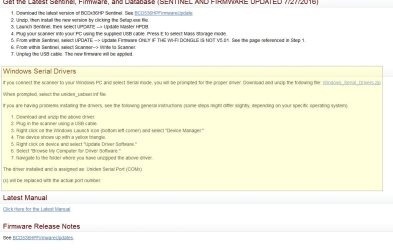
Now I'm assuming you have a BCD536HP because that's what it says in your screenshot of the window title bar for driver installation. If not, read here. and/or look at that Uniden product support page for Windows Serial Drivers just down the page. I can't link to it because they didn't anchor the title.


rhtht.jpg

- - - Updated - - -

the zip you linked has only inf and cat files. Drivers files are .sys.

I think it's because the inf file instructs Windows to install this or that driver from the driver store. So no actual sys file needed. The cat file is just for security verification.

Edit-

Yeah, reading the inf from what I linked to, it calls the MsPorts.dll file. msports.dll | Ports Class Installer | STRONTIC

I guess in the case of these scanners, Windows can't ID the hardware and thus install their driver... I think. So the inf just says, "hey! Install this driver for this hardware to work please." At least that's my theory. HAHA
 
Last edited:

My Computer

Computer type
PC/Desktop
OS
Windows 7 Ultimate x64
That image was from another posters thread (for convenience since it's the same error message).
Then why does the one I have work in XP?

My scanners are a BCD996P2 & SDS200 and I got that file from the equivalent page for the 996..

You have a PM.

- - - Updated - - -

Do modem drivers have anything do do with any of this? I ask because, I stripped all modem drivers when I compiled the O/S 4 years ago (for obvious reasons; removing unnecessary bloat).

This possibly related article seems to say they might;
Use or reference Usbser.sys driver from USB modem .inf files - Windows Client | Microsoft Docs
 
Last edited:

My Computers

System One System Two

  • Computer type
    Laptop
    Computer Manufacturer/Model Number
    Toshiba
    OS
    Win7 x64
    CPU
    AMD
  • Computer type
    PC/Desktop
    System Manufacturer/Model Number
    AMD based MB
    OS
    Win 7 Pro x64
    CPU
    AMD FX-8350
    Motherboard
    Gigabyte GA-970A-D3P
    Memory
    16GB
    Graphics Card(s)
    nVidia GeForce 1060
    Monitor(s) Displays
    25"
    Screen Resolution
    1920x1200
    Hard Drives
    two SSD;
    two 4TB HDD
    PSU
    700watt Seasonic
    Internet Speed
    300MB up & down
    Browser
    Firefox
    Other Info
    BD Recorder
Just want to make sure. From my screenshot, did you install the driver in that fashion via Device Manager?

That image you attached from MSN was grabbed from here. UPMan's post here may work. It's what is mentioned from the support page. Different driver but same procedure.

If you've already done all that, then I'm assuming it's withen the scanner its self. There was mention of pressing the .no button. That button may perform the same function in your scanner. I'd have to read over the manual. Also, you may have some settings there under Menu>Settings>Set Serial Port>Set Baud Rate>Set Front Port.

I think what's happening is that since you're installing the driver for the first time the scanner needs to be in a mode or something for Windows to ID it. It's working with the other computers because the driver was already installed. It's just that the scanner needs to be in a certain mode or baud rate so that Windows can see the device and use the driver.

Release Release 2.19 . W3AXL/FreeSCAN . GitHub

There's also mention that the default USB cable for the scanner may not work in 7. The user used his digital camera USB cable and that worked.
Easier to Read BCD996P2/XT Digital Scanner Manual

Set Serial Port (996XT)/Set GPS Baud Rate (996P2) is what you're looking for. You'll have to scroll up slightly.

- - - Updated - - -

Do modem drivers have anything do do with any of this? I ask because, I stripped all modem drivers when I compiled the O'S 4 years ago for obvious reasons (removing unnecessary bloat).
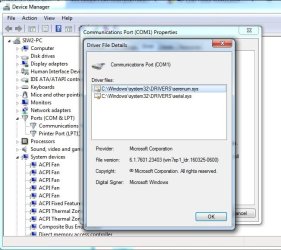
The main driver that this inf refers to is the Usbser.sys. See attachment.

If that is gone, then this inf file won't work. So I suppose it's possible that's why you're having an issue, but to be sure, download and install Everything.exe and in Everything search for Usbser.sys. You should see many. Downloads - voidtools
 

My Computer

Computer type
PC/Desktop
OS
Windows 7 Ultimate x64
Yes thru DM which I would of anyway even if I didn't read about it first. The standard way 'right click the inf file and point it to the folder'. Done that hundreds of times. Again, worked in XP fo all devices, though the XR-3 was a more of a hassle due to a much older software design (default location was in the root of C aka Win95 or earlier).

Let me see if I understand this correctly;
This usbser file with a inf & a cat file, there is no sys file so it's telling the O/S to install what is (or should be) already there, buried with the GB's of other files in the driver store?

If so, if it is modem related (why I wouldn't know) then it won't be, at least not here.
 

My Computers

System One System Two

  • Computer type
    Laptop
    Computer Manufacturer/Model Number
    Toshiba
    OS
    Win7 x64
    CPU
    AMD
  • Computer type
    PC/Desktop
    System Manufacturer/Model Number
    AMD based MB
    OS
    Win 7 Pro x64
    CPU
    AMD FX-8350
    Motherboard
    Gigabyte GA-970A-D3P
    Memory
    16GB
    Graphics Card(s)
    nVidia GeForce 1060
    Monitor(s) Displays
    25"
    Screen Resolution
    1920x1200
    Hard Drives
    two SSD;
    two 4TB HDD
    PSU
    700watt Seasonic
    Internet Speed
    300MB up & down
    Browser
    Firefox
    Other Info
    BD Recorder
You can remove Windows components with NTlite.
 

My Computer

Computer type
PC/Desktop
OS
Windows 7 Ultimate x64
That replaced RT7 Lite....
- - - Updated - - -

Ok, lets try this route;
I need to replace the "Standard Modem Driver" from a RT7Lite modified Win7 O/S. This is NOT vendor specific!

The "Modem" group of drivers was intentionally not added (who needs a modem anymore) when compiling a Win 7 Pro O/S thru RT7 Lite that up to this point (5 years later) was not missed. Without completely re-complying a new O/S (which is a huge project), there must be a way to selectively re-add this single item (driver(s) and/or protocol(s).

This without the actual DVD, just the ISO or the separate original files are available.
Standard Modem Driver missing.png
 

My Computers

System One System Two

  • Computer type
    Laptop
    Computer Manufacturer/Model Number
    Toshiba
    OS
    Win7 x64
    CPU
    AMD
  • Computer type
    PC/Desktop
    System Manufacturer/Model Number
    AMD based MB
    OS
    Win 7 Pro x64
    CPU
    AMD FX-8350
    Motherboard
    Gigabyte GA-970A-D3P
    Memory
    16GB
    Graphics Card(s)
    nVidia GeForce 1060
    Monitor(s) Displays
    25"
    Screen Resolution
    1920x1200
    Hard Drives
    two SSD;
    two 4TB HDD
    PSU
    700watt Seasonic
    Internet Speed
    300MB up & down
    Browser
    Firefox
    Other Info
    BD Recorder
(who needs a modem anymore)

See this post. HAHA Though, US Robotics has their own driver's and there are the Conexant based modems with their drivers... But the main component in Windows may be needed.

Question: I asked the following:

The main driver that this inf refers to is the Usbser.sys. See attachment.

If that is gone, then this inf file won't work. So I suppose it's possible that's why you're having an issue, but to be sure, download and install Everything.exe and in Everything search for Usbser.sys. You should see many. Downloads - voidtools

Is this the case? Is this component even in your OS to begin with? Also look for MsPorts.dll

Assuming this is the issue, adding back default drivers might be achieved with DISM, though I'm not sure. Calling Dr. @SIW2
 

My Computer

Computer type
PC/Desktop
OS
Windows 7 Ultimate x64
Well, it's not the missing basic modem driver. I did a revised W7 install w/ the driver added this time, but no difference. I guess that's what happens when one thinks logically.
 

My Computers

System One System Two

  • Computer type
    Laptop
    Computer Manufacturer/Model Number
    Toshiba
    OS
    Win7 x64
    CPU
    AMD
  • Computer type
    PC/Desktop
    System Manufacturer/Model Number
    AMD based MB
    OS
    Win 7 Pro x64
    CPU
    AMD FX-8350
    Motherboard
    Gigabyte GA-970A-D3P
    Memory
    16GB
    Graphics Card(s)
    nVidia GeForce 1060
    Monitor(s) Displays
    25"
    Screen Resolution
    1920x1200
    Hard Drives
    two SSD;
    two 4TB HDD
    PSU
    700watt Seasonic
    Internet Speed
    300MB up & down
    Browser
    Firefox
    Other Info
    BD Recorder
Back
Top