
I had to replace a motherboard/CPU for a windows 7 machine. I used Sysprep.exe on the hard drive, booted from the new hardware and created a new profile, as is required (AFAIK) when redeploying using Sysprep.exe.
When I went to change users to log into the default/original user account I found it to be missing. The User Folder is still in place in the C: drive /Users folder, however in the user profiles it is not listed in the Control Panel/ACCOUNTS section.
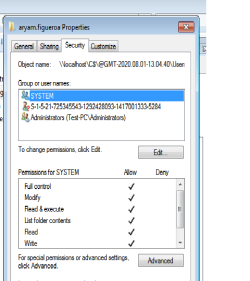
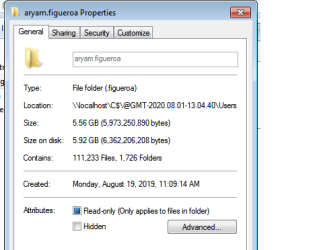
I attached 2 SS. I noticed that on the second SS the properties field shows the full User Account Name but in the "TYPE" field it only has the second part of the user account name. Not sure if relevant or a flag of something happening.
Obviously I am just trying to get this account back to being recognized so that this machine can operate as it did before the MB and CPU were replaced. Any help would be very much appreciated. Thanks.


When I went to change users to log into the default/original user account I found it to be missing. The User Folder is still in place in the C: drive /Users folder, however in the user profiles it is not listed in the Control Panel/ACCOUNTS section.
I attached 2 SS. I noticed that on the second SS the properties field shows the full User Account Name but in the "TYPE" field it only has the second part of the user account name. Not sure if relevant or a flag of something happening.
Obviously I am just trying to get this account back to being recognized so that this machine can operate as it did before the MB and CPU were replaced. Any help would be very much appreciated. Thanks.
Attachments
My Computer
At a glance
Windows 7 Pro x64Intel Core i7 5820K64.0 GB DDR4EVGA GeForce GTX970
- Computer type
- PC/Desktop
- Computer Manufacturer/Model Number
- Custom Build
- OS
- Windows 7 Pro x64
- CPU
- Intel Core i7 5820K
- Motherboard
- ASUS X99-A/USB3.1 LGA 2011-V3
- Memory
- 64.0 GB DDR4
- Graphics Card(s)
- EVGA GeForce GTX970
- Hard Drives
- 2Tb HDD Storage
240GB Crucial


