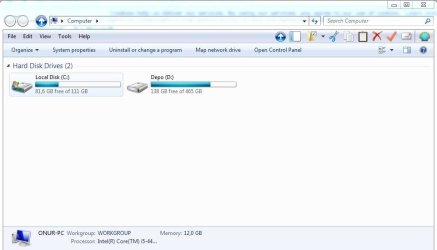
T throwaway33 New member Local time 6:37 PM Messages 1 Sep 9, 2016 #1 How can i fix this? Any help appreciated. Attachments Capture.JPG 41.1 KB · Views: 0 My Computer My Computer Computer typePC/DesktopOSHome premium x64
samuria New member Guru Gold Member VIP Local time 6:37 PM Messages 3,999 Location crewe uk Sep 9, 2016 #2 Welcome to the forum. Can you explain better as the photo doesn't seem to relate and it's not clear what is missing? My Computer My Computer Computer typePC/DesktopOSwin 8 32 bit
Welcome to the forum. Can you explain better as the photo doesn't seem to relate and it's not clear what is missing?
N nnq2603 New member Local time 6:37 AM Messages 20 Sep 9, 2016 #3 As I guess, then you're talking about missing navigation pane. Or you can take a look this article - http://www.sevenforums.com/tutorials/61502-navigation-pane-turn-off.html My Computer My Computer OSWindows 7 Ultimate x64CPUIntel(R) Core(TM) i5-6402P Skylake (14nm) 1151 LGAMotherboardMSI B150M MORTAR (MS-7972) 2.0Memory8.00 GB single DDR4 @ 1066MHzGraphics Card(s)Intel(R) HD Graphics 510 (rev6)Sound CardHigh Definition Audio DeviceMonitor(s) DisplaysHP S2032 1600x900 (60Hz)Hard DrivesModel ST1000DM 003-1SB10C SCSI Disk Device
As I guess, then you're talking about missing navigation pane. Or you can take a look this article - http://www.sevenforums.com/tutorials/61502-navigation-pane-turn-off.html
E Eric3742 New member Power User VIP Local time 7:37 AM Messages 708 Location Singapore Sep 9, 2016 #4 On the Menu bar, select Tools Drop down menu, select "Folder options..." On General tab: select "Restore Defaults" On View tab: select "Restore Defaults" Close. Edit. Now can you see the folders on the left panel. I can't duplicate on my computer. My Computer My Computer Computer typeLaptopComputer Manufacturer/Model NumberToshiba L630 and L735OSWindows 7 x64Hard Drives240 GB SSD
On the Menu bar, select Tools Drop down menu, select "Folder options..." On General tab: select "Restore Defaults" On View tab: select "Restore Defaults" Close. Edit. Now can you see the folders on the left panel. I can't duplicate on my computer.
E Eric3742 New member Power User VIP Local time 7:37 AM Messages 708 Location Singapore Sep 9, 2016 #5 Hi throwaway33 Follow nnq2603 screenshot. Confirm. Ignore mine. My Computer My Computer Computer typeLaptopComputer Manufacturer/Model NumberToshiba L630 and L735OSWindows 7 x64Hard Drives240 GB SSD