VBScript Error 2738 - more, and more and...

lukasamd

New member
Member
Local time
6:22 PM
Messages
24
Hello,
I often have a problem "VBScript Error 2738" when I try install / uninstall software, fox example bootracer, HP ProtectTools, etc.

I know what to do in this case:

Code:
regsvr32 vbscript.dll

and

Code:
reg delete "HKCU\SOFTWARE\Classes\Wow6432Node\CLSID\{B54F3741-5B07-11CF-A4B0-00AA004A55E8}" /f

It helps, but for only short time - when I reboot my computer and try install something else, I must do this again...
Is it possible to fix it forever?
 

My Computer

OS
Windows 7 / Windows 8
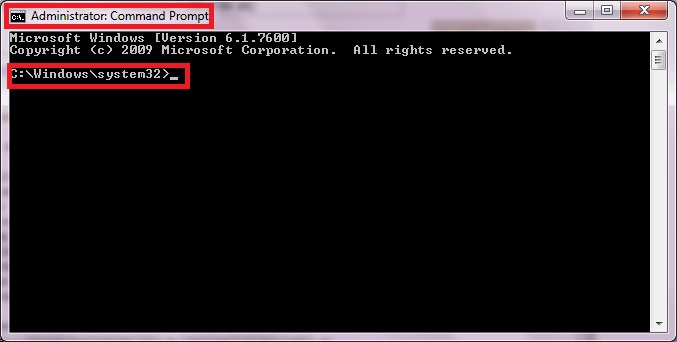
Make sure your running it with Administrative Privilege.
AwobR.jpg
 

My Computer

Computer Manufacturer/Model Number
HP Compaq Presario CQ60-421NR Laptop
OS
Win7 Ultimate SP1 6.1.7601 x86
CPU
Intel Pentium(R) Dual-Core T4300 @ 2094Mhz
Motherboard
HP Compaq Cq60-42NR Laptop Motherboard
Memory
3 Gigabytes of Ram
Graphics Card(s)
Intel Graphics Media Accelerator (Intel GMA)
Sound Card
Realtek Ultra Definition
Monitor(s) Displays
Built-in Compaq Cq60-42nr LED Display 1366x768
Screen Resolution
1366x768
Hard Drives
320 Gigabyte HDD
Case
HP Compaq Presario
Cooling
Built-in Laptop Cooling System
Keyboard
Built-in Laptop Keyboard
Mouse
Built-in Laptop Touchpad
Internet Speed
100Mbps Local Area Network/100kbps Internet (Bayantel)
Yep, I running this using UAC (from normal administrator account), or using internal Main-Administrator account, but error still exists.
 

My Computer

OS
Windows 7 / Windows 8

My Computer

Computer type
PC/Desktop
Computer Manufacturer/Model Number
Custom Build
OS
Windows 10 Pro x64, Arch Linux
CPU
Intel Core 2 Quad Q8200 OC'd 3.08GHz
Motherboard
Asus Rampage formula LGA775
Memory
8GB DDR2 900Mhz
Graphics Card(s)
MSI GT730 2GB GDDR5 (Kepler)
Sound Card
Supreme FX2
Monitor(s) Displays
Samsung LS22F350 LED
Screen Resolution
1080P
Hard Drives
Kingston SSDNow UV400 120GB, 500GB Hitachi, 2TB Samsung, 500GB Seagate FreeAgent, 640GB Samsung, 160GB Toshiba (Arch)
PSU
AeroCool 500W Bronze
Cooling
Cooler Master V6 + 3X fans
Keyboard
Prolink keyboard
Mouse
Logitech M705
Internet Speed
1MiB/s
Browser
Chrome Beta
I did scan - everything is ok in system files (problem still exists).
 

My Computer

OS
Windows 7 / Windows 8
I did scan - everything is ok in system files (problem still exists).
Try this

Fixing Error 2738 on Windows 7 64-bit
If you have a 64-bit operating system, you will need to follow these steps:
Open a command line window as Administrator, which requires clicking Start typing cmd in the search box, then right-clicking on the cmd.exe program and choosing Run as Administrator. Next paste the following in the command line and hit enter.
reg delete "HKCU\SOFTWARE\Classes\Wow6432Node\CLSID\{B54F3741-5B07-11CF-A4B0-00AA004A55E8}" /f
That previous command removes the incorrect entry for VBScript support on 64-bit Windows 7. Next you need to make sure VBScript is properly registered by typing:
Error 2738. Could not access VBScript run time for custom action.
 

My Computer

Computer type
PC/Desktop
Computer Manufacturer/Model Number
Custom Build
OS
Windows 10 Pro x64, Arch Linux
CPU
Intel Core 2 Quad Q8200 OC'd 3.08GHz
Motherboard
Asus Rampage formula LGA775
Memory
8GB DDR2 900Mhz
Graphics Card(s)
MSI GT730 2GB GDDR5 (Kepler)
Sound Card
Supreme FX2
Monitor(s) Displays
Samsung LS22F350 LED
Screen Resolution
1080P
Hard Drives
Kingston SSDNow UV400 120GB, 500GB Hitachi, 2TB Samsung, 500GB Seagate FreeAgent, 640GB Samsung, 160GB Toshiba (Arch)
PSU
AeroCool 500W Bronze
Cooling
Cooler Master V6 + 3X fans
Keyboard
Prolink keyboard
Mouse
Logitech M705
Internet Speed
1MiB/s
Browser
Chrome Beta
@yowanvista:
Please read my first post in this topic - I know this method and I used its a lot of times.
 

My Computer

OS
Windows 7 / Windows 8
Until permanent solution would be found, you can create a Batch file with those commands you do every time and put it Startup folder or make registry settings in
HKEY_LOCAL_MACHINE\Software\Microsoft\Windows\CurrentVersion\Run
or
HKEY_CURRENT_USER\Software\Microsoft\Windows\CurrentVersion\Run

So, this file would be doing those tweaks for you automatically every time Windows starts.
 

My Computer

Computer type
PC/Desktop
OS
Windows 8.1 ; Windows 7 x86 (Dec2008-Jan2013)
Other Info
"The scale icon at the top right of a post or tutorial is how you can give rep to the member."
Error 2738 With Skype

Hi,

I'm using this thread for a simular vbscrip.dll problem while reinstalling Skype or rather removing it first. During removal of Skype click to call I'm getting the 2738 error and am unable to uninstall it. Consequently a fress installation will fail also. If I try the CMD routines as given in this thread I get the error message, that the register keys, etc. cannot be found. If I use a register scanner such as Registry First Aid it gives me five entries (See below), so it must be there. However if I switch over to Regedit, this tells me, that the entries cannot be deleted. It seems as if I'm stuck in the middle. Does anybody have a solution how I can get rid of these entries so I can at least try to re-register vbscript.dll?

Kind regards,
Dave

Registry First Aid.8.2.0 build 2048 *** www.registry-repair-software.com ***
List of found entries. Saved: 8-7-2013 16:38:45
===============================================
*** Overeenkomsten *** Total found entries: 5
0 Key: "[HKEY_LOCAL_MACHINE] \SOFTWARE\Classes\CLSID\{B54F3741-5B07-11cf-A4B0-00AA004A55E8}"
Overeenkomst gevonden in sleutelnaam: "{B54F3741-5B07-11cf-A4B0-00AA004A55E8}"
Correction: "Laat ingang ongewijzigd (geen toestemming om wijzigingen aan te brengen)"
Safety Level: Safe
Correction: [0] "Laat ingang ongewijzigd (geen toestemming om wijzigingen aan te brengen)"
1 Key: "[HKEY_LOCAL_MACHINE] \SOFTWARE\Classes\VBS\CLSID"
Overeenkomst gevonden in waardegegevens: "(Default)" = "{B54F3741-5B07-11cf-A4B0-00AA004A55E8}"
Correction: "Laat ingang ongewijzigd (geen toestemming om wijzigingen aan te brengen)"
Safety Level: Safe
Correction: [0] "Laat ingang ongewijzigd (geen toestemming om wijzigingen aan te brengen)"
2 Key: "[HKEY_LOCAL_MACHINE] \SOFTWARE\Classes\VBScript\CLSID"
Overeenkomst gevonden in waardegegevens: "(Default)" = "{B54F3741-5B07-11cf-A4B0-00AA004A55E8}"
Correction: "Laat ingang ongewijzigd (geen toestemming om wijzigingen aan te brengen)"
Safety Level: Safe
Correction: [0] "Laat ingang ongewijzigd (geen toestemming om wijzigingen aan te brengen)"
3 Key: "[HKEY_LOCAL_MACHINE] \SOFTWARE\Classes\Wow6432Node\CLSID\{B54F3741-5B07-11cf-A4B0-00AA004A55E8}"
Overeenkomst gevonden in sleutelnaam: "{B54F3741-5B07-11cf-A4B0-00AA004A55E8}"
Correction: "Laat ingang ongewijzigd (geen toestemming om wijzigingen aan te brengen)"
Safety Level: Safe
Correction: [0] "Laat ingang ongewijzigd (geen toestemming om wijzigingen aan te brengen)"
4 Key: "[HKEY_LOCAL_MACHINE] \SOFTWARE\Wow6432Node\Classes\CLSID\{B54F3741-5B07-11cf-A4B0-00AA004A55E8}"
Overeenkomst gevonden in sleutelnaam: "{B54F3741-5B07-11cf-A4B0-00AA004A55E8}"
Correction: "Laat ingang ongewijzigd (geen toestemming om wijzigingen aan te brengen)"
Safety Level: Safe
Correction: [0] "Laat ingang ongewijzigd (geen toestemming om wijzigingen aan te brengen)"
 

My Computer

OS
Windows 7 Ultimate x64
Back
Top