
Viewing thumbnails as images but without .thumbs file

pintree3

Mich
Member
VIP
Local time
3:32 PM
Messages
394
Location
Canada
I know that if in Folder Options I choose "Always show icons, never thumbnails' the '.thumbs' file stops being created everytime you view an image file in Explorer. But I do want to see thumbnails, or more specifically I like the idea of viewing the image of the *.jpg, *.dng etc. when in Explorer. However, what I don't like is getting a '.thumbs' file being created.
I'm sure it is possible to have one without the other but can't recall how to do so.
Thank you
 

My Computer My Computer

At a glance

Windows 7 Home Premium 64Intel Core i5 760 @ 2800MHz12288MBAMD Radeon HD 7800 Series
Computer type
PC/Desktop
Computer Manufacturer/Model Number
OEM Designed by me :-)
OS
Windows 7 Home Premium 64
CPU
Intel Core i5 760 @ 2800MHz
Motherboard
Asus P7P55D-E LX
Memory
12288MB
Graphics Card(s)
AMD Radeon HD 7800 Series
Sound Card
ASUS Xonar DG
Monitor(s) Displays
ViewSonic VX2453 Series, HDMI 1080p Full HD
Screen Resolution
1920X1080
Hard Drives
Samsung SSD 840 EVO 250GB& two others
PSU
Tagan BZ Series, TG800-BZ 800W
Keyboard
Logitech MK250
Mouse
Logitech M310
Internet Speed
toppest, mostest :-) <-- bad, but fun English
Browser
Firefox, Crrome, IE
In Windows Explorer [Win7 and earlier] go to Organize, Folder and Search Options, View tab and the first item Files and Folders and uncheck the first thing about Always show icons, never thumbnails. At least that is what works with my Win7 Ult. But then I use the Extra Large Icons view for pictures and don't get the .thumbs part.
 

My Computer My Computer

At a glance

Windows 7 Ultimate 64-bit, Windows 8.1 64-bit...
Computer type
PC/Desktop
Computer Manufacturer/Model Number
Customs, Dell, Gateway, HP, Toshiba, Acer, ASUS
OS
Windows 7 Ultimate 64-bit, Windows 8.1 64-bit, Mac OS X 10.10, Linux Mint 17, Windows 10 Pro TP
Keyboard
Microsoft
Mouse
Microsoft
Desktop is actually the thumbs problem

OK new discovery: As you wrote, "Folder and Search Options, View tab ...Files and Folders and uncheck the first thing about Always show icons, never thumbnails."
Well that is exactly how I have it and also how I had it and there is no ".thumbs" file within Explorer and herein lies my new discovery.
What bothered me (and still does) is that recently I've been placing all photos I download on my desktop, and since I can see the thumbnails therefore the images I could easily delete them, and most of them do get deleted. And here's the thing If I download into a folder nothings happens all is GOOD. However if it's downloaded to the desktop then and only then is the .thumbs file created. Aaaah! why would it do this? SO the question now is: How do I keep things as they are within a folder (within Explorer) but not have the .thumbs file be created on the desktop.
If we check the "Show icons and never thumbnails' option within Folder Options the problem is taken care of on the desktop but then nothing is visible within Explorer.
 

My Computer My Computer

At a glance

Windows 7 Home Premium 64Intel Core i5 760 @ 2800MHz12288MBAMD Radeon HD 7800 Series
Computer type
PC/Desktop
Computer Manufacturer/Model Number
OEM Designed by me :-)
OS
Windows 7 Home Premium 64
CPU
Intel Core i5 760 @ 2800MHz
Motherboard
Asus P7P55D-E LX
Memory
12288MB
Graphics Card(s)
AMD Radeon HD 7800 Series
Sound Card
ASUS Xonar DG
Monitor(s) Displays
ViewSonic VX2453 Series, HDMI 1080p Full HD
Screen Resolution
1920X1080
Hard Drives
Samsung SSD 840 EVO 250GB& two others
PSU
Tagan BZ Series, TG800-BZ 800W
Keyboard
Logitech MK250
Mouse
Logitech M310
Internet Speed
toppest, mostest :-) <-- bad, but fun English
Browser
Firefox, Crrome, IE
That is how Microsoft handles caching of thumbnails and is automatic. As far as I know there isn't anything that can be done about it however the files are normally hidden. Is that not the case?
 

My Computers My Computers

  • At a glance

    Windows 7 pro/Windows 10 ProIntel i7 860 Quad core 2.8 ghz8 gbATI Radeon HD 5770 1 gb ram
    Computer type
    PC/Desktop
    Computer Manufacturer/Model Number
    HP Pavillion Elite HPE-250f
    OS
    Windows 7 pro/Windows 10 Pro
    CPU
    Intel i7 860 Quad core 2.8 ghz
    Memory
    8 gb
    Graphics Card(s)
    ATI Radeon HD 5770 1 gb ram
    Monitor(s) Displays
    Alienware 25 AW2521HF & Viewsonic
    Screen Resolution
    1920 x1080 & 1680x1050
    Hard Drives
    WD blue 1 tb & 500 gb.
    Browser
    FF of course.
    Other Info
    https://www.bestbuy.com/site/hp-pavilion-elite-desktop-intel-core-i7-processor-8gb-memory-1tb-hard-drive/9921493.p?skuId=9921493
  • At a glance

    Windows 2012 R2 Data center/Linux Minti3 9100 3.6GHz, 8M cache, 4C/4T8GB 2666MT/s DDR4 ECC UDIMM
    Computer type
    PC/Desktop
    System Manufacturer/Model Number
    Dell Poweredge T140
    OS
    Windows 2012 R2 Data center/Linux Mint
    CPU
    i3 9100 3.6GHz, 8M cache, 4C/4T
    Memory
    8GB 2666MT/s DDR4 ECC UDIMM
    Monitor(s) Displays
    Viewsonic
    Screen Resolution
    1680x1050
    Hard Drives
    1 TB & 750 GB
    Other Info
    https://www.dell.com/en-us/work/shop/productdetailstxn/poweredge-t140?~ck=bt

My Computer My Computer

At a glance

Windows 7 Ultimate 64-bit, Windows 8.1 64-bit...
Computer type
PC/Desktop
Computer Manufacturer/Model Number
Customs, Dell, Gateway, HP, Toshiba, Acer, ASUS
OS
Windows 7 Ultimate 64-bit, Windows 8.1 64-bit, Mac OS X 10.10, Linux Mint 17, Windows 10 Pro TP
Keyboard
Microsoft
Mouse
Microsoft
townsbg said: "That is how Microsoft handles caching of thumbnails and is automatic. As far as I know there isn't anything that can be done about it however the files are normally hidden. Is that not the case?"
While Berton added: "I just tried to duplicate the issue by creating a New Folder on the Desktop then Copying files from another location into it, could not get the .thumbs files in any of the 8 types of view. Win7 Ultimate 64-bit"

I think in both cases the reason is this, in order not to see anything you have, in your folder options, "Don't show hidden folder or files" or you have checked "Hide extensions for known file types."
Since I want to see everything my .thumbs file will show.
Nevertheless, I am convinced there was a way around this since I have always had my folder settings set as such and still not have the '.thumbs' icon visible. It may have been a registry hack or something, can't really remember. I think a recent windows series of updates may have changed this for me.
 

My Computer My Computer

At a glance

Windows 7 Home Premium 64Intel Core i5 760 @ 2800MHz12288MBAMD Radeon HD 7800 Series
Computer type
PC/Desktop
Computer Manufacturer/Model Number
OEM Designed by me :-)
OS
Windows 7 Home Premium 64
CPU
Intel Core i5 760 @ 2800MHz
Motherboard
Asus P7P55D-E LX
Memory
12288MB
Graphics Card(s)
AMD Radeon HD 7800 Series
Sound Card
ASUS Xonar DG
Monitor(s) Displays
ViewSonic VX2453 Series, HDMI 1080p Full HD
Screen Resolution
1920X1080
Hard Drives
Samsung SSD 840 EVO 250GB& two others
PSU
Tagan BZ Series, TG800-BZ 800W
Keyboard
Logitech MK250
Mouse
Logitech M310
Internet Speed
toppest, mostest :-) <-- bad, but fun English
Browser
Firefox, Crrome, IE
You want to see system files? Why?
 

My Computers My Computers

  • At a glance

    Windows 7 pro/Windows 10 ProIntel i7 860 Quad core 2.8 ghz8 gbATI Radeon HD 5770 1 gb ram
    Computer type
    PC/Desktop
    Computer Manufacturer/Model Number
    HP Pavillion Elite HPE-250f
    OS
    Windows 7 pro/Windows 10 Pro
    CPU
    Intel i7 860 Quad core 2.8 ghz
    Memory
    8 gb
    Graphics Card(s)
    ATI Radeon HD 5770 1 gb ram
    Monitor(s) Displays
    Alienware 25 AW2521HF & Viewsonic
    Screen Resolution
    1920 x1080 & 1680x1050
    Hard Drives
    WD blue 1 tb & 500 gb.
    Browser
    FF of course.
    Other Info
    https://www.bestbuy.com/site/hp-pavilion-elite-desktop-intel-core-i7-processor-8gb-memory-1tb-hard-drive/9921493.p?skuId=9921493
  • At a glance

    Windows 2012 R2 Data center/Linux Minti3 9100 3.6GHz, 8M cache, 4C/4T8GB 2666MT/s DDR4 ECC UDIMM
    Computer type
    PC/Desktop
    System Manufacturer/Model Number
    Dell Poweredge T140
    OS
    Windows 2012 R2 Data center/Linux Mint
    CPU
    i3 9100 3.6GHz, 8M cache, 4C/4T
    Memory
    8GB 2666MT/s DDR4 ECC UDIMM
    Monitor(s) Displays
    Viewsonic
    Screen Resolution
    1680x1050
    Hard Drives
    1 TB & 750 GB
    Other Info
    https://www.dell.com/en-us/work/shop/productdetailstxn/poweredge-t140?~ck=bt
You want to see system files? Why?
Why, you ask? paranoia :-) I like to see what is there. I am likely to notice some if these files, or their change, if they are visible AND at times these files need to be visible in order to access them, to change them, to delete them, to replace them etc.
 

My Computer My Computer

At a glance

Windows 7 Home Premium 64Intel Core i5 760 @ 2800MHz12288MBAMD Radeon HD 7800 Series
Computer type
PC/Desktop
Computer Manufacturer/Model Number
OEM Designed by me :-)
OS
Windows 7 Home Premium 64
CPU
Intel Core i5 760 @ 2800MHz
Motherboard
Asus P7P55D-E LX
Memory
12288MB
Graphics Card(s)
AMD Radeon HD 7800 Series
Sound Card
ASUS Xonar DG
Monitor(s) Displays
ViewSonic VX2453 Series, HDMI 1080p Full HD
Screen Resolution
1920X1080
Hard Drives
Samsung SSD 840 EVO 250GB& two others
PSU
Tagan BZ Series, TG800-BZ 800W
Keyboard
Logitech MK250
Mouse
Logitech M310
Internet Speed
toppest, mostest :-) <-- bad, but fun English
Browser
Firefox, Crrome, IE
at times these files need to be visible in order to access them, to change them, to delete them, to replace them etc.
Access them? Maybe access the Folder they are in to look at the files.
Change them? Only if desiring to kill Windows.
Delete them? Only if desiring to prevent Windows from booting or running.
Replace them? Only if it's known for certain something is wrong with them.

They are hidden System files for a reason, one part of which is to make it more difficult for outsiders/hackers/'infectors' to mess with them.
 

My Computer My Computer

At a glance

Windows 7 Ultimate 64-bit, Windows 8.1 64-bit...
Computer type
PC/Desktop
Computer Manufacturer/Model Number
Customs, Dell, Gateway, HP, Toshiba, Acer, ASUS
OS
Windows 7 Ultimate 64-bit, Windows 8.1 64-bit, Mac OS X 10.10, Linux Mint 17, Windows 10 Pro TP
Keyboard
Microsoft
Mouse
Microsoft
[/QUOTE]Access them? Maybe access the Folder they are in to look at the files.
Change them? Only if desiring to kill Windows.
Delete them? Only if desiring to prevent Windows from booting or running.
Replace them? Only if it's known for certain something is wrong with them.
They are hidden System files for a reason, one part of which is to make it more difficult for outsiders/hackers/'infectors' to mess with them.[/QUOTE]
"Access them? Maybe access the Folder they are in to look at the files." YES and to see if anything looks suspicious or is missing or is there which shouldn't be there. A crucial thing I would think :-)
"Change them? Only if desiring to kill Windows." not necessarily needs to be applied with caution and utmost certainty.
" Delete them? Only if desiring to prevent Windows from booting or running." Not at all, because files such as '.thumbs' can easily be deleted with no repercussions whatsoever.
"Replace them? Only if it's known for certain something is wrong with them." YUP
"They are hidden System files for a reason, one part of which is to make it more difficult for outsiders/hackers/'infectors' to mess with them."
Hackers know they are there and can access some of them (and they do) regardless of if or not you choose to see them. It is after all system files which are more often than not hacked, via viruses, trojans, malaware and stuff, are they not? :-)
I think, more than anything, they are hidden by default, to prevent people like me from screwing up their own computers (or their sister's) :-)
 

My Computer My Computer

At a glance

Windows 7 Home Premium 64Intel Core i5 760 @ 2800MHz12288MBAMD Radeon HD 7800 Series
Computer type
PC/Desktop
Computer Manufacturer/Model Number
OEM Designed by me :-)
OS
Windows 7 Home Premium 64
CPU
Intel Core i5 760 @ 2800MHz
Motherboard
Asus P7P55D-E LX
Memory
12288MB
Graphics Card(s)
AMD Radeon HD 7800 Series
Sound Card
ASUS Xonar DG
Monitor(s) Displays
ViewSonic VX2453 Series, HDMI 1080p Full HD
Screen Resolution
1920X1080
Hard Drives
Samsung SSD 840 EVO 250GB& two others
PSU
Tagan BZ Series, TG800-BZ 800W
Keyboard
Logitech MK250
Mouse
Logitech M310
Internet Speed
toppest, mostest :-) <-- bad, but fun English
Browser
Firefox, Crrome, IE
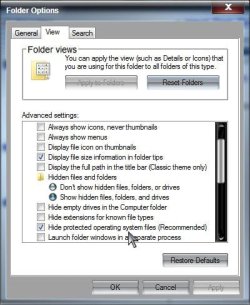
Do you have Hide protected operating system files (Recommended) unchecked as well?

Protected.jpg

I have Show hidden files, folders, and drives checked, and Hide extensions for known file types unchecked, and I get no .thumbs file on the desktop (nor desktop.ini which will also show if protected system files are showing).

Show hidden files, folders, and drives is NOT the same as Hide protected operating system files (Recommended). I doubt you need to regularly have protected operating system files showing. Those files should not have reason to "access them, to change them, to delete them, to replace them etc."

A Guy
 

My Computer My Computer

At a glance

Windows 10 Home x64INTEL Core i5-750 Quad-Core 3.37GHzHyperX Fury Black Series 8GB (2 x 4GB) 1866MhzEVGA GeForce GTX 750 Superclocked 1GB 128-Bit...
Computer type
PC/Desktop
OS
Windows 10 Home x64
CPU
INTEL Core i5-750 Quad-Core 3.37GHz
Motherboard
ASUS P7P55D
Memory
HyperX Fury Black Series 8GB (2 x 4GB) 1866Mhz
Graphics Card(s)
EVGA GeForce GTX 750 Superclocked 1GB 128-Bit GDDR5
Monitor(s) Displays
LG 32MA68HY 32" IPS
Screen Resolution
1920 x 1080
Hard Drives
Samsung 840 Evo 120GB, SEAGATE 500GB Barracuda® 7200.12, SATA 3 Gb/s, 7200 RPM, 16MB cache
PSU
ANTEC TruePower New TP-550, 80 PLUS, 550W
Case
ANTEC Three Hundred Illusion
Cooling
COOLER MASTER Hyper 212 Plus, 4 x 120mm 1 x 140mm Noctua's
Internet Speed
85 + Mbps
Antivirus
Avast
Browser
Vivaldi
I think, more than anything, they are hidden by default, to prevent people like me from screwing up their own computers (or their sister's) :-)
I think the assumption with that is that you are absolutely correct.
 

My Computer My Computer

At a glance

Windows 7 Ultimate 64-bit, Windows 8.1 64-bit...
Computer type
PC/Desktop
Computer Manufacturer/Model Number
Customs, Dell, Gateway, HP, Toshiba, Acer, ASUS
OS
Windows 7 Ultimate 64-bit, Windows 8.1 64-bit, Mac OS X 10.10, Linux Mint 17, Windows 10 Pro TP
Keyboard
Microsoft
Mouse
Microsoft
at times these files need to be visible in order to access them, to change them, to delete them, to replace them etc.
Access them? Maybe access the Folder they are in to look at the files.
Change them? Only if desiring to kill Windows.
Delete them? Only if desiring to prevent Windows from booting or running.
Replace them? Only if it's known for certain something is wrong with them.

They are hidden System files for a reason, one part of which is to make it more difficult for outsiders/hackers/'infectors' to mess with them.

I agree completely.
 

My Computers My Computers

  • At a glance

    Windows 7 pro/Windows 10 ProIntel i7 860 Quad core 2.8 ghz8 gbATI Radeon HD 5770 1 gb ram
    Computer type
    PC/Desktop
    Computer Manufacturer/Model Number
    HP Pavillion Elite HPE-250f
    OS
    Windows 7 pro/Windows 10 Pro
    CPU
    Intel i7 860 Quad core 2.8 ghz
    Memory
    8 gb
    Graphics Card(s)
    ATI Radeon HD 5770 1 gb ram
    Monitor(s) Displays
    Alienware 25 AW2521HF & Viewsonic
    Screen Resolution
    1920 x1080 & 1680x1050
    Hard Drives
    WD blue 1 tb & 500 gb.
    Browser
    FF of course.
    Other Info
    https://www.bestbuy.com/site/hp-pavilion-elite-desktop-intel-core-i7-processor-8gb-memory-1tb-hard-drive/9921493.p?skuId=9921493
  • At a glance

    Windows 2012 R2 Data center/Linux Minti3 9100 3.6GHz, 8M cache, 4C/4T8GB 2666MT/s DDR4 ECC UDIMM
    Computer type
    PC/Desktop
    System Manufacturer/Model Number
    Dell Poweredge T140
    OS
    Windows 2012 R2 Data center/Linux Mint
    CPU
    i3 9100 3.6GHz, 8M cache, 4C/4T
    Memory
    8GB 2666MT/s DDR4 ECC UDIMM
    Monitor(s) Displays
    Viewsonic
    Screen Resolution
    1680x1050
    Hard Drives
    1 TB & 750 GB
    Other Info
    https://www.dell.com/en-us/work/shop/productdetailstxn/poweredge-t140?~ck=bt
Disable thumbnail cache

What is the .thumbs file? I've searched my entire hard drive and don't have a single instance of it.

I could be wrong but I thought thumbnails get stored in thumbs.db files.

Take a look at this tutorial:

http://www.sevenforums.com/tutorials/10794-thumbnail-cache-enable-disable.html

and this one:

http://www.sevenforums.com/tutorials/11738-thumbnail-previews-enable-disable.html

I don't see any thumbnail cache on my system even with hidden files shown.

Well I do see a few small files in this folder only:

%userprofile%\AppData\Local\Microsoft\Windows\Explorer

There are 6 files in total. All except one are 1kb in size. The other is 4kb.

Folder options are set to show icons never thumbnails in all folders. Folder template discovery is switched off and all folders are set to general template and list view with no preview pane.

If I want a thumbnail cache I create my own as per This Post

I'm not sure if there's any additional settings that I've tweaked in order to prevent any thumbnail cache being created.
 
Last edited:

My Computer My Computer

At a glance

Microsoft Windows 7 Home Premium 64-bit 7601 ...AMD C-60 APU with Radeon(tm) HD Graphics4.00 GBAMD Radeon HD 6290 Graphics
Computer type
Laptop
Computer Manufacturer/Model Number
ASUS
OS
Microsoft Windows 7 Home Premium 64-bit 7601 Multiprocessor Free Service Pack 1
CPU
AMD C-60 APU with Radeon(tm) HD Graphics
Motherboard
ASUSTeK COMPUTER INC. X501U
Memory
4.00 GB
Graphics Card(s)
AMD Radeon HD 6290 Graphics
Sound Card
(1) AMD High Definition Audio Device (2) Realtek High Defi
Screen Resolution
1366 x 768 x 32 bits (4294967296 colors) @ 60 Hz
Hard Drives
Hitachi HTS545050A7E380 SATA Disk Device
Antivirus
Comodo CIS & FW, SecureAplus App Whitelisting, Threatfire
Browser
Cyberfox 64bit, Opera 64bit, Airfox
Other Info
Spy-The-Spy, HitmanPro.Alert, Norton Connect Safe, MJRegWatcher, BitDefender TrafficLight, Voodoo Shield, Zemana AntiMalware
Back
Top