Vista Bootloader Restored but still no Dual Boot Screen

MarkW

New member
Local time
1:43 AM
Messages
4
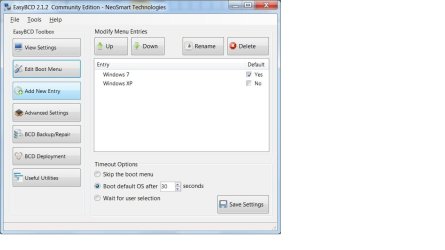
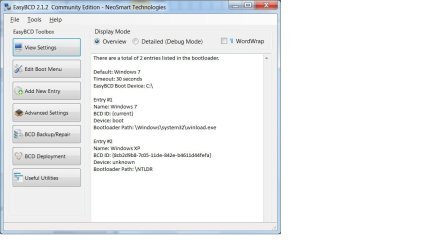
Hi im trying to enable dual boot for 7 and XP. 7 was installed first and after XP installation, I ran EasyBCD (in XP) to restore vista bootloader. Upon startup there is still no dual boot option and boots straight into 7.

Any advice?
 

My Computer My Computer

At a glance

Windows 7 x64 + XP x86
OS
Windows 7 x64 + XP x86
Try running EasyBCD from Windows 7.

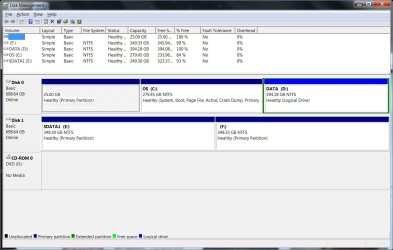
Also, please post a screen shot of an expanded Disk Management.

To open Disk Management, press Winkkey+r, type diskmgmt.msc and press Enter or click GO.

Vista and Windows 7: How to Use the Snipping Tool in Vista - Vista Forums (says it's for Vista but also works with Win 7).

Use the Paperclip next to the Smiley to upload and insert here.
 

My Computer My Computer

At a glance

Windows 10 Pro X64Intel Quad Core i7-4770 @ 3.4Ghz16.0GB PC3-12800 DDR3 SDRAM 1600 MHzIntel Integrated HD Graphics
Computer type
PC/Desktop
Computer Manufacturer/Model Number
Lenovo IdeaCenter 450
OS
Windows 10 Pro X64
CPU
Intel Quad Core i7-4770 @ 3.4Ghz
Memory
16.0GB PC3-12800 DDR3 SDRAM 1600 MHz
Graphics Card(s)
Intel Integrated HD Graphics
Sound Card
Realtek HD Audio
Monitor(s) Displays
HP 22" LCD
Screen Resolution
1680 x 1050
Hard Drives
250GB Samsung EVO SATA-3 SSD
2TB Seagate ST2000DM001 SATA-2
1.5TB Seagate ST3150041AS SATA
Keyboard
Dell USB
Mouse
Lenovo USB
Internet Speed
Cable via Road Runner 3MB Upload, 30MB Download
Antivirus
Windows Defender, MBAM Pro, MBAE
Browser
Seamonkey
Other Info
UEFI/GPT
PLDS DVD-RW DH16AERSH
hope this helps...

diskpartition.jpg

diskpartition2.jpg

diskpartition3.jpg
 

My Computer My Computer

At a glance

Windows 7 x64 + XP x86
OS
Windows 7 x64 + XP x86
C drive has Windows 7 Installation
F drive has XP installation
 

My Computer My Computer

At a glance

Windows 7 x64 + XP x86
OS
Windows 7 x64 + XP x86

My Computer My Computer

At a glance

Windows 7 Ultimate SP1 64-BitIntel Core i7 870 @ 2.93GHz8Gb Dual-Channel DDR3 @ 664MHznVidia GeForce GTX 460 1024MB dedicated RAM
Computer Manufacturer/Model Number
HP Pavilion Elite 495UK
OS
Windows 7 Ultimate SP1 64-Bit
CPU
Intel Core i7 870 @ 2.93GHz
Motherboard
MSI 2A9C (CPU1)
Memory
8Gb Dual-Channel DDR3 @ 664MHz
Graphics Card(s)
nVidia GeForce GTX 460 1024MB dedicated RAM
Sound Card
Realtek HD Audio
Monitor(s) Displays
HP2310i
Screen Resolution
1920 x 1080
Hard Drives
1x1954GB Hitachi HDS22020ALA 330 (RAID), 1x1954GB Hitachi External for backup and storage
PSU
460W
Case
HP Elite
Cooling
Air cooled
Keyboard
Logitech K750 solar-powered keyboard
Mouse
Logitech Wireless M180 mouse
Internet Speed
2Mb
Other Info
Pure Avanti Flow Internet Radio with iPod Dock, 64Gb iPod, HP USB Speakers, Sony MDR-V500 Headphones, Sony Vaio F-Series Laptop
Try Visual BCD Editor - Windows 7/Vista.
It comes with "Dual-boot Repair" tool.

Run Dual-boot Repair. Click "Automatic Repair". Confirm.
This will create/recreate the boot environment for Windows 7.

Later when booted to Windows 7 you can add an entry for XP if missing using Visual BCD Editor. Right-click in tree-view and select "Create missing Windows loaders". Confirm. That's all.

All is done automatically - no partitions, drives or other parameters to specify !
 

My Computer My Computer

At a glance

Win 8 RP, Win 7, XPIntel
Computer Manufacturer/Model Number
Acer Notebook
OS
Win 8 RP, Win 7, XP
CPU
Intel
The smartest method to dual boot on separate HD's is to set Win7 HD first to boot, then when you want to boot XP use the one-time BIOS Boot Menu key at boot to trigger it's HD to boot.

To do this, unplug the Win7 HD, boot into System Recovery Options on Win7 DVD or Repair CD to open a Command Prompt, mark XP partition Active: Partition - Mark as Active (Method Two).

Next in Diskpart type List Volume, get XP drive letter, type Exit to exit diskpart, then type: bootsect /nt52 F: or whatever the XP drive letter is in WinRe.

Reboot, tap the BIOS one-time Boot Menu key given on your first boot screen to choose XP HD to boot.

If this fails, you can delete XP in EasyBCd then add it again, accept it's boot files, Save, Reboot.

 
Back
Top