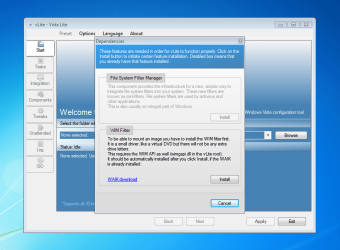
vlite needs wim filter

megabit

New member
Hello,

I have a question about the vlite program. I heard that it can be used to modify Windows 7, but without the service pack installed.

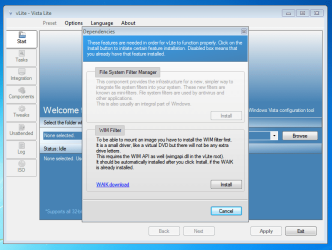
The program does not start without a Windows driver


When I installed and started vLite for the first time I was asked to download WAIK (Windows Automated Installation Kit). Although WAIK is available for free download from the Microsoft Download Center (thanks to Microsoft), downloading the mammoth1.3GB file is not an easy task. So my question is is there any alternative. For example, a file with this driver to copy to the vlite installation folder.

Unable to use Vlite due to missing WIM Filter - vLite - MSFN
vLite needs the WIM file - All Other Applications
 

Attachments
  • 11111111111111111111111111111111111111111111.PNG
    11111111111111111111111111111111111111111111.PNG
    248.3 KB · Views: 0
  • 22222222222222222222222222222222222.PNG
    22222222222222222222222222222222222.PNG
    108.6 KB · Views: 2

My Computer

Computer type
PC/Desktop
OS
Windows 7 Home Premium
As far as I know, vlite can remove things from win7 sp0 and sp1. However it wasn't made for that - so depending what you remove, you might break something.

You could also try this, but don't use it to remove Internet explorer. The other removals seem to be ok as far as I can remember.
Windows 7 Component Removal - Browse Files at SourceForge.net
 

My Computers

System One System Two

  • Computer type
    PC/Desktop
    OS
    7 X64
    CPU
    i5 8400
    Motherboard
    gigabyte b365m ds3h
    Memory
    2x8gb 3200mhz
    Hard Drives
    various
    PSU
    pure power 11 400w cm
    Case
    Coolermaster
    Cooling
    cryorig m9i
  • Computer type
    PC/Desktop
    OS
    7x64
    CPU
    g5400
    Motherboard
    ga b365m ds3h
    Memory
    8gb ddr4 2400
    PSU
    xfx pro 450w
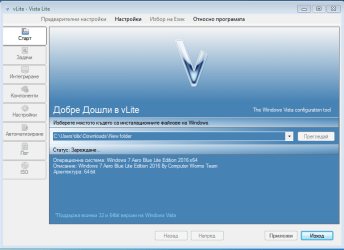
I looked at the program, but it turned out to be quite slow and not really designed for Windows 7. I tried to model Windows 7 with vLite.

Honestly, the program is quite slow and causes a lot of problems. nLite seemed like a much better option, but alas, it doesn't support Vista.

I think I should give up modeling Vista to my liking. By the way, the Windows 7 Component Removal - Browse Files at SourceForge.net you mentioned does not have a graphical interface, and I think that makes it difficult for a lot of people. Not everyone understands the command line.


I also sent an inquiry to the creator of the program and he answered me the following:

I'm not fresh with this, so I don't remember.
But I do remember there was a script that can extract pieces of WAIK remotely, cannot find it now, potentially on msfn.org

Or search online how to "tool extract single file remote link"
then get the link to that ISO, store that link and use it to browse and extract from it needed pieces...but I think they are again in CAB files inside it, you would need to know which one has the driver.
 

My Computer

Computer type
PC/Desktop
OS
Windows 7 Home Premium
But I do remember there was a script that can extract pieces of WAIK remotely

It is called gwt.exe and it is in the zip files in post #2 . If you can't be bothered to look at what is posted, people are not going to have the patience to help you
 

My Computers

System One System Two

  • Computer type
    PC/Desktop
    OS
    7 X64
    CPU
    i5 8400
    Motherboard
    gigabyte b365m ds3h
    Memory
    2x8gb 3200mhz
    Hard Drives
    various
    PSU
    pure power 11 400w cm
    Case
    Coolermaster
    Cooling
    cryorig m9i
  • Computer type
    PC/Desktop
    OS
    7x64
    CPU
    g5400
    Motherboard
    ga b365m ds3h
    Memory
    8gb ddr4 2400
    PSU
    xfx pro 450w
does not have a graphical interface, and I think that makes it difficult for a lot of people. Not everyone understands the command line.

It is very simple.

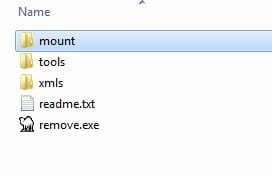
You have this:

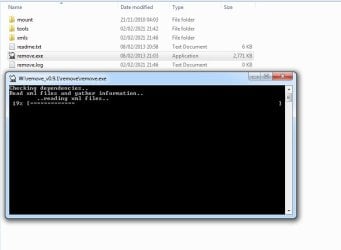
you need to create the folder called mount and mount the windows image into it.

Then check in the xmls folder and delete any xml files you are not wanting to remove from the image.

remove1.jpg


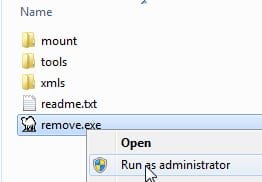
Then rt click on remove.exe and run as administrator. That is all you do. You don't need to do any commands

remove2.jpg

and off it goes. It shows what it is doing in the black window. It automatically processes whatever xml files you have left in the xmls folder. You don't need to issue any commands.

remove3.jpg

When it has finished, commit and unmount the image.
 

My Computers

System One System Two

  • Computer type
    PC/Desktop
    OS
    7 X64
    CPU
    i5 8400
    Motherboard
    gigabyte b365m ds3h
    Memory
    2x8gb 3200mhz
    Hard Drives
    various
    PSU
    pure power 11 400w cm
    Case
    Coolermaster
    Cooling
    cryorig m9i
  • Computer type
    PC/Desktop
    OS
    7x64
    CPU
    g5400
    Motherboard
    ga b365m ds3h
    Memory
    8gb ddr4 2400
    PSU
    xfx pro 450w
I tried with vLite but can't model it. As shown in the description I use another version of Windows 7.

Maybe vLite can model Windows 7, but it shouldn't have integrated updates in it and the service pack.

Windows 7: Re-add feature removed with v-lite without complete reinstall? - Super User


As far as I know Windows 7 Starter does not have an integrated SP

Whether if I download Windows 7 Starter and I will be able to model it with vLite

There is another similar edition called Windows 7 ThinPC, which can even be downloaded from Softpedia
 

Attachments

  • 23423432.PNG
    23423432.PNG
    62.5 KB · Views: 0

My Computer

Computer type
PC/Desktop
OS
Windows 7 Home Premium
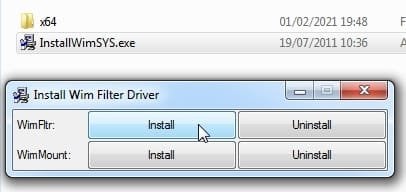
i installed the wim filter and it not works...
 

My Computers

System One System Two

  • Computer type
    PC/Desktop
    Computer Manufacturer/Model Number
    Lenovo
    OS
    Windows 11 Pro
    CPU
    Intel n100
    Motherboard
    lenovo
    Memory
    4 gb ram
    Graphics Card(s)
    igpu
    Hard Drives
    120 gb samsung ufs ssd
    Antivirus
    i dont have
    Browser
    brave
  • Computer type
    PC/Desktop
Back
Top