
JavaScript is disabled. For a better experience, please enable JavaScript in your browser before proceeding.
You are using an out of date browser. It may not display this or other websites correctly.
You should upgrade or use an
alternative browser .
VMware Windows 10 upgrade not supported
Although I have Windows 10 TP running on VMware Workstation 10 OK, I thought I'd try the 7 to 10 upgrade path in VM (to see how it all worked).
So, in a Windows 7 VM, I clicked the little white taskbar box - but I got this message
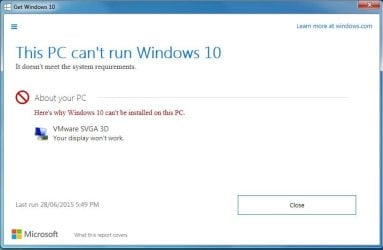
can anyone throw some light on this ? Maybe VM Workstation 11 would be more compatable with Windows 10 ?
Computer type PC/Desktop Computer Manufacturer/Model Number self build OS W10 Pro x64, W7 Pro x64 in VMware CPU i7 2600K @ 4.4GHz Motherboard MSI Z68A-GD80 Memory 8GB Mushkin @ 1600MHz Graphics Card(s) Nvidia GTX 750 Ti Monitor(s) Displays 27" Benq + 27" LG Screen Resolution 1080p Hard Drives 500GB 850 Evo SSD + 3 * 2TB Seagate PSU EVGA 650 GS modular Case Antec 300 Cooling Seidon 120V v2 Internet Speed 62/18 Mbps Antivirus Defender (W10) + MSE (W7) Browser Firefox
New member
Guru
Gold Member
VIP
Would it upgrade if you turned off 3d acceleration?
Computer type PC/Desktop Computer Manufacturer/Model Number Custom Build OS Windows 7 Ultimate x64 SP1 CPU AMD Phenom 2 1090T Motherboard Gigabyte GA-890FXA-UD5 Memory 2x8GB Kingston HyperX Fury Black 1600Mhz Unganged Graphics Card(s) MSI GTX 970 Gaming 4G Sound Card Realtek On-Board HD 7.1 Audio / Logitech G35 Monitor(s) Displays 3xAcer GD245HQ Screen Resolution 1920x1080 Hard Drives Samsung 850 Pro 512GB SSD - OS /
WD Caviar Black SATA 3 - 1 TBx2 - Dynamic RAID 0 /
WD Caviar Green SATA 2 - 640GBx2 - Dynamic RAID 0 /
WD Caviar Green SATA 2 - 640GB - Internal Backup /
Seagate Barracude SATA 3 - 3TB - External Backup/ Sync PSU HighPower 1000W Case Cooler Master HAF 932 Cooling Noctua NH-D14 Keyboard Logitech G19 Mouse Logitech G500 Internet Speed 100/4 Mbit Cable (100GB quota) Antivirus ZoneAlarm Extreme Security / MBAM Pro / MBAE Free / SAS Free Browser IE 11 - Firefox - Chrome Other Info Logitech F710/ G27/ G940/ Z5500 // TrackIR 5 // Nvidia 3D Surround Vision
New member
Pro User
VIP
Thread Starter
IIRC that's under display - advanced - troubleshoot, but troubleshoot is greyed out. VMware often doesn't seem to have all the features of a regular install. I was just a bit puzzled at why the 10 tech prev was fine, but the 10 upgrade checker said 'no'.
I might upgrade my VM to 11. Thanks for reply anyhow GokAy.
Computer type PC/Desktop Computer Manufacturer/Model Number self build OS W10 Pro x64, W7 Pro x64 in VMware CPU i7 2600K @ 4.4GHz Motherboard MSI Z68A-GD80 Memory 8GB Mushkin @ 1600MHz Graphics Card(s) Nvidia GTX 750 Ti Monitor(s) Displays 27" Benq + 27" LG Screen Resolution 1080p Hard Drives 500GB 850 Evo SSD + 3 * 2TB Seagate PSU EVGA 650 GS modular Case Antec 300 Cooling Seidon 120V v2 Internet Speed 62/18 Mbps Antivirus Defender (W10) + MSE (W7) Browser Firefox
New member
Guru
Gold Member
VIP
I guess you misunderstood, let me clarify. Shut down W10TP, and configure the virtual machine to not use 3d acceleration.
I use VirtualBox and it looks like this:
Computer type PC/Desktop Computer Manufacturer/Model Number Custom Build OS Windows 7 Ultimate x64 SP1 CPU AMD Phenom 2 1090T Motherboard Gigabyte GA-890FXA-UD5 Memory 2x8GB Kingston HyperX Fury Black 1600Mhz Unganged Graphics Card(s) MSI GTX 970 Gaming 4G Sound Card Realtek On-Board HD 7.1 Audio / Logitech G35 Monitor(s) Displays 3xAcer GD245HQ Screen Resolution 1920x1080 Hard Drives Samsung 850 Pro 512GB SSD - OS /
WD Caviar Black SATA 3 - 1 TBx2 - Dynamic RAID 0 /
WD Caviar Green SATA 2 - 640GBx2 - Dynamic RAID 0 /
WD Caviar Green SATA 2 - 640GB - Internal Backup /
Seagate Barracude SATA 3 - 3TB - External Backup/ Sync PSU HighPower 1000W Case Cooler Master HAF 932 Cooling Noctua NH-D14 Keyboard Logitech G19 Mouse Logitech G500 Internet Speed 100/4 Mbit Cable (100GB quota) Antivirus ZoneAlarm Extreme Security / MBAM Pro / MBAE Free / SAS Free Browser IE 11 - Firefox - Chrome Other Info Logitech F710/ G27/ G940/ Z5500 // TrackIR 5 // Nvidia 3D Surround Vision
New member
Pro User
VIP
Thread Starter
GokAy - I found the similar checkbox in the VMware props, unticked it but same problem. I have a spare 'real' machine, so maybe I'll give the upgrade a go on that.
Computer type PC/Desktop Computer Manufacturer/Model Number self build OS W10 Pro x64, W7 Pro x64 in VMware CPU i7 2600K @ 4.4GHz Motherboard MSI Z68A-GD80 Memory 8GB Mushkin @ 1600MHz Graphics Card(s) Nvidia GTX 750 Ti Monitor(s) Displays 27" Benq + 27" LG Screen Resolution 1080p Hard Drives 500GB 850 Evo SSD + 3 * 2TB Seagate PSU EVGA 650 GS modular Case Antec 300 Cooling Seidon 120V v2 Internet Speed 62/18 Mbps Antivirus Defender (W10) + MSE (W7) Browser Firefox
New member
Pro User
VIP
Thread Starter
GokAy - update : I upgraded VMware to latest version 11, and I got the 'reserve your copy of W10' message. This was with the 3D enabled in VM properties. In the new VM dialog in VMware 11, you can select Windows 10 (VMware 10 only went upto W8), so maybe it was a W10/VMware compatability thing.
So now (hopefully) I can do a W7 > W10 upgrade test in VMware.
Computer type PC/Desktop Computer Manufacturer/Model Number self build OS W10 Pro x64, W7 Pro x64 in VMware CPU i7 2600K @ 4.4GHz Motherboard MSI Z68A-GD80 Memory 8GB Mushkin @ 1600MHz Graphics Card(s) Nvidia GTX 750 Ti Monitor(s) Displays 27" Benq + 27" LG Screen Resolution 1080p Hard Drives 500GB 850 Evo SSD + 3 * 2TB Seagate PSU EVGA 650 GS modular Case Antec 300 Cooling Seidon 120V v2 Internet Speed 62/18 Mbps Antivirus Defender (W10) + MSE (W7) Browser Firefox
New member
Guru
Gold Member
VIP
Computer type PC/Desktop Computer Manufacturer/Model Number Custom Build OS Windows 7 Ultimate x64 SP1 CPU AMD Phenom 2 1090T Motherboard Gigabyte GA-890FXA-UD5 Memory 2x8GB Kingston HyperX Fury Black 1600Mhz Unganged Graphics Card(s) MSI GTX 970 Gaming 4G Sound Card Realtek On-Board HD 7.1 Audio / Logitech G35 Monitor(s) Displays 3xAcer GD245HQ Screen Resolution 1920x1080 Hard Drives Samsung 850 Pro 512GB SSD - OS /
WD Caviar Black SATA 3 - 1 TBx2 - Dynamic RAID 0 /
WD Caviar Green SATA 2 - 640GBx2 - Dynamic RAID 0 /
WD Caviar Green SATA 2 - 640GB - Internal Backup /
Seagate Barracude SATA 3 - 3TB - External Backup/ Sync PSU HighPower 1000W Case Cooler Master HAF 932 Cooling Noctua NH-D14 Keyboard Logitech G19 Mouse Logitech G500 Internet Speed 100/4 Mbit Cable (100GB quota) Antivirus ZoneAlarm Extreme Security / MBAM Pro / MBAE Free / SAS Free Browser IE 11 - Firefox - Chrome Other Info Logitech F710/ G27/ G940/ Z5500 // TrackIR 5 // Nvidia 3D Surround Vision
New member
Pro User
VIP
Thread Starter
I spoke too soon - W7 VM has reverted to original message about the VMware graphics not being good enough for W7 to W10 upgrade.
Computer type PC/Desktop Computer Manufacturer/Model Number self build OS W10 Pro x64, W7 Pro x64 in VMware CPU i7 2600K @ 4.4GHz Motherboard MSI Z68A-GD80 Memory 8GB Mushkin @ 1600MHz Graphics Card(s) Nvidia GTX 750 Ti Monitor(s) Displays 27" Benq + 27" LG Screen Resolution 1080p Hard Drives 500GB 850 Evo SSD + 3 * 2TB Seagate PSU EVGA 650 GS modular Case Antec 300 Cooling Seidon 120V v2 Internet Speed 62/18 Mbps Antivirus Defender (W10) + MSE (W7) Browser Firefox