

VPN Related Issue (Please, I need some real help to sort this out.)
Hello. I really need someone who understands desktop computers to help me sort out what happened and fix it because their technical support was unable to do so, and frankly very inadequate. My own computer skill/user/whatever level is average, maybe below average. And I don't know when I'm using the wrong word for stuff. But I need some real help getting this fixed on a desktop PC with Internet connection that have both been working fine for over two years.
My main Internet connection is AT&T U-Verse. It connects from the telephone thing on the wall to my Ethernet thing on the desktop PC with a box (router, whatever) in between that was provided by AT&T. I don't remember having Internet connection problems since I switched from Comcast to AT&T two years ago. My Internet connection says Internet connection 4, but I don't know why it has a 4 if that matters. I can't remember what happened when I created the Internet connection in the first place or if I had an Internet connection problem I don't remember that made it necessary to try creating a new Internet connection and it took two or three tries to make it work or something. I just don't know. It's been working okay for as long as I can remember.
I was using TunnelBear VPN for about 2 years without any problem. Then one day in December, 2016 it stopped connecting. The program worked normally otherwise, just wouldn't connect when I tried to connect to a country. I had not installed anything new or made any changes to the computer. Avast Free updates virus definitions automatically. And I did Windows Update two days before TunnelBear stopped working right, restarted the computer after Windows Update, and continued to use the computer and TunnelBear as usual for 2 days. Nothing else seems to be wrong with my computer.
I use Windows Firewall. I don't have Microsift Security Essentials installed. It hasn't ever been installed. I use Avast Free Antivirus. I also have free versions of MalwareBytes and SuperAntiSpyware installed. I have been using them for years. Both are free versions. No realtime protection. Just run scans. That's all the security software I have. I ran scans with all that stuff and a full scan with Windows Malicious Software Removal Tool. There were no threats detected. I ran them all again more than once since then, and nothing ever shows up.
I tried using TunnelBear with Avast and Windows Firewall disabled. That didn't make any difference. I even uninstalled TunnelBear and Avast, then reinstalled TunneBear and tried it before reinstalling Avast. That made no difference either. The TunnelBear program behaved normally, but it wouldn't connect. Also, it wasn't displayed in my Control Panel\Network and Internet\Network Connections folder after it stopped connecting. Only my main Internet connection was.
I contacted them for help. They replied first with these instructions:
1) Open the Control Panel (icons view), click/tap on the Administrative Tools icon, double click/tap on Services shortcut
2) Locate the 'DHCP client' service, right click it and press restart
3) From Control Panel\Network and Internet\Network Connections, right click and disable/enable the wifi or Ethernet connection (depending on which one you're using).
4) In the same Window, disable TunnelBear adapter (do not re-enable)
5) Launch TunnelBear
If you are still unable to connect, can you try sending the bug report again at this point?
That didn't change anything. Then they sent these instructions:
1) Open the Start
2) Start typing the words ‘Command prompt’
3) Locate the Command prompt icon
4) Right-click it and select Run as administrator
5) Type the following commands in order:
cd C:\Program Files (x86)\TunnelBear\V2\Driver64
[press enter]
deltapall.bat
[press enter]
tapin.exe install OemWin2k.inf tap-tb-0901
[press enter]
6) Try TunnelBear
7) If it still doesn't work, go to C:\Users\{yourusernamehere}\AppData\Roaming\TunnelBear and send us a copy of the export.zip file.
When I tried TunnelBear then, I had Task Manager open to the Networking tab. Below Local Area Connection (my main Internet connection) the second network connection thing was there again. (It had been not showing there after this problem began.) When I clicked to connect in TunnelBear, the second network connection disappeared and TunnelBear failed to connect. It gave no error message. It just failed to connect. The switch to connect in TunnelBear moved from On to Off, and a pop-up said, "Grrr, you're not connected" or whatever.
I never looked in Device Manager the whole time all this problem was going on and they were trying to help me fix it. I didn't know to look in Device Manager, and they never said to. They kept telling me to look in Control Panel\Network and Internet\Network Connections, where there was no TunnelBear network connection listed, only my main Internet connection. When I first contacted them, there was only my main Internet connection listed in the Task Manager Networking tab too. The only time a second connection did appear there again was when I just mentioned above.
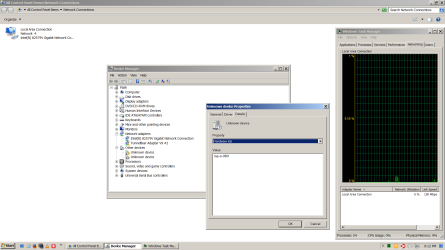
I uninstalled TunnelBear again after they said they couldn't help. Then today, I came to SevenForums, serached "tunnelbear", and looked at threads that were listed in the search results. In one of the threads, Device Manager was mentioned, so I looked in my Device Manager for the first time since TunnelBear first stopped working right in mid-December.
I sent them an email to ask if there is supposed to be a TunnelBear Adapter V9 #2 adapter listed in Device Manger with no TunnelBear installed. And I asked if unknown device tap-in-0901 was something installed while they were helping me or something that is always supposed to be installed in my computer. I asked because of what they had me type in Command Prompt when they were trying to help me.
Can anyone here tell me anything that might help, such as whether or not this TunnelBear Adapter V9 #2 or unkown device tap-in-0901 should be in my computer when I have no TunnelBear installed? Does anyone know why that problem with TunnelBear may have occured in the first place December 15 or what I might be able to do to allow TunnelBear to work again on my computer?
I will try to attach a screenshot of what it looks like right now with no TunneBear installed.
Sorry that was a long post or if I put it in the wrong category or I didn't title it properly. Thank you for reading it.
Hello. I really need someone who understands desktop computers to help me sort out what happened and fix it because their technical support was unable to do so, and frankly very inadequate. My own computer skill/user/whatever level is average, maybe below average. And I don't know when I'm using the wrong word for stuff. But I need some real help getting this fixed on a desktop PC with Internet connection that have both been working fine for over two years.
My main Internet connection is AT&T U-Verse. It connects from the telephone thing on the wall to my Ethernet thing on the desktop PC with a box (router, whatever) in between that was provided by AT&T. I don't remember having Internet connection problems since I switched from Comcast to AT&T two years ago. My Internet connection says Internet connection 4, but I don't know why it has a 4 if that matters. I can't remember what happened when I created the Internet connection in the first place or if I had an Internet connection problem I don't remember that made it necessary to try creating a new Internet connection and it took two or three tries to make it work or something. I just don't know. It's been working okay for as long as I can remember.
I was using TunnelBear VPN for about 2 years without any problem. Then one day in December, 2016 it stopped connecting. The program worked normally otherwise, just wouldn't connect when I tried to connect to a country. I had not installed anything new or made any changes to the computer. Avast Free updates virus definitions automatically. And I did Windows Update two days before TunnelBear stopped working right, restarted the computer after Windows Update, and continued to use the computer and TunnelBear as usual for 2 days. Nothing else seems to be wrong with my computer.
I use Windows Firewall. I don't have Microsift Security Essentials installed. It hasn't ever been installed. I use Avast Free Antivirus. I also have free versions of MalwareBytes and SuperAntiSpyware installed. I have been using them for years. Both are free versions. No realtime protection. Just run scans. That's all the security software I have. I ran scans with all that stuff and a full scan with Windows Malicious Software Removal Tool. There were no threats detected. I ran them all again more than once since then, and nothing ever shows up.
I tried using TunnelBear with Avast and Windows Firewall disabled. That didn't make any difference. I even uninstalled TunnelBear and Avast, then reinstalled TunneBear and tried it before reinstalling Avast. That made no difference either. The TunnelBear program behaved normally, but it wouldn't connect. Also, it wasn't displayed in my Control Panel\Network and Internet\Network Connections folder after it stopped connecting. Only my main Internet connection was.
I contacted them for help. They replied first with these instructions:
1) Open the Control Panel (icons view), click/tap on the Administrative Tools icon, double click/tap on Services shortcut
2) Locate the 'DHCP client' service, right click it and press restart
3) From Control Panel\Network and Internet\Network Connections, right click and disable/enable the wifi or Ethernet connection (depending on which one you're using).
4) In the same Window, disable TunnelBear adapter (do not re-enable)
5) Launch TunnelBear
If you are still unable to connect, can you try sending the bug report again at this point?
That didn't change anything. Then they sent these instructions:
1) Open the Start
2) Start typing the words ‘Command prompt’
3) Locate the Command prompt icon
4) Right-click it and select Run as administrator
5) Type the following commands in order:
cd C:\Program Files (x86)\TunnelBear\V2\Driver64
[press enter]
deltapall.bat
[press enter]
tapin.exe install OemWin2k.inf tap-tb-0901
[press enter]
6) Try TunnelBear
7) If it still doesn't work, go to C:\Users\{yourusernamehere}\AppData\Roaming\TunnelBear and send us a copy of the export.zip file.
When I tried TunnelBear then, I had Task Manager open to the Networking tab. Below Local Area Connection (my main Internet connection) the second network connection thing was there again. (It had been not showing there after this problem began.) When I clicked to connect in TunnelBear, the second network connection disappeared and TunnelBear failed to connect. It gave no error message. It just failed to connect. The switch to connect in TunnelBear moved from On to Off, and a pop-up said, "Grrr, you're not connected" or whatever.
I never looked in Device Manager the whole time all this problem was going on and they were trying to help me fix it. I didn't know to look in Device Manager, and they never said to. They kept telling me to look in Control Panel\Network and Internet\Network Connections, where there was no TunnelBear network connection listed, only my main Internet connection. When I first contacted them, there was only my main Internet connection listed in the Task Manager Networking tab too. The only time a second connection did appear there again was when I just mentioned above.
I uninstalled TunnelBear again after they said they couldn't help. Then today, I came to SevenForums, serached "tunnelbear", and looked at threads that were listed in the search results. In one of the threads, Device Manager was mentioned, so I looked in my Device Manager for the first time since TunnelBear first stopped working right in mid-December.
I sent them an email to ask if there is supposed to be a TunnelBear Adapter V9 #2 adapter listed in Device Manger with no TunnelBear installed. And I asked if unknown device tap-in-0901 was something installed while they were helping me or something that is always supposed to be installed in my computer. I asked because of what they had me type in Command Prompt when they were trying to help me.
Can anyone here tell me anything that might help, such as whether or not this TunnelBear Adapter V9 #2 or unkown device tap-in-0901 should be in my computer when I have no TunnelBear installed? Does anyone know why that problem with TunnelBear may have occured in the first place December 15 or what I might be able to do to allow TunnelBear to work again on my computer?
I will try to attach a screenshot of what it looks like right now with no TunneBear installed.
Sorry that was a long post or if I put it in the wrong category or I didn't title it properly. Thank you for reading it.
Attachments
Last edited:
My Computer
At a glance
Windows 7 Ultimate 64-bit SP1Intel Core i5-3570KCorsair Vengeance Blue 4x8 GBNvidia GTX 1060
- Computer type
- PC/Desktop
- Computer Manufacturer/Model Number
- I do not know. It was put together with separately purchased parts.
- OS
- Windows 7 Ultimate 64-bit SP1
- CPU
- Intel Core i5-3570K
- Motherboard
- ASUS P8Z77-V PRO
- Memory
- Corsair Vengeance Blue 4x8 GB
- Graphics Card(s)
- Nvidia GTX 1060
- Sound Card
- M-Audio Delta 1010LT
- Monitor(s) Displays
- 2 Asus VS247H-P 23.6-Inch LED-Lit LCD monitors
- Screen Resolution
- 1920x1080
- Hard Drives
- Western Digital WD1002FAEX Caviar Black 1TB SATA III
(no SSD)
My Passport Ultra external hard drive 2TB
- PSU
- CORSAIR RM650 650W 80 PLUS GOLD Full Modular PSU
- Case
- Corsair Obsidian Series Black 550D Mid Tower
- Cooling
- Zalman CNPS9500AT CPU Cooler
- Keyboard
- Azio Large Print Tri-Color Backlit Wired Keyboard (KB505U)
- Mouse
- Logitech Gaming Mouse G300
- Internet Speed
- 6-8Mbps down, 2Mbps up
- Antivirus
- Malwarebytes Premium
- Browser
- IE, Firefox, Chrome
- Other Info
- 2nd PC: Dell Dimension 4600
OS: Windows 7 Home Premium 32-bit SP1
PSU: EVGA 500W 80+ thingo
CPU: Intel Pentium 4
RAM: 3.00 GB Dual Channel DDR @ 199MHz
MB: Dell 02Y832
GPU: 512MB Nvidia GeForce 6200
HDD: 465GB WDC WD5000AAKS-00A7B2 ATA (SATA)
Opt Drive: HL-DT-ST DVD-ROM GDR8162B ATA Device
Opt Drive: TSSTcorp CD-RW TS-H292C ATA Device
Audio: Creative SB Live
Monitor: Asus-VS247H-P

