
garyclem
New member
I have a small network with several computers connected via Cat 5 and other appliances connected wirelessly.
My main system has an AsRock Fatal1ty P67 Performance Mother Board with on board Realtek LAN circuitry. In Windows 7 Home Premium, the system will not wake up when access is attempted from other machines on the network. The system is correctly accessible when awake. The problem occurs either when put to sleep by the power settings or by user interface (sleep button).
This is a dual boot system, and does wake up when booted to XP SP3. This implies that it is a W7 problem, but I’ve included my bios settings anyway.
In Bios: (only things I found that reference LAN)
Under [Advanced\ACPI Configuration]
PCI Devices Power On = Disabled
Under [Boot]
Boot from Onboard Lan = Enabled
For Windows 7
When in sleep mode, there is no light emitting from the NIC card.
In device manager, On the NIC Power Management Tab, it doesn’t seem to matter what settings are selected. I’ve tried these. There aren’t any NIC lights in any of these settings when in sleep mode.
Note that you can’t select [Allow this device to wake the computer] unless the first choice is also selected.
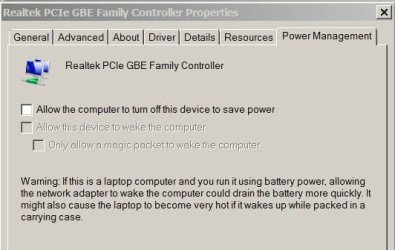


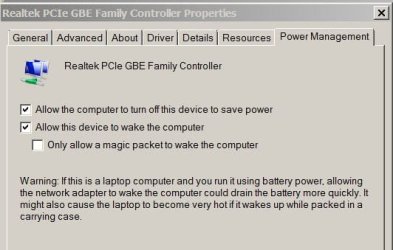
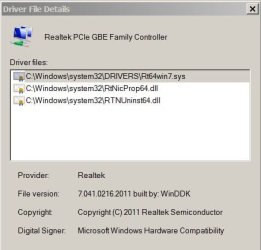
Windows reports that I have the latest drivers
These are my power management settings:


I appreciate any help offered.
My main system has an AsRock Fatal1ty P67 Performance Mother Board with on board Realtek LAN circuitry. In Windows 7 Home Premium, the system will not wake up when access is attempted from other machines on the network. The system is correctly accessible when awake. The problem occurs either when put to sleep by the power settings or by user interface (sleep button).
This is a dual boot system, and does wake up when booted to XP SP3. This implies that it is a W7 problem, but I’ve included my bios settings anyway.
In Bios: (only things I found that reference LAN)
Under [Advanced\ACPI Configuration]
PCI Devices Power On = Disabled
Under [Boot]
Boot from Onboard Lan = Enabled
For Windows 7
When in sleep mode, there is no light emitting from the NIC card.
In device manager, On the NIC Power Management Tab, it doesn’t seem to matter what settings are selected. I’ve tried these. There aren’t any NIC lights in any of these settings when in sleep mode.
Note that you can’t select [Allow this device to wake the computer] unless the first choice is also selected.
Windows reports that I have the latest drivers
These are my power management settings:
I appreciate any help offered.
My Computer
At a glance
W7 Pro x86, W7 HP x64
- OS
- W7 Pro x86, W7 HP x64

