Want group to enable administrator account but not change its password

loganjones

New member
Local time
4:20 AM
Messages
3
Is this even possible?
 

My Computer My Computer

At a glance

Windows 7 Professional x64
OS
Windows 7 Professional x64
Sorry, What is it you are asking?
 

My Computer My Computer

At a glance

7 x64
OS
7 x64
Custom group whose members are able to activate the deactivated administrator account, but are now allowed to change its password.
 

My Computer My Computer

At a glance

Windows 7 Professional x64
OS
Windows 7 Professional x64
Don't think so. To enable the Built in Admin account you would need to have a Named Admin account already. If you already have one of those type accounts you can change the password on any account.

Same goes if they had an Admin password even though they were standard users.

If you are going to allow standard users to install software you might as well give them and Admin account.
 

My Computer My Computer

At a glance

7 x64
OS
7 x64
Admin account has more privileges than I want most people to have. User account has too few. I generally set my security fairly granularly on my Linux servers, but I'm finding the amount of control I'm given extremely lacking on the Windows servers. Granted 7 isn't a perfect analog to 2008 Server, but I had already registered here before I realized I was on a Windows 7 specific forum and figured it was worth a shot.

The idea is to require administrators to use their accounts to activate the Administrator account and then log in to the administrator account with a different password if they want to affect monitoring, allowing the administrators to administrate but putting another password between them and event logging and such, leaving an extra layer of security in between the administrator's personal account and the true administrator account that has the ability to destroy the audit trail in the event that the less privileged account is compromised.

 

My Computer My Computer

At a glance

Windows 7 Professional x64
OS
Windows 7 Professional x64
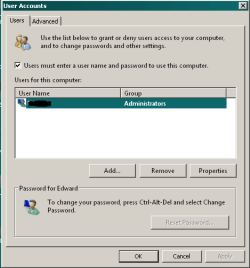
Look into a Power User account. Not normally available in the Control Panel User Accounts but if you open RUN and type Control Userpasswords2 and hit enter you get this screen.

User Accounts 1.PNG

Then highlight the user name and click properties and you get this window.

User Acount 2.PNG

Then go to the Group Membership tab (Pictured) and click the Other section. From there click the drop down arrow and select Power User.
 

My Computer My Computer

At a glance

7 x64
OS
7 x64
What about using UAC to fine control the permissions?

The idea is that all users aren't in the administrator group and therefore with very limited rights in their day to day accounts. When they want to perform administrative task, run the needed programs as administrators (or let the system itself ask for permission) and in the elevation dialog box, you'll be asked for the administrator username and password to get real admin privileges.

EDIT: Have a look at gpedit.msc. In the security section under computer configuration it contains an important number of settings, somewhat hidden, that control many other things about permission and security. Maybe it helps in having a tighter control over permissions.
 
Last edited:

My Computer My Computer

At a glance

Windows 7 Ultimate x64Intel Core i7-740QM8 GB DDR3NVIDIA GeForce 330GT
Computer type
Laptop
Computer Manufacturer/Model Number
Toshiba Sattelite A665-S6092
OS
Windows 7 Ultimate x64
CPU
Intel Core i7-740QM
Memory
8 GB DDR3
Graphics Card(s)
NVIDIA GeForce 330GT
Screen Resolution
1366x768
Hard Drives
Samsung 840 SSD 500GB
1TB USB3 external HD
Cooling
Coolermaster Notepal U3 notebook cooling pad
Internet Speed
3mbps ASDL
Antivirus
ClamWin 0.98.7
Browser
Opera 12.17 x86 (main), Firefox 38 (sec), IE11 (last resort)
Back
Top