Solved Warning icon on Volume C:

ifthisisntaname

New member
Local time
6:33 AM
Messages
4
Hi,

After a new Windows 7 installation on an old ThinkPad X220, I'm showing a warning icon (exclamation point on yellow triangle) on my Drive C:. Any ideas on what I should do to address this please?
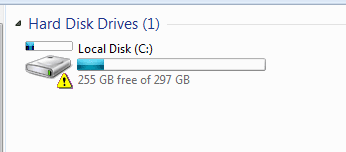
warning_icon_volC.PNG
 

My Computer My Computer

At a glance

windows 7 professional 64biti5-2520M4GBIntel HD Graphics 3000
Computer type
Laptop
Computer Manufacturer/Model Number
ThinkPad X220
OS
windows 7 professional 64bit
CPU
i5-2520M
Motherboard
Lenovo 42915L1
Memory
4GB
Graphics Card(s)
Intel HD Graphics 3000
Screen Resolution
1366x768
Hard Drives
320 GB, SATA300, 3.5", 5455rpm
Do you see anything unusual in Device Manager?

Only reference I could find was that it may be Bitlocker enabled. Go to Control Panel - Bitlocker Drive Encryption and see if it is enabled.
 

My Computer My Computer

At a glance

Windows 7 Ultimate x64 SP1AMD Phenom 2 1090T2x8GB Kingston HyperX Fury Black 1600Mhz Unga...MSI GTX 970 Gaming 4G
Computer type
PC/Desktop
Computer Manufacturer/Model Number
Custom Build
OS
Windows 7 Ultimate x64 SP1
CPU
AMD Phenom 2 1090T
Motherboard
Gigabyte GA-890FXA-UD5
Memory
2x8GB Kingston HyperX Fury Black 1600Mhz Unganged
Graphics Card(s)
MSI GTX 970 Gaming 4G
Sound Card
Realtek On-Board HD 7.1 Audio / Logitech G35
Monitor(s) Displays
3xAcer GD245HQ
Screen Resolution
1920x1080
Hard Drives
Samsung 850 Pro 512GB SSD - OS /
WD Caviar Black SATA 3 - 1 TBx2 - Dynamic RAID 0 /
WD Caviar Green SATA 2 - 640GBx2 - Dynamic RAID 0 /
WD Caviar Green SATA 2 - 640GB - Internal Backup /
Seagate Barracude SATA 3 - 3TB - External Backup/ Sync
PSU
HighPower 1000W
Case
Cooler Master HAF 932
Cooling
Noctua NH-D14
Keyboard
Logitech G19
Mouse
Logitech G500
Internet Speed
100/4 Mbit Cable (100GB quota)
Antivirus
ZoneAlarm Extreme Security / MBAM Pro / MBAE Free / SAS Free
Browser
IE 11 - Firefox - Chrome
Other Info
Logitech F710/ G27/ G940/ Z5500 // TrackIR 5 // Nvidia 3D Surround Vision
Do you see anything unusual in Device Manager?

Only reference I could find was that it may be Bitlocker enabled. Go to Control Panel - Bitlocker Drive Encryption and see if it is enabled.

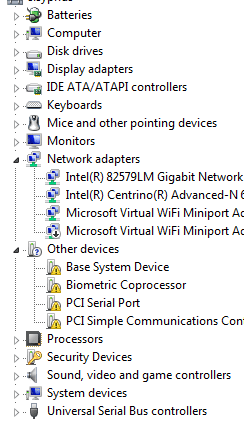
Here's an image of what appears in Device Manager:
dev_mgr.PNG

I searched for Bitlocker inside Control Panel, but pulled up nothing. Is Bitlocker built into Windows 7?

Thanks, I appreciate you taking the time to help me!
 

My Computer My Computer

At a glance

windows 7 professional 64biti5-2520M4GBIntel HD Graphics 3000
Computer type
Laptop
Computer Manufacturer/Model Number
ThinkPad X220
OS
windows 7 professional 64bit
CPU
i5-2520M
Motherboard
Lenovo 42915L1
Memory
4GB
Graphics Card(s)
Intel HD Graphics 3000
Screen Resolution
1366x768
Hard Drives
320 GB, SATA300, 3.5", 5455rpm

My Computer My Computer

At a glance

Win 10 Pro x64Intel I5-2500K @3.3GHz16GB G.Skill Ripjaws X (4x4GB)EVGA GeForce 750 Ti SC 2GB
Computer type
PC/Desktop
Computer Manufacturer/Model Number
Self Built
OS
Win 10 Pro x64
CPU
Intel I5-2500K @3.3GHz
Motherboard
Asrock P67 Extreme4
Memory
16GB G.Skill Ripjaws X (4x4GB)
Graphics Card(s)
EVGA GeForce 750 Ti SC 2GB
Sound Card
ASUS Xonar DG 5.1 Channels 24-bit 96KHz PCI Interface Sound
Monitor(s) Displays
auria eq2367
Screen Resolution
1920 x 1080
Hard Drives
250GB Samsung 850 EVO SSD
1TB WD Blue
1TB Hitachi
PSU
SeaSonic X 650W 80 Plus Gold
Case
Corsair Obsidian 750D
Cooling
Corsair H60, Three 140mm case fans
Keyboard
Logitech Wireless Keyboard K520
Mouse
Logitech Wireless Mouse M310
Internet Speed
Wave Broadband ~ 100 dn 5 up
Antivirus
Windows Defender, Malwarebytes Premium
Browser
Edge, IE11, Chrome
Other Info
Laptop specs: HP g7-1365dx /
CPU: AMD A6-3420M APU with Radeon(tm) HD Graphics /
RAM: Crucial 8Gb (2x4Gb) /
SSD: Crucial M4-CT128M4SSD2 ATA Device/ FW 000F /
GFX: AMD Radeon HD 6520G /
OS: Windows 10 Pro x64
I think I figured it out. It's a warning I get from Hard Disk Sentinel, telling me the condition of the hard drive.

Thanks Derekimo, I did get the chipset drivers and updated Windows!
 

My Computer My Computer

At a glance

windows 7 professional 64biti5-2520M4GBIntel HD Graphics 3000
Computer type
Laptop
Computer Manufacturer/Model Number
ThinkPad X220
OS
windows 7 professional 64bit
CPU
i5-2520M
Motherboard
Lenovo 42915L1
Memory
4GB
Graphics Card(s)
Intel HD Graphics 3000
Screen Resolution
1366x768
Hard Drives
320 GB, SATA300, 3.5", 5455rpm
That makes sense.

You're welcome, glad you got it sorted.
 

My Computer My Computer

At a glance

Win 10 Pro x64Intel I5-2500K @3.3GHz16GB G.Skill Ripjaws X (4x4GB)EVGA GeForce 750 Ti SC 2GB
Computer type
PC/Desktop
Computer Manufacturer/Model Number
Self Built
OS
Win 10 Pro x64
CPU
Intel I5-2500K @3.3GHz
Motherboard
Asrock P67 Extreme4
Memory
16GB G.Skill Ripjaws X (4x4GB)
Graphics Card(s)
EVGA GeForce 750 Ti SC 2GB
Sound Card
ASUS Xonar DG 5.1 Channels 24-bit 96KHz PCI Interface Sound
Monitor(s) Displays
auria eq2367
Screen Resolution
1920 x 1080
Hard Drives
250GB Samsung 850 EVO SSD
1TB WD Blue
1TB Hitachi
PSU
SeaSonic X 650W 80 Plus Gold
Case
Corsair Obsidian 750D
Cooling
Corsair H60, Three 140mm case fans
Keyboard
Logitech Wireless Keyboard K520
Mouse
Logitech Wireless Mouse M310
Internet Speed
Wave Broadband ~ 100 dn 5 up
Antivirus
Windows Defender, Malwarebytes Premium
Browser
Edge, IE11, Chrome
Other Info
Laptop specs: HP g7-1365dx /
CPU: AMD A6-3420M APU with Radeon(tm) HD Graphics /
RAM: Crucial 8Gb (2x4Gb) /
SSD: Crucial M4-CT128M4SSD2 ATA Device/ FW 000F /
GFX: AMD Radeon HD 6520G /
OS: Windows 10 Pro x64
For future reference, did you find out what does HD Sentinel trying to say? Is your drive started to go bad?
 

My Computer My Computer

At a glance

Windows 7 Ultimate x64 SP1AMD Phenom 2 1090T2x8GB Kingston HyperX Fury Black 1600Mhz Unga...MSI GTX 970 Gaming 4G
Computer type
PC/Desktop
Computer Manufacturer/Model Number
Custom Build
OS
Windows 7 Ultimate x64 SP1
CPU
AMD Phenom 2 1090T
Motherboard
Gigabyte GA-890FXA-UD5
Memory
2x8GB Kingston HyperX Fury Black 1600Mhz Unganged
Graphics Card(s)
MSI GTX 970 Gaming 4G
Sound Card
Realtek On-Board HD 7.1 Audio / Logitech G35
Monitor(s) Displays
3xAcer GD245HQ
Screen Resolution
1920x1080
Hard Drives
Samsung 850 Pro 512GB SSD - OS /
WD Caviar Black SATA 3 - 1 TBx2 - Dynamic RAID 0 /
WD Caviar Green SATA 2 - 640GBx2 - Dynamic RAID 0 /
WD Caviar Green SATA 2 - 640GB - Internal Backup /
Seagate Barracude SATA 3 - 3TB - External Backup/ Sync
PSU
HighPower 1000W
Case
Cooler Master HAF 932
Cooling
Noctua NH-D14
Keyboard
Logitech G19
Mouse
Logitech G500
Internet Speed
100/4 Mbit Cable (100GB quota)
Antivirus
ZoneAlarm Extreme Security / MBAM Pro / MBAE Free / SAS Free
Browser
IE 11 - Firefox - Chrome
Other Info
Logitech F710/ G27/ G940/ Z5500 // TrackIR 5 // Nvidia 3D Surround Vision
Yep, the health was at 49%, and I'm advised to always back up my files..
 

My Computer My Computer

At a glance

windows 7 professional 64biti5-2520M4GBIntel HD Graphics 3000
Computer type
Laptop
Computer Manufacturer/Model Number
ThinkPad X220
OS
windows 7 professional 64bit
CPU
i5-2520M
Motherboard
Lenovo 42915L1
Memory
4GB
Graphics Card(s)
Intel HD Graphics 3000
Screen Resolution
1366x768
Hard Drives
320 GB, SATA300, 3.5", 5455rpm
Back
Top