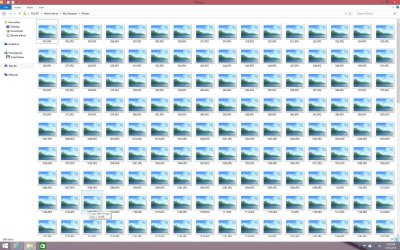
WD FTP Media Server No Thumbnail Preview

Modesty

New member
Local time
6:08 PM
Messages
3
I have attached a WD "My Passport" hard drive to use as a home server onto my home router. When I try to access the drive contents remotely their are no thumbnail previews. For example a folder full of JPEG pictures and all you see are the generic tiles with no preview.

Things I have tried.

I have tried changing the tile size.
I have tried on both Windows 7 and Windows 8.1 computers.
I have done the whole view settings to show icons not thumbnails etc

Nothing seems to work. Is it even possible ?

Thanks in advance
 

My Computer My Computer

At a glance

Windows 7 Home Premium 64 biti78 gig RamNVIDIA® GeForce® GTX 460M 1.5GB GDDR5 VRAM
Computer type
Laptop
Computer Manufacturer/Model Number
Asus
OS
Windows 7 Home Premium 64 bit
CPU
i7
Memory
8 gig Ram
Graphics Card(s)
NVIDIA® GeForce® GTX 460M 1.5GB GDDR5 VRAM
Hard Drives
SSD 100 gig and 1000 gig 7200 hardrive
Browser
Windows 7
Hello Modesty!

Do you mean that the view of the files is only in tile-mode and you cannot change it? Can you post a screenshot? Do you have any other problems: with performance, or access, can you open or transfer your files successfully?

Are the files/shortcuts broken? Are absolutely all files like that?

CK_WD
 

My Computer My Computer

At a glance

Windows 7 Home Premium x64
Computer type
PC/Desktop
OS
Windows 7 Home Premium x64
Hello CK_WD,

Firstly thanks for the reply. Yes it only shows the tiles and no thumbnail preview. Apart from that issue the remote drive works perfectly. I can download, access, transfer, save, open etc etc without issue. It just wont show a thumbnail preview as per the attached picture.
 

Attachments

  • Screen Shot.jpg
    Screen Shot.jpg
    321.6 KB · Views: 2

My Computer My Computer

At a glance

Windows 7 Home Premium 64 biti78 gig RamNVIDIA® GeForce® GTX 460M 1.5GB GDDR5 VRAM
Computer type
Laptop
Computer Manufacturer/Model Number
Asus
OS
Windows 7 Home Premium 64 bit
CPU
i7
Memory
8 gig Ram
Graphics Card(s)
NVIDIA® GeForce® GTX 460M 1.5GB GDDR5 VRAM
Hard Drives
SSD 100 gig and 1000 gig 7200 hardrive
Browser
Windows 7
I see. This means the problem is not with the drive. It could be the Internet connection or the System settings. Try this:

Thumbnail Previews

CK_WD
 

My Computer My Computer

At a glance

Windows 7 Home Premium x64
Computer type
PC/Desktop
OS
Windows 7 Home Premium x64
Thanks for trying. None of those things work and I had already tried most. Maybe its something to do with the WD drive itself ??
 

My Computer My Computer

At a glance

Windows 7 Home Premium 64 biti78 gig RamNVIDIA® GeForce® GTX 460M 1.5GB GDDR5 VRAM
Computer type
Laptop
Computer Manufacturer/Model Number
Asus
OS
Windows 7 Home Premium 64 bit
CPU
i7
Memory
8 gig Ram
Graphics Card(s)
NVIDIA® GeForce® GTX 460M 1.5GB GDDR5 VRAM
Hard Drives
SSD 100 gig and 1000 gig 7200 hardrive
Browser
Windows 7

My Computer My Computer

At a glance

Windows 7 Ultimate x64 SP1AMD Phenom 2 1090T2x8GB Kingston HyperX Fury Black 1600Mhz Unga...MSI GTX 970 Gaming 4G
Computer type
PC/Desktop
Computer Manufacturer/Model Number
Custom Build
OS
Windows 7 Ultimate x64 SP1
CPU
AMD Phenom 2 1090T
Motherboard
Gigabyte GA-890FXA-UD5
Memory
2x8GB Kingston HyperX Fury Black 1600Mhz Unganged
Graphics Card(s)
MSI GTX 970 Gaming 4G
Sound Card
Realtek On-Board HD 7.1 Audio / Logitech G35
Monitor(s) Displays
3xAcer GD245HQ
Screen Resolution
1920x1080
Hard Drives
Samsung 850 Pro 512GB SSD - OS /
WD Caviar Black SATA 3 - 1 TBx2 - Dynamic RAID 0 /
WD Caviar Green SATA 2 - 640GBx2 - Dynamic RAID 0 /
WD Caviar Green SATA 2 - 640GB - Internal Backup /
Seagate Barracude SATA 3 - 3TB - External Backup/ Sync
PSU
HighPower 1000W
Case
Cooler Master HAF 932
Cooling
Noctua NH-D14
Keyboard
Logitech G19
Mouse
Logitech G500
Internet Speed
100/4 Mbit Cable (100GB quota)
Antivirus
ZoneAlarm Extreme Security / MBAM Pro / MBAE Free / SAS Free
Browser
IE 11 - Firefox - Chrome
Other Info
Logitech F710/ G27/ G940/ Z5500 // TrackIR 5 // Nvidia 3D Surround Vision
Back
Top