Solved WD reads uninitialized and unallocated

Hmmm... that is some good news , though I don't have the pleasure of seeing it in a screenshot.

And yes, we will go with TestDisk. But you seem to have downloaded the Win64 version of TestDisk. No, delete it from your PC .( It is to be used only on systems lacking WoW64 as some features are missing) I am sure that your system will have WOW64. Check. If you do have WOW64 then download and use only the Windows version, the second in the list here TestDisk Download - CGSecurity. It should be testdisk-7.0.win.zip (11.8MB). Run testdisk_win.exe from it.

Now go to Post No 6.in this thread
WD Elements being read as RAW // Contents readable through app

Are you able to reach the fifth screen in it showing your partition?

If you do see the partition and [Boot] is highlighted, move the highlight to
  • and then press enter.
  • Does it list your files? Post a screenshot and then close TestDisk by clicking on X on the Title Bar.

    As with any Data Recovery effort I am keeping my fingers crossed :).

    Note: For copying the files you should have plugged in another external drive with adequate space with a folder named Recovery on it.This Recovery folder on your Destination drive will be the destination to copy the files. If you do not have one plugged in when you started TestDisk, you may run TestDisk again after plugging in the destination drive and copy the files.
 

My Computer My Computer

At a glance

Windows 7 Home Premium 32 bit
OS
Windows 7 Home Premium 32 bit
Hi Jumanji..thanks your help

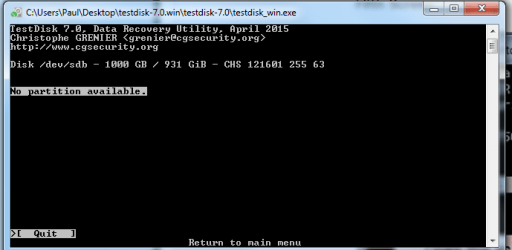
Per your instruction, I downloaded and used the correct copy of testdisk, Here is my fifth screen:
 

Attachments

  • testdisk fifth screen.png
    testdisk fifth screen.png
    12.4 KB · Views: 33

My Computer My Computer

At a glance

Windows 7 64 bit
Computer type
PC/Desktop
Computer Manufacturer/Model Number
Custom Build
OS
Windows 7 64 bit
Hello All


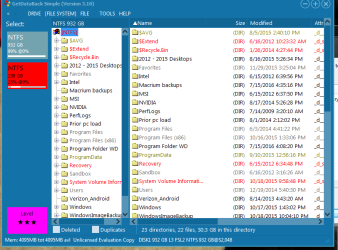
Hi Jumanji, Looks like getdataback simple found a bunch of my files. So on to testdisk from here?

Can you please rerun Getdataback simple and show me the screen that showed your data?

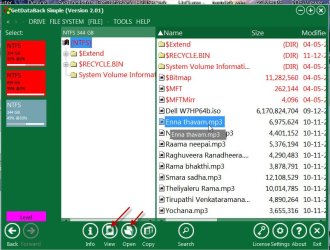
Do you confirm that is the data you would like to getback? ( You can rightclick on the folder/file and then view/open the file to check its integrity.)

15-01-2017 10-12-57.jpg

(Screen showing my external drive 750GB: two partitions, converted MBR to GPT, Second partition deleted, new simple volume created but not formatted. The data on second unformatted partition still visible in Getdataback. I can right click and open the file and it plays on Windows Media Player)
 

My Computer My Computer

At a glance

Windows 7 Home Premium 32 bit
OS
Windows 7 Home Premium 32 bit
thanks
yes Jumanji, its the data I want back
 

Attachments

  • getdataback.png
    getdataback.png
    30 KB · Views: 0

My Computer My Computer

At a glance

Windows 7 64 bit
Computer type
PC/Desktop
Computer Manufacturer/Model Number
Custom Build
OS
Windows 7 64 bit
1. Windows failed to initialise your 1TB drive. The all important sector 0 is bad.

2. Normally the first partition starts at Sector 2048. But Partition Wizard did not find the boot record at sector 2048. It shows your drive as Read only and Bad Disk. When there are too many Bad Sectors the disk controller in the drive shuts off the drive and makes it impossible to write any more data in it. That is what seems to have happened in this case.

3. WD Datalifeguard Diagnostic for Windows did not see your drive. Normally that is taken as the death of the drive.

4. TestDisk did not find the partition. If it had found the partition it would have been possible to check whether the Volume boot record and back up of it exists and also rebuild the bootsector if both were bad. That did not happen. Coupled with point 2, in all probability sector 2048 is also bad.

5. Fortunately the MFT seems to be still OK. Even if the MFT is bad, GetDataback in most cases will find the data. We have seen many cases where GetDataback could really get back all data when TestDisk failed to repair the MFT.

At point 3, I had told still miracles can happen. And this is that miracle. If you have confirmed that is the data you want back and that data or most of that data are still good and worth to get back, then......
spend $80 and buy it. Copy the data.

There seems to be no other option. ( We have taxed your drive enough already. Don't blame me :) if after recovery you find the data bad. Neither will GettDetaback take that responsibility. It is purely your responsibility to check the integrity of the data before you buy.)
 

My Computer My Computer

At a glance

Windows 7 Home Premium 32 bit
OS
Windows 7 Home Premium 32 bit
Thanks for your help Jumanji! I really appreciate it.
 

My Computer My Computer

At a glance

Windows 7 64 bit
Computer type
PC/Desktop
Computer Manufacturer/Model Number
Custom Build
OS
Windows 7 64 bit
Back
Top