
Hi everybody
About 1 month ago I had some weird issue with my HDD after a power failure so I had to change the HDD with this one.
I cloned it and for a short perod of time everything seamed to be fine.
However, 1 week leater I start experiencing system lag & freezing. For example, if I try to copy something (usually big files or many files and when I try to copy to/from USB drives), I simply can't watch a movie or surf the web without lag & browser/player freezing. Sometimes even the whole system freezes. At first I couldn't figure it out since in the same period of time I upgraded my AV software (N360), browser (Opera - lately Opera seams to be a CPU & memory hog so it was the first thing I suspected) & uTorrent client (not the first time I'm having problems with it so this was my second thought).
So I uninstalled them all and tried to figure it out. Unfortunately nothing changed so I am starting to suspect the new HDD. I ran a full test before cloning the old one and ran another few test when I start experiencing those problems but nothing showed up.
The system was fully tested after the power failure & HDD replacement, just to be sure.
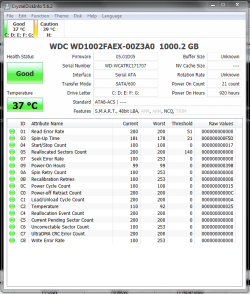
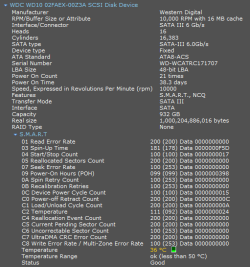
Another weird thing is that CrystalDsk Info doesn't show up the correct info and doesn't detect the RPM/buffer size and Speccy shows 10k RPM when the HDD has 7200.
There is another problem: the new HDD is SATA3 with 64MB cache while the mobo only supports SATA2 (32MB the old drive). I wasn't expecting any issues however. Besides that, there wasn't any SATA2 HDD bigger (and I checked about 15 retailers & online shops) than 640 (the old one) so that I could clone it.
I am somehow thinking th mobo doesn't support 64MB cache drives and somehow this results in bottlenecking (sorry if this sound stupid).
My motherboard is ASUS Striker II Formula, BIOS up to date. The old HDD was a Caviar Black 640 SATA2 32MB. Quite similar to the new one I'd say.
Any ideas? This HDD is the 10th or 11th HDD I am replacing in 4 years :| Somehow me and HDDs don't get along well.
BTW the SATA cable is new. Also, ignore H:\ in CristalDisk Info screenshot. It's an old laptop drive I use with an external enclosure for temporary storage.
LE:
Think I should mention I don't experience those problems unless some file copy/transfer/download (torrent client) is involved. I can run 5 movies and 5 instances of Winamp, surf the web, chat online & download Steam games at the same time. I actually tried this.
About 1 month ago I had some weird issue with my HDD after a power failure so I had to change the HDD with this one.
I cloned it and for a short perod of time everything seamed to be fine.
However, 1 week leater I start experiencing system lag & freezing. For example, if I try to copy something (usually big files or many files and when I try to copy to/from USB drives), I simply can't watch a movie or surf the web without lag & browser/player freezing. Sometimes even the whole system freezes. At first I couldn't figure it out since in the same period of time I upgraded my AV software (N360), browser (Opera - lately Opera seams to be a CPU & memory hog so it was the first thing I suspected) & uTorrent client (not the first time I'm having problems with it so this was my second thought).
So I uninstalled them all and tried to figure it out. Unfortunately nothing changed so I am starting to suspect the new HDD. I ran a full test before cloning the old one and ran another few test when I start experiencing those problems but nothing showed up.
The system was fully tested after the power failure & HDD replacement, just to be sure.
Another weird thing is that CrystalDsk Info doesn't show up the correct info and doesn't detect the RPM/buffer size and Speccy shows 10k RPM when the HDD has 7200.
There is another problem: the new HDD is SATA3 with 64MB cache while the mobo only supports SATA2 (32MB the old drive). I wasn't expecting any issues however. Besides that, there wasn't any SATA2 HDD bigger (and I checked about 15 retailers & online shops) than 640 (the old one) so that I could clone it.
I am somehow thinking th mobo doesn't support 64MB cache drives and somehow this results in bottlenecking (sorry if this sound stupid).
My motherboard is ASUS Striker II Formula, BIOS up to date. The old HDD was a Caviar Black 640 SATA2 32MB. Quite similar to the new one I'd say.
Any ideas? This HDD is the 10th or 11th HDD I am replacing in 4 years :| Somehow me and HDDs don't get along well.
BTW the SATA cable is new. Also, ignore H:\ in CristalDisk Info screenshot. It's an old laptop drive I use with an external enclosure for temporary storage.
LE:
Think I should mention I don't experience those problems unless some file copy/transfer/download (torrent client) is involved. I can run 5 movies and 5 instances of Winamp, surf the web, chat online & download Steam games at the same time. I actually tried this.
Attachments
Last edited:
My Computer
- Computer type
- PC/Desktop
- OS
- Windows 7 Professional x64 SP1
- CPU
- Intel Quad Core q9300
- Motherboard
- ASUS Striker II Formula
- Memory
- 4*2Gb A-Data Extreme 800 Mhz
- Graphics Card(s)
- ASUS GeForce GTX285 1Gb DDR 3
- Sound Card
- Supreme FX II
- Monitor(s) Displays
- Philips LCD 220VW
- Screen Resolution
- 1680 x 1050
- Hard Drives
- 1 x 1TB WD Caviar Black 64 Mb 7200RPM SATA 3
- Case
- Antec P190B
- Keyboard
- Microsoft Natural Ergonomic Keyboard 4000
- Mouse
- Logitech G5 Refresh
- Antivirus
- Norton 360
- Browser
- Opera


